Bottom line: A split-type fiber laser marking machine is worth considering when your shop needs to mark metal parts in different shapes, move the marking head closer to an awkward workpiece, or keep the main laser unit away from a crowded work area. It is commonly used for serial numbers, part IDs, logos, QR codes, Data Matrix codes and other permanent identification on suitable metals.
But don’t buy one just because the head looks easy to move. The marking field, focusing distance, cable routing, fixture, safety arrangement and actual cycle time still determine whether the machine fits your production process.
For a typical metal fabrication shop, the practical starting point is to identify the parts you mark most often, the surface condition, the largest marking layout and the required output per shift. Then compare 20W, 30W, 50W and 100W configurations using real samples—not a maximum-speed number from a catalogue.
This guide covers seven buying checks, real workshop applications, reference specifications, a procurement checklist and a comparison of split-type and integrated marking machines.
What Is a Split-Type Fiber Laser Marking Machine?
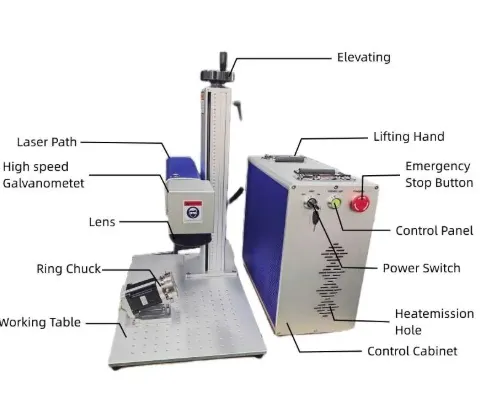
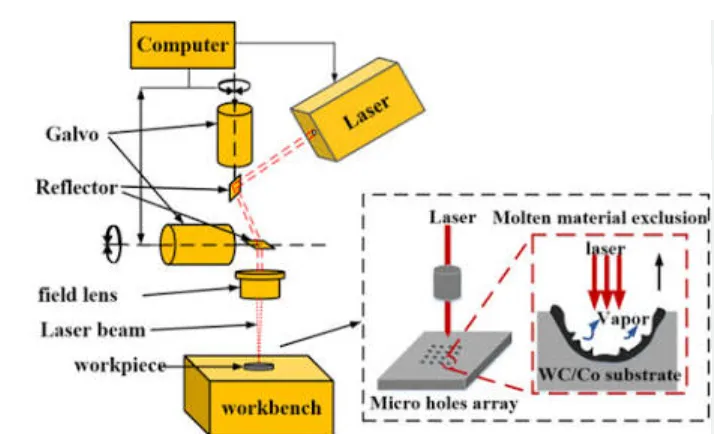
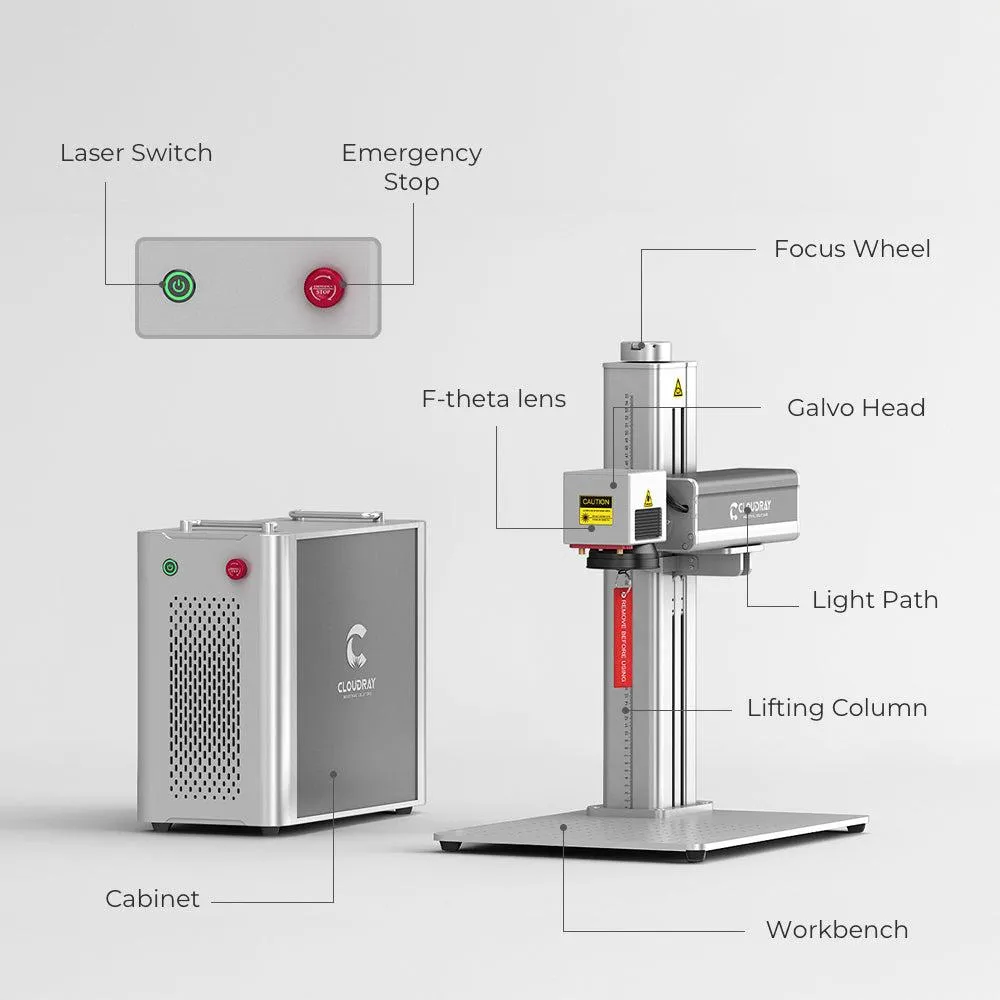
A split-type system separates the main laser unit and control components from the scanning head and focusing lens. The head is mounted on a support, bracket, column or application-specific fixture, while the main unit can sit in a more convenient location nearby.
That layout can be useful in a fabrication shop where a finished part is too large or awkward to place under a traditional desktop marking machine. Instead of lifting every component onto a small worktable, the operator may be able to position the marking head over the part, provided the machine’s mounting arrangement, focus distance and safety design allow it.
Why the split design can help
- Better use of floor space: the main unit does not have to sit directly beneath the workpiece.
- More flexible positioning: the head can be arranged for certain fixtures and workpiece geometries.
- Convenient part handling: suitable components can remain on a workbench or dedicated fixture instead of being moved to a small machine table.
- Useful for mixed jobs: shops can mark part numbers, serial numbers, logos and codes across different metal components using controlled job files.
There is an important limitation: split-type does not mean unlimited reach. The cable or fiber connection has a specified length and routing requirement, and the optical head still has a defined working distance and marking field. A standard 110 × 110 mm lens, for example, does not mark an entire large steel panel in one exposure.
Before ordering, ask the supplier to confirm the head mounting method, cable length, allowable bend radius, working distance, marking field, focus adjustment range and the safe operating arrangement for your intended installation.
Where Metal Fabrication Shops Use Split-Type Fiber Laser Markers
1. Serial numbers on welded frames and brackets
Fabricators often need to identify a frame, bracket or welded assembly after cutting, machining and welding. A split head may make it easier to access a defined marking area without moving the entire assembly onto a small machine bed.
What to check: weld spatter, surface scale, distortion, access to the marking zone and the repeatability of the fixture. If the marking surface is close to a weld or has significant height variation, test focus and mark consistency on representative parts.
2. Part numbers and QR codes on sheet-metal enclosures
Electrical enclosures, control cabinets, equipment covers and fabricated panels may need a model number, serial number, logo or QR code for service records. A split-type system can be useful when the enclosure is too large or inconvenient to place inside a compact desktop marker.
What to check: the panel’s coating, thickness, surface finish and required mark contrast. A laser recipe suitable for bare stainless steel may not produce the same result on painted or powder-coated sheet metal. Confirm whether the customer wants a coating-removal mark or a mark directly on the substrate.
3. Permanent identification on machined components
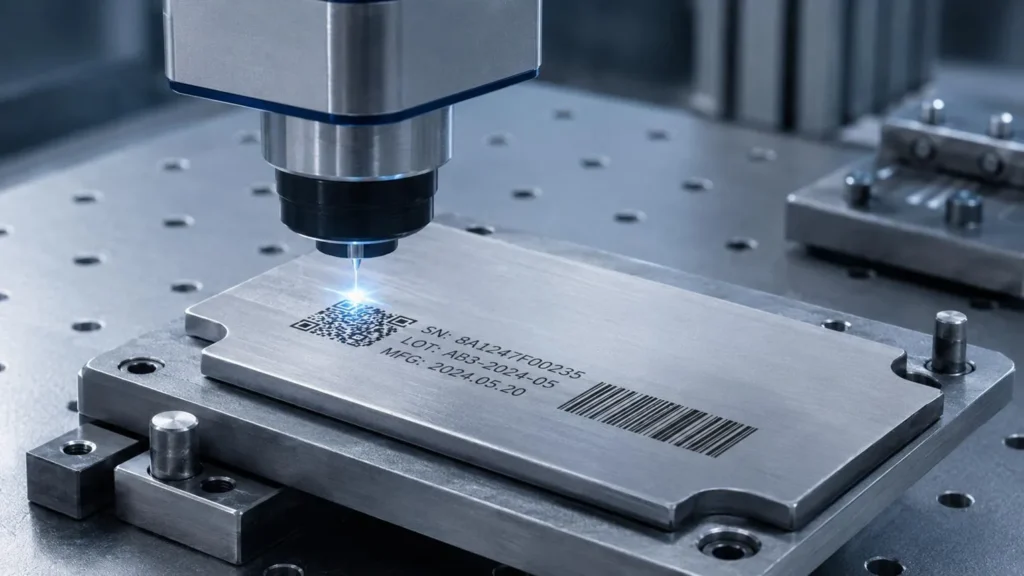
Machined parts such as shafts, housings, flanges, brackets and fixtures may need a part number, production batch, date code or traceability code. Fiber lasers are often evaluated for these metal marking jobs because they can produce fine text and machine-readable symbols on suitable surfaces.
What to check: the smallest character, actual code dimensions, available flat area and downstream handling. A code that looks clear on a monitor can still fail scanning when marked too small, placed on a reflective surface or distorted by an unsuitable process.
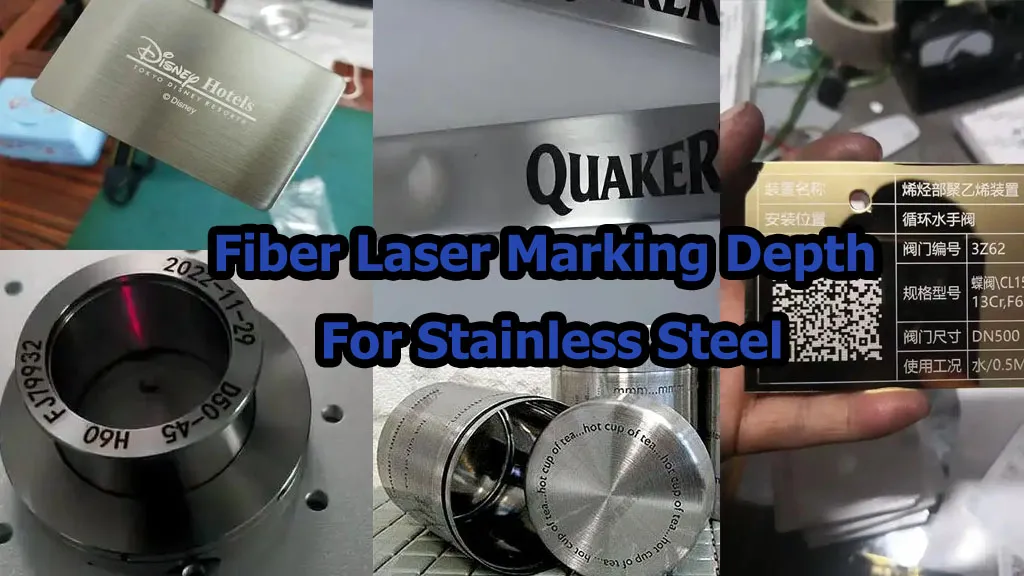
4. Stainless-steel nameplates and equipment labels
Machine builders and fabrication shops often mark stainless-steel plates with logos, serial numbers, ratings and asset IDs. A split-type system may be appropriate when the plate is fixed to a large assembly or when the operator needs a flexible workholding arrangement.
What to check: whether the required finish is dark marking, bright engraving or deeper material removal. These are different process goals and should be tested separately.
5. Aluminum parts and coated metal components
Aluminum housings, anodized panels and selected coated metal components can be candidates for fiber laser marking. However, the result depends on the alloy, surface treatment and the intended appearance. Do not assume that one set of parameters will work across bare aluminum, anodized aluminum and painted aluminum.
What to check: color or contrast requirements, surface treatment, heat effects and any restrictions on coating damage.
6. Large or awkward workpieces that cannot be loaded easily
A split-type layout can help when the part is large, heavy or difficult to move. Examples include machine bases, welded support structures, long brackets and selected equipment frames. The benefit comes from the installation layout—not from a larger marking field.
What to check: whether the head can reach the intended location, whether the operator can hold the required focus distance and whether the entire laser path can be safely controlled. For a large part with multiple marking locations, a fixture, repositioning procedure or automated axis may still be necessary.
7 Things to Check Before Buying a Split-Type Fiber Laser Marker
Check 1: Define the job before choosing laser power
Start with the actual marking requirement. Are you adding a small serial number, a QR code, a large logo or a deep engraved part ID? These jobs can require different settings even on the same metal.
For example, a shop marking short serial numbers on stainless-steel brackets may be satisfied with a lower-power system. A shop that needs deeper engraving across larger characters, or that has a demanding production cycle, may need to evaluate a higher-power configuration.
Practical test: supply the actual part and marking file, then ask the supplier to record the source power, lens, focus, speed, hatch spacing, pass count and measured cycle time.
Limit: higher wattage does not automatically produce a better mark or a proportional increase in finished parts per hour.
Check 2: Match the marking field to the real layout
The marking field is the area the optics can mark under the specified lens configuration. A common reference configuration is 110 × 110 mm, with larger fields available on selected configurations.
A larger field can reduce the need to reposition a part for some layouts, but it may also change the optical setup, spot size and achievable detail. The result depends on the actual lens and machine configuration.
Practical test: prepare the largest real marking layout, including any required margins. Ask the supplier to mark it on your part using the proposed lens.
Limit: the dimensions of a part are not the same as the marking field. If a panel is 500 mm long, a 110 × 110 mm system cannot mark the entire panel in one field simply because it is a split-type machine.
Check 3: Confirm the head’s access and focus distance
Split-type machines are often considered because the workpiece is awkward to handle. That makes physical access a first-order requirement.
Check the height of the part, the location of brackets and welds, available head clearance, fixture access, cable routing and the operator’s ability to position the workpiece repeatably.
Practical test: install the proposed head or a representative mounting arrangement over the actual part. Confirm focus, marking field, clearance and safe positioning before finalizing the quotation.
Limit: a split head is not automatically a handheld head. Do not assume that the head can be detached, carried around the workshop or mounted in any orientation unless the manufacturer confirms that configuration.
Check 4: Test the actual material and finish
“Metal” is too broad a specification for approving a laser process. Stainless steel, carbon steel, aluminum, brass, copper, anodized aluminum and painted steel can behave differently.
For example, bare stainless steel may be marked for contrast, while a powder-coated enclosure may require controlled coating removal. If the customer expects a dark mark on a specific alloy, that appearance must be demonstrated on the actual material.
Practical test: test the real grade and finish, inspect the result under normal lighting, and repeat the test on representative production parts.
Limit: a successful sample on clean sheet metal does not establish the same result on a coated, oily, oxidized or curved component.
Check 5: Calculate the complete production cycle
A scanner speed rating is not a production rate. Your real cycle includes positioning the part, loading the file, clamping, focusing, marking, inspection and unloading.
For example, a job that takes 5 seconds to mark may still require 20 seconds per part if the operator needs 15 seconds to position and check it. The figures are illustrative; your own cycle must be measured.
Practical test: time at least a representative batch using the normal operator, fixture and inspection method. Record both the laser-on time and total cycle time.
Limit: a single demonstration on a perfectly positioned sample is not proof of stable production throughput.
Check 6: Make sure the traceability workflow is included
If your shop needs unique serial numbers, QR codes or Data Matrix codes, clarify where the marking data comes from and how the operator selects the correct job.
A simple setup may use controlled job files and manual confirmation. A higher-volume operation may need a barcode reader, PLC handshake, variable-data software or MES integration. These are different scopes and should not be assumed to come standard with every machine.
Practical test: demonstrate a correct job, a wrong job, a missing data record and a repeated serial number. Confirm that the process prevents or flags errors according to your quality requirements.
Limit: the laser machine can mark the supplied characters, but it cannot independently guarantee that the supplied data is correct unless the relevant data-control system and validation are included.
Check 7: Include laser safety and fume control in the layout
Industrial fiber laser marking systems can present serious eye and skin hazards from direct or reflected laser radiation. A split-type design does not remove those hazards; it can make beam-path planning even more important because the head may be positioned away from the main unit.
Ask the supplier to specify the laser classification for the supplied system, the protective enclosure or controlled area required, the interlocks, warning indicators and any additional safeguards. If the laser removes paint, coating or other surface material, assess the resulting fumes and provide suitable extraction where required.
Practical test: review the installation drawing and risk assessment with the responsible safety person before commissioning. Confirm that the planned use, enclosure and access controls match the delivered configuration.
Limit: do not assume that safety glasses alone make an open-beam installation safe. Do not bypass interlocks or operate a system outside its approved safety arrangement.
Reference Specifications: What to Expect from a Split-Type Fiber Laser Marker
JQ Laser’s published fiber laser marking range includes 20W, 30W, 50W and 100W configurations. The reference specification lists a typical 1064 nm wavelength, a standard 110 × 110 mm marking field, optional larger fields and reference scan speed up to approximately 7,000 mm/s. Common pulsed fiber configurations use air cooling, but the exact electrical and cooling requirements must be confirmed for the quoted machine.
The following values are starting points for a quotation discussion. They are not a guarantee of a particular marking depth, character size or cycle time on every metal part.
| Parameter | Published reference | What the buyer should confirm |
|---|---|---|
| Laser power | 20W / 30W / 50W / 100W options | Exact laser source model, rated output and application test result. |
| Wavelength | 1064 nm typical | Actual source specification and suitability for the target material. |
| Standard marking field | 110 × 110 mm typical | Lens model, working distance and available optional fields. |
| Optional marking field | 150 × 150 / 175 × 175 / 200 × 200 / 300 × 300 mm on selected configurations | Availability for the chosen source and the effect on fine detail. |
| Reference scan speed | Up to approximately 7,000 mm/s | Actual cycle time on the real design, including passes and inspection. |
| Cooling | Air cooling is common for published pulsed fiber configurations | Cooling requirements and operating conditions for the exact machine. |
| Power supply | 110V or 220V, 50/60Hz depending on configuration | Destination-country voltage, frequency, current and plug arrangement. |
| Control and software | JCZ/BJJCZ-compatible control and EZCAD configurations are common | Exact controller, software version, supported formats and license scope. |
Important: the published standard and optional fields describe the optical marking area, not the total physical reach of the head. For split-type installations, also request the head mounting drawing, connection cable length, cable routing requirements and allowed working orientation.
How to choose between 20W, 30W, 50W and 100W
- 20W: evaluate first for serial numbers, logos, basic part identification and QR codes when the required mark and cycle time can be met.
- 30W: consider when the job needs more process capacity than the 20W candidate or when the sample test shows that a higher-power configuration can improve the required cycle.
- 50W: evaluate for applications where deeper material removal or a shorter marking cycle is needed and the sample results justify the extra capacity.
- 100W: consider for demanding industrial applications after testing the material-removal requirement, heat effects, cycle time and total system cost.
Do not treat these as strict rules. A 20W system can be the right choice for one part and the wrong choice for another part made from the same metal. Marking area, surface finish, character geometry, depth, focus, pass count and fixture time all affect the result.
A Practical Sample-Test Workflow Before You Buy
For a metal fabrication shop, a sample test should answer the questions that can otherwise lead to an expensive mismatch between the machine and the production process.
- Send the real part: include material grade, surface finish, coating and any important dimensional variation.
- Supply the actual artwork: include the smallest text, logo, serial number or machine-readable code you expect to use.
- Define the target: state whether you need surface contrast, coating removal, engraving depth, readability or a particular cycle time.
- Test suitable configurations: compare candidate power levels and lenses where appropriate, and record all relevant parameters.
- Inspect the sample: assess character edges, contrast, code readability, material effects and any customer-specific acceptance criteria.
- Repeat the job: test multiple parts and normal positioning variation rather than approving a single perfect sample.
- Record the result: retain the sample photos, parameters, machine configuration, measured cycle time and limitations.
A useful test report should identify the part and material, marking file, laser source and power, lens and marking field, software and controller, key parameters, number of passes, measured cycle time and inspection method. If a result depends on a clean surface or a special fixture, state that condition clearly.
Why this matters: without a documented sample report, it is difficult to compare two suppliers fairly or reproduce a result after the machine arrives.
Procurement Checklist: 7 Checks for a Split-Type Fiber Laser Marker
Use this checklist during supplier evaluation. Each item includes the conditions where it matters, a practical verification method and the limitation to keep in mind.
| Procurement check | Applicable conditions | Evidence or test method | Limitations |
|---|---|---|---|
| 1. Laser power and source | When marking depth, cycle time or multiple material types affect the choice. | Request the exact source model and run the actual artwork on the real material. Record parameters and total cycle time. | Rated wattage alone does not establish mark quality or throughput. |
| 2. Marking field and lens | When layouts are large, text is small or several marking locations are required. | Test the full artwork with the proposed lens; check field dimensions, focus and detail. | A larger field does not cover an unlimited workpiece area and may affect fine detail. |
| 3. Head access and cable layout | When the workpiece is large, heavy, awkward or positioned away from the main unit. | Review the installation drawing and physically test the head position, working distance and cable routing. | Split-type does not automatically mean handheld or unrestricted reach. |
| 4. Material and finish | For bare, coated, painted, anodized, oily or oxidized metal surfaces. | Run sample tests on representative parts and document the surface condition and result. | One successful sample cannot represent every alloy, coating or production condition. |
| 5. Production cycle | When the shop has a target output per hour, shift or production order. | Measure repeated full cycles including loading, clamping, marking, inspection and unloading. | Advertised scan speed is not finished parts per hour. |
| 6. Data and traceability | When each part needs a unique serial, batch number, QR code or Data Matrix code. | Test correct, incorrect, missing and duplicate jobs; verify the record and rejection workflow. | Standard marking software may not include PLC or MES integration. |
| 7. Safety, service and acceptance | Every industrial installation, especially open-head or integrated production systems. | Review the laser risk assessment, guarding, interlocks, extraction needs, FAT plan, training and spare parts. | Safety controls and service scope depend on the supplied configuration and destination requirements. |
What to request in the quotation
- Laser source brand, model and rated power.
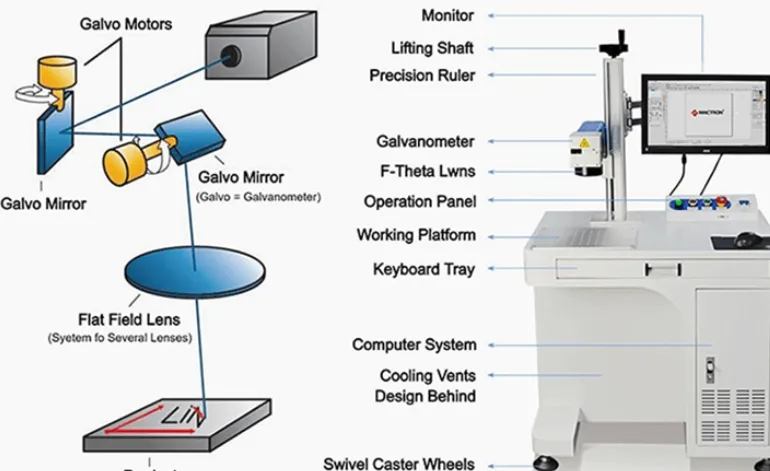
- Galvo scanner, F-theta lens, marking field and working distance.
- Head mounting arrangement, connection cable length and cable-routing requirements.
- Controller, software version, supported file formats and any license costs.
- Required fixture, adjustable support, rotary axis or vision system.
- Protective enclosure, interlocks, warning indicators and extraction requirements, where applicable.
- Sample-test report, factory acceptance test criteria and installation requirements.
- Operator training, maintenance guidance, spare-parts list and technical support scope.
- Final voltage, frequency, plug, packaging, delivery time and shipping terms.
Comparison: Split-Type vs Integrated Fiber Laser Marking Machines
Neither layout is universally better. The choice depends on the parts you make, how operators handle them and how much installation flexibility you need.
| Factor | Split-type fiber laser marker | Integrated or desktop marker |
|---|---|---|
| Physical layout | Main unit and scanning head are separated, allowing more flexible placement within the specified cable and installation limits. | Major components are arranged in a compact machine structure. |
| Typical workpiece handling | Useful for selected large, heavy or awkward parts that are difficult to load onto a small table. | Convenient for small and medium parts that fit the worktable and fixture. |
| Space planning | Requires space for the main unit, head support, cable routing and the safe marking zone. | Usually easier to plan as a self-contained workstation. |
| Positioning | May offer more flexibility when a suitable mount or fixture is designed. | Often easier to use with a fixed table and repeatable fixture. |
| Fine marking | Depends on the laser source, lens, focus and stability of the head mount. | Depends on the same optical factors and the stability of the machine structure. |
| Safety design | Needs a safe arrangement for the separated head and its beam path. | A fully enclosed model may simplify beam containment when correctly specified and interlocked. |
| Best buying question | Can the head reach the actual part safely and repeatably? | Can the complete part fit the work area and be loaded efficiently? |
Split-type vs handheld: do not confuse the two
A split-type machine separates the head and main unit, but the head may still be intended for mounting on a column, bracket or fixture. A handheld laser marker is designed around a different handling arrangement and may have different cable, enclosure, power and safety considerations.
If your operators need to mark a large welded assembly in several locations, tell the supplier whether the head must be fixed, adjustable, robot-mounted or manually carried. Do not assume that a standard split-type machine can be used in all four ways.
Safety and Workshop Installation: Plan This Before Delivery
Many industrial fiber laser marking sources fall into Class 4 laser systems. The final classification and required controls depend on the complete supplied system and its intended use. A split layout can place the scanning head away from the main unit, so the beam path and the operator’s access need to be assessed as part of the installation.
Before commissioning, the responsible safety person should review:
- The supplied system’s laser classification and risk assessment.
- Beam containment, protective enclosure or controlled laser area.
- Interlocks, warning indicators and access control.
- Reflections from polished metal, fixtures and nearby surfaces.
- Fume extraction for marking or removing coatings, paint or other surface material.
- Electrical grounding, ventilation, operator training and maintenance access.
OSHA’s laser safety guidance discusses the need for hazard assessment and appropriate controls for Class IV laser operations. Follow the applicable local rules and the delivered machine documentation; do not use an open-beam arrangement without a suitable risk assessment and safeguards.
Reference: OSHA — Guidelines for Laser Safety and Hazard Assessment.
How JQ Laser Can Help You Select a Configuration
JQ Laser publishes fiber laser marking configurations from 20W to 100W, with a typical 1064 nm wavelength and a standard 110 × 110 mm marking field on common configurations. Larger marking fields and automation options depend on the selected machine and optical arrangement.
For a metal fabrication shop, the best first step is to match the machine to your actual part—not to choose the highest wattage on the price list.
Send these details for a more useful quotation
- Material grade and surface finish.
- Part dimensions and a photo showing the marking location.
- Marking artwork, smallest character and required mark size.
- Whether you need surface marking, coating removal or deeper engraving.
- Required parts per hour or the target cycle time.
- Whether parts are loaded on a table, held in a fixture or remain on a large assembly.
- Required head mounting method and any access restrictions.
- Whether serial-number, QR/Data Matrix, PLC or MES integration is required.
- Destination-country voltage and safety requirements.
With these details, the supplier can recommend a configuration to test, identify likely fixture or positioning issues and clarify which functions are included in the quotation.
Request a sample test or quotation: Contact JQ Laser.
Related pages: Fiber Laser Marking Machine, JQ Laser Products and Automatic Laser Marking Machine.
Specification note: The published power, wavelength, marking field and speed are reference values for common configurations. Confirm the exact laser source, lens, head arrangement, cable length, electrical requirements, safety package and application performance in the final quotation and sample-test report.
Frequently Asked Questions
1. What is the main advantage of a split-type fiber laser marker?
It separates the main laser unit from the scanning head, giving the shop more flexibility in placing the equipment and positioning the head. This can help with certain large or awkward metal parts, provided the head, cable and safety arrangement suit the application.
2. What materials can a split-type fiber laser mark?
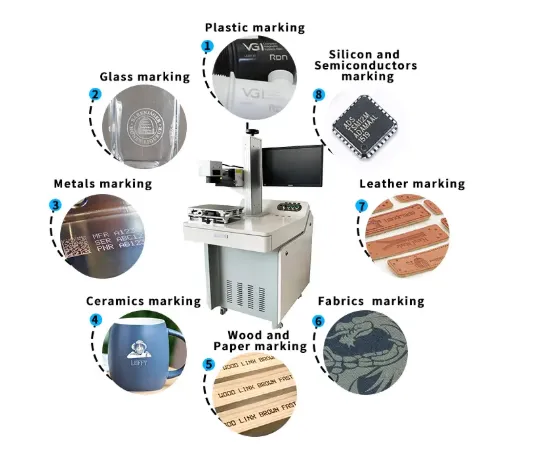
Fiber laser marking is commonly used on suitable metals such as stainless steel, carbon steel, aluminum, brass and copper. The result depends on the material, finish, laser configuration and marking objective. Test coated and treated surfaces separately.
3. Is 20W enough for metal fabrication work?
It can be enough for many serial numbers, logos and basic part-identification jobs. If you need deeper engraving, larger filled graphics or a shorter cycle time, compare higher-power configurations using the same part and acceptance criteria.
4. Does split-type mean the head can be carried by hand?
No. Split-type describes the separation of the main unit and marking head. Whether the head can be handheld, moved or mounted in different orientations depends on the specific design and approved operating method.
5. What marking area should I choose?
A 110 × 110 mm field is a common reference configuration. Larger fields are available on selected setups, but the best lens depends on the artwork, required detail and working distance. Test the complete layout before selecting the lens.
6. Does a 7,000 mm/s scan speed mean the machine can mark 7,000 mm of production parts per second?
No. Scan speed is a scanner parameter, not finished production throughput. The actual cycle also depends on the artwork, marking settings, number of passes, material, part positioning, inspection and handling.
7. What information should I send when requesting a quote?
Send the material, surface finish, part dimensions, marking file, required result, target cycle time, head access requirements, automation needs and destination-country electrical requirements. A real sample or clear photos help make the configuration recommendation more specific.
Sources and Technical References
- JQ Laser — Fiber Laser Marking Machine. Published 20W–100W options, typical wavelength, marking fields and reference scan speed.
- JQ Laser — Products. Published product range and configuration-dependent options.
- JQ Laser — About. Explains the application-first approach to selecting power, marking content, production speed and automation.
- OSHA — Guidelines for Laser Safety and Hazard Assessment. Reference for industrial laser hazard assessment and safeguards.
- OSHA Technical Manual — Laser Hazards. Background on laser classifications and protective enclosures.
How to interpret these sources: JQ Laser pages describe published equipment options, not a guarantee that every configuration is suitable for every part. OSHA material is safety guidance and does not replace the local regulations or the risk assessment required for a specific installation. The final application must be validated using the customer’s actual workpiece and operating conditions.