INDUSTRIAL BARCODE & PRODUCT TRACEABILITY SOLUTION
Barcode Marking Solution: 7 Traceability Requirements to Plan
A barcode marking system is not successful just because a laser can create a QR code or Data Matrix symbol. The code must contain the right information, remain readable on the actual product, survive the required production environment and connect correctly with your traceability system.
JQ Laser helps manufacturers evaluate permanent laser marking for metal parts, industrial components and production-line identification. The right solution starts with your traceability requirements, not simply the laser wattage.
Quick Answer: What Should You Plan Before Buying?
Before purchasing a barcode laser marking machine, define seven things: the identity of each product, the data structure, the barcode type and size, the material and marking process, the required code quality, the production-line connection, and the lifetime traceability records.
For many metal components, a 1064 nm pulsed fiber laser is a practical starting point. However, the final choice must be confirmed by testing the actual material and barcode with a barcode verifier—not just a phone camera or ordinary scanner.
Why Barcode Marking Projects Fail Even When the Laser Can Mark
We often hear a customer say, “I need a machine to mark QR codes on metal parts.” That sounds like a straightforward request. But when we ask a few more questions, the actual requirement is usually more complicated.
Does every part need a unique serial number? Does the code need to contain a batch number and production date? Will a customer scan it after painting, cleaning or assembly? Does the code have to remain readable after years of handling? Does the marking station need to receive data from an ERP or MES system?
These details change the machine configuration and the marking process.
For example, a large QR code on a flat stainless-steel plate is not the same job as a tiny Data Matrix code on a curved automotive component. The second application may require more careful optical selection, fixture positioning, code verification and data synchronization.
There are two separate questions:
- Can the laser produce the symbol? This is a marking-process question.
- Can the symbol be correctly decoded and verified throughout production? This is a traceability and quality-control question.
A reliable project must solve both.
The 7 Traceability Requirements to Plan
1. Define What Each Barcode Must Identify
Start with the product identity. Do not start by choosing a QR code size or a laser power.
A traceability code may identify an individual product, a production batch, a component type, a manufacturing order or a shipping unit. These are different data requirements.
For example, an automotive parts manufacturer may need each component to carry:
- Part number
- Unique serial number
- Production batch or lot
- Manufacturing date
- Supplier or production-line reference
An electronics manufacturer may need a smaller code that links a PCB or metal housing to a production record. A tool manufacturer may only need a product identifier, model number and batch reference.
For GS1-based applications, the data structure may use Application Identifiers (AIs). Examples include AI (01) for a Global Trade Item Number, AI (10) for a batch or lot number, AI (17) for an expiration date and AI (21) for a serial number. The exact data structure must follow the applicable GS1 application rules and the customer’s specification.
Example: A metal component may carry a unique serial number in its Data Matrix symbol, while the full manufacturing history remains in the factory database. The code acts as the key to retrieve the record; it does not need to contain the entire production history.
2. Choose the Correct Barcode Type and Data Structure
Not every barcode is suitable for every product.
Linear barcodes such as Code 128 are often used where the available marking area is relatively wide. Two-dimensional symbols such as QR Code and Data Matrix can store more information in a compact area and are commonly considered for small components and product traceability.
| Code Type | Typical Use | What to Consider |
|---|---|---|
| Code 128 | Labels, packages and larger product surfaces | Needs sufficient horizontal space and suitable contrast |
| QR Code | Product information, service links and general identification | Confirm the customer’s scanner and data requirements |
| Data Matrix | Small industrial components and direct part marking | Module size, surface condition and DPM verification are important |
| GS1 DataMatrix | Applications using GS1 identification and data conventions | Follow the required GS1 Application Identifiers and symbol rules |
For small metal components, Data Matrix is often worth evaluating because it can represent data in a compact two-dimensional symbol. But do not assume that every customer accepts the same code type. Confirm the required symbology, data format, human-readable text and verification criteria before designing the marking station.
For GS1 applications, consult the current GS1 barcode standards and guidance. GS1’s General Specifications define how identification keys, data attributes and barcodes are used in business applications.
3. Match the Barcode Size to the Material, Lens and Reading Distance
A barcode that looks clear on a computer screen may become difficult to read when it is reduced to a few millimeters and marked on a real component.
Three dimensions need to be considered together:
- Overall symbol size: The physical width and height of the barcode.
- Module size: The size of each individual cell or element in the symbol.
- Available marking area: The flat or curved surface available on the workpiece.
There is no universal minimum barcode size that works on every metal part. A smaller module means the optical system, focus, material response, surface condition and reading equipment become more critical.
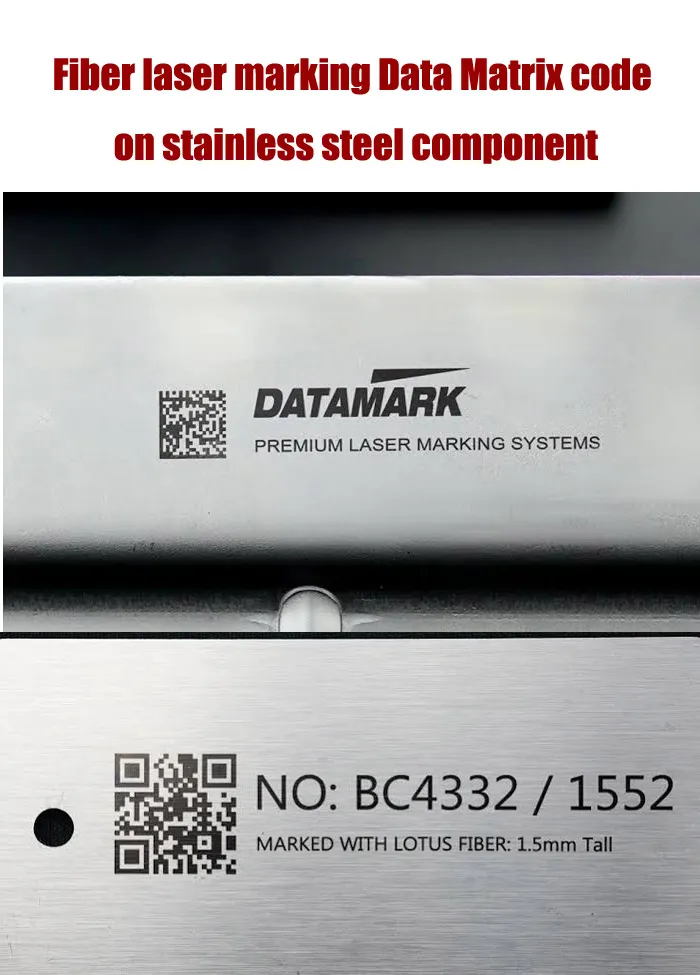
For example, a 10 mm Data Matrix on a flat stainless-steel plate may be straightforward to mark and read. The same symbol size on a small curved component may require a different fixture, lens arrangement or marking strategy.
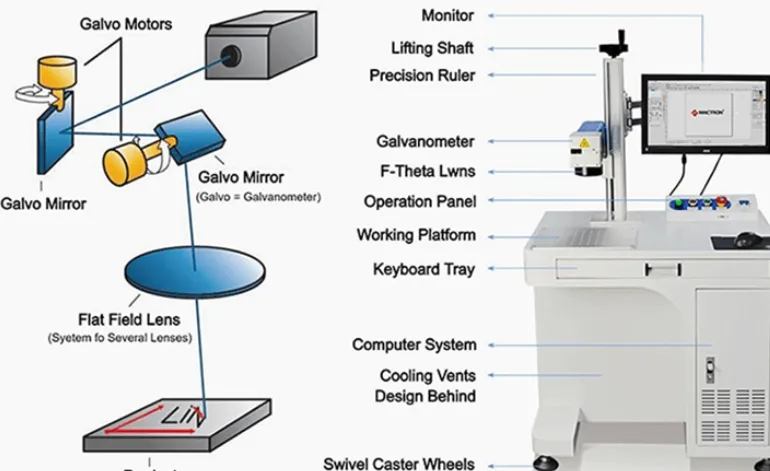
When selecting the marking field, remember that a larger F-theta lens field does not automatically mean better fine-code performance. The required field should cover the workpiece and its positioning tolerance while maintaining the optical resolution needed for the symbol.
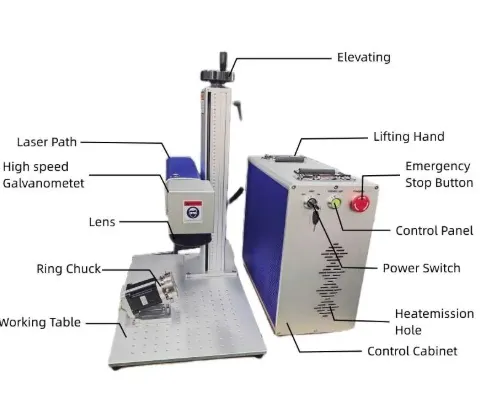
JQ Laser’s published fiber configurations include 1064 nm wavelength, 20W, 30W, 50W and higher power options, with a typical 110 × 110 mm standard marking field and larger fields available by configuration. These are equipment specifications, not a guarantee that a particular barcode size will pass verification. The sample must be tested using the intended lens and actual workpiece.
4. Select the Laser Process According to the Material and Required Mark
The correct laser is determined by the material and the required surface result.
For many metals, a pulsed fiber laser around 1064 nm is a practical starting point. It can be used for surface marking, contrast marking and engraving, depending on the material and process settings.
However, “metal marking” covers several different processes:
- Surface contrast marking: Creates a visible symbol without requiring substantial material removal.
- Annealing or oxide-related marking: Produces a controlled surface color or contrast on suitable metals.
- Engraving: Removes material to create a recessed mark.
- Coating removal: Removes a coating to expose a contrasting layer beneath it.
These processes do not have identical parameter windows. A high-contrast surface mark may be preferable for fast scanning, while a deeper engraved mark may be required where abrasion or surface wear is expected.
| Material / Part | Starting Technology to Evaluate | Important Test |
|---|---|---|
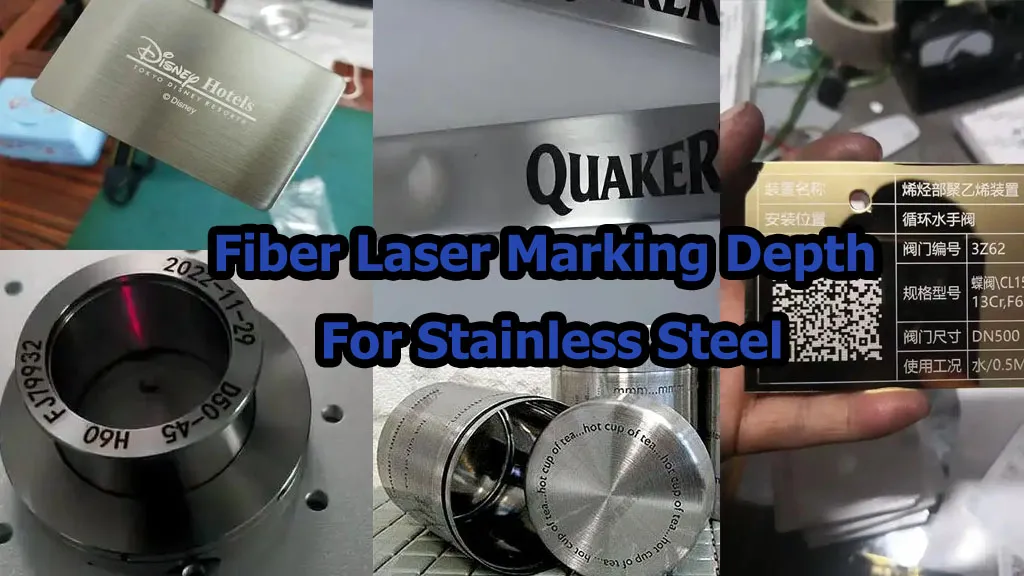
| Stainless-steel components | 1064 nm pulsed fiber; MOPA when pulse flexibility is needed | Contrast, code grade, surface condition and corrosion-related requirements |
| Aluminum parts | Fiber laser; MOPA for selected surface effects | Alloy, anodized or bare surface, contrast and readability |
| Steel tools and hardware | 20W–50W fiber as an initial configuration range to test | Mark depth, abrasion resistance and cycle time |
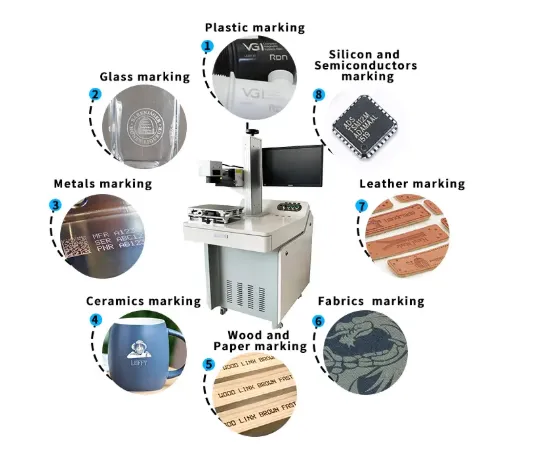
| Plastic housings | UV or suitable fiber/MOPA process, depending on polymer | Color change, melting, deformation and code readability |
| Glass or heat-sensitive materials | Evaluate UV or CO2 according to the material and required result | Cracking, surface damage and contrast |
For plastic housings, do not assume that a fiber laser is always the best option. Some polymers respond better to UV marking or a different process. Material formulation, pigments, additives and surface finish can change the result.
See our laser marking material compatibility chart when comparing fiber, MOPA, UV and CO2 technologies.
5. Define Barcode Verification and Readability Requirements
This is one of the most frequently overlooked parts of a barcode marking project.
A code that can be read by one handheld scanner has not necessarily passed a formal quality verification process. Scanner readability is useful for a quick functional check, but it does not replace verification against the customer’s required standard.
For printed two-dimensional symbols, ISO/IEC 15415 specifies methods for measuring and grading symbol quality. For direct part marks (DPM), ISO/IEC 29158 provides a specific quality test specification with adapted illumination conditions and grading methodology.
That distinction matters because a laser-marked symbol on metal is not the same optical surface as a printed label. Reflections, surface texture, curved geometry and marking method can affect how the code is illuminated and evaluated.
Before production approval, ask the customer:
- Is a normal scanner-read test sufficient, or is a verifier required?
- Which verification standard applies?
- What minimum grade is required?
- At what location and angle will the code be read?
- Will the part be cleaned, coated, painted or assembled after marking?
- Does the customer require a verification report or retained sample?
For direct part marking, review ISO/IEC 29158:2025. For two-dimensional printed barcode quality, see ISO/IEC 15415:2024. GS1 also explains that GS1 DataMatrix should be verified using an ISO/IEC-compliant verifier.
6. Connect the Marking Machine to the Production Line
A standalone laser marking machine can work well for manual batches. But once the factory needs hundreds or thousands of parts per shift, manual data entry and manual triggering can become a source of errors.
A production-line barcode marking solution may need to communicate with:
- PLC and machine sensors
- Conveyor or indexing system
- MES or ERP software
- Barcode database or serial-number server
- Vision positioning system
- Barcode reader or verifier
- Reject station or production alarm system
A typical workflow may look like this:
- A sensor detects that a part has arrived at the marking station.
- The PLC confirms the part position and sends a trigger.
- The production system supplies the correct serial number or variable data.
- The marking software receives the approved content.
- The laser marks the symbol.
- A reader or vision system checks whether the code can be decoded.
- Where required, a verifier checks the symbol against the agreed quality standard.
- The result is stored against the part’s production record.
- The line continues, or the part is rejected if the defined check fails.
Not every project needs every component. A low-volume manual station may only need a PC, marking software and an operator. A high-volume traceability line may need PLC communication, database control, vision positioning and automatic verification.
For more information about this type of setup, see our laser marking machine for production line solution.
7. Keep the Marking Record Connected to the Product’s Life Cycle
A permanent barcode is useful only if the information behind it remains accurate and accessible.
For example, a customer may scan a metal component six months after production because a quality issue has been reported. The code should lead to the correct record—not a duplicate serial number, an outdated database entry or a record for another batch.
At a minimum, the traceability system should define:
- Who generates each serial number
- How duplicate numbers are prevented
- Which production order the number belongs to
- How marking success or failure is recorded
- How rework and replacement parts are handled
- How records are backed up and retained
- Who can change or release barcode data
Do not rely on the laser marking software alone to act as the factory’s complete traceability database. The marking system should receive controlled data from the system responsible for generating and managing product identity.
Recommended Fiber Laser Configurations for Barcode Marking
For metal parts, JQ Laser offers pulsed fiber laser configurations in 20W, 30W, 50W and higher power options. The published product specifications include a typical 1064 nm wavelength, air cooling and a standard 110 × 110 mm marking field, with other lens fields available depending on configuration.
The following table is a practical starting point for discussing a project. It is not a guaranteed production recipe. Actual code quality and cycle time must be confirmed with the real part and barcode artwork.
| Configuration | Typical Application to Test | Why Consider It | Limitations / Checks |
|---|---|---|---|
| 20W Fiber | Serial numbers, QR codes and Data Matrix on common metal parts | Can be a cost-conscious starting point for standard marking | May require longer cycle time or multiple passes for demanding depth or contrast |
| 30W Fiber | General metal identification and batch production | Offers additional processing capability over a lower-power configuration | Does not guarantee a higher barcode grade or a fixed cycle-time reduction |
| 50W Fiber | Higher-volume metal marking or applications requiring more material removal | Can provide more processing capacity for suitable jobs | Must check heat effects, material response, code quality and actual production cycle |
| MOPA Fiber | Selected stainless-steel, anodized aluminum and applications needing pulse flexibility | Adjustable pulse characteristics can help develop specific surface effects | More parameter flexibility does not guarantee better results on every material |
| UV Laser | Selected plastics and heat-sensitive materials | Can be suitable when a lower-thermal-impact process is needed | Polymer formulation and marking contrast must be tested |
For the complete product range and available configurations, visit the JQ Laser fiber laser marking machine page.
Real Production Scenarios: What Should You Specify?
Scenario 1: Automotive Metal Parts
Customer requirement: Each machined component needs a permanent Data Matrix code linked to its serial number and production record.
Potential solution: A fiber laser marking station with a dedicated fixture, controlled serial-number input and a downstream code-reading or verification step.
What to test: The actual steel or aluminum grade, code size, surface condition, marking location, oil residue, cleaning process and post-marking readability.
Common mistake: Testing on a clean, flat sample and assuming the same result will be achieved on every production part. Machined surfaces, curved surfaces and different surface finishes can change the result.
Scenario 2: Stainless-Steel Tools and Hardware
Customer requirement: Mark a product code, model number and batch identifier on tools that will be handled frequently.
Potential solution: A 20W, 30W or 50W fiber configuration can be evaluated according to the required mark appearance, depth and batch volume.
What to test: Contrast, readability after handling, cleaning resistance and cycle time. If abrasion resistance is important, test the actual mark after the customer’s defined wear or cleaning procedure.
Common mistake: Choosing deep engraving automatically. A deeper mark may be unnecessary if the real requirement is a readable, permanent identification mark with a controlled cycle time.
Scenario 3: Electronic Housings and Small Components
Customer requirement: A compact code must fit on a limited surface and remain readable after assembly.
Potential solution: Evaluate the symbol size, lens field, fixture and laser type together. Fiber or MOPA may suit some metal housings; UV may be more appropriate for selected plastic housings.
What to test: The smallest required module, actual material formulation, code grade, positioning tolerance and post-assembly scanning access.
Common mistake: Designing a code that fits the marking area but cannot be scanned after the component is installed.
Scenario 4: Packaging and Product Identification
Customer requirement: Each package or product needs a date, batch number or variable code.
Potential solution: Depending on the substrate and line speed, evaluate a suitable laser source, sensor trigger, encoder and data interface. For some packaging materials, CO2 or UV may be more appropriate than fiber.
What to test: Material compatibility, line speed, code contrast, print/mark location, readability and the effect of product movement.
Common mistake: Using the scanner’s maximum speed as the production line’s expected throughput. The complete cycle also includes detection, positioning, data transfer, marking and verification.
Purchasing Decision Checklist: 10 Items Before You Order
Use this checklist when discussing a barcode marking project with a machine supplier. Each item includes the operating condition, evidence or test method, and a limitation to clarify before purchase.
| No. | Purchase Check | Applicable Condition | Evidence / Test Method | Limitation to Clarify |
|---|---|---|---|---|
| 1 | Barcode content | Unique serial numbers, batch numbers or product IDs | Approve a data-field list and sample encoded data with the customer’s IT or quality team | Laser software should not independently invent or control enterprise identity rules |
| 2 | Symbology | QR Code, Data Matrix, GS1 DataMatrix or Code 128 requirements | Confirm the required code type and data format in the customer specification | Different customers and industries may require different formats |
| 3 | Code dimensions | Small components, limited marking areas or curved parts | Mark the smallest required symbol on the actual part and test with the intended reader/verifier | Minimum size depends on module size, optics, surface and reading setup |
| 4 | Material compatibility | Stainless steel, aluminum, brass, coated metals or plastics | Run sample tests on the exact material and surface finish | Alloys, coatings, pigments and surface treatments can change the result |
| 5 | Laser configuration | Different contrast, depth and production-volume requirements | Compare 20W, 30W or 50W samples where appropriate; record source model and lens | Higher power does not automatically mean better readability or a higher verification grade |
| 6 | Mark durability | Parts exposed to handling, cleaning, abrasion or later processing | Repeat the customer’s actual cleaning, handling or wear test, then re-read the code | Do not promise lifetime readability without a defined test and operating environment |
| 7 | Verification grade | Automotive, medical, regulated or customer-controlled traceability | Use an appropriate verifier and the standard specified by the customer; use ISO/IEC 29158 for DPM where applicable | A handheld scanner read is not the same as a formal verification grade |
| 8 | Data and PLC integration | Automatic serial numbers and production-line marking | Run a data handshake test from the customer’s PLC, MES or database and check duplicate prevention | Confirm interface protocol, software scope and integration responsibility in writing |
| 9 | Complete cycle time | Batch production, conveyor systems or high-volume lines | Measure detection, positioning, data transfer, marking and inspection as one cycle | Maximum scanner speed is not the same as actual line throughput |
| 10 | Service and documentation | Export installations and multi-shift production | Request manuals, electrical drawings, training plan, spare-parts list and support response terms | Confirm what is included in the quotation and what requires additional payment |
Comparison Table: Manual Barcode Marking vs. Integrated Laser Marking
Not every factory needs a fully automated system. The correct solution depends on production volume, data variation, operator workload and the cost of a marking error.
| Factor | Manual Laser Marking | Integrated Laser Marking |
|---|---|---|
| Part loading | Operator loads and positions each part | Fixture, conveyor, robot or indexing system can position parts |
| Data input | May involve manual entry or file selection | Can receive controlled variable data from a PLC, MES or database |
| Best fit | Low-volume batches and frequent product changes | Repeated production and controlled traceability workflows |
| Operator dependency | Higher dependence on operator procedure | More steps can be controlled automatically |
| Error control | Requires clear work instructions and manual checks | Can include data validation, sensors and code-reading checks |
| Initial investment | Usually lower | Usually higher due to fixtures, integration and automation |
| Engineering work | Relatively simple for standard jobs | Requires workflow design and interface testing |
| Recommended decision | Choose when flexibility matters more than automation | Choose when repeatability, data control and throughput justify integration |
How to Test a Barcode Marking Machine Before Purchase
When a customer sends us an inquiry, we do not want to recommend a machine based only on a product photo or a short description. A sample test is a much better starting point.
Here is the test process I recommend:
- Send the actual workpiece. Include the real alloy, coating, surface finish and geometry where possible.
- Send the actual barcode data. Do not use a random QR code if the production code has a different data length or structure.
- Confirm the required symbol size. Include the available marking area and the customer’s minimum module requirement if specified.
- Test more than one process setting. Compare contrast, mark appearance, depth and cycle time.
- Use the intended reading equipment. Test with the customer’s scanner or an appropriate verifier.
- Repeat the test. Mark multiple samples to check consistency rather than approving a single attractive result.
- Test after downstream processing. If the part will be cleaned, coated, assembled or handled, repeat the reading test afterward.
- Record the approved configuration. Save the laser source model, lens, parameters, symbol artwork, data format and test results.
- Customer material and part description
- Barcode type and encoded data length
- Symbol size and module size
- Laser source and rated power
- Lens and marking field
- Process settings and number of passes
- Marking time per part
- Scanner decoding result
- Verifier grade and test standard, if required
- Photos of the marked sample and any limitations
What Information Should You Send When Requesting a Quote?
To avoid receiving a generic quotation, prepare the following information before contacting a supplier.
- Material name and grade
- Part photo or drawing
- Flat, curved or irregular marking surface
- Required barcode type
- Actual barcode data or representative data length
- Required symbol dimensions
- Marking depth or contrast requirement
- Expected parts per hour or shift
- Manual or automatic loading
- Required PLC, MES or ERP connection
- Customer verification standard and minimum grade
- Destination country and electrical requirements
If you do not know the exact laser power yet, that is fine. The supplier should help determine the configuration after reviewing the material, symbol and production requirements.
Frequently Asked Questions About Laser Barcode Marking
1. What is a barcode marking solution?
A barcode marking solution is a complete process for creating and managing product identification codes. It may include a laser marking machine, barcode data, fixtures, software, production-line communication, code reading and verification. The goal is to produce a code that can be correctly identified and traced throughout the required product life cycle.
2. Can a fiber laser mark QR codes on stainless steel?
Yes. A pulsed 1064 nm fiber laser is commonly evaluated for QR code and Data Matrix marking on suitable stainless-steel surfaces. The final contrast, code size and verification result depend on the steel grade, surface finish, lens, parameters and reading setup. Test the actual part before selecting the final configuration.
3. Is Data Matrix better than QR Code for industrial parts?
Not in every application. Data Matrix is often considered for compact direct part marking, while QR Code is widely used for general identification and information access. The correct choice depends on the customer’s data specification, available area, scanner compatibility and applicable industry requirements.
4. What laser power is suitable for barcode marking?
20W and 30W fiber lasers can be starting points for many standard metal identification jobs. A 50W configuration may be considered for higher throughput or applications requiring more material removal. Power alone does not determine code quality. The actual barcode must be tested and verified.
5. Can a laser-marked barcode be permanent?
Laser marking can create durable identification on suitable materials, but durability depends on the marking process and the product’s operating environment. If the part will experience abrasion, chemicals, heat, cleaning or coating, include those conditions in the sample test.
6. Does a barcode need an ISO verification grade?
That depends on the customer, industry and application specification. Some projects require only successful decoding; others require formal verification to a defined standard and minimum grade. For direct part marking, ISO/IEC 29158 is an important standard to discuss with the customer.
7. Can the laser marking machine generate unique serial numbers automatically?
Many marking systems support variable text, automatic numbering and data import. For controlled production traceability, however, serial numbers should normally come from an approved database, PLC, MES or ERP workflow. Duplicate prevention and data ownership must be designed into the integration.
8. Can a laser marking machine work with a conveyor?
Yes, a suitable system can be integrated with a conveyor using sensors, triggers, encoders and control interfaces. The exact design depends on whether the conveyor stops for marking or the laser marks while the product is moving. Both methods need cycle-time and positioning tests.
9. Can one laser mark both metal and plastic barcodes?
Some fiber laser configurations can mark certain plastics, but results vary significantly by polymer formulation and surface treatment. UV lasers may be more suitable for selected heat-sensitive plastics. Test every material rather than assuming one laser process will work equally well on all products.
10. What should I send for a barcode marking sample test?
Send the actual material or part, the required barcode type, representative data, target symbol size, surface requirements and any customer verification specification. If the part undergoes cleaning, coating or assembly, explain those steps so the sample can be evaluated under realistic conditions.
Need a Barcode Marking Solution for Your Production Line?
Send us your part photo, material, barcode type and required production volume. JQ Laser can help evaluate a suitable laser configuration and arrange a sample test before you make a purchasing decision.
Don’t choose a laser by wattage alone. Start with the code your customer needs to read.
Technical References and Standards
The technical recommendations on this page combine published JQ Laser product specifications, established barcode standards and application-engineering guidance. The following references are useful when preparing a barcode marking specification:
- GS1 Barcode Standards — barcode types and GS1 identification applications.
- GS1 General Specifications — identification keys, data attributes, barcode use and application rules.
- ISO/IEC 29158:2025 — direct part mark (DPM) barcode symbol quality test specification.
- ISO/IEC 15415:2024 — two-dimensional barcode symbol print quality test specification.
- GS1 guidance on DataMatrix verification — explains the need for an ISO/IEC-compliant verifier.
- JQ Laser Fiber Laser Marking Machine Specifications — published laser power options, wavelength, marking field and configuration information.
Specification note: Standards and customer requirements can change. Confirm the current edition, application rules and acceptance criteria with the customer or relevant standards organization before production approval. Laser specifications listed on this page are published configuration references; final machine parameters and barcode performance must be confirmed through an application test.