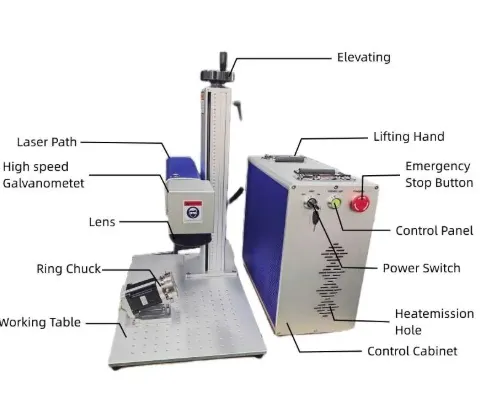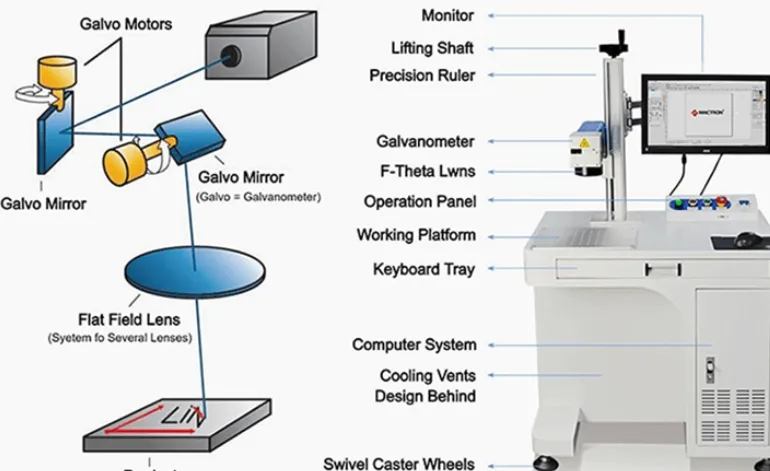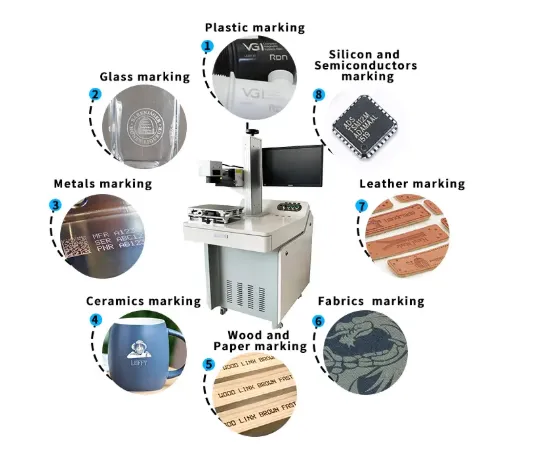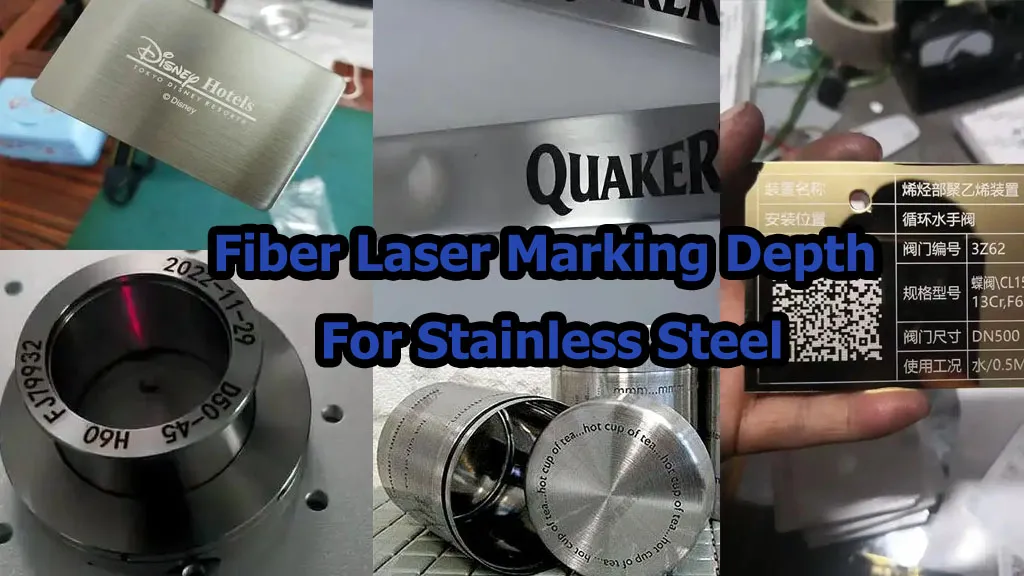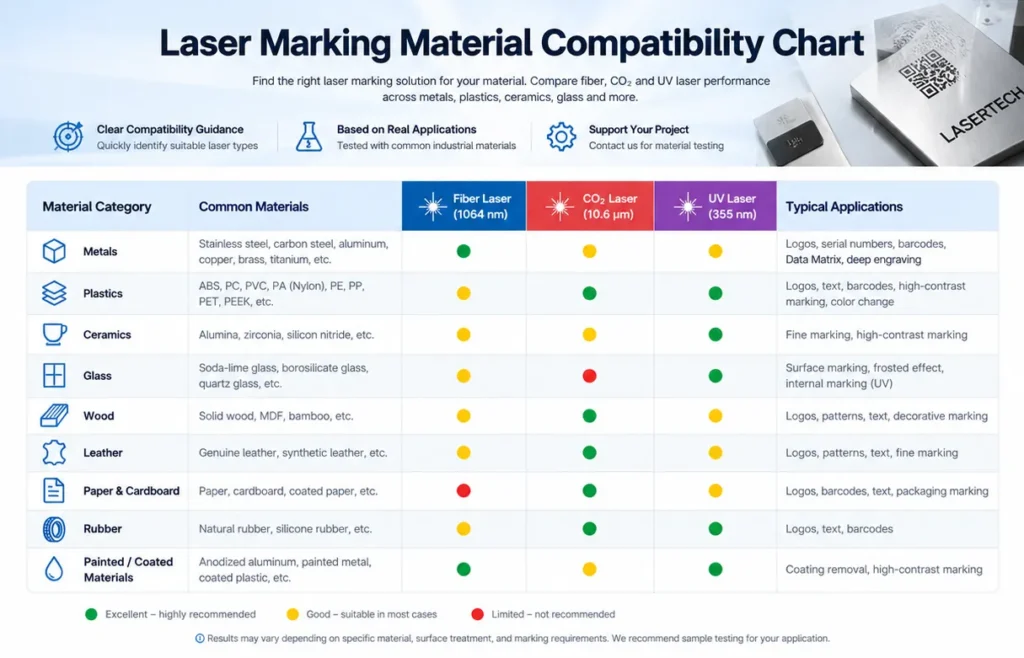
Laser Marking Material Compatibility Chart: Fiber vs MOPA vs UV vs CO₂
Which laser is best for stainless steel, aluminum, copper, brass, plastic, glass, wood, leather, ceramic and other materials?
This practical material compatibility chart compares fiber laser, MOPA fiber, UV and CO₂ laser marking technologies by wavelength, material response, marking effect, typical power range, application and purchasing considerations.
For most bare metal marking, a 1064 nm fiber laser is the normal starting point. MOPA fiber becomes especially useful when pulse control matters, such as black anodized aluminum or stainless-steel color marking. For many plastics, glass and heat-sensitive materials, 355 nm UV can provide a cleaner process with lower thermal impact. For wood, leather, paper, acrylic and many other organic materials, CO₂ lasers around 10.6 μm are often a natural fit.
However, material names alone are not enough. The exact alloy, coating, pigment, surface finish and required marking effect can change the correct laser choice.
This guide separates manufacturer-published specifications, JQ Laser published machine configurations and application-based engineering judgment. A compatibility rating is not a guarantee that every grade or formulation of a material will produce the same result.
1. Laser Marking Material Compatibility: The Master Chart
The table below is designed to answer the first question most buyers ask: “Which laser should I use for my material?”
The ratings are intentionally conservative. “Good” means the technology is a reasonable starting point for testing. It does not mean every material grade will produce an identical result.
| Material | Fiber 1064 nm | MOPA Fiber 1064 nm | UV 355 nm | CO₂ 9.3–10.6 μm | Typical Marking Effect | Typical Applications |
|---|---|---|---|---|---|---|
| Stainless Steel | Excellent | Excellent | Possible | Generally Not First Choice | Black marking, surface marking, engraving, color effects | Automotive parts, tools, medical instruments, hardware, nameplates |
| Carbon Steel | Excellent | Excellent | Possible | Not Typical | Annealing, dark marking, engraving | Machine parts, tools, automotive components, industrial equipment |
| Aluminum | Excellent | Excellent | Possible | Not First Choice | Surface marking, contrast marking, engraving | Electronic housings, automotive parts, nameplates, aerospace components |
| Anodized Aluminum | Good | Excellent | Possible | Not Typical | High-contrast black marking, coating removal | Consumer electronics, tools, aerospace components, premium products |
| Copper | Good | Very Good | Possible | Not Typical | Surface marking, engraving, identification | Electrical components, connectors, copper parts, electronics |
| Brass | Excellent | Excellent | Possible | Not Typical | Dark marking, logos, engraving | Hardware, valves, fittings, decorative components, instruments |
| Titanium | Excellent | Excellent | Possible | Not Typical | Dark marking, surface coloration, engraving | Medical devices, aerospace, bicycle components, premium products |
| Gold / Silver | Good | Good | Possible | Not Typical | Fine marking and engraving | Jewelry, watches, precious-metal products |
| ABS Plastic | Possible | Very Good | Excellent | Good | Color change, foaming, surface ablation | Electronic housings, automotive components, consumer products |
| PC / Polycarbonate | Possible | Good | Excellent | Good | High-contrast marking, color change | Electronics, medical components, industrial housings |
| PE / HDPE | Application Dependent | Good | Excellent | Good | High-contrast identification and coding | Packaging, bottles, pharmaceutical containers |
| PP | Possible | Good | Excellent | Good | Surface color change, contrast marking | Packaging, automotive plastics, consumer products |
| PVC | Application Dependent | Application Dependent | Good | Good | Surface marking / engraving depending on formulation | Industrial products, cables, packaging |
| PEEK / Engineering Plastics | Possible | Good | Excellent | Application Dependent | High-contrast precision marking | Medical, aerospace, semiconductor and engineering components |
| Glass | Limited / Application Dependent | Limited | Excellent | Excellent | Surface engraving, frosting, microcracking, subsurface marking | Bottles, pharmaceutical glass, cosmetic packaging, decorative glass |
| Acrylic / PMMA | Limited | Application Dependent | Excellent | Excellent | Engraving, cutting, surface marking | Advertising, signs, displays, gifts, industrial panels |
| Wood | Not First Choice | Not First Choice | Possible | Excellent | Engraving, cutting, surface darkening | Furniture, gifts, packaging, crafts |
| Leather | Not First Choice | Not First Choice | Possible | Excellent | Engraving, pattern marking, surface darkening | Fashion, footwear, wallets, belts, gifts |
| Rubber | Application Dependent | Application Dependent | Good | Excellent | Surface engraving / color change | Seals, industrial rubber, consumer products |
| Ceramic | Good | Good | Excellent | Good | Surface marking, engraving, coating removal | Electronics, ceramics, decorative products |
| PCB | Application Dependent | Good | Excellent | Limited | Fine text, QR, barcode, component identification | Electronics manufacturing, PCB traceability |
2. The Most Important Rule: Material First, Laser Second
If you are buying your first laser marking machine, this is the rule I would put at the top of the purchasing checklist:
Do not choose the laser first and then ask what it can mark.
Start with the material, required marking effect and production requirement, then select the laser technology.
I have seen buyers start with:
“I want a 30W fiber laser. Can it mark my plastic?”
That is backwards.
The correct sequence is:
- Identify the exact material.
- Identify the surface condition.
- Define the required marking effect.
- Calculate the production requirement.
- Choose the wavelength.
- Choose the laser source type.
- Select power and optical configuration.
- Run a sample test.
3. Why Fiber, MOPA, UV and CO₂ Behave So Differently
The reason is not simply that one laser is “stronger”.
The wavelength determines how the laser energy interacts with the material. Pulse duration, pulse energy and repetition rate then influence how that energy is delivered.
Fiber Laser
The normal starting point for metals such as stainless steel, carbon steel, aluminum, brass and titanium.
MOPA Fiber
Still an infrared fiber laser, but with greater pulse-control flexibility on suitable models.
UV Laser
Often selected for plastics, glass, electronics and applications where fine marking and low thermal impact are important.
CO₂ Laser
A natural choice for many organic and non-metallic materials including wood, acrylic, paper, leather and many plastics.
IPG describes laser marking as a non-contact process capable of marking both metals and non-metals including polymers, ceramics and glass. Coherent likewise explains that fiber, CO₂ and UV technologies occupy different application spaces because their wavelengths interact differently with materials.
4. Real Product Parameters Behind This Chart
A compatibility chart is only useful if it is connected to real laser-source specifications.
Here are several published specifications that illustrate why the technologies behave differently.
Raycus RFL-P20QB — 20W Q-Switched Fiber Laser
| Parameter | Published Specification |
|---|---|
| Average Output Power | 20 W |
| Central Wavelength | 1064 nm |
| Repetition Frequency | 20–60 kHz |
| Pulse Width | 90–110 ns |
| Maximum Single Pulse Energy | 1 mJ |
| Beam Quality | M² < 1.5 |
| Cooling | Air cooled |
| Power Adjustment | 10–100% |
Raycus specifically describes this 20W Q-switched fiber source as suitable for marking and precision processing, including gold, silver, copper, aluminum and stainless materials.
JPT M7 — 20W / 30W / 60W / 100W MOPA Fiber
| Model | Power | Pulse Energy | Frequency | Pulse Width | M² |
|---|---|---|---|---|---|
| YDFLP-E2-20-M7-S-R | 20W | 1 mJ | 1–4000 kHz | 2–500 ns | <1.5 |
| YDFLP-E2-30-M7-S-R | 30W | 1 mJ | 1–4000 kHz | 2–500 ns | <1.5 |
| YDFLP-E2-60-M7-M-R | 60W | 2 mJ | 1–4000 kHz | 2–500 ns | <1.5 |
| YDFLP-E2-100-M7-M-R | 100W | 1.5 mJ | 1–4000 kHz | 2–500 ns | <1.6 |
The important point here is not that MOPA is automatically “better”. The important point is the much wider pulse-width and repetition-rate control available on these JPT M7 models.
That flexibility can become valuable when the target is not simply “make a permanent mark”, but rather:
- Create a very dark mark.
- Minimize thermal damage.
- Produce a particular surface appearance.
- Process anodized aluminum.
- Experiment with stainless-steel color effects.
- Process difficult reflective materials.
JQ Laser 20W Fiber Configuration
For comparison, JQ Laser currently publishes a 20W fiber marking machine configuration using 1064 nm, up to 7,000 mm/s marking speed, a standard 110×110 mm field, optional 70×70 / 175×175 / 200×200 mm fields and air cooling.
5. UV Laser: Why 355 nm Can Be the Better Choice for Some Plastics
This is one of the most important purchasing decisions on this page.
If a buyer tells me:
“I need to mark plastic.”
I do not immediately quote a fiber laser.
I first ask:
- What plastic?
- What color?
- Is it transparent?
- Does it contain additives or fillers?
- Does the customer need engraving or only color change?
- How much heat can the part tolerate?
- What is the required mark size?
Coherent’s UV marking documentation explains that UV photons can induce photochemical changes in polymers and are used for permanent marking of medical plastics, pharmaceutical packaging, transparent plastics and other sensitive products. It specifically gives examples including HDPE packaging, ABS/polyurethane and clear plastics.
If a plastic part melts, chars, deforms or develops an ugly heat-affected zone when processed with infrared fiber, do not simply keep increasing the power.
Change the process — and potentially change the wavelength.
6. CO₂ Laser: Why Wood, Acrylic, Leather and Paper Usually Point Toward CO₂
CO₂ lasers operate around the far-infrared 10 μm region. Coherent notes that this wavelength is strongly compatible with many organic materials and plastics, including wood, cardboard, leather, textiles, rubber, composites and glass.
This is why I would not normally recommend a 1064 nm fiber laser for a customer whose main products are:
- Wooden gifts
- Wood furniture
- Acrylic signs
- Leather products
- Paper packaging
- Rubber products
- Many non-metallic packaging materials
A buyer sees “laser marking machine” and assumes all laser technologies can process the same materials.
They cannot.
The wavelength is one of the first things that should be considered.
7. Material Compatibility Is Not the Same as “Can It Mark?”
This distinction is extremely important.
Technically, a material may produce a visible mark with a particular laser. That does not necessarily mean the process is commercially acceptable.
| Question | What the Buyer Actually Needs to Know |
|---|---|
| Can it mark? | Can the laser create a visible permanent change? |
| Is the mark readable? | Can operators or scanners reliably read it? |
| Is the contrast sufficient? | Does the mark meet the visual or machine-vision requirement? |
| Is the surface damaged? | Is melting, cracking, burning or deformation acceptable? |
| Is the mark permanent? | Will cleaning, abrasion, corrosion or sterilization remove it? |
| Is the cycle time acceptable? | Can the process keep up with production? |
| Is the process repeatable? | Will 1,000th part look like the 1st part? |
| Is it commercially viable? | Does the total machine and operating cost make sense? |
“Can it be marked?” is only the first question.
The real purchasing question is: “Can it be marked consistently, quickly and acceptably on my actual product?”
8. How We Rate Material Compatibility
To avoid making this chart look more precise than it really is, I use five practical categories.
Excellent
The laser technology is a strong first choice for this material and application.
Good
Commonly suitable, but parameters and surface condition need to be evaluated.
Possible
The technology can work in selected formulations or applications, but testing is strongly recommended.
Not First Choice
The technology may technically produce an effect, but another wavelength or laser type is normally more appropriate.
9. The Buyer Should Never Ignore the Material’s Surface Treatment
This is where many compatibility charts become misleading.
“Aluminum” is not one material from a laser-processing perspective.
Consider:
- Bare aluminum
- Anodized aluminum
- Black anodized aluminum
- Painted aluminum
- Powder-coated aluminum
- Polished aluminum
- Brushed aluminum
- Aluminum alloy automotive components
The same principle applies to stainless steel.
- 304 stainless
- 316 stainless
- Polished stainless
- Brushed stainless
- Passivated stainless
- Coated stainless
- Medical-grade stainless
The laser does not process the material name in your purchase order. It processes the actual surface in front of the optical system.
10. What I Would Ask a Customer Before Recommending a Laser
If you contact us and say:
“Which laser is best for my material?”
These are the questions I would ask before giving you a final recommendation.
- What is the exact material grade?
- Is there a coating, anodizing or plating?
- What color is the material?
- What marking effect do you want?
- Do you need surface marking or deep engraving?
- What is the required marking area?
- What is the smallest character or code?
- How many parts do you produce per day?
- What is the maximum acceptable cycle time?
- Is the process manual or automatic?
- Does the mark need to survive cleaning, abrasion or sterilization?
- Can you provide an actual sample for testing?
Not with: “20W is cheap.”
And not with: “100W is better.”
The correct answer comes from the customer’s material and production process.
11. Material Compatibility Summary
| Material Group | First Technology to Test | Alternative | Typical Reason |
|---|---|---|---|
| Steel / Stainless Steel | Fiber 1064 nm | MOPA Fiber | Permanent metal identification and engraving |
| Aluminum | Fiber / MOPA | UV for special applications | Metal marking and surface contrast |
| Copper / Brass | Fiber / MOPA | UV for special cases | Reflective-metal processing |
| Titanium | Fiber / MOPA | USP / UV for special applications | Traceability, cosmetic and medical marking |
| Black Anodized Aluminum | MOPA Fiber | Conventional Fiber | High-contrast black marking |
| Engineering Plastics | UV / MOPA | Fiber / CO₂ depending on formulation | Contrast and thermal control |
| Transparent Plastic | UV | Application-specific | Fine marking and lower thermal impact |
| Glass | UV / CO₂ | USP | Surface or subsurface marking requirements |
| Wood | CO₂ | UV for selected applications | Efficient absorption at CO₂ wavelengths |
| Leather | CO₂ | UV | Engraving and surface darkening |
| Paper / Cardboard | CO₂ | UV | Fast non-contact processing |
| PCB / Electronics | UV | MOPA / Fiber depending on material | Fine, high-contrast identification |
The Material Determines the Laser — Not the Other Way Around
A fiber laser is not a universal laser. A MOPA laser is not a universal laser. A UV laser is not a universal laser. And a CO₂ laser is not a universal laser.
The correct technology depends on wavelength absorption, required marking effect, thermal sensitivity, production speed and the final quality standard.
The compatibility chart is therefore a starting point. The final machine configuration should be confirmed by testing the customer’s actual material.
- IPG Photonics — Laser Marking and Fiber Laser Marking Technology
- Wuhan Raycus — RFL-P20QB 20W Q-Switched Fiber Laser specification
- JPT — M7 20–100W MOPA Fiber Laser specification
- Coherent — Laser Marking Technology and Material Processing Guidance
- Coherent — UV Laser Marking of Plastics, Glass and Packaging
- JQ Laser — Published Fiber, MOPA, UV and CO₂ Laser Marking Machine configurations
Manufacturer specifications should always be checked against the exact laser source model quoted for the machine.

METAL COMPATIBILITY
Fiber Laser Marking Compatibility for Stainless Steel, Aluminum, Copper, Brass and Titanium
If your main products are metal parts, a 1064nm pulsed fiber laser is usually the first technology I would test. But that does not mean every metal should use the same laser parameters. Stainless steel, aluminum, copper, brass, titanium, gold and silver respond differently because their reflectivity, thermal conductivity, surface treatment and required marking effect are different.
From a technician’s point of view, the important question is not simply “Can this laser mark the metal?” The more useful question is: “Can it produce the required contrast, depth, speed and surface quality at an acceptable production cost?”
Quick Answer: Which Fiber Laser Should You Choose for Metal?
For standard metal marking, a 20W or 30W pulsed fiber laser is often enough for logos, serial numbers, QR codes, DataMatrix codes, basic text and surface marking. If you need faster production, deeper engraving or a larger amount of material removal, moving to 50W or 100W can make more sense.
If the application requires special effects such as black marking on stainless steel, high-contrast marking on anodized aluminum, controlled color marking or processing where heat input must be carefully controlled, a MOPA fiber laser is usually worth testing.
| Application | Typical Starting Choice | Why | When to Upgrade |
|---|---|---|---|
| Stainless steel serial numbers | 20W / 30W Fiber | Good general-purpose metal marking | High production volume or deeper engraving |
| Deep stainless steel engraving | 50W / 100W Fiber | More material removal per unit time | Very deep or high-throughput applications |
| Black anodized aluminum | 20W / 30W MOPA | Better pulse-control flexibility | Higher speed or larger production volume |
| Copper electrical components | 30W / 50W Fiber or MOPA | Copper is highly reflective and thermally conductive | High-speed production or difficult surface conditions |
| Brass hardware | 20W / 30W Fiber | Generally suitable for surface marking | Deep engraving or high cycle rate |
| Titanium medical / aerospace parts | 20W / 30W Fiber or MOPA | Excellent compatibility with 1064nm fiber systems | Special black-marking or corrosion-sensitive applications |
| Gold / Silver jewelry | 20W / 30W Fiber | Suitable for many engraving and identification jobs | High-speed production or deeper engraving |
Technician’s Rule #1: Do Not Choose the Laser by Wattage Alone
Two 30W fiber lasers can produce noticeably different results. The actual marking behavior depends on the laser source, pulse characteristics, frequency range, pulse width, beam quality, scanner, F-theta lens, focal spot, software and the material itself.
1. Stainless Steel Laser Marking Compatibility
Stainless steel is probably the most common metal I would expect a general-purpose fiber laser marking machine to process. It is widely used for industrial equipment, kitchen appliances, tools, medical components, automotive parts, nameplates and consumer products.
A 1064nm pulsed fiber laser is generally a strong starting point for stainless steel. Depending on the process window, you can create surface contrast, oxide-based color effects, or remove material to create an engraved mark.
Typical Applications
- Serial numbers
- QR codes and DataMatrix codes
- Company logos
- Tool identification
- Medical component identification
- Automotive components
- Stainless steel nameplates
- Kitchen appliance identification
- Industrial equipment marking
Recommended Machine Selection
| Requirement | Recommended Starting Point | Technician’s Reason |
|---|---|---|
| Simple text / logo | 20W Fiber | Usually enough for basic identification work |
| QR / DataMatrix production | 20W–30W Fiber | Balance between speed and marking quality |
| High-volume production | 30W–50W | More production headroom |
| Deep engraving | 50W–100W | More useful when material removal is the bottleneck |
| High-contrast / specialized black marking | MOPA or specialized ultrashort-pulse system | Pulse control and thermal behavior become more important |
Common Failure: “The Mark Is Gray Instead of Black”
This is one of the most common questions I receive. Increasing laser power is not always the correct solution. Marking result is affected by pulse characteristics, speed, frequency, focus, hatch strategy, surface finish and the stainless grade.
For demanding applications where a very dark, corrosion-resistant black mark is required, the customer should not simply order a conventional fiber marker and assume that a black mark will automatically be achieved. The required process technology needs to be discussed before purchasing the machine.
2. Carbon Steel Laser Marking
Carbon steel is generally straightforward for a pulsed fiber laser. Typical applications include tools, mechanical components, shafts, machine parts, automotive components and industrial hardware.
Where Fiber Laser Works Well
- Part numbers
- Serial numbers
- Logos
- QR codes
- Deep engraving
- Identification marks
- Tool marking
- Industrial traceability
For simple identification, 20W or 30W is normally the first configuration I would test. For deeper engraving, 50W or 100W becomes more attractive because production time becomes more important than simply achieving a visible mark.
Sales Engineer’s Procurement Advice
If a customer tells me: “I need to engrave 0.5 mm deep into steel,” I would not immediately quote a 20W machine just because it can mark steel.
I would first ask:
- How large is the marking area?
- How much material must be removed?
- How many pieces are produced per day?
- How large is the text or logo?
- Does the customer need a smooth bottom surface?
- Is there a coating or plating on the steel?
These questions determine whether the real bottleneck is laser power, scanning speed, number of passes or the marking strategy.
3. Aluminum Laser Marking Compatibility
Aluminum is compatible with 1064nm fiber laser marking, but it deserves more attention than ordinary steel because aluminum has different optical and thermal characteristics. The actual result can also change significantly depending on whether the aluminum is raw, anodized, painted, coated or polished.
Typical Applications
- Electronics housings
- Automotive components
- Machine nameplates
- Aluminum profiles
- Consumer electronics
- Industrial control panels
- Aluminum tools
- Product serial numbers
Raw Aluminum vs Anodized Aluminum
| Material | Typical Difficulty | Starting Choice | Main Concern |
|---|---|---|---|
| Raw Aluminum | Medium | 20W–30W Fiber | Contrast and surface finish |
| Anodized Aluminum | Easy to Medium | 20W–30W Fiber / MOPA | Removing or modifying the anodized layer |
| High-reflective Aluminum | Medium | Fiber / MOPA testing recommended | Reflection and heat management |
4. Anodized Aluminum: One of the Most Important Compatibility Cases
Anodized aluminum deserves its own section because customers often say simply “aluminum” when they actually mean anodized aluminum.
Those are not the same marking job. The anodized layer changes the optical response and the visual appearance of the final mark.
Common Applications
- Consumer electronics housings
- Mobile device components
- Industrial control panels
- Machine nameplates
- Automotive interior components
- Aluminum tools
- Electrical equipment
Why MOPA Is Often Considered
MOPA fiber lasers provide significantly more flexibility in pulse width and frequency compared with conventional Q-switched fiber sources. This additional control can be useful when the customer is trying to control contrast, heat input or surface appearance.
JPT’s M7 family, for example, specifies a 1–4000kHz repetition range and 2–500ns pulse-width range for its 20W and 30W models. Higher-power versions are also available.
5. Copper Laser Marking
Copper is one of the materials where I recommend testing before making a final machine decision. The reason is simple: copper is highly reflective and has high thermal conductivity.
A standard fiber laser can process copper, but the customer’s actual requirement matters. Marking a small serial number on an electrical component is very different from removing a large area of copper or processing thick copper parts.
Typical Applications
- Copper electrical terminals
- Busbars
- Electrical connectors
- Motor components
- Transformer components
- Electrical hardware
- Industrial copper parts
Practical Selection
| Job | Possible Starting Configuration | Recommendation |
|---|---|---|
| Small identification mark | 20W Fiber | Test actual copper alloy and surface |
| Production marking | 30W–50W Fiber / MOPA | Useful when speed becomes important |
| Deep engraving | 50W–100W | Conduct production test before purchase |
Important Purchasing Warning
Do not accept a supplier’s statement that “20W can mark copper” as proof that the machine is suitable for your copper production line.
Ask the supplier to mark your actual copper component. Check contrast, marking time, heat-affected area, repeatability and barcode readability.
6. Brass Laser Marking
Brass is commonly used for hardware, valves, fittings, decorative components, electrical parts and industrial products. A pulsed fiber laser is generally a practical choice for surface identification and engraving.
Common Applications
- Brass valves
- Plumbing fittings
- Hardware components
- Decorative parts
- Electrical components
- Industrial identification
- Logos and serial numbers
For ordinary brass identification work, I would normally start with a 20W or 30W fiber laser. If the customer wants deep engraving or very high production throughput, a 50W system is worth comparing.
7. Titanium Laser Marking
Titanium can be marked with fiber lasers and is used in aerospace, medical devices, automotive components, sports products and premium hardware.
The important point is that “titanium marking” can mean several completely different things: simple identification, dark marking, surface oxidation/color effects or actual engraving.
| Requirement | Possible Technology | Procurement Consideration |
|---|---|---|
| Serial number | 20W–30W Fiber | Check required contrast |
| Logo / identification | 20W–30W Fiber / MOPA | Test surface finish and alloy |
| Deep engraving | 50W–100W | Production time becomes important |
| Medical-grade black marking | Specialized process may be required | Surface integrity and corrosion resistance must be validated |
8. Gold Laser Marking
Gold jewelry can be marked using pulsed fiber laser systems, but jewelry applications require a different mindset from industrial serial-number marking.
Typical Jewelry Applications
- Names
- Dates
- Logos
- Serial numbers
- Custom messages
- Decorative engraving
- Jewelry identification
For jewelry, the machine should not be evaluated only by maximum laser power. Fine spot quality, optical stability, rotary-axis integration, software control and the ability to produce clean small characters can be more important.
My Practical Recommendation
If the customer mainly makes small jewelry pieces and wants names, logos and simple engraving, I would rather recommend a well-tuned 20W or 30W machine than automatically pushing the customer toward 50W or 100W.
More power is not automatically better for delicate jewelry. The correct focus, beam quality and process control can be more important than raw wattage.
9. Silver Laser Marking
Silver is another reflective metal that can be processed with fiber laser technology. Jewelry, identification and decorative applications are common use cases.
As with copper and gold, I recommend testing the actual alloy rather than relying only on the material name. “Silver” in a real production environment may refer to different alloys, finishes or plated surfaces.
Common Applications
- Silver jewelry
- Jewelry identification
- Decorative engraving
- Custom names
- Serial numbers
- Product logos
20W vs 30W vs 50W vs 100W: How I Would Actually Choose
This is one of the questions I receive most often from overseas buyers. My answer is simple: do not start with the highest wattage; start with the production requirement.
| Power | Best Fit | Advantages | Limitations |
|---|---|---|---|
| 20W | Basic metal marking, jewelry, serial numbers, logos | Lower system cost, compact, suitable for many identification jobs | Slower for demanding deep engraving and high-volume removal |
| 30W | General industrial marking | Good balance between marking speed and machine cost | Still not the best choice for very deep engraving |
| 50W | Deep engraving and higher production throughput | More processing headroom | Higher equipment cost; unnecessary for many simple marks |
| 100W | Industrial high-throughput and deeper material removal | Stronger productivity potential | Higher cost and not automatically better for fine marking |
Real Laser Source Parameters: Why the Datasheet Matters
A good buyer should look beyond the advertised wattage. Here are two real manufacturer examples that show why.
Raycus RFL-P20QB — 20W Q-Switched Fiber Laser
| Average Output Power | 20W |
| Wavelength | 1064nm |
| Repetition Frequency | 20–60kHz |
| Pulse Width | 90–110ns |
| Maximum Single Pulse Energy | 1mJ |
| Beam Quality | M² < 1.5 |
| Cooling | Air cooled |
JPT M7 20W / 30W MOPA
| Output Power | 20W / 30W |
| Wavelength | 1064nm |
| Frequency Range | 1–4000kHz |
| Pulse Width | 2–500ns |
| Maximum Pulse Energy | 1mJ for 20W / 30W models |
| Beam Quality | M² < 1.5 |
| Cooling | Air cooled |
These specifications do not mean that the JPT M7 will automatically produce a better mark than the Raycus source in every application. They demonstrate something more important: the laser source’s pulse characteristics can be significantly different even when the nominal power is similar.
How I Would Test a New Metal Before Buying the Machine
The following is a starting test methodology, not a guaranteed parameter recipe. Exact parameters depend on alloy, surface condition, lens, scanner, laser source, focal spot, required contrast and production speed.
- Identify the exact material. Do not write only “stainless steel” or “aluminum”. Ask for the alloy and surface treatment whenever possible.
- Define the required mark. Surface color, white mark, black mark, engraved depth and decorative effect are different processes.
- Start with a matrix test. Change speed, power, frequency and hatch strategy systematically instead of randomly adjusting one parameter after another.
- Check the actual production cycle. A beautiful mark that takes 40 seconds may be less valuable than a slightly different mark that takes 5 seconds.
- Check barcode readability. For traceability applications, appearance is not enough. QR and DataMatrix codes need reliable machine readability.
- Check the surface after cleaning. If the customer washes, oils, passivates, anodizes or sterilizes the product, the mark should be tested after the actual downstream process.
- Repeat the test on multiple parts. One successful sample does not prove production stability.
Metal Laser Marking Machine Procurement Checklist
If you are purchasing a laser marking machine for metal production, I recommend sending the supplier these questions before comparing prices.
| Question | Why It Matters |
|---|---|
| What exact laser source model is installed? | “20W Fiber” alone does not identify the actual source. |
| Is it Q-switched or MOPA? | Pulse control can affect process flexibility. |
| What are the pulse width and frequency ranges? | Useful for evaluating process control rather than only nominal wattage. |
| Which scan head is installed? | Scanner performance affects marking speed and quality. |
| Which F-theta lens is included? | The lens determines the practical marking field and optical spot characteristics. |
| Can the supplier test my actual material? | Real samples are much more useful than generic material charts. |
| Can the supplier provide a production-time test? | A sample proves possibility; cycle-time testing proves productivity. |
| Can the supplier provide the tested parameters? | Useful for machine commissioning and future process development. |
5 Common Purchasing Mistakes When Buying a Metal Laser Marker
Mistake 1: Buying by Wattage Only
“30W is 30W” is not a complete technical comparison. Laser source architecture and pulse characteristics matter.
Mistake 2: Testing Only One Material Sample
A supplier may successfully mark one stainless steel sample, but your production parts may have a different surface finish, alloy or coating.
Mistake 3: Ignoring Production Speed
The machine may produce an excellent mark but still be too slow for the production line. Always calculate marking time per piece.
Mistake 4: Confusing Marking With Engraving
A visible surface mark and deep material removal are completely different requirements. A machine that is excellent at identification marking is not automatically the best machine for deep engraving.
Mistake 5: Not Testing the Finished Product
If the part will later be cleaned, anodized, passivated, sterilized, painted or exposed to chemicals, test the marking after the actual production process.
Metal Compatibility Decision Chart
| Material | Fiber | MOPA | Typical Starting Power | Main Application | Important Note |
|---|---|---|---|---|---|
| Stainless Steel | Excellent | Excellent | 20–50W | Traceability / engraving | Black-mark requirements need testing |
| Carbon Steel | Excellent | Excellent | 20–100W | Industrial parts | Power depends strongly on depth |
| Aluminum | Excellent | Excellent | 20–50W | Electronics / machinery | Surface finish matters |
| Anodized Aluminum | Excellent | Excellent | 20–30W | Consumer electronics | Pulse control can be important |
| Copper | Good–Excellent | Excellent | 30–50W | Electrical components | High reflectivity; test required |
| Brass | Excellent | Excellent | 20–50W | Hardware / valves | Alloy and surface finish matter |
| Titanium | Excellent | Excellent | 20–50W | Medical / aerospace | Required mark type determines technology |
| Gold | Good | Excellent | 20–30W | Jewelry | Fine marking requires process testing |
| Silver | Good | Excellent | 20–30W | Jewelry | Alloy and reflectivity should be tested |
7 Practical Conclusions From a Laser Technician’s Perspective
01. 20W Is Not “Too Weak”
For many identification applications, 20W is already sufficient. The real question is required cycle time and depth.
02. 50W Is Not Automatically Better
More power is useful when production requires faster material removal, not necessarily when you need tiny high-resolution marks.
03. MOPA Is About Control
The main reason to choose MOPA is not simply the word “MOPA”. It is the additional control over pulse behavior.
04. Copper Deserves Testing
Reflective metals should be evaluated using the actual production material, not just a supplier’s standard sample.
05. Anodized Aluminum Is Different
Do not treat raw aluminum and anodized aluminum as exactly the same application.
06. Marking and Engraving Are Different
A visible surface mark may require much less energy than deep material removal.
07. The Sample Test Is Part of the Purchase
For a serious production application, testing your actual parts should be treated as part of the machine-selection process.
Source Traceability and Technical Notes
The laser-source specifications in this section are based on manufacturer-published information rather than estimated marketplace specifications.
- Raycus RFL-P20QB: 20W, 1064nm, 20–60kHz, 90–110ns pulse width, maximum single pulse energy 1mJ, M² < 1.5, air cooled.
- JPT M7 20W / 30W: 1064nm, 1–4000kHz, 2–500ns pulse width, maximum pulse energy 1mJ and M² < 1.5.
- Technology reference: Pulsed fiber lasers around 1µm are widely used for metal marking, while MOPA provides greater pulse-control flexibility than conventional Q-switched architectures.
Important: The power recommendations in this article are engineering starting points for machine selection, not guaranteed marking recipes. Final parameters should be established by testing the customer’s actual alloy, surface treatment, marking size, required contrast, production speed and downstream process.
About the Author
This material compatibility guide is written from the practical perspective of a laser marking equipment technician and international sales engineer working with metal marking applications.
The purpose is not to tell every buyer that one laser source or one wattage is always best. In real machine selection, the correct configuration depends on material, surface treatment, required marking effect, cycle time, marking depth, production volume and budget.
That is why actual sample testing should be part of the purchasing process whenever the application is technically sensitive.
Continue Reading: Plastic and Non-Metal Compatibility
Metal compatibility is only one half of a laser marking material chart. Plastics, engineering polymers, glass, acrylic, wood, leather, rubber, ceramic and PCB materials require a different approach.
The next section will compare ABS, PC, PE, PP, PVC, PEEK, Acrylic, Glass, Wood, Leather, Rubber, Ceramic and PCB across Fiber, MOPA, UV and CO₂ laser systems.
PLASTIC & NON-METAL COMPATIBILITY
Laser Marking Material Compatibility Chart for Plastics, Glass, Wood, Leather, Rubber and PCB
Plastic and non-metal materials are where laser selection becomes more complicated. A metal application can often start with a 1064nm fiber laser, but with plastics, glass, wood, leather, rubber and PCB materials, wavelength selection becomes much more important.
From a technician’s perspective, I would never choose a laser simply because a supplier says “this machine can mark plastic.” The correct question is: What is the exact material formulation, what mark do you need, and what happens to the surface after laser processing?
Quick Answer: Fiber vs UV vs CO₂ for Non-Metal Materials
For many plastics, especially heat-sensitive or precision components, 355nm UV laser is usually the first technology I would test. UV processing can produce high-contrast marks with lower thermal impact on suitable materials.
For wood, acrylic, leather, paper, packaging and many general non-metal products, CO₂ laser is usually the more natural starting point.
Fiber laser can also mark many plastics, especially plastics formulated with laser-sensitive additives or applications where a specific contrast mechanism is required. But I would not assume that a fiber laser will produce the same result on every plastic.
| Material | Fiber 1064nm | UV 355nm | CO₂ 10.6μm | First Technology I Would Test |
|---|---|---|---|---|
| ABS | Good* | Excellent | Good* | UV |
| PC | Good* | Excellent | Good* | UV |
| PE / HDPE | Application dependent | Good–Excellent* | Good* | UV / CO₂ test |
| PP | Application dependent | Excellent* | Good* | UV |
| PVC | Application dependent | Excellent* | Good* | UV / CO₂ test |
| PEEK / Engineering Plastics | Application dependent | Excellent* | Application dependent | UV |
| Acrylic / PMMA | Limited / application dependent | Good–Excellent* | Excellent | CO₂ |
| Glass | Limited | Excellent* | Good–Excellent* | UV / CO₂ |
| Wood | Not first choice | Application dependent | Excellent | CO₂ |
| Leather | Not first choice | Application dependent | Excellent* | CO₂ |
| Rubber | Application dependent | Application dependent | Good–Excellent* | CO₂ |
| PCB | Application dependent | Excellent | Not first choice | UV |
*Compatibility does not mean that every grade, color, additive, coating or formulation will produce the same result. Actual production material testing is recommended.
Technician’s Rule: “Plastic” Is Not a Material Specification
When a customer tells me “I need to mark plastic”, that is not enough information to choose a laser.
I normally ask for at least:
- Exact plastic type
- Grade or material designation
- Color
- Manufacturer if available
- Whether the plastic contains glass fiber
- Whether it contains flame retardants
- Whether it contains laser-sensitive additives
- Required marking color
- Required marking depth
- Production speed
1. ABS Plastic Laser Marking
ABS is one of the most common engineering plastics used for housings, automotive components, electrical products and consumer products.
UV laser is particularly interesting for ABS when the customer needs a clean, high-contrast mark with limited thermal deformation. UV laser marking can interact directly with polymer bonds and produce a photochemical color transformation rather than relying only on thermal melting.
Typical ABS Applications
- Electrical housings
- Automotive interior components
- Switch panels
- Consumer electronics
- Appliance control panels
- Product serial numbers
- QR and DataMatrix codes
- Logos and product identification
Why UV Is Often a Good Starting Point
If the customer wants a fine mark on an ABS housing and does not want obvious melting around the characters, I would normally test 355nm UV first.
This does not mean every ABS formulation requires UV. Pigments and additives can dramatically change the result.
2. Polycarbonate (PC) Laser Marking
Polycarbonate is widely used where impact resistance, dimensional stability and transparency are important. It appears in electronics, automotive components, industrial products, protective covers and consumer products.
Typical Applications
- Electronic housings
- Transparent or translucent components
- Automotive switches
- Control panels
- Industrial components
- Safety-related product identification
For precision identification on PC, UV is often worth testing first. The lower thermal impact can help when the customer is concerned about deformation, melting or excessive heat-affected areas.
Common Problem: The Mark Is Too Wide
When a customer wants very small characters but the mark appears wider than expected, simply reducing the laser power may not solve the problem. Focus quality, optical spot size, pulse characteristics, scanning speed, frequency and the material response all contribute.
3. PE and HDPE Laser Marking
Polyethylene is common in packaging, containers, industrial components, bottles and many everyday plastic products.
PE is a good example of why a material compatibility chart should not be treated as a guaranteed recipe. The exact polymer formulation, pigment, density and additives can change the laser response.
Applications
- Plastic containers
- Packaging products
- Industrial components
- Plastic caps
- Identification codes
- Batch information
Procurement Warning
If a supplier says “our UV machine can mark PE”, ask for a sample test using your actual PE product.
The phrase “PE” alone does not tell the machine supplier enough about the final marking behavior.
4. Polypropylene (PP) Laser Marking
PP is frequently used in packaging, automotive parts, containers, household products and industrial components.
UV laser is often considered when the application requires fine, permanent identification and low thermal impact. CO₂ can also be appropriate for selected PP formulations.
Typical Applications
- Packaging components
- Plastic containers
- Automotive plastic components
- Household products
- Product identification
- Batch and date marking
5. PVC Laser Marking
PVC is widely used in industrial products, cables, profiles, packaging and other plastic components.
PVC deserves special attention because the formulation can vary considerably. Processing should therefore be evaluated not only from a marking-quality perspective but also from a material-safety and ventilation perspective.
Typical Applications
- PVC components
- Industrial identification
- Product labels
- Plastic profiles
- Selected cable applications
Important Safety Note
Laser processing of PVC can generate corrosive and hazardous decomposition products. The exact formulation matters.
For PVC applications, material composition, ventilation and the manufacturer’s safety requirements must be evaluated before production.
6. PEEK and Engineering Plastics
Engineering plastics such as PEEK, PA, POM and other high-performance polymers are commonly used in automotive, medical, electronics and industrial applications.
These materials are often more demanding than ordinary commodity plastics. The customer may need extremely small characters, permanent identification, traceability codes or marks that survive cleaning and chemical exposure.
Where UV Becomes Interesting
- Medical components
- Electronic components
- Precision mechanical parts
- Automotive components
- High-performance polymer parts
- Traceability marking
JQ’s published UV application information includes engineering plastics such as PEEK among the materials considered for UV processing. The final process should still be validated using the actual grade.
7. Acrylic / PMMA Laser Marking
Acrylic is one of the classic CO₂ laser materials. It is widely used for signage, displays, gifts, decorative panels and customized products.
Typical Applications
- Advertising signs
- Display panels
- Decorative products
- Customized gifts
- Industrial panels
- Product identification
For general acrylic engraving, I would normally start with a CO₂ laser. The 10.6μm wavelength is naturally suited to many organic and polymer materials.
CO₂ Is Usually the Practical Choice for Acrylic
If the customer’s requirement is simply: “engrave a logo into acrylic”, I would not automatically recommend a UV machine just because UV is more precise.
The correct technology is the one that produces the required result at the required production speed and cost.
8. Glass Laser Marking
Glass is a particularly interesting material because both CO₂ and UV lasers can be used, but the marking mechanisms and achievable results are different.
Typical Applications
- Cosmetic bottles
- Pharmaceutical containers
- Laboratory glass
- Industrial glass
- Decorative glass
- Product identification
- Graduation marks
- Traceability information
| Requirement | Technology I Would Test | Reason |
|---|---|---|
| General glass surface engraving | CO₂ | Mature non-metal processing approach |
| Fine glass identification | UV | Fine feature control and lower thermal impact can be important |
| Pharmaceutical / cosmetic packaging | UV or CO₂ depending on glass and mark | Required contrast, crack resistance and production speed must be tested |
For glass, I would never promise a production result based only on the word “glass”. Glass composition, thickness, coating and the required mark all matter.
9. Wood and Bamboo Laser Marking
Wood and bamboo are classic CO₂ laser applications. The material absorbs the CO₂ wavelength efficiently enough for controlled engraving and surface modification.
Typical Applications
- Wooden gifts
- Furniture components
- Wooden boxes
- Bamboo products
- Decorative panels
- Personalized products
- Craft products
- Logos and illustrations
JQ’s published CO₂ configurations include 30W, 60W and 100W classes, while the exact useful power depends on whether the customer needs surface marking, engraving depth or production speed.
30W vs 60W vs 100W CO₂
| Power | Typical Use | Buyer Logic |
|---|---|---|
| 30W | General engraving and identification | Good starting point for many small and medium jobs |
| 60W | Faster production and deeper engraving | Better when production time matters |
| 100W | Industrial production and demanding material removal | Consider when throughput or depth justifies the additional cost |
10. Leather Laser Marking and Engraving
CO₂ laser is commonly considered for leather because it can create controlled surface engraving and color changes.
Typical Applications
- Wallets
- Bags
- Belts
- Shoes
- Leather labels
- Logos
- Names
- Decorative patterns
Natural Leather vs Synthetic Leather
These should not be treated as identical materials. Natural leather, PU leather, PVC-based materials and synthetic composites can respond very differently to laser processing.
Always identify the actual material composition before production, especially when the product is intended for consumer use.
11. Rubber Laser Marking
Rubber is another material where the word itself does not provide enough technical information. Natural rubber, synthetic rubber, silicone and industrial rubber compounds can have very different laser responses.
Typical Applications
- Rubber seals
- Industrial components
- Gaskets
- Product identification
- Logos
- Batch numbers
- Custom rubber products
CO₂ is often a practical starting point for suitable rubber materials, but the exact formulation should always be tested.
12. Ceramic Laser Marking
Ceramic applications include electronic components, insulators, capacitors, technical ceramics and decorative products.
UV laser can be particularly attractive for precision identification because the 355nm wavelength can interact with sensitive materials while reducing the thermal footprint compared with some infrared processes.
Applications
- Ceramic capacitors
- Electronic components
- Insulators
- Technical ceramics
- Precision components
- Product identification
13. PCB Laser Marking
PCB marking is one of the applications where I would normally consider UV before a conventional fiber or CO₂ system.
Typical PCB Applications
- PCB serial numbers
- QR codes
- DataMatrix codes
- Product identification
- Traceability codes
- Manufacturing information
- Component identification
JQ’s published UV system uses 355nm technology and lists PCB and electronic components among its target applications.
Why PCB Is Different From Metal Marking
On a metal part, removing a few microns of material may not be a major concern. On a PCB, excessive heat or uncontrolled material removal can damage the substrate, solder mask or nearby structures.
That is why PCB laser marking is normally evaluated based on:
- Mark contrast
- Character size
- Thermal impact
- Position accuracy
- Barcode readability
- Distance from sensitive components
- Production cycle time
Real UV Laser Parameters: What the Buyer Should Look At
JQ’s published UV laser marking machine specifications provide a useful real-world reference for a compact industrial UV system.
| Laser Wavelength | 355nm |
| Laser Power Options | 3W / 5W / 10W / 15W |
| Listed Maximum Marking Speed | Up to 8000mm/s |
| Listed Position Accuracy | Approximately ±0.005mm |
| Working Area Options | 70×70mm / 110×110mm / 175×175mm |
| Cooling | Air cooling / water cooling depending on configuration |
These are machine-level published specifications. They should not be interpreted as a guarantee that every material will mark at the maximum listed speed or accuracy.
Real CO₂ Laser Parameters for Non-Metal Applications
| Laser Type | CO₂ gas laser |
| Wavelength | Approximately 10.6μm |
| Published Power Options | 10W / 30W / 60W / 100W |
| Listed Maximum Speed | Up to 7000mm/s |
| Working Area | Approximately 70×70mm to 300×300mm depending on configuration |
For a specific 30W CO₂ configuration, JQ’s published product information lists 10.64μm wavelength, air cooling and a maximum engraving speed of up to 15,000mm/s under its stated specification conditions. Actual production speed depends on material, lens, artwork and parameters.
UV vs CO₂: How I Decide Between Them
| Requirement | UV | CO₂ |
|---|---|---|
| Fine plastic marking | Excellent candidate | Application dependent |
| Heat-sensitive plastic | Usually preferred for testing | May produce more thermal effect |
| PCB | Strong candidate | Not normally first choice |
| Glass | Strong candidate | Strong candidate for many applications |
| Wood engraving | Not first choice | Excellent |
| Acrylic engraving | Possible depending on application | Excellent |
| Leather | Application dependent | Excellent candidate |
Why the Same Plastic Can Produce Completely Different Laser Results
This is one of the most important sections for anyone buying a laser marking machine.
Imagine two products both labeled “ABS”. One produces a clean dark mark with a UV laser. The other produces a weak gray mark. The customer may assume that one machine is defective. In reality, the plastic formulation may be different.
Factors That Can Change Laser Marking Results
- Pigments: Different pigments absorb different wavelengths.
- Laser-sensitive additives: Some plastics are specifically formulated for laser marking.
- Glass fiber: Reinforced engineering plastics can behave differently from unfilled polymers.
- Flame retardants: Additives can change both optical absorption and thermal behavior.
- Surface coating: A coating can completely change the laser/material interaction.
- Color: Black, white, transparent and colored plastics may respond differently.
- Surface texture: Rough and polished surfaces can produce different visual contrast.
The Real Buying Rule
If the material is commercially important, test the actual production material, not a similar-looking sample.
How to Build a Plastic Laser Parameter Test
Plastic applications should normally be tested systematically. Randomly changing power and speed can make the test difficult to reproduce.
Step 1 — Define the Desired Mark
- White mark
- Black mark
- Color change
- Surface removal
- Deep engraving
- High-resolution QR code
Step 2 — Establish a Conservative Starting Point
Begin with a relatively low thermal load when working with sensitive plastics. The goal is to understand the material response before increasing energy density.
Step 3 — Test Speed and Power as a Matrix
Instead of testing one parameter at a time, create a small grid with several power levels and scanning speeds.
Step 4 — Inspect the Material
- Is there melting?
- Is the edge sharp?
- Is the mark uniform?
- Is there discoloration?
- Is the surrounding surface damaged?
- Is there residue?
Step 5 — Test Durability
A beautiful mark is not necessarily a good industrial mark. Rub resistance, cleaning resistance, chemical resistance and environmental exposure should be tested according to the actual product requirement.
Real Purchasing Scenarios: Which Machine Would I Recommend?
Scenario 1: Electronics Housing
Material: ABS or PC
Requirement: small logo + serial number
My first test: 355nm UV
Reason: fine marking and reduced thermal impact are usually more important than deep material removal.
Scenario 2: Wooden Gift Products
Material: wood / bamboo
Requirement: logo + decorative engraving
My first test: CO₂
Reason: CO₂ is a natural fit for general wood engraving.
Scenario 3: Cosmetic Glass Bottle
Material: glass
Requirement: fine logo + product information
My first test: UV and CO₂ comparison
Reason: required appearance, glass composition, speed and crack resistance determine the final choice.
Scenario 4: PCB Traceability
Material: PCB
Requirement: DataMatrix + serial number
My first test: 355nm UV
Reason: precision and thermal control are critical.
Scenario 5: Leather Products
Material: natural or synthetic leather
Requirement: logo + decorative pattern
My first test: CO₂
Reason: suitable CO₂ processing can produce strong visual contrast and engraving effects.
Scenario 6: Medical Plastic
Material: engineering plastic
Requirement: permanent traceability
My first test: UV
Reason: low thermal impact, fine detail and permanent identification can be important in medical applications.
7 Common Failures in Plastic and Non-Metal Laser Marking
1. The Plastic Melts
The process may be introducing too much thermal energy. Consider wavelength, pulse characteristics, speed and power rather than simply increasing or decreasing one number.
2. The Mark Has Low Contrast
The material may not have the required absorption characteristics for the selected wavelength, or the plastic may not contain suitable laser-sensitive additives.
3. The Edges Are Too Wide
Focus, spot size, pulse characteristics and thermal diffusion can all influence edge quality.
4. Transparent Plastic Is Difficult
Transparent materials often require a different process strategy from opaque plastics. UV should be considered when fine interaction is required.
5. The Result Changes Between Batches
Material formulation or color may have changed. For industrial traceability applications, material consistency should be checked.
6. The Mark Looks Good but Fails Durability Testing
Visual appearance is not the same as production qualification. Always test the downstream cleaning and environmental process.
7. The Supplier Tested a Different Material
This is perhaps the easiest problem to avoid. Send the supplier your actual production sample.
Plastic Laser Marking Machine Buying Checklist
| Question to Ask the Supplier | Why It Matters |
|---|---|
| What exact plastic grade was tested? | “ABS” or “PC” alone may not describe the actual material formulation. |
| Was the sample supplied by the customer? | Your actual production material is much more reliable than a generic sample. |
| Which wavelength was used? | Wavelength strongly affects material interaction. |
| What is the actual cycle time? | Maximum scanner speed is not the same as production cycle time. |
| What happens after cleaning? | Some marks look good initially but change during downstream processing. |
| Can the QR/DataMatrix code be verified? | Traceability requires machine-readable quality, not only visual contrast. |
| Can the supplier provide the final tested parameters? | Useful for production commissioning and repeatability. |
8 Practical Conclusions From a Laser Technician’s Perspective
01. UV Is Not Simply “A More Powerful Laser”
Its main value is the different wavelength and material interaction, especially when thermal effects are a major concern.
02. CO₂ Is Still Extremely Useful
For wood, acrylic, leather, paper and many suitable non-metals, CO₂ remains a practical industrial solution.
03. Plastic Formulation Matters
The material name alone cannot guarantee the laser result.
04. Maximum Speed Is Not Production Speed
Real cycle time depends on artwork, fill density, material, focal conditions and process parameters.
05. Glass Needs Actual Testing
UV and CO₂ can both be useful, but the required effect and glass type determine the choice.
06. PCB Is Not a Normal Plastic Job
Thermal impact, position accuracy and barcode readability are more important than raw power.
07. A Sample Test Is More Valuable Than a Generic Compatibility Chart
A chart tells you where to start. A real sample tells you whether the application is commercially viable.
08. Do Not Buy UV Simply Because It Is “Better”
If you are engraving wood or acrylic, a CO₂ system may be the more economical and practical solution.
Technical Data Traceability
The following technical points are based on manufacturer-published information and are separated from the author’s practical recommendations.
- JQ UV Laser Marking Machine: 355nm wavelength, 3W / 5W / 10W / 15W configurations, listed speed up to 8000mm/s and approximately ±0.005mm position accuracy.
- JQ CO₂ Laser Marking Machine: approximately 10.6μm wavelength, 10W / 30W / 60W / 100W configurations, with listed marking speed up to 7000mm/s depending on configuration.
- JPT SEAL 355: 355nm UV laser family with 10–30W models and applications including plastic marking and glass marking.
- Independent technical reference: UV lasers are widely used for high-contrast plastic marking where photochemical interaction and reduced thermal impact are advantageous.
Important: Material compatibility statements in this article should be understood as technology-selection guidance rather than a guarantee for every commercial formulation. Final production parameters must be established using the actual material, artwork, required contrast, cycle time and downstream process.
About This Material Compatibility Guide
This guide is written from the practical perspective of a laser marking technician and international sales engineer.
The goal is not to claim that one wavelength is always better than another. Different materials require different processing mechanisms.
For this reason, the recommended purchasing process is: identify the actual material → define the required mark → test the actual sample → measure cycle time → verify durability → then finalize the machine configuration.
Continue Reading: Laser Marking Compatibility by Application
Material compatibility is only one part of the buying decision. The next step is to connect the material with the actual production application.
The next section will compare real application scenarios including automotive parts, electronics, medical devices, packaging, jewelry, battery components, PCB traceability and product identification, and explain why the same material may require different laser configurations depending on the production goal.
APPLICATION-BASED COMPATIBILITY
Laser Marking Machine Selection by Industry and Application
Material compatibility tells you whether a laser can interact with a material. Application compatibility answers a much more important purchasing question: Can the laser produce the required mark, at the required speed, with the required durability and production reliability?
A 20W fiber laser may be excellent for a stainless-steel serial number, while the same 20W class may not be the right solution for a high-volume deep-engraving application. A UV laser may be ideal for a medical plastic, while a CO₂ laser may be the more practical choice for a wooden package.
Quick Laser Marking Application Compatibility Chart
| Industry | Typical Materials | Typical Laser | Common Mark | Main Buying Priority |
|---|---|---|---|---|
| Automotive | Stainless steel, carbon steel, aluminum, plastics | Fiber / MOPA / UV | VIN, serial number, DataMatrix, logo | Traceability + cycle time |
| Electronics | PCB, ABS, PC, aluminum, coated plastics | UV / Fiber / MOPA | QR, serial number, logo | Precision + low thermal impact |
| Medical | Stainless steel, titanium, engineering plastics | UV / Fiber / Ultrafast | UDI, DataMatrix, serial number | Durability + biocompatibility + traceability |
| Battery | Aluminum, steel, copper, polymer films | Fiber / UV / CO₂ depending on task | DataMatrix, serial number, production code | Cycle time + readability + automation |
| Packaging | Plastic, paper, cardboard, glass, coated materials | CO₂ / UV | Date code, batch number, QR | Speed + contrast + integration |
| Jewelry | Gold, silver, stainless steel, titanium | Fiber / MOPA | Name, logo, serial number, engraving | Fine detail + rotary capability |
| Aerospace | Titanium, aluminum, stainless steel, superalloys | Fiber / MOPA / specialized ultrafast | Part ID, serial number, DataMatrix | Permanent traceability + material integrity |
My Application Selection Rule
I do not start a laser recommendation with: “Which laser machine do you want?”
I start with:
- What product are you marking?
- What is the exact material?
- What information needs to be marked?
- How large is the marking area?
- How fast does one piece need to be processed?
- How permanent does the mark need to be?
- What happens to the product after marking?
- Does the machine need to connect to a production line?
Only after these questions are answered do I choose the wavelength, laser source and power.
1. Automotive Laser Marking Applications
Automotive marking is one of the clearest examples of why a material chart alone is not enough. An automotive factory may process steel, stainless steel, aluminum, engineering plastics and coated components on the same production line.
Common Automotive Marking Requirements
- VIN-related identification
- Part numbers
- Serial numbers
- DataMatrix codes
- QR codes
- Supplier identification
- Production batch information
- Quality-control information
Recommended Technology by Automotive Material
| Component | Typical Material | Starting Technology | Main Consideration |
|---|---|---|---|
| Engine / machine part | Steel / stainless steel | Fiber | Permanent identification |
| Aluminum housing | Aluminum / anodized aluminum | Fiber / MOPA | Contrast and surface quality |
| Plastic component | ABS / PC / engineering plastic | UV | Thermal impact and readability |
| Reflective component | Copper / brass / aluminum | Fiber / MOPA | Optical reflection and cycle time |
Automotive Buyer Question #1: How Fast Is the Actual Cycle?
Automotive customers often make the mistake of comparing laser scanners using the advertised maximum speed.
What matters in production is: complete marking time per part.
A complicated DataMatrix, logo and serial number may take significantly longer than a simple line of text even if the scanner is capable of moving at a very high speed.
2. Electronics Laser Marking Applications
Electronics manufacturing is generally more sensitive to heat than heavy metal processing. The part may contain thin plastic walls, PCB traces, coatings, connectors or components close to the marking area.
Typical Products
- PCB
- Electronic housings
- Connectors
- Switches
- IC-related components
- Aluminum housings
- Consumer electronics
Typical Marking Requirements
- Small serial numbers
- QR codes
- DataMatrix codes
- Logo
- Production batch
- Component identification
For small plastic components and PCB traceability, I would normally test 355nm UV before selecting a conventional infrared process. The reason is not simply “UV is stronger”. It is because the shorter wavelength can provide a different material interaction and can reduce unwanted thermal effects in suitable applications.
3. Medical Device Laser Marking
Medical marking has a much higher qualification requirement than ordinary product marking. A mark that looks perfect on day one may not be acceptable after cleaning, passivation, sterilization or repeated handling.
Common Medical Materials
- Stainless steel
- Titanium
- PEEK
- Polyurethane
- Nylon
- ABS and engineering plastics
- Medical packaging plastics
Typical Medical Marking
- UDI
- DataMatrix
- Serial number
- Device identification
- Graduation marks
- Lot / batch information
Medical Application: The Mark Must Survive the Process
Coherent’s published medical-device material explains that permanent marking of plastic medical devices can use UV lasers to produce photochemical transformations, including high-contrast marks on suitable polymers. It specifically discusses applications such as catheters, inhalation masks, syringes and pharmaceutical bottles.
For stainless-steel medical devices, specialized ultrafast laser processes can also be used when corrosion resistance, passivation and long-term mark durability are critical.
Therefore, medical procurement should never be reduced to “20W fiber vs 30W fiber.” The qualification process is much more important.
4. Battery and Lithium Battery Laser Marking
Battery production is a good example of an industry where laser marking is only one step inside a much larger automated manufacturing process.
Battery cells and modules can contain aluminum, copper, steel, polymer films and coated materials. The required marking may include serial numbers, production information and machine-readable traceability codes.
Typical Battery Marking Requirements
- Cell serial number
- DataMatrix
- QR code
- Batch information
- Production date
- Component traceability
- Module identification
Real Industrial Reference
Coherent’s battery-manufacturing documentation identifies marking as an application across pouch, prismatic and cylindrical battery cells and also lists marking for battery modules and packs.
One published example specifies a permanent, abrasion-resistant DataMatrix approximately 5 × 5 mm in size produced in less than one second.
This is an important procurement lesson: industrial battery marking must be evaluated by cycle time and code quality, not simply by whether the laser can create a visible mark.
Battery Buyer Checklist
- Required code size
- Required readability grade
- Cycle time per cell
- Marking position accuracy
- Surface condition
- Downstream handling
- Automation interface
- Vision verification
5. Packaging Laser Marking Applications
Packaging is a high-volume application where production speed and readability often matter more than deep engraving.
Typical Materials
- Plastic bottles
- Plastic caps
- Paper
- Cardboard
- Glass
- Coated packaging
- Films
Typical Marking
- Production date
- Expiry date
- Batch number
- Lot number
- QR code
- Barcode
- Brand information
| Packaging Material | Technology to Test | Main Reason |
|---|---|---|
| Paper / cardboard | CO₂ | Efficient surface marking |
| Plastic packaging | UV / CO₂ | Depends on polymer and required contrast |
| Glass bottle | CO₂ / UV | Depends on glass and mark requirements |
6. Jewelry Laser Marking Applications
Jewelry is different from industrial traceability because the customer often cares more about fine detail, visual quality and customization than raw production power.
Common Materials
- Gold
- Silver
- Platinum
- Stainless steel
- Titanium
Typical Applications
- Name engraving
- Date engraving
- Logo engraving
- Serial numbers
- Pattern engraving
- Inside-ring engraving
- Custom jewelry
Why I Would Not Automatically Recommend 100W for Jewelry
Jewelry often requires small characters, fine lines and controlled surface interaction. More laser power can be useful for certain engraving jobs, but it does not automatically produce a better fine mark.
For many jewelry applications, I would first test a well-configured 20W or 30W fiber or MOPA system with a suitable rotary axis.
7. Aerospace Laser Marking Applications
Aerospace parts require permanent identification and traceability, but the marking process must also respect the material and component requirements.
Common Materials
- Titanium
- Aluminum
- Stainless steel
- Nickel alloys
- Engineering plastics
Typical Marking
- Part identification
- Serial number
- DataMatrix
- Manufacturing information
- Inspection information
Aerospace buyers should pay particular attention to whether the marking process changes the surface in a way that could affect the component’s intended use.
For simple identification, conventional pulsed fiber technology may be suitable. For applications involving very strict surface integrity requirements, specialized ultrafast laser processes may need to be considered.
8. Product Traceability: The Application That Connects All Industries
If I had to choose one laser marking application that appears across almost every industry, it would be product traceability.
Automotive, electronics, medical, battery, aerospace and industrial machinery can all require permanent identification.
Typical Traceability Data
- Serial number
- Batch number
- Lot number
- Production date
- DataMatrix
- QR code
- Barcode
- Part number
- Supplier code
The Marking Machine Is Only One Part of a Traceability System
A production traceability solution may also require:
- PLC communication
- Barcode scanner
- Vision system
- Automatic positioning
- Database connection
- MES integration
- Mark verification
- Automatic reject system
This means a customer buying a machine for an automated production line should not compare suppliers only by laser source and machine price.
When Should You Buy a Standard Laser Marker vs an Automated System?
| Production Situation | Suggested Configuration | Reason |
|---|---|---|
| Small batch | Standard manual laser marker | Lower investment and flexible setup |
| Repetitive production | Rotary / fixture system | Reduce loading and positioning time |
| High-volume production | Automatic feeding + laser + PLC | Improve cycle time and repeatability |
| Traceability production line | Laser + vision + code reader + MES/PLC | Control the entire identification process |
20W, 30W, 50W or 100W: Application-Based Selection
| Application | Starting Power | Possible Upgrade | Main Reason |
|---|---|---|---|
| Jewelry | 20W–30W | 50W | Fine detail first, productivity second |
| General metal traceability | 20W–30W | 50W | Good balance of cost and productivity |
| Deep engraving | 50W | 100W | Material removal rate |
| Plastic electronics | UV 3W–10W | UV 10W–15W | Precision and thermal control |
| Wood / acrylic | CO₂ 30W | 60W–100W | Faster/deeper processing |
| High-volume metal production | 30W–50W | 100W | Cycle-time reduction |
Laser Marking Machine Purchasing Decision Tree
Question 1: Is the Material Mainly Metal?
Yes → Start by evaluating 1064nm fiber or MOPA.
No → Continue to Question 2.
Question 2: Is It Heat-Sensitive Plastic or a Precision Component?
Yes → Test 355nm UV first.
No → Continue to Question 3.
Question 3: Is It Wood, Acrylic, Paper, Cardboard or Leather?
Yes → Test CO₂ first.
No → Continue to Question 4.
Question 4: Is the Main Goal Deep Engraving?
Yes → Compare 50W and 100W based on cycle time and required depth.
No → Continue to Question 5.
Question 5: Is the Main Goal Traceability?
Yes → Evaluate code readability, vision verification, communication and automation—not just laser power.
5 Realistic B2B Purchasing Scenarios
Case 1 — Hardware Factory
Material: stainless steel and carbon steel
Requirement: logo + serial number
My starting choice: 20W or 30W fiber
Upgrade to 50W if production volume or engraving depth justifies it.
Case 2 — Electronics Manufacturer
Material: ABS / PC / PCB
Requirement: small DataMatrix + serial number
My starting choice: 355nm UV
Main evaluation criteria: contrast, thermal impact and cycle time.
Case 3 — Jewelry Manufacturer
Material: gold / silver / stainless steel
Requirement: names, logos and fine engraving
My starting choice: 20W–30W fiber or MOPA
Rotary axis and fine positioning can be more important than maximum power.
Case 4 — Battery Factory
Material: aluminum / steel / polymer surfaces
Requirement: permanent DataMatrix + production traceability
My starting approach: Test the complete production cycle
Focus on cycle time, readability, automation and verification.
Case 5 — Packaging Factory
Material: plastic / glass / cardboard
Requirement: date code + batch number
My starting approach: CO₂ or UV depending on the substrate
Production speed and integration usually matter more than engraving depth.
Application Test Protocol Before You Buy
For serious B2B purchases, I recommend asking the supplier to perform the following test before placing the order.
- Use the customer’s actual production material.
- Mark the customer’s actual artwork.
- Use the requested marking dimensions.
- Record the actual cycle time.
- Record the laser source model.
- Record power, speed, frequency and other relevant parameters.
- Check the mark after cleaning or downstream processing.
- Verify QR/DataMatrix readability if applicable.
- Repeat the test on multiple samples.
- Keep the test result as part of the purchasing specification.
The Most Important Procurement Advice
Do not purchase a laser marking machine because the supplier says “this material can be marked.”
Purchase the machine after confirming that your material + your artwork + your required mark + your cycle time can be achieved consistently.
Industry-Level Laser Marking Decision Matrix
| Industry | Primary Technology | Typical Power Starting Point | Main Challenge | Procurement Priority |
|---|---|---|---|---|
| Automotive | Fiber / MOPA / UV | 20W–50W | Cycle time | Traceability + automation |
| Electronics | UV / Fiber | 3W–20W | Thermal damage | Precision |
| Medical | UV / Fiber / Ultrafast | Application dependent | Durability / surface integrity | Qualification |
| Battery | Fiber / UV / CO₂ | Application dependent | High-volume traceability | Cycle time + automation |
| Packaging | CO₂ / UV | 3W–60W+ | Speed | Integration |
| Jewelry | Fiber / MOPA | 20W–30W | Fine detail | Optical quality + rotary |
| Aerospace | Fiber / MOPA / specialized ultrafast | Application dependent | Material integrity | Qualification + traceability |
10 Practical Conclusions for Buyers
01. Material Compatibility Is Only the First Step
A material can be technically markable but commercially unsuitable if the cycle time or durability is wrong.
02. Traceability Changes the Buying Criteria
Once QR or DataMatrix is involved, readability and verification become as important as visual appearance.
03. Medical Is a Qualification Problem
A visible mark is not enough. Cleaning, passivation and sterilization may affect the final result.
04. Battery Is a Cycle-Time Problem
High-volume production makes marking time per cell or component a major economic factor.
05. Electronics Usually Need More Process Control
Small components and sensitive substrates make thermal impact more important.
06. Jewelry Does Not Automatically Need High Power
Fine detail, positioning and rotary processing can be more important.
07. Automotive Usually Needs Repeatability
Production-line integration can be more important than laboratory sample quality.
08. Packaging Usually Needs Speed
A slightly slower but deeper engraving machine may make no sense for high-speed packaging.
09. The Laser Source Is Only One Component
Scanner, lens, controller, software, fixture, vision and automation all affect production performance.
10. The Best Machine Is Application-Specific
There is no universal “best laser marking machine.” There is only a machine configuration that is appropriate for a specific production task.
Application Data Traceability
The application recommendations in this section distinguish manufacturer-published application information from practical purchasing recommendations.
- Medical plastics: Coherent documents UV laser marking of medical plastics and disposables, including catheters, inhalation masks, syringes and pharmaceutical bottles.
- Battery traceability: Coherent’s battery manufacturing documentation identifies permanent marking and traceability for battery cells and modules and gives a published example of a 5 × 5 mm DataMatrix produced in less than one second.
- Medical stainless steel: Coherent describes specialized picosecond processing for permanent black marking of stainless-steel medical devices where corrosion/passivation resistance is important.
- UV marking: Coherent’s Matrix UV platform includes 5W and 10W systems operating at 50–300kHz for high-contrast marking applications in consumer goods, industrial electronics and packaging.
The power ranges and machine configurations in this article are starting points, not guaranteed production specifications for every application. The final configuration should be established through sample testing, cycle-time verification and downstream-process validation.
How We Evaluate a Laser Marking Application
From the perspective of a laser technician and international sales engineer, the machine selection process should follow the production requirement rather than the sales quotation.
The practical sequence is: material identification → marking requirement → sample test → cycle-time test → durability test → automation requirement → final machine configuration.
This approach is especially important for automotive, electronics, medical, battery and aerospace applications where a visually acceptable mark may still fail the actual production requirement.
Continue Reading: Laser Parameters by Material
Knowing which laser to use is only the beginning. The next step is understanding how to build a practical parameter window for each material and application.
The next section will cover: Power, Speed, Frequency, Pulse Width, Hatch Spacing, Line Spacing, Number of Passes, Focus Offset and Marking Depth , and explain why the same 20W or 30W laser can produce completely different results after changing only a few process parameters.
LASER MARKING PARAMETER GUIDE
Laser Marking Parameters Explained: Power, Speed, Frequency, Pulse Width and Hatch
Choosing the correct laser wavelength is only the beginning. Once the laser is selected, the actual marking result depends on how laser power, scanning speed, frequency, pulse width, focus, hatch spacing and number of passes are combined.
Two machines with the same 30W laser source can produce very different marks if their parameters are configured differently. This is why a serious laser marking test should record the complete process, not just the laser power.
Quick Answer: What Do Laser Marking Parameters Actually Control?
| Parameter | Main Effect | Increasing It Usually Means |
|---|---|---|
| Power | More laser energy delivered | More material interaction |
| Speed | Controls energy delivered per unit distance | Usually less energy per unit length |
| Frequency | Controls pulse repetition rate | Usually more pulses per unit time |
| Pulse Width | Controls pulse duration | Longer interaction time per pulse |
| Hatch / Line Spacing | Controls overlap and fill density | Smaller spacing usually increases energy density and processing time |
| Number of Passes | Repeats the process | More cumulative material removal or surface modification |
| Focus | Controls spot size and energy density | In-focus generally produces the smallest spot |
1. Laser Power
Laser power is the most obvious parameter, but it is also one of the most misunderstood.
A higher-power laser does not automatically produce a better mark. Power becomes valuable when the application requires higher material removal, faster production or deeper engraving.
Typical Power Logic
| Application | Typical Starting Class | Why |
|---|---|---|
| Fine jewelry marking | 20W–30W | Fine detail is usually more important than maximum removal rate |
| General metal marking | 20W–30W | Good balance for identification work |
| High-volume metal marking | 30W–50W | Higher production headroom |
| Deep metal engraving | 50W–100W | More material removal per unit time |
Important:
If a 20W machine already produces the required mark in 2 seconds, buying a 50W machine may not provide meaningful commercial value. If the same job takes 15 seconds and the customer produces hundreds of thousands of parts, the calculation changes completely.
2. Scanning Speed
Scanning speed determines how quickly the laser beam moves across the workpiece. It has a major influence on the energy delivered per unit distance.
In simple terms: higher speed generally reduces the amount of energy deposited along each path.
Common Parameter Relationships
- High power + low speed → stronger material interaction
- Low power + high speed → lighter marking
- High power + high speed → can be useful for faster production
- Low power + low speed → can still create significant thermal effects
Why “Maximum Speed” Is Not the Same as “Production Speed”
A machine may advertise a scanner speed of 7000mm/s, 8000mm/s, 10,000mm/s or even higher.
That does not mean a complete logo or DataMatrix code will be produced at that speed.
Acceleration, vector changes, hatch lines, jumps, marking frequency, artwork complexity and material response all affect actual cycle time.
3. Laser Frequency
Frequency is usually expressed in kHz and represents the pulse repetition rate.
It is particularly important for pulsed fiber and MOPA laser processing. Changing frequency changes the relationship between pulse energy, average power, pulse overlap and material interaction.
Why Frequency Matters
For a given average power, increasing the pulse repetition frequency generally means the energy is distributed across more pulses. Therefore, individual pulse energy can decrease.
This is one reason why the same average laser power can produce different marking behavior at different frequencies.
Technician’s View
When a customer says: “The laser is 30W, why can’t it engrave like another 30W machine?” I immediately want to know the laser source model, pulse width, frequency range and actual process parameters.
The number “30W” alone does not describe the complete pulse behavior.
4. Pulse Width
Pulse width describes how long each laser pulse lasts. It becomes particularly important when comparing conventional Q-switched fiber lasers with MOPA fiber lasers.
Coherent explains that Q-switched fiber lasers generate nanosecond pulses whose characteristics are related to frequency, while MOPA systems provide greater flexibility in controlling pulse duration and pulse behavior. This flexibility can be especially useful for plastic marking. :contentReference[oaicite:1]{index=1}
Why MOPA Can Be Useful
- Different pulse widths can be tested
- Thermal interaction can be adjusted
- Plastic marking flexibility can improve
- Anodized aluminum black marking can be optimized
- Special stainless-steel effects can be investigated
Real MOPA Parameter Example: Black Marking on Anodized Aluminum
One useful public reference comes from Trotec’s application documentation. For a 20W MOPA laser and F-254 lens, it gives the following example for black marking on anodized aluminum:
| Laser Power | 20W |
| Power Setting | 50% |
| Speed | 1500mm/s |
| Frequency | 200kHz |
| Pulse Width | 8ns |
| Focus | In focus |
| Filling Line Distance | 0.001mm bidirectional for rich black |
| Passes | 1 |
Trotec specifically warns that anodized layers can vary significantly, so these values should be treated as an application reference, not as a universal recipe. :contentReference[oaicite:2]{index=2}
What This Example Tells Us
Notice that the process does not simply use maximum power. The combination of pulse width, frequency, speed and extremely dense filling determines the final visual result.
This is exactly why a MOPA machine should be evaluated by its process-control capability, not merely by its wattage.
5. Hatch Spacing / Line Spacing
Hatch spacing controls the distance between adjacent laser scan lines when filling an area.
Smaller spacing means more scan lines are used to fill the same area. This generally increases processing time and can increase cumulative energy input.
Simple Example
| Hatch Spacing | General Effect | Typical Use |
|---|---|---|
| Larger | Faster, lower fill density | Light marking / faster production |
| Medium | Balance between speed and density | General marking |
| Very small | High fill density | Dense black marking / detailed processing |
Trotec’s anodized-aluminum black-marking example illustrates this clearly: it uses a 0.001mm bidirectional filling-line distance for a rich black result, while larger 0.002–0.005mm spacing can produce gray tones. :contentReference[oaicite:3]{index=3}
6. Number of Passes
A single pass may be sufficient for surface marking. Deep engraving normally requires multiple passes.
Increasing the number of passes increases the cumulative processing time, but it also provides more opportunities to remove material gradually.
Surface Marking vs Deep Engraving
| Requirement | Typical Pass Strategy | Main Goal |
|---|---|---|
| Simple surface identification | Often 1 pass | Contrast |
| Dense black marking | Often 1 optimized pass | Surface transformation |
| Light engraving | Multiple passes may be useful | Controlled material removal |
| Deep engraving | Multiple passes | Depth |
Trotec’s deep-engraving guidance explicitly describes deep engraving as a process using multiple passes and notes that quality-optimized processing can take substantially longer than time-optimized processing. :contentReference[oaicite:4]{index=4}
7. Focus and Defocus
Focus determines the laser spot size on the workpiece. In many precision marking applications, the smallest spot is obtained near the focal plane.
However, defocusing can sometimes be useful. A larger spot reduces energy density and can change the way heat is distributed.
Real Example: Stainless Steel Annealing
Trotec’s published 20W fiber-laser annealing example uses an out-of-focus setup to reduce energy density and heat stainless steel without ablating the surface.
Its example specifies approximately 5mm defocus with an F-160 lens or approximately 7mm with an F-254 lens.
The key lesson is that “always work perfectly in focus” is not a universal rule. Focus position is part of the process design. :contentReference[oaicite:5]{index=5}
8. Stainless Steel Parameter Starting Windows
The following ranges are intended as starting test windows. They are not guaranteed production recipes.
| Goal | Power Class | Speed Starting Range | Frequency Starting Range | Passes |
|---|---|---|---|---|
| Light surface marking | 20W | 1500–3000mm/s | 40–100kHz | 1 |
| Dark / high-contrast surface mark | 20W–30W | 500–2000mm/s | 20–80kHz | 1–3 |
| Deep engraving | 50W–100W | 250–1000mm/s | Lower-frequency test window | Multiple |
| Annealing / black marking | 20W–30W | Low-speed test | 20–30kHz starting window | 1 |
As a public reference, Trotec lists approximately 2000mm/s, 60kHz and one pass for a 20W fiber polishing process on stainless steel, while its annealing example uses 80–100% power, 80–120mm/s, approximately 20–30kHz and deliberate defocus. These examples demonstrate how dramatically parameters can change according to the desired effect. :contentReference[oaicite:6]{index=6}
9. Deep Engraving: Why Lower Frequency Can Matter
Deep engraving is fundamentally different from simple surface marking. The objective is to remove material rather than simply change its color.
Lower frequency can increase the energy available per pulse for a given average power, which can be useful when material removal is the goal.
Trotec’s deep-engraving guidance describes stainless-steel deep engraving as requiring high power, relatively low frequency and slower scanning speeds, with published examples in the 250–900mm/s region for the process. :contentReference[oaicite:7]{index=7}
Important Production Lesson
If the customer wants a 0.5mm-deep engraving, do not compare machines by “marking speed”.
Compare: depth per unit time and total cycle time to achieve the required depth.
10. Aluminum Parameter Strategy
Aluminum applications vary greatly depending on whether the surface is raw, anodized, painted or coated.
Raw Aluminum
Start with moderate power and relatively high speed, then adjust according to contrast and surface response.
Anodized Aluminum
If the goal is black marking while preserving the anodized layer, MOPA is particularly useful because short pulse durations can be selected.
Trotec’s published 20W MOPA example uses: 50% power, 1500mm/s, 200kHz, 8ns and one pass for a rich black result under its specified conditions. :contentReference[oaicite:8]{index=8}
The same source notes that larger filling-line distances can produce gray tones, while very dense filling can create deeper black. :contentReference[oaicite:9]{index=9}
11. Copper Parameter Strategy
Copper requires more caution because of its high reflectivity and thermal conductivity.
Starting Test Strategy
- Start with a moderate power setting.
- Use a parameter matrix rather than one fixed value.
- Test several frequencies.
- Compare contrast and heat-affected area.
- Measure actual production cycle time.
If the application involves deep engraving or large copper areas, a higher-power source may become economically more attractive.
12. Plastic Parameter Strategy
Plastic processing should normally begin with the goal of controlling heat.
| Problem | Possible Parameter Direction | What to Watch |
|---|---|---|
| Plastic melts | Reduce thermal load / increase speed / change pulse strategy | Edge deformation |
| Mark too light | Increase controlled energy input | Contrast |
| Mark too wide | Review focus / pulse width / speed | Character edge quality |
| Surface cracks | Reduce thermal stress | Microscopic damage |
| Poor contrast | Test different wavelength / pulse conditions | Material absorption |
UV is especially valuable for plastics because its high-energy photons can directly break molecular bonds and produce photochemical color changes, reducing the need to rely entirely on thermal melting or ablation. :contentReference[oaicite:10]{index=10}
13. Practical Parameter Matrix for Common Materials
The table below is intended as a testing framework. It should not be copied directly into production without sample validation.
| Material | Laser | Power Class | Speed Test | Frequency Test | Main Goal |
|---|---|---|---|---|---|
| Stainless Steel | Fiber | 20–50W | 500–3000mm/s | 20–100kHz | Contrast / engraving |
| Anodized Aluminum | MOPA | 20–30W | 1000–2500mm/s | 100–500kHz | Black / gray marking |
| Carbon Steel | Fiber | 20–100W | 250–2000mm/s | 20–100kHz | Marking / engraving |
| Copper | Fiber / MOPA | 30–100W | 500–3000mm/s | Multiple test points | Contrast / heat control |
| ABS | UV | 3–10W | 500–5000mm/s | Application dependent | High contrast |
| PC | UV | 3–10W | 500–5000mm/s | Application dependent | Precision |
| Acrylic | CO₂ | 30–60W | Application dependent | Not usually the primary variable | Engraving |
| Wood | CO₂ | 30–100W | Application dependent | Not primary | Engraving |
| PCB | UV | 3–10W | High-speed test | Application dependent | Precision + readability |
14. How a Technician Builds a Parameter Test Matrix
Instead of guessing one “perfect” parameter, I normally create a small parameter matrix.
Example: Stainless Steel
| Test | Power | Speed | Frequency |
|---|---|---|---|
| A | 30% | 2000mm/s | 40kHz |
| B | 50% | 2000mm/s | 40kHz |
| C | 70% | 2000mm/s | 40kHz |
| D | 50% | 1000mm/s | 40kHz |
| E | 50% | 3000mm/s | 40kHz |
| F | 50% | 2000mm/s | 80kHz |
This approach makes it easier to identify whether the main variable is power, speed or frequency instead of changing everything simultaneously.
15. Black Marking vs Deep Engraving: Do Not Use the Same Parameters
| Feature | Black / Surface Marking | Deep Engraving |
|---|---|---|
| Primary Goal | Surface appearance | Material removal |
| Speed | Often relatively high | Often lower |
| Passes | Often 1 | Multiple |
| Hatch | Selected for surface appearance | Selected for efficient removal |
| Main Evaluation | Contrast / color | Depth / cycle time |
16. Parameter Troubleshooting: What Does the Result Tell You?
| Problem | Possible Cause | What I Would Test |
|---|---|---|
| Mark too light | Insufficient energy interaction | Power / speed / frequency |
| Surface melted | Excessive thermal input | Speed / pulse width / power |
| Mark too wide | Spot size / heat diffusion | Focus / pulse width / speed |
| Uneven fill | Hatch / focus / optical alignment | Hatch spacing and focus |
| Deep engraving too slow | Insufficient material-removal rate | Power / pulse energy / passes |
| Black mark turns gray | Process window not optimized | Pulse width / frequency / hatch / speed |
17. What Parameters Should a Laser Supplier Give You?
If you are buying a machine for production, I recommend asking the supplier to provide a parameter sheet rather than simply sending a finished sample.
| Information | Should Be Recorded? | Why |
|---|---|---|
| Laser source model | Yes | Defines source architecture |
| Laser power | Yes | Basic energy capability |
| Speed | Yes | Cycle-time calculation |
| Frequency | Yes | Pulse behavior |
| Pulse width | Yes for MOPA | Process control |
| Hatch spacing | Yes | Fill density |
| Passes | Yes | Material removal |
| Focus / defocus | Yes | Spot size / energy density |
| Lens model | Yes | Optical field and spot characteristics |
| Actual cycle time | Absolutely | Production economics |
Important: Never Copy Parameters Between Machines Without Testing
A parameter such as: 50% power / 1500mm/s / 200kHz / 8ns does not define a universal process.
It is only meaningful together with:
- Laser source model
- Actual optical output
- Beam quality
- Scanner
- F-theta lens
- Spot size
- Material
- Surface treatment
- Focal position
- Software configuration
Therefore, supplier-provided parameters should be treated as application references, not universal recipes.
18. The 10 Parameter Rules I Use in Real Laser Testing
01. Define the Goal First
Marking, blackening and engraving require different process windows.
02. Do Not Change Everything at Once
Use a parameter matrix so the cause of improvement can be identified.
03. Power Is Not Everything
Speed, frequency and pulse behavior can change the result dramatically.
04. MOPA Gives More Process Flexibility
Especially when pulse-width control is useful.
05. Hatch Controls Fill Density
Dense filling can increase visual density but also increases processing time.
06. Multiple Passes Mean More Time
Deep engraving should always be evaluated by depth per unit time.
07. Focus Is a Process Parameter
Do not assume every application must use exactly the same focal position.
08. Test the Actual Material
Alloy, coating, plastic formulation and surface finish all matter.
09. Measure Cycle Time
A beautiful sample that takes too long may not be commercially useful.
10. Save the Final Parameter File
Production repeatability depends on being able to reproduce the successful process.
Technical Parameter References
The numerical examples in this section are separated into two categories: manufacturer/application-lab references and practical starting windows.
- Published application reference: Trotec provides a 20W MOPA example for black marking anodized aluminum using 50% power, 1500mm/s, 200kHz, 8ns and one pass under its specified setup. :contentReference[oaicite:11]{index=11}
- Published stainless-steel reference: Trotec documents different parameter strategies for polishing and annealing, demonstrating that surface appearance and annealing require substantially different process windows. :contentReference[oaicite:12]{index=12}
- Deep-engraving reference: Trotec notes that deep stainless-steel engraving uses multiple passes and can require substantially more processing time when optimized for quality. :contentReference[oaicite:13]{index=13}
- Technology reference: Coherent explains the difference between Q-switched and MOPA fiber lasers and highlights the greater pulse-control flexibility of MOPA systems. :contentReference[oaicite:14]{index=14}
- UV plastic reference: Coherent explains that UV laser photons can directly interact with polymer bonds, enabling photochemical color changes with reduced thermal effects on suitable plastics. :contentReference[oaicite:15]{index=15}
All other numerical ranges presented in this section should be understood as engineering test windows, not guaranteed production parameters.
How We Build Laser Parameters
A practical laser parameter is not selected because it appears in a generic parameter table on the internet.
We normally establish a process by combining: material → desired effect → laser source → optical system → parameter matrix → sample testing → cycle-time test → durability test → production verification.
This is especially important when the customer needs a production process rather than a demonstration sample.
Continue Reading: Laser Marking Machine Cost and ROI
Once material compatibility and parameters are understood, the next purchasing question is usually: How much should I spend on a laser marking machine?
The next section will explain how to compare 20W vs 30W vs 50W vs 100W, Fiber vs MOPA vs UV vs CO₂, laser source cost, machine configuration, cycle time, annual production volume, payback period, maintenance cost and total cost of ownership.
Final Laser Marking Material Compatibility Decision Guide
Choosing a laser marking machine should start with the material, but material compatibility alone is not enough. The correct production laser depends on the material grade, surface treatment, required mark, marking speed, contrast, depth, thermal sensitivity, part geometry and production volume.
In practical terms, a material can sometimes be marked by more than one laser wavelength. The important question is not simply “Can this laser mark the material?” but “Which laser produces the required result consistently and economically in production?”
10-Second Laser Selection Rule
If you need a quick starting point, use the following rule:
| Material / Requirement | First Laser to Test | Why |
|---|---|---|
| Stainless steel | Fiber / MOPA | Strong absorption at approximately 1064 nm and broad industrial use |
| Carbon steel | Fiber | Suitable for identification, serial numbers, logos and many engraving applications |
| Aluminum | Fiber / MOPA | Excellent for anodized and bare aluminum applications when parameters are optimized |
| Copper / Brass | Fiber | Suitable wavelength, but reflective materials require appropriate power and process settings |
| ABS / PC / PA / engineering plastics | UV / MOPA | Better process flexibility for many heat-sensitive or appearance-critical plastics |
| PE / PP | CO₂ / UV / Application-dependent | Formulation, additives and desired contrast strongly affect the result |
| Glass | UV / CO₂ | The required appearance and thermal behavior determine the better wavelength |
| Wood | CO₂ | Longer infrared wavelength is widely used for organic materials |
| Leather | CO₂ | Common choice for organic materials and decorative marking |
| PCB / electronic components | UV | Useful where fine marking and reduced thermal influence are important |
This table should be treated as a starting-point selection guide, not a guaranteed production result. The same polymer family can behave differently depending on fillers, pigments, flame retardants, coatings, surface finish and manufacturing process.
Master Laser Marking Material Compatibility Matrix
The following matrix summarizes the practical starting position for common industrial materials. “Excellent” means the laser type is commonly suitable for that material category. “Good” means it can be a strong option under appropriate conditions. “Application-dependent” means testing is particularly important before selecting the machine. “Not typical” means the laser is generally not the first choice for that material.
| Material | Fiber 1064 nm | MOPA 1064 nm | UV 355 nm | CO₂ ~10.6 μm |
|---|---|---|---|---|
| Stainless Steel | Excellent | Excellent | Good | Not typical |
| Carbon Steel | Excellent | Excellent | Application-dependent | Not typical |
| Aluminum | Excellent | Excellent | Good | Not typical |
| Anodized Aluminum | Excellent | Excellent | Good | Not typical |
| Copper | Good | Good | Good | Not typical |
| Brass | Good | Good | Good | Not typical |
| Titanium | Excellent | Excellent | Good | Not typical |
| Gold | Good | Good | Application-dependent | Not typical |
| Silver | Good | Good | Application-dependent | Not typical |
| ABS | Application-dependent | Good | Excellent | Good |
| PC | Application-dependent | Good | Excellent | Application-dependent |
| PE / HDPE | Application-dependent | Good | Good | Good |
| PP | Application-dependent | Good | Good | Good |
| PVC | Application-dependent | Good | Good | Good |
| PEEK / Engineering Plastics | Application-dependent | Good | Excellent | Application-dependent |
| Glass | Not typical | Not typical | Good | Good |
| Acrylic / PMMA | Not typical | Application-dependent | Good | Excellent |
| Wood | Not typical | Not typical | Application-dependent | Excellent |
| Leather | Not typical | Not typical | Application-dependent | Excellent |
| Rubber | Application-dependent | Application-dependent | Good | Good |
| Ceramic | Application-dependent | Application-dependent | Good | Good |
| PCB | Application-dependent | Good | Excellent | Not typical |
The matrix is intentionally conservative. A “Good” or “Application-dependent” rating does not mean the material cannot be marked. It means the final production result should be confirmed with actual samples.
Can It Be Marked vs. Is It the Right Production Process?
The Most Important Purchasing Distinction
One of the most common mistakes when purchasing a laser marking machine is to test whether a laser can create any visible mark and then assume the machine is suitable for production.
These are two different questions:
- Can it mark? — Can the laser produce a visible or measurable change?
- Can it produce the required mark? — Is the contrast, depth, resolution and appearance acceptable?
- Can it do it consistently? — Does the result remain stable across production batches?
- Can it do it fast enough? — Is the cycle time acceptable?
- Can it do it without damaging the part? — Especially important for plastics, electronics and medical components.
For example, a fiber laser may create a visible mark on a particular plastic formulation. That does not automatically mean it is the best production solution. A UV laser may provide better contrast, smaller heat-affected areas or more controlled surface interaction for the same application.
Conversely, choosing UV simply because it provides excellent results on one plastic does not mean it is economically justified for a high-volume metal marking application where a fiber laser may already provide the required result at a lower system cost.
Material → Laser → Application → Reason
| Material | Recommended Starting Technology | Typical Application | Main Reason |
|---|---|---|---|
| Stainless steel | Fiber / MOPA | Serial numbers, logos, QR/DataMatrix, surgical tools | Strong industrial compatibility and flexible marking processes |
| Anodized aluminum | Fiber / MOPA | Consumer products, electronics housings, nameplates | Fast removal of anodized coating and high contrast potential |
| Copper | Fiber / MOPA | Electrical components, busbars, connectors | Fiber systems can process conductive metals with suitable parameters |
| ABS | UV / MOPA | Automotive interiors, electronics, molded components | Fine marking and better process control on suitable formulations |
| PC | UV | Electronics, medical components, transparent parts | Useful for fine, high-contrast marking on suitable polymer grades |
| Acrylic | CO₂ | Signs, displays, decorative products | CO₂ is widely used for organic materials |
| Wood | CO₂ | Gift products, packaging, furniture components | Suitable interaction with organic materials |
| PCB | UV | Traceability codes, component identification | Fine marking where thermal influence must be carefully controlled |
How to Choose Between Fiber, MOPA, UV and CO₂
Choose Fiber Laser When:
- Your main materials are stainless steel, carbon steel or aluminum.
- You need serial numbers, logos, QR codes or DataMatrix codes.
- You need a general-purpose industrial metal marking machine.
- You want a practical starting point for a wide range of metal parts.
Choose MOPA When:
- You need greater control over pulse width and frequency.
- You are working with anodized aluminum and demanding black-mark applications.
- You process difficult or appearance-sensitive materials.
- You need more process flexibility than a conventional Q-switched fiber source provides.
Choose UV When:
- Your main materials are plastics or electronic components.
- Fine detail and contrast are important.
- The part is sensitive to excessive thermal influence.
- You are marking PCB, medical plastics, packaging or other application-sensitive components.
Choose CO₂ When:
- Your main materials are wood, acrylic, leather, paper or other organic materials.
- You need engraving or marking on non-metal products.
- Your application is primarily packaging, decorative products or signage.
20W, 30W, 50W or 100W: Which Power Should You Buy?
Laser power should not be selected simply by choosing the highest number available. The correct power depends on the required marking speed, depth, material, mark size and production volume.
| Power | Typical Starting Applications | When It Makes Sense |
|---|---|---|
| 20W | General metal marking, logos, serial numbers, QR codes | Lower-to-moderate production volume and standard marking depth |
| 30W | Metal identification and faster production | When cycle time matters more than a basic 20W system can provide |
| 50W | Higher-volume marking and deeper engraving | Higher throughput or deeper material removal |
| 100W | Deep engraving, high throughput, larger industrial workloads | Production environments where higher optical power provides measurable process benefits |
Higher power does not automatically mean better marking quality. For fine text, small DataMatrix codes, plastics or appearance-sensitive products, beam quality, pulse characteristics, frequency, pulse width, scanning system and parameter control can be more important than simply increasing wattage.
Before Buying: The Sample Test Protocol
If your material is important to your production, do not make the purchase decision from a compatibility chart alone. Ask the supplier to process your actual parts.
Step 1 — Send Real Production Samples
Ideally, provide the exact material grade and the same surface treatment used in production. A generic piece of “stainless steel” or “ABS” is not always an adequate substitute.
Step 2 — Define the Required Mark
- Logo
- Serial number
- QR code
- DataMatrix code
- Text
- Deep engraving
- Black marking
- Color marking
- Coating removal
Step 3 — Define the Acceptance Criteria
- Minimum contrast
- Maximum acceptable heat-affected area
- Required marking depth
- Required code readability
- Surface appearance
- Maximum cycle time
- Required repeatability
Step 4 — Test Multiple Parameter Windows
A serious machine supplier should not only demonstrate one parameter. For important applications, compare different combinations of power, speed, frequency, pulse width where available, hatch spacing, number of passes and focus position.
Step 5 — Test Durability
If the application requires permanent identification, test the marked sample using the actual cleaning, abrasion, handling, chemical exposure or production process that the part will experience.
Buyer Sample Test Checklist
| Test Item | Pass / Fail | What to Check |
|---|---|---|
| Contrast | ☐ | Is the mark clearly visible? |
| Resolution | ☐ | Can small text and codes be reproduced? |
| Depth | ☐ | Does the result meet the required engraving depth? |
| Heat effect | ☐ | Is discoloration or deformation acceptable? |
| Speed | ☐ | Does actual cycle time meet production requirements? |
| Repeatability | ☐ | Are results consistent across multiple samples? |
| Durability | ☐ | Does the mark survive the required production/use conditions? |
What Information Should You Give a Laser Machine Supplier?
Instead of asking only: “Which laser marking machine is best?”
Give the supplier the following information:
- Material: exact material name and grade if available.
- Surface: bare, anodized, painted, coated, polished, plated or treated.
- Part size: length, width, height and marking area.
- Mark: text, logo, QR code, DataMatrix, serial number or engraving.
- Required depth: surface mark or actual material removal.
- Required contrast: black, white, gray, color or simply readable.
- Production quantity: parts per hour, day or month.
- Cycle-time target: maximum acceptable marking time per part.
- Automation: manual loading, rotary, conveyor or integrated production line.
- Sample requirement: ask for testing on your actual material.
The more complete this information is, the more meaningful the supplier’s recommendation becomes.
Final 10 Buyer Conclusions
- Start with the material, not the laser wattage.
- Fiber is the practical starting point for many industrial metal applications.
- MOPA becomes more attractive when pulse control and appearance are important.
- UV should be strongly considered for fine and application-sensitive plastic marking.
- CO₂ remains a practical choice for many organic materials such as wood, acrylic and leather.
- The exact material formulation can matter as much as the material family.
- Surface coatings can completely change the marking process.
- A visible mark does not automatically mean a commercially acceptable mark.
- Cycle time should be measured on the actual production part, not estimated from laser power alone.
- For an important production application, always request a sample test before final purchase.
Frequently Asked Questions About Laser Marking Material Compatibility
What materials can a laser marking machine mark?
Laser marking machines can process many metals, plastics and non-metal materials, but different laser wavelengths are suited to different material groups. Fiber lasers are widely used for metals, UV lasers are commonly considered for plastics and fine marking, and CO₂ lasers are widely used for organic materials such as wood, acrylic and leather.
Is a fiber laser suitable for plastic marking?
Sometimes. Certain plastics and specially formulated marking plastics can produce good results with a fiber laser, but the result depends strongly on polymer formulation, additives, pigments and the required appearance. UV or MOPA may provide a better production process for some plastic applications.
Is UV laser better than fiber laser for plastics?
UV is often a strong candidate for demanding plastic applications because 355 nm ultraviolet light can interact differently with polymer materials. However, “better” depends on the actual plastic, required contrast, cycle time, durability and production cost. A sample test is the correct way to make the final decision.
Which laser is best for stainless steel?
Fiber and MOPA fiber lasers are common starting choices for stainless steel. The final selection depends on whether the application requires surface marking, black annealing, polishing, deep engraving, high-speed coding or another specific result.
Which laser is best for aluminum?
Fiber and MOPA lasers are common choices for aluminum. Anodized aluminum is particularly suitable for many fiber marking applications, while MOPA can provide additional parameter flexibility for appearance-sensitive results.
Can one laser mark different materials?
Yes. A fiber laser, for example, can process multiple metal types. However, one machine does not necessarily provide the optimal process for every material. If a factory processes metals, plastics and glass, it may be more practical to select the laser based on the highest-volume or most difficult application.
Does higher laser power always produce better marking?
No. Higher power can improve productivity or material removal in some applications, but marking quality also depends on speed, frequency, pulse width, beam quality, hatch spacing, focus, number of passes and material properties.
Should I choose 20W, 30W, 50W or 100W?
Choose based on the required process rather than wattage alone. 20W can be suitable for many standard identification applications, while 30W and 50W can provide additional throughput or engraving capability. 100W becomes more relevant for demanding high-throughput or deeper engraving applications.
Why should I send my actual material to the laser manufacturer?
Because material names are broad categories. Different grades, additives, coatings and surface treatments can react differently to the same laser. Testing your actual production material provides much more useful information than relying on a generic compatibility chart.
What is the most important test before buying a laser marking machine?
Test the exact production material with the exact marking content and measure contrast, resolution, depth, heat effect, durability and cycle time. If possible, test multiple samples rather than accepting a single successful demonstration.
Technical Takeaway
A laser material compatibility chart is a decision-making tool, not a substitute for application testing. Wavelength determines the basic interaction with the material, while laser source characteristics and processing parameters determine how that interaction is converted into a useful production mark.
For this reason, the best laser marking machine is not necessarily the machine that can mark the largest number of materials. It is the machine that can produce your required mark, on your actual material, at the required quality and cycle time, with acceptable production stability and operating cost.
For JQ Laser, the recommended engineering approach is simple: material → marking requirement → sample test → parameter optimization → production validation → machine selection.