Top 10 Desktop Laser Marking Machine Recommendations
10 desktop and compact laser marking machines worth comparing in 2026 — with real specifications, application scenarios and practical buying advice from a laser marking engineer.
This is not an official industry ranking. I compare these machines based on actual published specifications, machine architecture, application fit, safety, productivity and the problems buyers are trying to solve.
What I Compare
Fiber, CO₂, UV, MOPA and dual-laser systems
Field size and actual workpiece capacity
Speed, batch work and automation potential
What you actually get for the money

LEO — Sales Engineer, JQ Laser
LEO has more than 10 years of experience in laser marking applications, including machine selection, material testing, marking parameter development and automation marking projects. His recommendations are based on application requirements rather than simply choosing the highest laser power.
What Counts as a Desktop Laser Marking Machine?
Before comparing machines, I want to clear up one common problem. “Desktop laser marking machine” is not a strict technical category. Different manufacturers use the term for very different products.
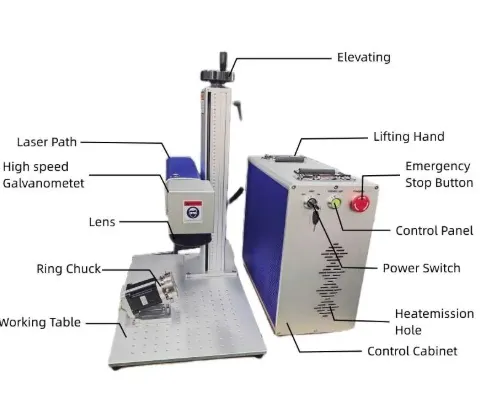
In this guide, I use desktop laser marking machine to describe a compact benchtop or compact workstation that can be installed in a workshop, laboratory, jewelry shop, electronics facility or small production area without requiring a large industrial marking cell.
That means I include both traditional enclosed desktop fiber markers and compact industrial workstations. I also include a few compact dual-laser machines because they solve a different buyer problem: one machine covering both metal and non-metal personalization.
If you can realistically put the system beside your production bench, load the workpiece manually and use it for individual parts or small-to-medium batches, I consider it a desktop or compact laser marking solution.
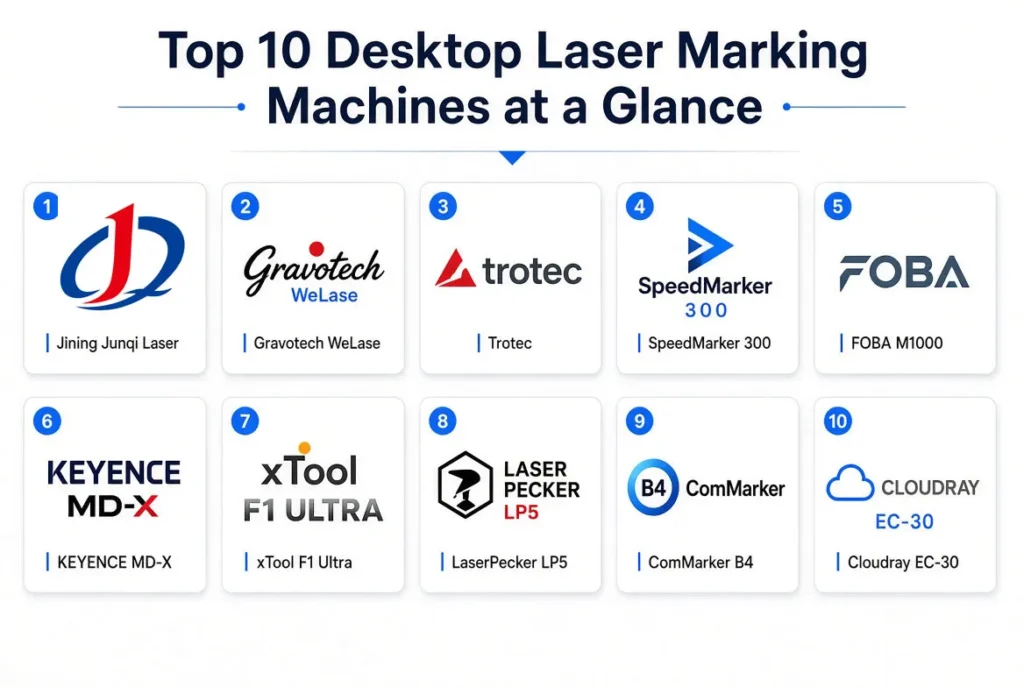
Top 10 Desktop Laser Marking Machines at a Glance
These are editorial recommendations based on application fit, published specifications and purchasing considerations — not an official industry ranking.
| Rank | Machine | Laser / Power | Working Area | Best For | My Take |
|---|---|---|---|---|---|
| #1 | JQ Laser Desktop | Fiber 20/30/50/60W | 110×110 mm typical | Industrial metal marking | Best factory-direct value |
| #2 | Gravotech WeLase | Fiber 20/30W | 110×110 mm | Jewelry / retail / identification | Excellent compact Class 1 system |
| #3 | Trotec SpeedMarker 300 | Fiber 20/30/50W | 190×190 mm | Industrial batches | Strong productivity option |
| #4 | FOBA M1000 | Fiber | 450×250 mm workspace | Industrial components | Best compact industrial workstation |
| #5 | KEYENCE MD-X | YVO₄ 13/25W | 125×125 / 330×330 mm | Automation / traceability | Strong integration choice |
| #6 | xTool F1 Ultra | 20W Fiber + 20W Diode | 220×220 mm | Small business / mixed materials | Best dual-laser desktop |
| #7 | LaserPecker LP5 | 20W Fiber + 20W Diode | 120×160 / 160×300 mm | Personalization / small business | Compact and flexible |
| #8 | ComMarker B4 | Fiber 20/30/50/100W | 110 / 200 mm lens options | Metal engraving / jewelry | Strong value for fiber users |
| #9 | Cloudray EC-30 | CO₂ 30W | 210×210 mm | Plastic / wood / non-metal | Good compact CO₂ choice |
| #10 | Trotec SpeedMarker 50 | Fiber 20/30/50W | 310×310 mm | Large-area compact marking | Interesting option when field size matters |
My First Advice: Don’t Buy a Desktop Laser Just Because It Is Compact
This is the mistake I see most often.
A customer tells me, “I only need a small machine.” Then I ask what they actually need to mark. Sometimes the parts are small, but the production volume is high. Sometimes the product is small but requires a 300×300 mm field. Sometimes the customer wants to mark stainless steel today but expects to process plastic next year.
So I would not start with machine size. I would start with four questions:
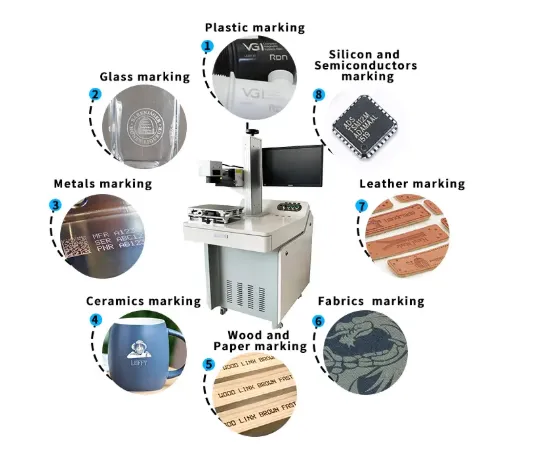
Metal, plastic, glass, wood or mixed materials?
Logo, QR code, serial number, deep engraving or color?
10 pieces a day or 10,000?
Manual workbench or production-line integration?
JQ Laser Desktop Laser Marking Machine
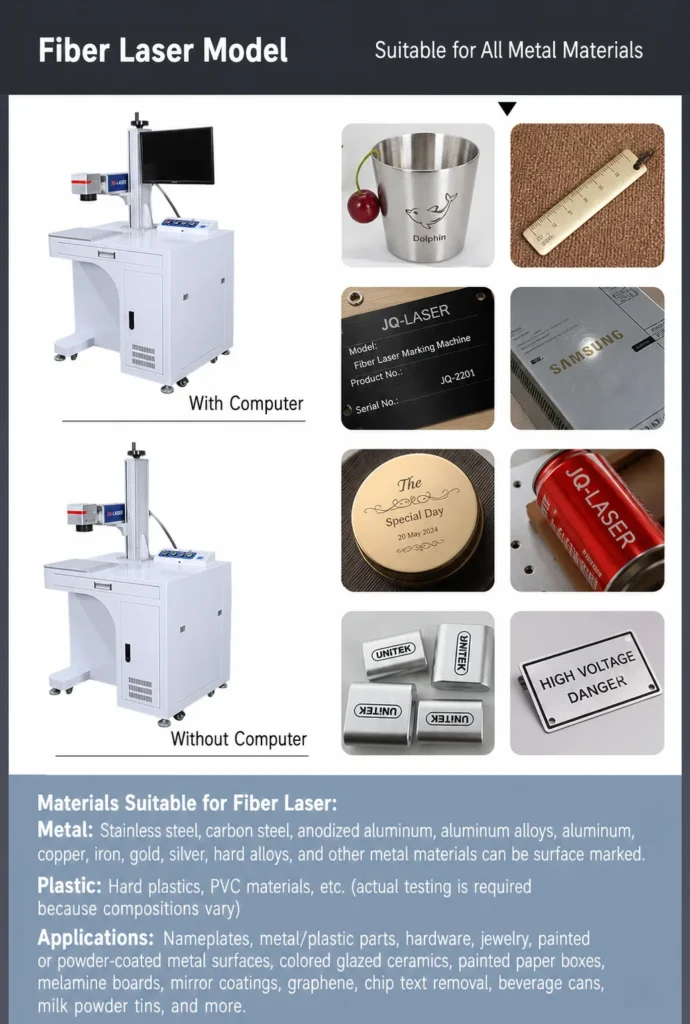
If the customer mainly wants to mark metal parts and is buying directly from a manufacturer, this is the type of machine I would put near the top of the shortlist.
JQ Laser’s current desktop page lists fiber, UV and CO₂ configurations, while its published fiber configurations include 20W, 30W, 50W and 60W options. The standard fiber configuration uses 1064 nm and a typical 110×110 mm marking field.
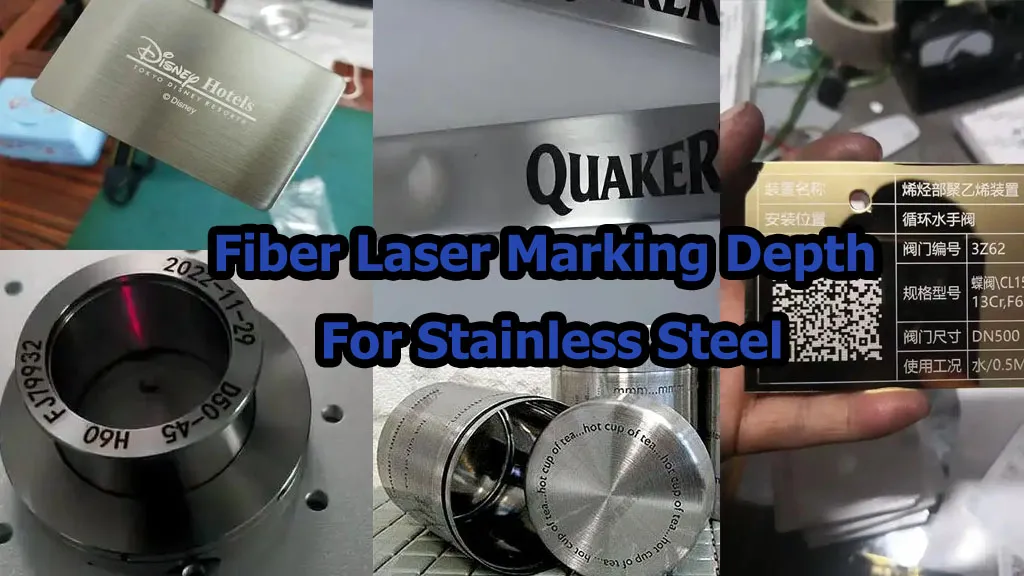
For everyday work such as stainless-steel nameplates, aluminum components, serial numbers, QR codes, logos and hardware identification, I would normally look at 20W or 30W first rather than automatically jumping to 50W.
View JQ Desktop LaserPublished / Reference Specifications
| Laser type | Fiber |
| Power | 20 / 30 / 50 / 60W |
| Wavelength | 1064 nm |
| Marking speed | Up to 7,000 mm/s |
| Typical field | 110×110 mm |
| Cooling | Air cooling |
Gravotech WeLase Fiber
If your priority is a polished, enclosed and easy-to-use desktop system rather than the lowest purchase price, WeLase is worth serious consideration.
Gravotech publishes Fiber versions at 20W and 30W, a 110×110 mm field and marking speeds up to 3000 mm/s. The machine is Class 1 with the door closed and has programmable motorized Z adjustment. Gravotech also positions it for jewelry, personalization and industrial part identification.
1064 nm
Compact marking field
Manufacturer-published maximum
Enclosed operation
Best fit: jewelry stores, premium personalization, medical/industrial identification and companies that want a compact professional workstation rather than an open-frame engraver.
Trotec SpeedMarker 300
This is where the word “desktop” starts to mean something different. SpeedMarker 300 is a compact industrial workstation rather than a hobby engraver.
Trotec lists a 190×190 mm maximum marking area, 20W/30W/50W fiber options, 20–100W MOPA options, a maximum marking speed of 12 m/s and a maximum workpiece height of 168 mm in the F160 configuration.
Why I Would Choose It
- More working area than many 110×110 mm desktop markers.
- 20–50W fiber options give buyers room to choose production capacity.
- MOPA options are available for applications requiring more pulse control.
- Good fit for small and medium industrial batches.
My warning: if your work is simply 100 stainless-steel nameplates per day, you may not need this level of workstation.
FOBA M1000
If your definition of “desktop” means a real industrial workstation that can handle substantially heavier parts, I would look at the FOBA M1000.
FOBA specifies a 450×250 mm workspace, up to 25 kg workpiece weight and up to 450×250×200 mm workpiece size. It uses a programmable Z axis and operates as a Class 1 workstation. Available fiber marker options include Y.0100, Y.0200, Y.0300, Y.0201 and Y.0500.
Work space
Maximum workpiece weight
Programmable Z axis
Industrial safety enclosure
Best fit: automotive components, medical products, tools, metal/plastic components and contract marking where a small footprint is important but the parts are much larger than jewelry-sized products.
FOBA M1000
If your definition of “desktop” means a real industrial workstation that can handle substantially heavier parts, I would look at the FOBA M1000.
FOBA specifies a 450×250 mm workspace, up to 25 kg workpiece weight and up to 450×250×200 mm workpiece size. It uses a programmable Z axis and operates as a Class 1 workstation. Available fiber marker options include Y.0100, Y.0200, Y.0300, Y.0201 and Y.0500.
Work space
Maximum workpiece weight
Programmable Z axis
Industrial safety enclosure
Best fit: automotive components, medical products, tools, metal/plastic components and contract marking where a small footprint is important but the parts are much larger than jewelry-sized products.
xTool F1 Ultra
This is one of the machines I would look at if the buyer does not want to choose between metal and non-metal applications.
F1 Ultra combines a 20W 1064 nm fiber laser with a 20W blue diode laser. The published working area is 220×220 mm, expandable to 220×500 mm with the conveyor, and the manufacturer lists a maximum working speed of 10,000 mm/s.
1064 nm metal marking
Wood, leather, acrylic and other applications
Standard working area
Maximum published speed
Best fit: personalization shops, mixed-material products, jewelry, gifts, small businesses and users who want one compact machine instead of buying separate fiber and diode systems.
xTool F1 Ultra
This is one of the machines I would look at if the buyer does not want to choose between metal and non-metal applications.
F1 Ultra combines a 20W 1064 nm fiber laser with a 20W blue diode laser. The published working area is 220×220 mm, expandable to 220×500 mm with the conveyor, and the manufacturer lists a maximum working speed of 10,000 mm/s.
1064 nm metal marking
Wood, leather, acrylic and other applications
Standard working area
Maximum published speed
Best fit: personalization shops, mixed-material products, jewelry, gifts, small businesses and users who want one compact machine instead of buying separate fiber and diode systems.
LaserPecker LP5
LP5 follows a similar dual-laser idea but takes a much more compact approach. It combines a 20W 1064 nm fiber laser with a 20W 450 nm blue diode laser.
The manufacturer publishes a 120×160 mm elliptical field, 100×100 mm square field and up to 160×300 mm with the slide extension. Maximum working speed is listed at 10,000 mm/s.
The Numbers That Matter
| Fiber laser | 20W / 1064 nm |
| Diode laser | 20W / 450 nm |
| Speed | 10,000 mm/s |
| Weight | 6.02 kg |
| Software | LaserPecker software / LightBurn |
ComMarker B4
If the buyer specifically wants a fiber laser for metal engraving but still wants a relatively compact machine, the B4 is an interesting option.
ComMarker currently lists 20W, 30W, 50W and 100W configurations. The B4 uses an electric lifting structure, supports 110 mm and 200 mm lens options and is compatible with LightBurn and EZCAD2.
Multiple fiber power options
Different marking field options
Published machine dimensions
Published machine weight
Current price reference: the manufacturer’s store currently displays a B4 starting price of USD 1,399 for one configuration. Because power, rotary options and other configurations change the price, treat this as a live retail reference rather than a universal B4 price.
Cloudray EC-30 CO₂ Laser Marker
This one is important because not every desktop marking job should use a fiber laser.
If your main products are plastics, wood, packaging materials or other non-metal products, a compact CO₂ marker can make much more sense.
| Laser power | 30W |
| Wavelength | 10,600 nm |
| Working area | 210×210 mm |
| Maximum speed | 10,000 mm/s |
| Software | LightBurn compatible |
Best fit: plastic products, wood, packaging, coated materials and other applications where a 10.6 μm CO₂ source is more appropriate than a 1064 nm fiber laser.
Trotec SpeedMarker 50 Fiber
Sometimes the problem is not laser power. It is simply that 110×110 mm is too small.
The SpeedMarker 50 Fiber is interesting because Trotec publishes a 310×310 mm maximum marking area and fiber options of 20W, 30W and 50W. The published maximum marking speed is 12 m/s.
Large compact marking field
Fiber options
Maximum published marking speed
Who should consider it? Buyers marking larger nameplates, panels, tools, assemblies or multiple small parts in one setup.
Don’t Compare Machines by Maximum Speed Alone
You will see machines advertised at 7,000, 10,000 or even 12,000 mm/s. Those numbers are useful, but they are not enough to calculate your production capacity.
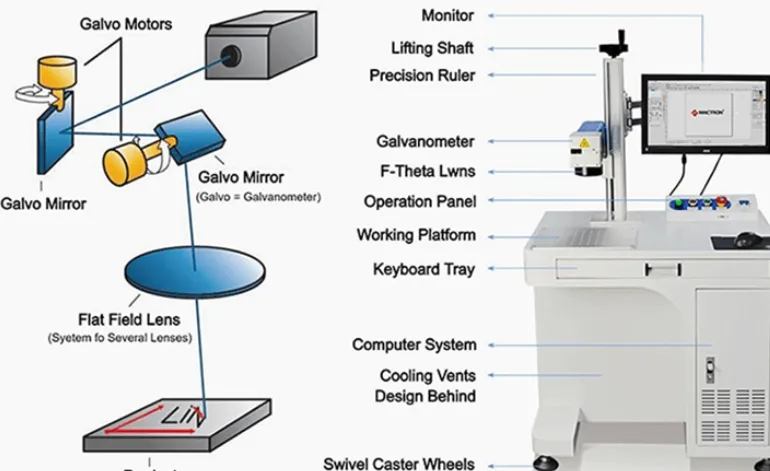
The real cycle time also depends on the graphic, fill density, hatch spacing, number of passes, material, required contrast, positioning, loading and unloading.
A Simple Example
If Machine A has a 10,000 mm/s scanner but needs three passes to produce the required mark, while Machine B runs at 7,000 mm/s and produces the same result in one pass, Machine B may actually have the shorter production cycle.
This is why I recommend sample testing instead of buying from a specification sheet alone.
If You Need QR Codes or Data Matrix Codes, Test Readability — Not Just Appearance
A beautiful-looking QR code is not necessarily a good production mark. For direct part marking, the important question is whether the code can be reliably read under the actual lighting, surface and scanning conditions.
ISO/IEC 29158:2025 is the current international standard for direct-part-mark quality testing. It specifically addresses quality evaluation of symbols applied directly to parts and considers the different optical conditions encountered in direct marking.
Can the scanner distinguish the mark from the background?
Are the code modules clean and sufficiently defined?
Does reflection, coating or curvature affect reading?
Can the final code pass your actual scanner/checker?
Don’t Forget Laser Safety
A desktop machine is not automatically a safe machine. Laser class, enclosure design, interlocks, viewing windows, exhaust and local regulations all matter.
For example, Gravotech publishes its enclosed WeLase as Class 1 with the door closed, while KEYENCE identifies its MD-X marking laser as a Class 4 laser product. These are very different machine architectures and should not be compared only by laser power.
- What is the laser classification?
- Is the enclosure interlocked?
- What happens when the door is opened?
- How are fumes and particles handled?
- What safety documentation is supplied?
- Does the machine meet the requirements of your destination market?
The Buying Process I Recommend
Send Material
Use the actual production material whenever possible.
Define the Mark
Tell the supplier what the finished mark must look like.
Test Samples
Compare actual marking results, not only specifications.
Calculate Cycle Time
Measure the complete production cycle.
Check Support
Ask who handles software, parameters and spare parts.
Compare JQ Laser Marking Solutions
Desktop Laser Marking Machine
Compact laser marking for small and medium products.
Fiber Laser Marking Machine
General-purpose laser marking for metals and selected plastics.
20W Fiber Laser
Practical option for standard metal marking.
30W Fiber Laser
A balanced option for general industrial production.
50W Fiber Laser
More processing capacity for deeper engraving and higher workloads.
MOPA Laser Marking Machine
Additional pulse-control options for specialized marking.
UV Laser Marking Machine
For fine marking and selected heat-sensitive materials.
CO₂ Laser Marking Machine
For plastics, wood, packaging and other non-metal applications.
Desktop Laser Marking Machine FAQ
What is the best desktop laser marking machine?
There is no universal best machine. For general metal marking, a 20W or 30W fiber system is often a practical starting point. For mixed materials, a dual-laser machine may be more useful. For industrial automation, a compact workstation from a specialist industrial manufacturer may be a better choice.
Is 20W enough for a desktop fiber laser?
For many surface-marking applications, yes. 20W can be practical for serial numbers, QR codes, logos, nameplates and general identification on suitable metals. Deep engraving and high-throughput applications may justify 30W, 50W or higher power.
Is 30W better than 20W?
Not automatically. Higher power gives you more processing capacity, but it does not guarantee better fine detail. If your main requirement is standard surface marking, 20W may already be sufficient. 30W becomes more attractive when production speed and future capacity matter.
What is the difference between a desktop and portable laser marking machine?
A desktop machine is normally designed to stay at a workbench and process parts placed inside or under the marking system. A portable machine is designed to be moved to large or difficult-to-move workpieces. The better choice depends on your part size and production method.
Is a fiber laser suitable for plastic?
Some plastics can be marked with 1064 nm fiber lasers, but plastic formulations vary significantly. UV or CO₂ may be better depending on the material and desired effect. Sample testing is strongly recommended.
Do I need a rotary attachment?
You should consider one if you need to mark rings, tubes, bottles, cylinders or other round parts. If all your parts are flat, a rotary axis may not be necessary.
Does a higher laser speed mean faster production?
Not necessarily. Actual cycle time depends on marking content, hatch settings, number of passes, positioning and loading time. A machine’s maximum scanner speed should not be used as the only production-speed comparison.
Should I test my material before buying?
Yes. If the machine will be used for a specific production product, testing the actual material is one of the safest ways to confirm marking contrast, depth, code readability and cycle time before purchase.
Which desktop laser is best for QR codes and serial numbers?
A 20W or 30W fiber laser is often sufficient for QR codes and serial numbers on suitable metal surfaces. If the application requires direct-part-mark verification, the important step is to test the actual code on the actual surface and verify it with the intended scanner.
Technical Sources & Data Traceability
The specifications in this article are based primarily on manufacturer-published product pages and technical documentation available at the time of research. Where a manufacturer does not publish a public price, this article does not invent one.
- JQ Laser: Desktop Laser Marking Machine and Fiber Laser Marking Machine product specifications.
- Gravotech: WeLase technical specifications and application information.
- Trotec: SpeedMarker product portfolio and technical specifications.
- FOBA: M1000 compact fiber laser marking workstation specifications.
- KEYENCE: MD-X series specifications and supported marking / code functions.
- xTool: F1 Ultra technical specifications.
- LaserPecker: LP5 technical specifications.
- ComMarker: B4 published specifications and current public pricing.
- Cloudray: EC Series CO₂ marking machine specifications.
- ISO/IEC 29158:2025: Direct Part Mark quality test specification.
- U.S. FDA: Laser product performance and radiation safety information.
Still Not Sure Which Desktop Laser Marking Machine You Need?
Send us your material, product photo, marking content, required marking size and approximate daily production volume. We can help you determine the laser type and power from the actual application instead of simply selling you the highest-power machine.