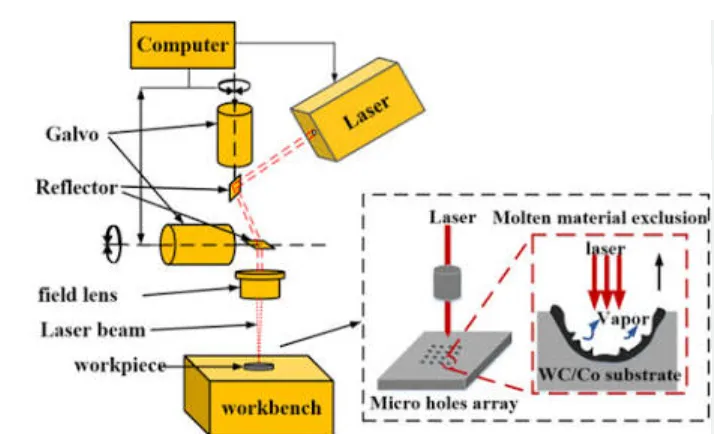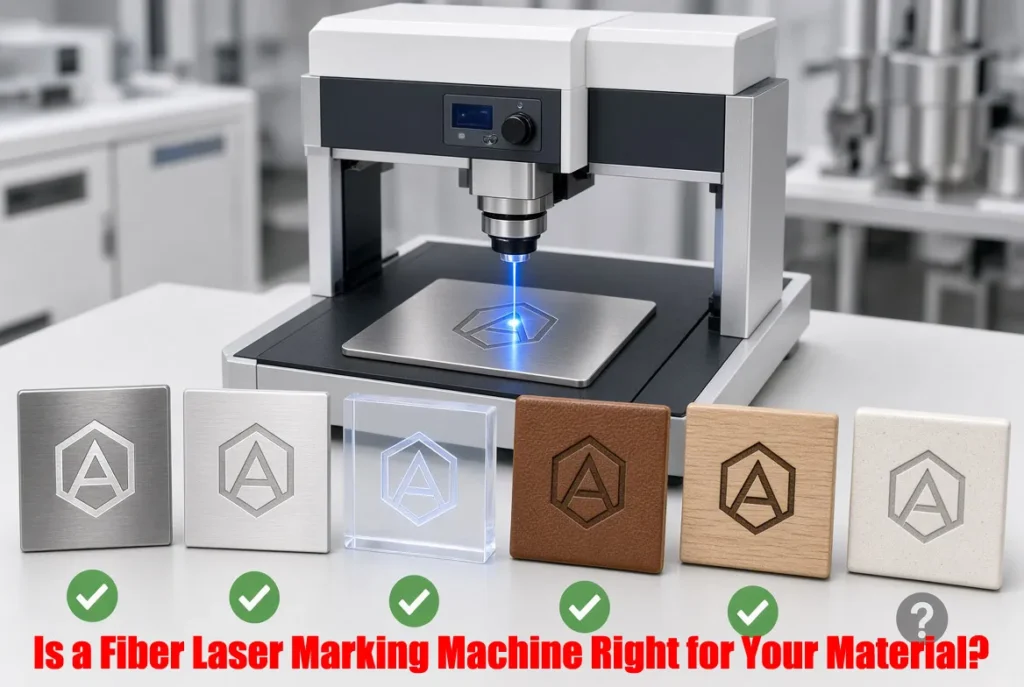
marking machine material compatibility
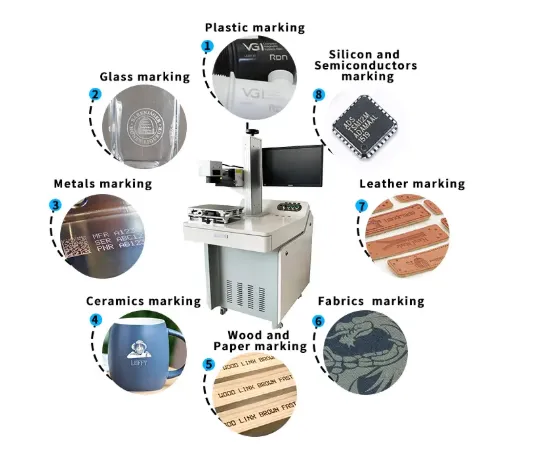
A fiber laser is usually the right starting point when your main materials are metals such as stainless steel, aluminum, brass, copper, titanium or coated metal parts. JQ Laser’s current fiber systems use a typical 1064 nm wavelength with 20W–100W power options. But “metal” or “plastic” is not enough information to approve a machine. Alloy, coating, color, surface finish, required mark, depth and production speed all matter. For many heat-sensitive plastics, glass, PCB and fine electronic parts, UV may be a better starting point; for wood, leather, acrylic and many organic materials, CO₂ is often more suitable. The safest purchasing method is to test your actual production material before placing the machine order.
Request a Material Sample Test View Fiber Laser Machines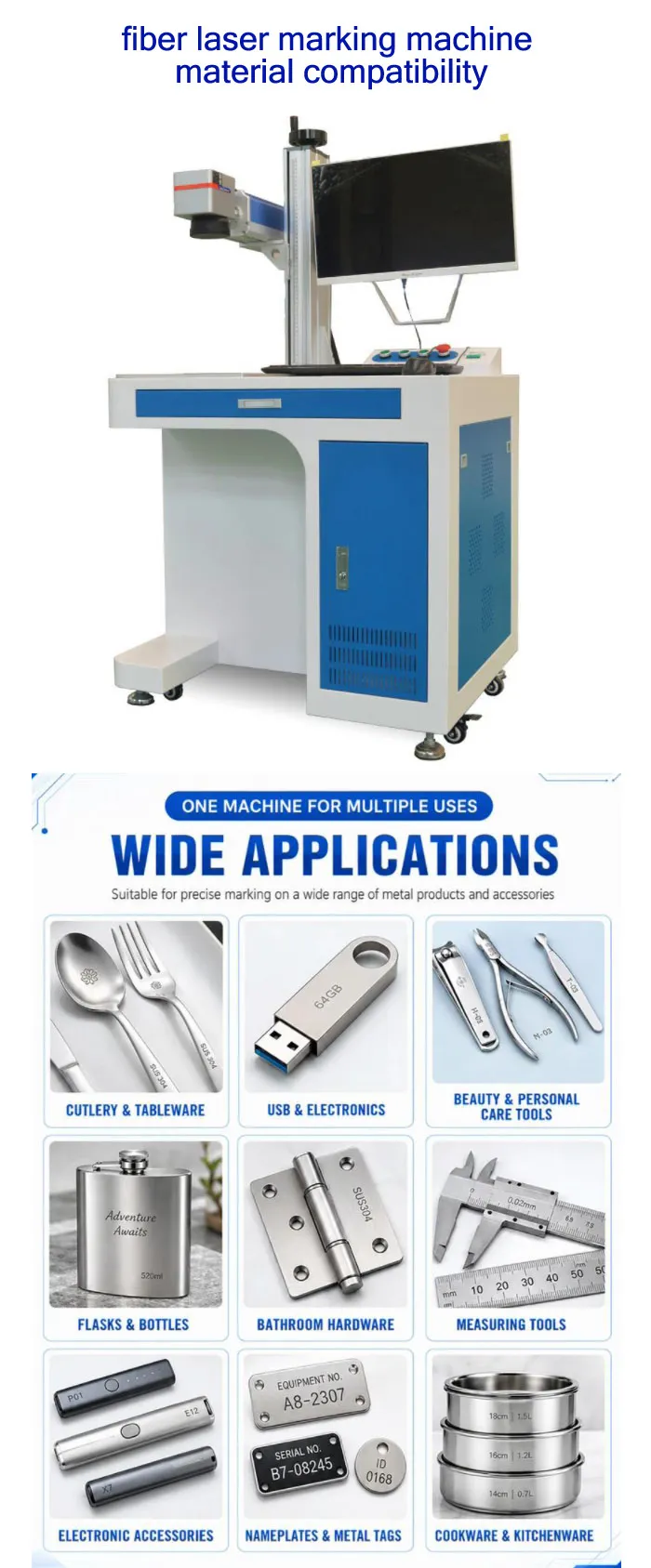
First Question: What Exactly Are You Marking?
When a customer tells me, “We need to mark plastic,” I normally don’t give a machine recommendation yet. The same thing happens with aluminum and stainless steel.
From the application side, the material name is only the beginning. A 304 stainless-steel part, a polished 316 stainless-steel part and a coated stainless-steel part may require different parameters or even a different marking strategy. The same applies to aluminum: bare aluminum, anodized aluminum, black anodized aluminum and painted aluminum do not behave identically under the laser.
Don’t choose the laser first. Define the material, surface treatment, required marking effect, marking size, production quantity and cycle time first. Then choose the wavelength and power.
Metal
Fiber 1064 nm is normally the first technology to test for stainless steel, aluminum, brass, copper, titanium, carbon steel and many coated metal applications.
Plastic & Electronics
Fiber can work on selected plastics, but the formulation matters. UV is often a better starting point when low thermal impact and fine contrast are critical.
Organic Materials
Wood, leather, paper, cardboard and many acrylic applications are generally better candidates for CO₂ rather than a standard fiber laser.
fiber laser marking machine material compatibility: Practical Decision Table
The table below is intentionally conservative. “Good” means the material is a reasonable candidate for fiber laser testing. It does not mean every grade, coating or surface finish will produce the same result.
| Material / Surface | Fiber 1064 nm | Typical Marking Result | Main Concern | Buying Recommendation |
|---|---|---|---|---|
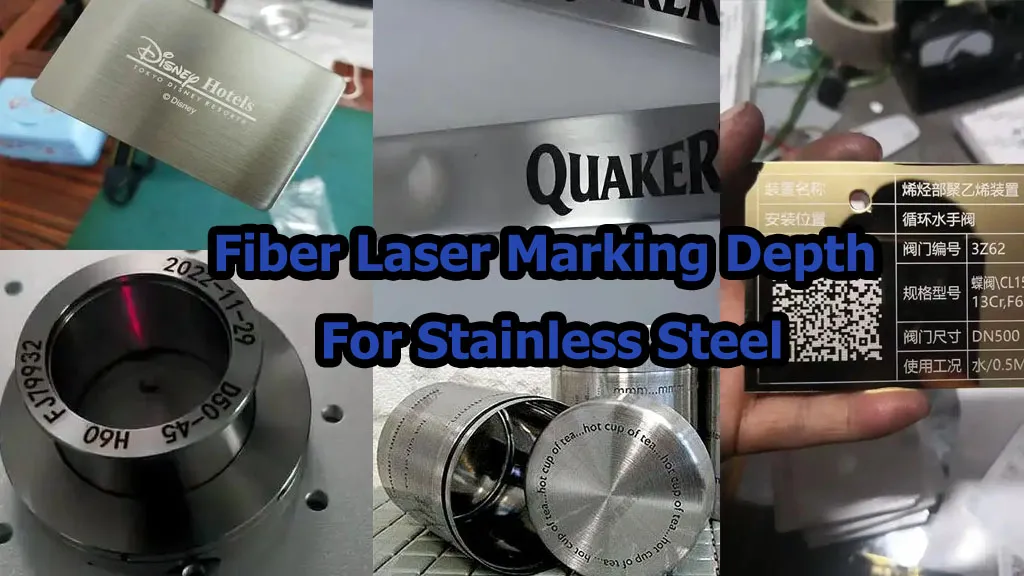
| Stainless Steel | Good | Black annealing, surface marking, engraving | Finish, alloy, required contrast | Fiber / MOPA test |
| Aluminum | Good | Surface marking, coating removal, contrast marking | Raw vs anodized surface | Fiber is a normal starting point |
| Brass | Good | Dark marking / engraving depending on process | Reflectivity and alloy | Sample test recommended |
| Copper | Possible / Good depending on task | Surface marking / engraving | High reflectivity and heat transfer | Test actual copper grade |
| Titanium | Good | Surface marking, annealing, fine marking | Required color / contrast | Fiber or MOPA depending on effect |
| Gold | Possible / application dependent | Fine surface marking / engraving | Reflectivity, jewelry finish | Sample test before production |
| Silver | Possible / application dependent | Fine marking / engraving | Reflectivity and surface finish | Sample test strongly recommended |
| Black Anodized Aluminum | Good | High-contrast coating removal / surface effect | Coating thickness and color | Fiber or MOPA depending on effect |
| ABS / PC / Engineering Plastic | Application dependent | Color change / surface contrast | Pigment, additives, heat sensitivity | Test actual resin grade |
| PCB | Application dependent | Fine identification / codes | Substrate and component sensitivity | UV is often worth testing first |
| Glass | Limited | Not a normal fiber application | 1064 nm interaction with transparent material | Consider UV or CO₂ |
| Acrylic / PMMA | Limited / application dependent | Usually not the main fiber application | Material absorption | CO₂ is usually a better starting point |
| Wood | Not first choice | Limited compared with CO₂ | Organic material absorption | CO₂ recommended for testing |
| Leather | Not first choice | Limited compared with CO₂ | Material composition and burning | CO₂ normally preferred |
Compatibility ratings are application guidance, not a production guarantee. Exact material formulation, coating, color, surface finish and required marking effect can change the result.
Why 1064 nm Fiber Laser Works Well on Metal
JQ Laser’s standard fiber marking platform uses a typical 1064 nm wavelength. This is the wavelength family commonly used for industrial metal marking because it can efficiently interact with many metallic surfaces.
In a real project, the important question isn’t simply whether the beam can mark the metal. The important question is what type of mark you need.
Surface Marking
Suitable when the customer mainly needs logos, serial numbers, QR codes, barcodes or identification marks without significant material removal.
Annealing
Used on suitable metals such as stainless steel when the objective is a dark mark with limited material removal.
Engraving
The laser removes material to create a visible recess. Higher power and repeated passes can make deeper processing more practical.
Coating Removal
Used on selected coated or anodized products where the required contrast comes from removing or changing the surface layer.
Real JQ Fiber Laser Parameters: What Are You Actually Buying?
The following values are based on the current JQ Laser fiber laser product range. Final specifications should be confirmed on the quotation because the laser source, lens, galvanometer, marking field and machine structure can be configured differently.
| Parameter | JQ Fiber Laser Reference | Why It Matters to Your Material |
|---|---|---|
| Laser Type | Pulsed Fiber Laser | Main technology for many metal marking applications |
| Wavelength | 1064 nm typical | Important for absorption and material compatibility |
| Power Options | 20W / 30W / 50W / 60W / 100W | Higher power can provide more processing headroom |
| Standard Marking Field | 110 × 110 mm | Smaller field can be useful for finer energy density and compact parts |
| Optional Fields | 150 / 175 / 200 / 300 mm class options | Larger products may require a larger lens/field |
| Marking Speed | Up to approx. 7,000 mm/s commonly referenced on the current product overview | Maximum scanner speed is not the same as actual cycle time |
| Cooling | Air cooling is common | Reduces system complexity for many standard configurations |
| Software | EZCAD compatible | Useful for text, logos, QR, barcode and variable data marking |
| Typical Applications | Metal parts, tools, electronics, automotive parts, jewelry, medical components | Application determines the correct laser configuration |
JQ’s product page also publishes higher maximum scanner-speed figures on some sections. For procurement, we recommend treating scanner maximum speed and actual production cycle time as two different specifications.
20W, 30W, 50W, 60W or 100W: Which Power Makes Sense for Your Material?
I often see buyers start with the question “How many watts should I buy?” I would change the question to: How much material must the laser remove, how fast must it process the part, and what mark must survive production?
20W
Typical public-market reference for standard configurations
Good starting point for standard logos, serial numbers, QR codes, nameplates and general surface marking.
Consider when:- Marking is relatively shallow
- Production volume is moderate
- Part size is small
- Budget is important
30W
Typical public-market reference for standard configurations
A practical general-purpose configuration for routine industrial metal marking.
Consider when:- Regular batch production
- Metal parts need consistent marking
- QR and serial numbers are common
- You need more processing headroom than 20W
50W
Typical public-market reference for standard configurations
More useful when cycle time, engraving depth or production volume becomes important.
Consider when:- Deep engraving is required
- Batch volume is higher
- Material removal takes too many passes
- Future production expansion is expected
60W / 100W: When Does Higher Power Become Justified?
Higher-power fiber systems become more relevant when the job involves deeper engraving, larger material removal, demanding production cadence or industrial applications where reducing laser processing time has measurable value.
JQ currently publishes 60W and 100W configurations within its fiber laser range. The correct choice should be based on an actual sample and required cycle time rather than simply choosing the largest wattage available.
Compare 50W Fiber Laser See 100W Fiber LaserFiber Laser vs UV vs CO₂: When Should You Change Technology?
This is one of the most important purchasing decisions. If your material is wrong for fiber, increasing the wattage usually isn’t the solution.
| Material / Job | Fiber 1064 nm | UV 355 nm | CO₂ 10.6 μm | First Technology to Test |
|---|---|---|---|---|
| Stainless Steel | Excellent candidate | Possible | Not normal choice | Fiber / MOPA |
| Aluminum | Excellent candidate | Possible | Not normal choice | Fiber |
| Brass / Copper | Good / application dependent | Possible | Not normal choice | Fiber sample test |
| Black Anodized Aluminum | Good | Good | Not normal choice | Fiber / MOPA test |
| ABS / PC / Engineering Plastic | Application dependent | Good candidate | Application dependent | UV test |
| PCB / Electronics | Application dependent | Good candidate | Usually not first choice | UV test |
| Glass | Limited | Good candidate | Good candidate | UV / CO₂ test |
| Acrylic | Limited | Possible | Good candidate | CO₂ |
| Wood | Not first choice | Possible | Excellent candidate | CO₂ |
| Leather | Not first choice | Possible | Excellent candidate | CO₂ |
Metal → start with Fiber.
Sensitive plastic / PCB / fine glass → test UV.
Wood / leather / acrylic / many organic materials → test CO₂.
Mixed-material production → send samples before selecting the machine.
Real Material Samples: What Should You Send to the Supplier?
If you want a useful quotation rather than a generic machine price, the sample is more important than a long email describing the product.
Ideally, send the supplier 5–20 actual production pieces. If the parts are expensive, send representative offcuts or samples from the same material and surface treatment.
For Stainless Steel
- Material grade: 304, 316 or other
- Brushed / polished / coated surface
- Required black mark or engraving
- Marking size
- Required depth if engraving
- Target cycle time
For Aluminum
- Alloy if known
- Bare or anodized
- Anodizing color
- Required contrast
- Surface finish
- Part dimensions
For Plastic
- Exact resin / grade
- Color
- Manufacturer if available
- Glass fiber content if applicable
- Flame-retardant additives if applicable
- Required marking color and contrast
For Production Parts
- Parts per hour
- Loading method
- Part orientation
- Marking position tolerance
- Variable data requirement
- Vision inspection requirement
Don’t Forget Surface Treatment: “Aluminum” Is Not One Laser Material
This is one of the easiest ways to get a wrong quotation.
| Surface | What Changes? | What the Supplier Should Test |
|---|---|---|
| Bare Aluminum | Reflectivity and desired contrast | Power, speed, frequency and marking strategy |
| Anodized Aluminum | The laser may interact mainly with the anodized layer | Coating removal and contrast |
| Black Anodized Aluminum | Contrast often comes from controlled removal/change of the coating | Mark quality and coating consistency |
| Painted Metal | Laser may remove the paint rather than directly mark the base metal | Paint thickness and required contrast |
| Polished Stainless | Appearance and reflection can influence the result | Contrast, heat input and visual finish |
| Brushed Stainless | Existing surface direction affects visual appearance | Mark orientation and consistency |
How Your Material Changes the Machine Price
Two customers can both ask for a “30W fiber laser marking machine” and receive very different quotations. The reason is that the laser source is only one part of the system.
1. Laser Source
Different source brands and configurations can affect beam quality, pulse characteristics, stability and overall machine cost.
Ask: What laser source is included, and what exact model will appear on the quotation?
2. Laser Power
20W, 30W, 50W, 60W and 100W are not interchangeable when the job involves deep engraving or high-volume production.
Ask: What cycle time did you achieve on my actual sample?
3. Machine Cabinet / Enclosure
An open desktop system and a fully enclosed industrial system are not the same product. Enclosure design also affects operator protection, footprint, access and integration.
Ask: Is the machine open or enclosed? Are interlocks included?
4. Rotary Axis
Cylindrical parts such as rings, pens, tubes and bottles may require rotary equipment or a customized fixture.
Ask: What diameter range and fixture type does the rotary axis support?
5. Automation
Conveyor systems, pneumatic fixtures, sensors, PLC integration and flying marking can turn a simple marking machine into a production system.
Ask: What is the actual parts-per-minute target?
6. Vision / CCD
If the part position changes from piece to piece, a vision system can locate the product or verify the mark. It is useful when it solves a positioning problem, not simply because “CCD” sounds advanced.
Ask: What specific positioning or inspection problem will vision solve?
7. Exhaust / Fume Extraction
Some materials create smoke, dust or fumes. The extraction system should be designed around the actual material and production process.
Ask: What extraction capacity and filtration method are included?
8. After-Sales Support
A low purchase price is less useful if the supplier cannot help with parameter adjustment, replacement parts, software issues or troubleshooting.
Ask: What support is included after the machine arrives?
Do You Need an Enclosed Fiber Laser?
This decision should be based on the installation environment, operator access and safety design, not only appearance.
| Configuration | Typical Use | Advantages | What to Check |
|---|---|---|---|
| Open / Split System | Industrial workshops, large parts, specialized production setups | Flexible access and larger workpieces | Laser safety controls, operating environment and guarding |
| Desktop Enclosed | Small parts, workshops, laboratories, general industrial marking | Compact and easier operator protection | Door/interlock design, working area and ventilation |
| Industrial Enclosure | Production lines and higher-throughput applications | Better integration and controlled operating environment | Interlocks, sensors, exhaust and automation interface |
When a Rotary Axis Is Actually Worth Paying For
If you mark flat metal plates, a rotary axis may add cost without adding value. If you mark rings, pens, tubes, cylindrical handles or bottles, the situation is different.
Flat Parts
Standard galvo marking field is often enough.
Small Cylinders
Rotary chuck or roller can maintain positioning around the cylindrical surface.
High Volume
Customized fixtures can be more important than the rotary motor itself because loading consistency controls the real cycle time.
For cylindrical production, tell the supplier the diameter range, product length, marking position and required coverage angle. A standard 110×110 mm flat marking field does not automatically mean the machine can mark every cylindrical product around its full circumference.
See Automatic Rotary Laser MarkingWhen Do You Need Automation or Vision?
Automation should be purchased because it removes a production bottleneck. Don’t buy a conveyor simply because the supplier says the machine is “fully automatic.”
| Production Problem | Possible Solution | Information Needed for Quotation |
|---|---|---|
| Operator loads each part manually | Fixture / pneumatic fixture | Part dimensions and loading method |
| Parts arrive continuously | Conveyor + sensor | Parts/minute, spacing and product orientation |
| Product position changes | CCD / vision positioning | Position tolerance and camera field |
| Mark must move with conveyor | Encoder + mark-on-the-fly control | Conveyor speed range and synchronization requirement |
| Unique serial number for each product | Variable data / database connection | Data source and communication method |
| Mark must be verified | Vision inspection | Code type, inspection criteria and rejection method |
Real Production Scenario: Three Customers, Three Different Machines
Scenario 1: Stainless Steel Hardware
Material: Stainless steel
Mark: Logo + serial number + QR
Volume: 500–2,000 parts/day
Likely starting point: 20W–30W fiber
If the customer only needs identification marks, I would test 20W and 30W first rather than automatically quoting 50W or 100W.
Scenario 2: Tool Manufacturer
Material: Hardened metal tools
Mark: Deep logo + model number
Volume: Batch production
Likely starting point: 50W or higher
Here power becomes more important because material removal and cycle time can dominate the production cost.
Scenario 3: Plastic Electronics Housing
Material: Engineering plastic
Mark: Small serial number
Requirement: High contrast without melting
Likely starting point: UV sample test
I would not simply increase fiber power if the actual problem is heat damage.
What I Would Put in the RFQ Before Asking for a Price
If you send only “Please quote 30W fiber laser marking machine,” you will probably receive several prices that are impossible to compare properly.
Use this checklist instead.
| RFQ Information | What to Tell the Supplier |
|---|---|
| Material | Exact material / alloy / resin grade |
| Surface | Bare, anodized, polished, brushed, painted, coated, plated |
| Part Dimensions | Length × width × height / diameter |
| Marking Area | Actual required marking dimensions |
| Mark Content | Text, logo, QR, DataMatrix, barcode, serial number, image |
| Marking Effect | Black, white, color, coating removal, engraving, depth |
| Required Depth | For example 0.1 mm, 0.3 mm or a defined engineering requirement |
| Production Volume | Parts/hour or parts/day |
| Cycle Time | Target seconds per part if already known |
| Fixture | Flat fixture, rotary, pneumatic fixture or custom tooling |
| Automation | Manual, conveyor, PLC, encoder, MES/database integration |
| Vision | Position correction, code inspection or both |
| Enclosure | Open, desktop enclosed or industrial enclosed |
| Electrical Supply | Voltage, frequency and country |
| Shipping | Destination port / city and preferred Incoterm |
| Sample Test | Ask for actual sample photos/videos and processing parameters |
Questions You Should Ask the Fiber Laser Supplier
Material Questions
- Have you tested this exact material?
- Was the sample raw, coated or anodized?
- What laser parameters were used?
- How many passes were required?
Performance Questions
- What is the actual cycle time?
- What is the marking field?
- What depth can you achieve on my sample?
- What happens when production speed increases?
Configuration Questions
- Which laser source is included?
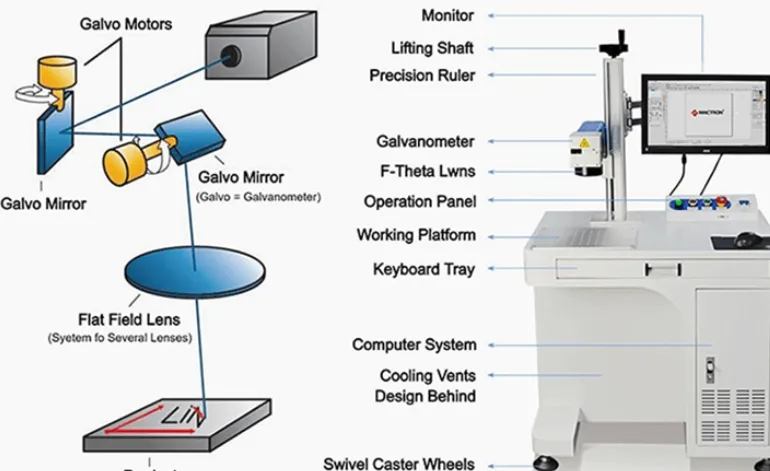
- Which galvanometer scanner is included?
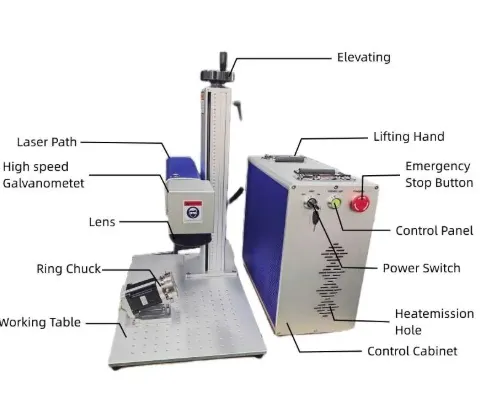
- Which F-theta lens is included?
- Is a rotary axis included or optional?
After-Sales Questions
- What warranty is included?
- Which spare parts are recommended?
- Is remote troubleshooting available?
- Can the supplier support parameter adjustment?
Why Sample Testing Is More Important Than a “Universal Material” Claim
A supplier may tell you that a fiber laser can mark “metal and plastic.” That statement can be technically true and still be useless for purchasing.
What matters is whether your exact part produces the required result: the correct contrast, depth, edge quality, permanence, cycle time and appearance.
- Actual material sample result
- Laser power and source model
- Marking parameters
- Processing time per part
- Photos or video of the finished sample
If the supplier refuses to provide enough technical information to reproduce the sample, you should be careful about comparing the quotation purely by price.
Common Fiber Laser Material Problems — and What to Change
| Problem | Possible Cause | Practical Next Step |
|---|---|---|
| Mark is too light | Insufficient energy / unsuitable parameter | Adjust power, speed, frequency or passes and retest |
| Plastic melts | Excessive thermal input | Test lower heat input or consider UV |
| Stainless steel becomes brown | Heat input / parameter combination | Optimize speed, power, frequency and pulse strategy |
| Engraving is too slow | Low power or too many passes | Test higher power if depth requirement justifies it |
| Copper result is inconsistent | Reflectivity / surface condition | Test exact copper grade and optimize parameters |
| Large part does not fit the field | Marking area too small | Choose suitable F-theta lens or alternative positioning method |
| Mark position changes | Part loading variation | Improve fixture or consider vision positioning |
| Production is slower than expected | Scanner speed confused with total cycle time | Measure marking + loading + positioning + inspection time |
Fiber Laser Buying Decision: Use This Simple Process
Step 1
Identify the exact material
Don’t stop at “metal” or “plastic.” Record alloy, resin, coating and surface treatment.
Step 2
Define the mark
Logo? QR? Serial number? Deep engraving? Black annealing? Coating removal?
Step 3
Define production
How many parts per hour? What is the acceptable cycle time?
Step 4
Choose wavelength
Fiber, UV or CO₂ should be selected according to material response, not simply machine price.
Step 5
Choose power
Use enough power for the required processing time and depth. More power is not automatically better.
Step 6
Test before buying
Approve the actual sample, cycle time and machine configuration before final payment.
Related JQ Laser Resources
Fiber Laser Marking Machine
Main product page covering 20W–100W fiber laser configurations.
View Fiber Laser Machines →Fiber Laser for Metal
Useful for customers mainly processing metal parts and industrial components.
View Metal Marking Solution →Material Compatibility Chart
Compare Fiber, MOPA, UV and CO₂ across metals, plastics, glass, wood and other materials.
View Material Chart →UV Laser Marking Machine
Review UV options for plastics, glass, PCB and heat-sensitive applications.
View UV Laser →MOPA Fiber Laser Marking Machine
Consider MOPA when pulse control, fine marking or stainless-steel color marking matters.
View MOPA Fiber Laser →Automatic Laser Marking Machine
For customers who need conveyors, fixtures, sensors, PLC integration or production-line marking.
View Automatic Laser Marking →FAQ: Fiber Laser Material Compatibility
Can a fiber laser mark all metals?
No. Fiber lasers are widely used for many metals, but the result depends on the alloy, surface finish, reflectivity and required marking effect. Copper, silver and gold deserve additional testing because their optical and thermal behavior can make the process more demanding.
Can a fiber laser mark plastic?
Some plastics can be marked successfully with a fiber laser, particularly formulations designed or naturally suited to absorb the wavelength. However, plastic type, pigment, additives and surface condition matter. For sensitive plastics where heat damage is a concern, UV is often worth testing.
Can a fiber laser mark stainless steel?
Yes. Stainless steel is one of the common applications for 1064 nm fiber lasers. Depending on the required result, the process may be surface marking, annealing or engraving.
What power should I use for stainless steel?
There is no single correct wattage. For standard identification marking, 20W or 30W can be a reasonable starting point. If deeper engraving or higher production throughput is required, 50W, 60W or 100W may become more appropriate. Actual sample testing is the better way to make the decision.
Is 100W always better than 20W?
No. Higher power can provide more processing capacity, but if your application only needs a small serial number or QR code, a lower-power machine may already meet the requirement. The correct machine is the one that meets the required result and cycle time without unnecessary configuration.
Can fiber laser mark glass?
Standard 1064 nm fiber is generally not the first choice for transparent glass. UV or CO₂ technologies are normally more appropriate depending on the glass and desired effect.
Can fiber laser mark wood?
Fiber is not normally the first technology I would recommend for wood. CO₂ is generally a more natural starting point for wood engraving and related organic materials.
Do I need a MOPA fiber laser?
Not necessarily. Standard fiber is sufficient for many normal metal marking applications. MOPA becomes more interesting when adjustable pulse behavior, stainless-steel color effects, black anodized aluminum or specific heat-control requirements are important.
Do I need a rotary axis?
Only if your parts are cylindrical or require controlled marking around a curved surface. Flat plates and many standard components do not need a rotary axis.
Should I buy an enclosed fiber laser?
The answer depends on your installation and safety requirements. An enclosed system can provide a controlled operator environment, while open systems may be useful for larger or specialized parts. Review enclosure, interlock and applicable safety requirements before purchasing.
Why should I send samples before ordering?
Because material compatibility alone does not prove production suitability. A sample test can reveal the actual contrast, depth, edge quality, heat effect and processing time on your material.

Written by LEO — JQ Laser Sales Engineer
I have worked with laser marking applications for more than 10 years, covering metal marking, product identification, fine marking and automation projects. My job is not only to quote a machine. I work with customers to match the laser, material, marking effect, production requirement and machine configuration before the order.
JQ Laser — Jining Junqi Intelligent Technology Co., Ltd.
Not Sure Whether Fiber Laser Is Right for Your Material?
Send us your actual material sample or clear photos together with the marking requirement. Tell us the material, part size, marking size, required depth or contrast and production quantity. We can recommend whether Fiber, MOPA, UV or CO₂ is the better technology to test.
Request a Material Sample Test Request a Project RFQFor an accurate quotation, please include material grade, surface treatment, part dimensions, marking content, marking area, required cycle time, production volume, automation requirements and destination country.
Technical & Source Notes
JQ Laser’s current published fiber laser range lists 20W/30W/50W/60W/100W configurations, 1064 nm wavelength, 110×110 mm standard marking field with larger field options, air cooling as a common configuration and EZCAD-compatible software. Published pricing is presented as a market/configuration reference rather than a fixed quotation.
Material compatibility guidance is intentionally conservative. Actual results depend on alloy, formulation, pigment, coating, surface finish, required marking effect and process parameters. Sample testing is recommended before production approval.