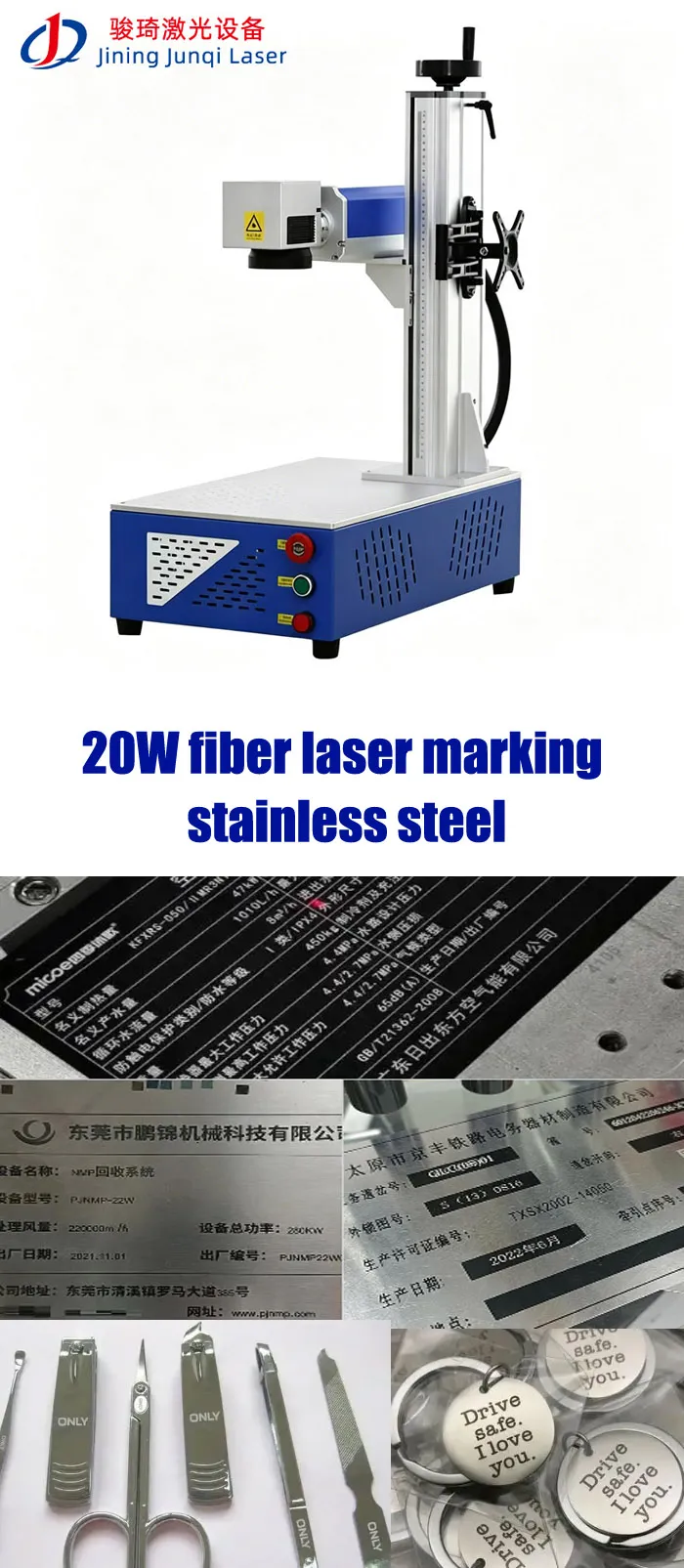
Is a 20W Fiber Laser Marking Machine Enough for Stainless Steel? Yes — for many stainless-steel marking jobs, a 20W fiber laser is enough. If your requirement is serial numbers, QR codes, Data Matrix codes, logos, text, nameplates or permanent identification on stainless steel, 20W is often a practical starting point. It can also produce black annealed marks when the material and process are suitable. Where 20W starts to become limiting is deep engraving, very short cycle times, heavy material removal or large-volume production. In those cases, I would test 30W or 50W rather than simply increasing the 20W machine’s parameters. The safest buying decision is to test your actual stainless-steel parts before ordering.

LEO has more than 10 years of experience in laser marking applications, working with manufacturers on metal marking, product identification, traceability and automated marking projects. His approach is simple: understand the material and production requirement first, test the actual application where necessary, and then recommend the laser configuration.
So, Is 20W Really Enough?
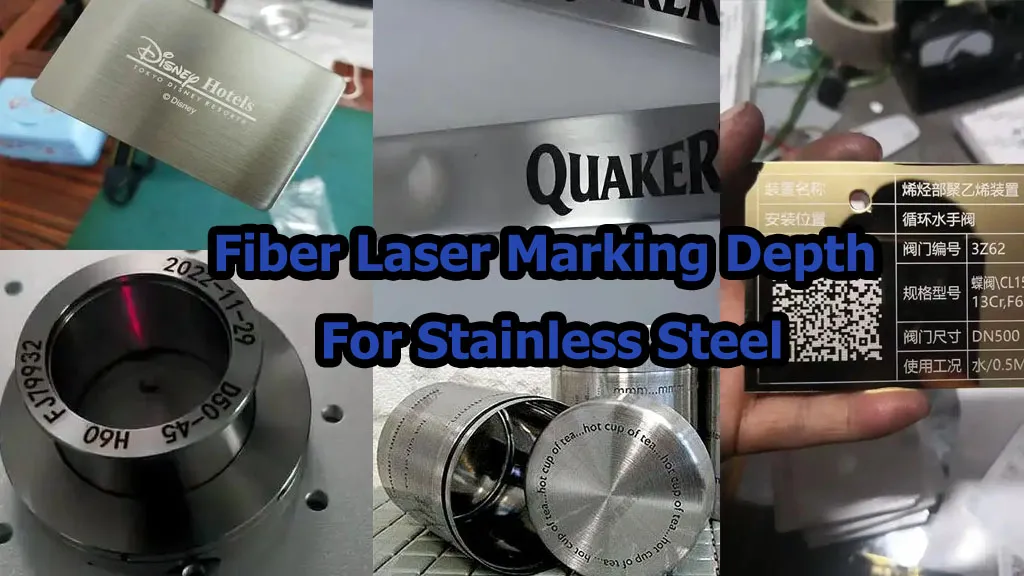
In most cases where the customer wants identification rather than deep metal removal, yes. A 20W pulsed fiber laser is a sensible configuration for stainless-steel serial numbers, QR codes, Data Matrix codes, logos, product IDs and nameplates.
But there is an important difference between saying “20W can mark stainless steel” and saying “20W is the right machine for your stainless-steel production.”
The second question depends on the stainless grade, surface finish, required mark appearance, marking size, cycle time, production volume and whether you need engraving rather than surface marking.
If you send me a 304 stainless-steel part and tell me, “I need a serial number or QR code, permanent and readable, and I don’t need deep engraving,” I would be comfortable starting the test with 20W. If you tell me, “I need 0.3mm deep engraving on 10,000 parts per day,” I would not recommend buying 20W without a production test.
20W vs 30W vs 50W for Stainless Steel
Before looking at the detailed technical information, this is the quick decision table I would use when discussing a stainless-steel project with a customer.
| Requirement | 20W | 30W | 50W |
|---|---|---|---|
| Serial Number | ✓ Suitable | ✓ Suitable | ✓ Suitable |
| QR / Data Matrix | ✓ Suitable | ✓ Suitable | ✓ Suitable |
| Logo / Text | ✓ Suitable | ✓ Suitable | ✓ Suitable |
| Black Annealing | ✓ Possible with suitable process | ✓ Possible | ✓ Possible |
| Light Etching | ✓ Suitable | ✓ Suitable | ✓ Suitable |
| Deep Engraving | Possible but slower | More suitable | Stronger choice |
| Very Short Cycle Time | Application dependent | Better headroom | More processing capacity |
JQ Laser 20W Fiber Laser: Real Reference Parameters
The following figures are based on JQ Laser’s currently published 20W fiber laser configuration. They are reference specifications, not a guarantee that every machine sold under the 20W label will have identical components.
| Parameter | JQ Laser 20W Reference | Why It Matters |
|---|---|---|
| Laser Type | Pulsed Fiber Laser | Standard architecture for many metal marking applications |
| Output Power | 20W | Suitable starting power for many identification applications |
| Wavelength | 1064nm | Common wavelength for metal marking |
| Reference Marking Speed | Up to approximately 7,000mm/s | Maximum scanning reference, not guaranteed cycle time |
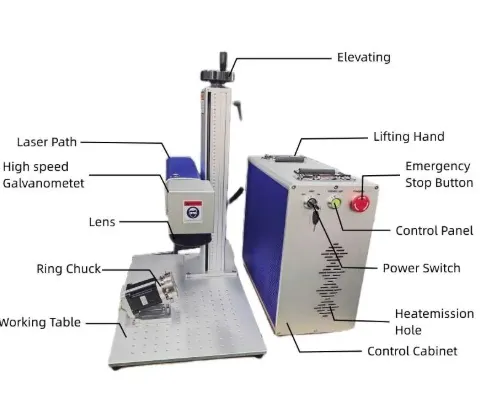
| Standard Marking Field | 110 × 110mm | Practical field for many small and medium metal parts |
| Optional Field | 70×70 / 175×175 / 200×200mm and other configurations | Selected according to part size and required marking area |
| Cooling | Air Cooling | Simple configuration for many workshop installations |
| Control | BJJCZ / JCZ-compatible | Common industrial laser marking control architecture |
| Software | EZCAD2 commonly used | Text, graphics, serial numbers, QR and barcode applications |
| Power Supply | 110V / 220V, 50/60Hz depending on destination | Must be confirmed before shipment |
What Stainless Steel Can a 20W Fiber Laser Mark?
“Stainless steel” is not one single material from a laser-processing point of view. Grade, surface finish, heat treatment, coating and polishing can all influence the result. That is why I prefer customers to send the actual part rather than simply tell me, “It is stainless steel.”
| Workpiece | Typical Requirement | 20W Starting Direction | What I Would Test |
|---|---|---|---|
| 304 Stainless Steel | Serial number / logo / QR | 20W Fiber | Contrast, speed and mark appearance |
| 316 / 316L Stainless Steel | Medical / industrial identification | 20W Fiber starting point | Actual alloy, surface finish and required contrast |
| Brushed Stainless Steel | Logo / serial / identification | 20W Fiber | Contrast against directional surface texture |
| Polished Stainless Steel | Cosmetic marking | 20W Fiber | Reflection, contrast and heat-affected appearance |
| Stainless Tool / Hardware | Part number / logo | 20W–30W | Required depth and production cycle |
Stainless Steel Marking Is Not Just “Black or Engraved”
One of the biggest purchasing mistakes is asking for “a stainless-steel laser mark” without defining what the finished surface should actually look like.
1. Black Annealed Mark
The laser heats the stainless surface to create a dark oxide-related contrast without intentionally removing significant material.
This can be useful when the customer wants a high-contrast identification mark while preserving a relatively smooth surface.
Typical use:Medical instruments, industrial identification, stainless nameplates and cosmetic products.
2. Light Etching
A small amount of material is removed to create contrast. This can be useful when the customer wants a more physical mark than annealing provides.
The correct parameter window depends on the required depth, surface finish and appearance.
Typical use:Industrial components, tools, hardware and identification plates.
3. Deep Engraving
The purpose is no longer simply identification. Material has to be removed to achieve measurable depth.
This is where 20W can become slow, especially when the customer requires substantial depth over a large marking area.
Typical use:Tools, molds, durable industrial components and applications where the mark must survive aggressive wear.
Can a 20W Fiber Laser Make Black Marks on Stainless Steel?
Yes, but I would be careful with the wording. A 20W fiber laser can produce black or dark annealed marking on suitable stainless steel when the laser parameters are correctly controlled. The result depends on the stainless grade, surface condition, focus strategy, power, speed, frequency and other process parameters.
This is a thermal process. You are not simply “burning black paint onto the metal.” The goal is to create the required surface contrast while avoiding unwanted melting, excessive material removal or a heat-affected appearance outside the mark.
One published 20W technical example
Trotec’s technical tutorial for a 20W fiber source describes stainless-steel annealing using approximately 80–100% power, 80–120mm/s speed and around 20–30kHz frequency, with the focus intentionally moved out of focus for the annealing process.
These values are useful as a technical reference, not as a universal JQ Laser production recipe. Stainless alloy, lens, laser source and surface condition can change the result substantially.
Practical 20W Stainless-Steel Parameter Starting Points
The table below is intentionally presented as a starting range, not a production recipe. The correct parameter must be confirmed on the actual stainless-steel part.
| Application | Starting Power Direction | Speed Direction | What to Watch |
|---|---|---|---|
| Light / bright marking | Lower energy density | Higher speed | Contrast and surface finish |
| Black annealing | Higher power may be required | Slower process | Heat input, focus and surface appearance |
| Light etching | Moderate energy | Moderate to high | Contrast and material removal |
| Deep engraving | Higher energy / repeated passes | Usually slower | Depth, heat, cycle time and debris |
Do not copy a parameter table from another website and assume it will work on your part. Even two stainless-steel components described as “304” can have different surface finishes and therefore require different process settings.
When Is 20W NOT Enough for Stainless Steel?
I would not recommend 20W simply because the part is stainless steel. There are several situations where another configuration makes more sense.
Deep Engraving
If you need substantial depth, 20W may complete the job, but the number of passes can make the process too slow.
Consider:30W / 50W / higher power depending on depth.
Very High Production
If the same machine needs to process thousands of components per shift, cycle time becomes more important than the purchase price difference.
Consider:30W / 50W + optimized fixture or automation.
Special Surface Effects
If the customer needs color effects or a wider process-control window, a MOPA source may be more appropriate than standard fiber.
Consider:MOPA 20W / 30W or higher depending on application.
Large Marking Area
Large fields can change the optical configuration and processing efficiency. Do not assume the standard 110 × 110mm field is suitable for every job.
Consider:Larger F-Theta lens after application testing.
Real Applications Where 20W Makes Sense
| Application | Stainless Part | Mark | 20W Fit |
|---|---|---|---|
| Hardware | Screws, fittings, locks, fasteners | Logo / part number | Good starting point |
| Electronics | Connectors / metal housings | Serial / Data Matrix | Good starting point |
| Medical | Stainless instruments | Identification / UDI-related code | Application testing required |
| Kitchen Hardware | Stainless accessories | Logo / model | Good starting point |
| Industrial Equipment | Plates / components | Serial / QR / logo | Good starting point |
| Tools | Stainless / tool steel | Tool number / logo | Depends on depth |
Send These Stainless-Steel Samples for a More Useful Test
If your product is small, one sample is not always enough. For a serious production decision, I would rather test several real production pieces.
304 Part
Send the same surface finish used in production.
Test:Black mark, light mark, QR code and cycle time.
316L Component
Especially important when surface condition and downstream cleaning matter.
Test:Contrast, readability and surface condition after marking.
Polished Part
Cosmetic surfaces can expose unwanted heat effects more easily.
Test:Edge quality, contrast and cosmetic appearance.
Brushed Part
Surface texture can influence how the mark is visually perceived.
Test:Readability from the customer’s actual viewing direction.
Before You Buy: Test the Actual Stainless Steel
This is the step I would put above almost every other specification. A quotation can tell you the laser power. It cannot tell you whether your particular stainless-steel part will produce the exact appearance, contrast and cycle time you need.
Send actual sample
Confirm material & finish
Test 20W parameters
Compare contrast
Scan the code
Measure cycle time
Test repeatability
The testing process looks at material composition, surface condition, marking content, required size, contrast/readability, engraving depth, production speed and automation requirements.
A Good Stainless-Steel Mark Should Pass More Than a Visual Check
| Check | What to Verify | Typical Buyer Concern |
|---|---|---|
| Visual Contrast | Is the mark clearly visible? | Operator readability |
| Code Readability | Does the customer’s scanner decode it? | Traceability failure |
| Position | Is the mark in the required location? | Assembly / inspection problems |
| Repeatability | Do multiple samples look consistent? | Batch-to-batch variation |
| Cycle Time | How many seconds per part? | Production capacity |
| Surface Condition | Is there unwanted melting or heat effect? | Cosmetic / quality rejection |
How Much Does a 20W Stainless-Steel Laser Marker Cost?
JQ Laser currently publishes a public reference range of approximately USD 900–1,600 for a standard 20W fiber laser configuration. This is a market/reference figure rather than a fixed quotation.
Typical public reference for a standard configuration. Final quotation depends on laser source, marking field, enclosure, rotary axis, automation, accessories and shipping terms.
Why can two 20W machines have different prices?
| Cost Factor | What Changes |
|---|---|
| Laser Source | Brand, model and source configuration |
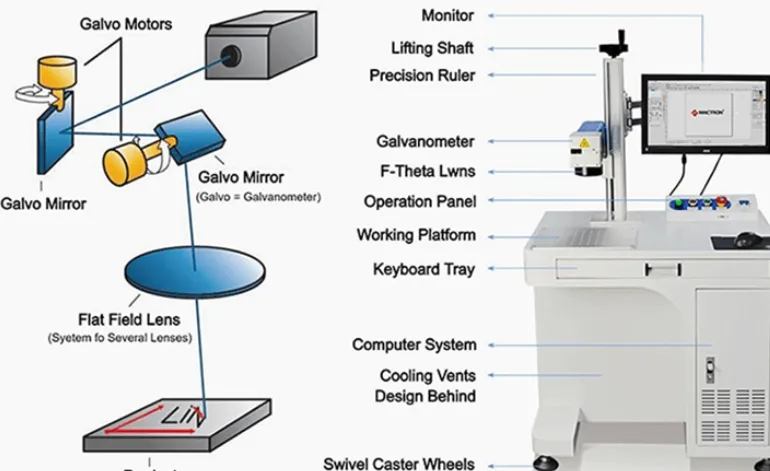
| F-Theta Lens | Marking field and optical requirements |
| Galvo Scanner | Speed and positioning requirements |
| Cabinet | Desktop / enclosed / customized structure |
| Rotary Axis | Chuck, roller or custom fixture |
| Vision | Camera, lighting and software integration |
| Automation | PLC, conveyor, sensor, encoder and fixtures |
| Support | Warranty, training, remote support and spare parts |
What Does JQ Laser Actually Do Before Shipping a 20W Machine?
I don’t think “factory direct” should mean much to a buyer unless the supplier can explain what actually happens inside the factory.
JQ Laser currently states that it was established in 2011, operates a 15,000㎡ manufacturing facility, has a 40–50 person team, approximately 10 engineers, and has delivered more than 5,000 machines. These figures describe the company’s current published manufacturing profile rather than a claim that every machine is completely identical in configuration.
Machine Assembly
Machines are assembled by the manufacturing team rather than simply resold as finished equipment.
Laser Testing
Laser operation and marking performance are checked before delivery.
Application Testing
Customer materials can be tested before final configuration when the application requires it.
Final Inspection
Electrical, laser, software, marking and safety checks are included in the published QC process.
20W Fiber Laser Quality Control: What Should Be Checked?
| QC Stage | What Is Checked | Why It Matters to the Buyer |
|---|---|---|
| Incoming Inspection | Incoming components and materials | Reduces the chance of poor components entering assembly |
| Assembly | Machine structure and electrical assembly | Mechanical stability affects marking consistency |
| Laser Test | Laser operation and output | Confirms the marking system operates as expected |
| Software Test | Marking files and control functions | Prevents avoidable setup problems after delivery |
| Marking Verification | Marking accuracy and result | Directly relates to product quality |
| Safety Check | Safety and applicable compliance checks | Important before installing the machine in a real workshop |
| Final Traceability | Final inspection records | Provides a clearer production record |
Need OEM or ODM 20W Fiber Laser Machines?
OEM makes sense when you already have your own brand, packaging or machine specification. ODM makes more sense when you want the machine configuration itself adapted around your application.
OEM
- Your brand name and logo
- Specified machine configuration
- Private-label packaging
- Product documentation
- Selected appearance customization
ODM
- Application-specific laser configuration
- Customized marking area
- Rotary / positioning systems
- Vision integration
- Production-line automation
JQ Laser does not publish one universal OEM MOQ because the required quantity depends on the degree of customization, machine configuration, packaging requirements and production arrangement. The applicable MOQ should therefore be confirmed for the specific OEM/ODM project rather than advertised as a single number for every customer.
20W Fiber Laser Production Lead Time
JQ Laser currently publishes a typical production time of 5–7 working days for 20W fiber laser machines. This is a production estimate after configuration and order confirmation, not a guaranteed arrival date.
Confirm configuration
Machine production
Application testing
Final inspection
Export packing
International shipment
Customized automation, special structures and unusual components may require a separately confirmed lead time.
Spare Parts and After-Sales Support
For an overseas buyer, after-sales support is part of the machine purchase. If a marking problem happens six months later, the useful question is not simply “Does the supplier have a warranty?” The useful question is: Can the supplier help me identify the problem?
Remote Diagnosis
Photos, videos, software screenshots, parameters and marking samples can be used to help identify the problem.
Parameter Support
Starting-point parameters can be discussed according to material and required marking effect.
Spare Parts
Replacement components can be identified according to the machine configuration.
Installation & Training
Installation, operation, software and parameter guidance are available according to the project.
JQ Laser currently publishes a 2-year machine warranty under applicable warranty terms, lifetime maintenance support, remote technical support, installation/training support and spare-parts assistance. Exact warranty coverage and replacement conditions should be confirmed in the quotation and order documents.
What Should You Ask Before Buying a 20W Fiber Laser?
| Question | Why You Should Ask |
|---|---|
| What is the exact laser source brand and model? | “20W fiber” alone does not describe the complete source configuration. |
| What marking field is included? | Lens selection affects the usable marking area and optical setup. |
| Can you test my actual stainless steel? | The actual surface finish matters. |
| Can you measure cycle time? | Maximum scanner speed is not production throughput. |
| Can the code be read by my scanner? | Visual appearance alone does not prove machine readability. |
| What is included in the warranty? | Warranty conditions vary by component and project. |
| What spare parts are recommended? | Useful for reducing downtime in overseas installations. |
| What is the actual production lead time? | Production time and international delivery time are different. |
Send These Details for a 20W Stainless-Steel Laser Quote
Instead of sending only “20W fiber laser price,” send the information below. It allows the supplier to quote the machine you actually need.
- Stainless grade: 304, 316L, 430, unknown, etc.
- Surface finish: polished, brushed, sandblasted, coated, raw.
- Part dimensions: length × width × height or diameter.
- Marking position: show the exact location.
- Marking content: text, logo, serial, QR, Data Matrix or barcode.
- Marking size: actual width and height.
- Mark appearance: black, light, engraved or cosmetic.
- Required depth: if engraving is required.
- Production quantity: pieces per day / month.
- Required cycle time: seconds per part if known.
- Part loading: manual, fixture, conveyor, robot, etc.
- Part geometry: flat, curved, cylindrical or irregular.
- Rotary requirement: yes / no / not sure.
- Vision requirement: positioning / inspection / both.
- Power supply: destination voltage and frequency.
- Destination country: required for export configuration and shipping.
- Sample quantity: preferably several actual production pieces.
Let Us Test Your Stainless Steel Before You Buy
Send us your stainless-steel part, marking artwork and production requirement. We can start with the 20W configuration and determine whether it is enough, or whether 30W, 50W or MOPA would make more sense.
Sample testing is more useful than guessing from a wattage chart.
FAQ: 20W Fiber Laser Marking Stainless Steel
Is 20W enough to mark 304 stainless steel?
For many identification applications, yes. A 20W pulsed fiber laser can be a suitable starting configuration for serial numbers, QR codes, logos and other permanent marks on 304 stainless steel. The actual result should be verified on the customer’s production surface.
Can a 20W fiber laser mark 316L stainless steel?
Yes, 20W fiber is a reasonable starting point for many 316L identification applications. However, medical and other quality-critical applications should be tested on the actual material, finish and required code size before production.
Can a 20W fiber laser make black marks on stainless steel?
Yes. A 20W fiber source can produce black annealed marks on suitable stainless steel when the process parameters are correctly controlled. The result depends on the alloy, surface condition, focus and laser parameters.
Can a 20W fiber laser engrave stainless steel deeply?
It can remove material from stainless steel, but deep engraving can become slow because multiple passes may be required. If the required depth or production volume is high, 30W or 50W should be tested for comparison.
What is the difference between annealing and engraving?
Annealing creates contrast mainly through a controlled thermal change without intentionally removing significant material. Engraving removes material and creates physical depth. The correct method depends on the required appearance, durability and application.
Should I buy 20W or 30W for stainless steel?
Start with 20W if the application is mainly identification marking and the cycle time is acceptable. Consider 30W when you need more processing headroom, higher production capacity or faster processing. A sample test is the best way to compare the two configurations.
When should I choose MOPA instead of standard fiber?
MOPA becomes more interesting when you need additional pulse control, specialized stainless-steel surface effects or applications that require a wider process window. For ordinary serial numbers, logos and QR codes, standard fiber may already be sufficient.
What is the typical price of a 20W fiber laser marking machine?
JQ Laser currently publishes a public reference range of approximately USD 900–1,600 for standard 20W configurations. The final quotation depends on the laser source, marking field, cabinet, rotary axis, automation, accessories and shipping terms.
How long does a JQ Laser 20W machine take to produce?
JQ Laser currently publishes a typical production time of 5–7 working days for a 20W fiber laser after the order and configuration are confirmed. Customized automation or special configurations may require additional time.
Does JQ Laser offer OEM for 20W fiber laser machines?
Yes. JQ Laser currently offers OEM and ODM support covering branding, machine configuration, appearance, packaging, documentation, marking area, rotary systems and automation. The applicable MOQ depends on the specific customization project.
Related JQ Laser Resources
Technical Basis and Information Traceability
JQ Laser 20W product data: The published JQ Laser 20W fiber laser page provides the reference values used here, including 20W power, 1064nm wavelength, approximately 7,000mm/s maximum reference speed, 110×110mm standard marking field, air cooling and 110V/220V options.
Stainless-steel process reference: Trotec’s published technical tutorial provides a 20W fiber-laser example for stainless-steel polishing and annealing. The tutorial specifically notes that annealing is a thermal process and gives example parameters for a 20W source. Those parameters are treated here only as technical reference values, not as JQ Laser production settings.
Industrial stainless-steel reference: KEYENCE’s technical material distinguishes annealing, light etching and engraving on stainless steel and explains that process selection depends on the required surface condition, contrast and application.
JQ Laser factory information: Current company information states that JQ Laser was established in 2011, operates a 15,000㎡ facility, has a 40–50 person team, approximately 10 engineers and has delivered more than 5,000 machines. The company also publishes its incoming inspection, laser testing, marking verification, safety checking and final traceability process.
Limit of this page: No universal parameter can guarantee the same result on every stainless-steel alloy or surface. The actual workpiece, surface finish, marking content and required appearance should be tested before final production configuration.
Don’t Guess Whether 20W Is Enough
Send us your stainless-steel parts and marking requirements. We can test the actual material and determine whether 20W is enough, or whether 30W, 50W or MOPA is a better production configuration.
Request a Stainless-Steel Sample Test