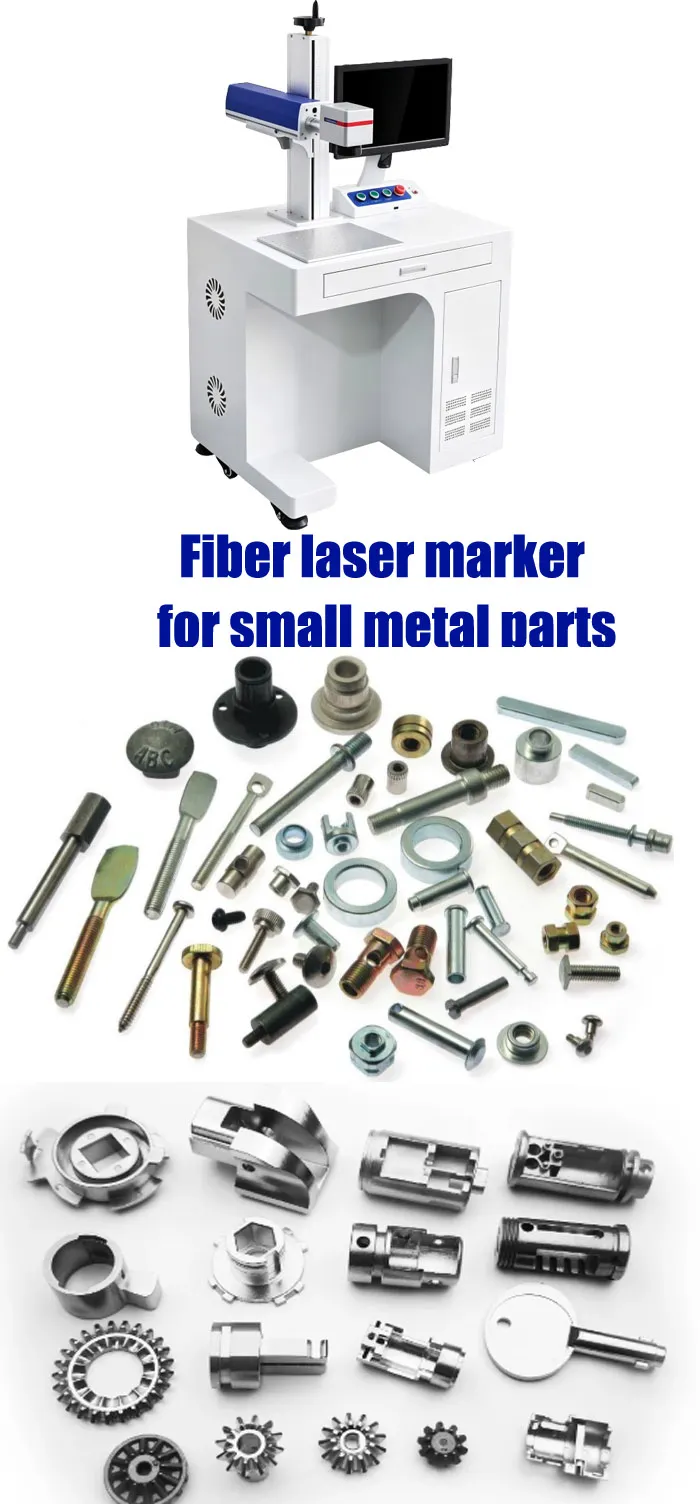
For small metal parts, I would not choose a fiber laser marker by wattage alone. Start with the actual part, marking size, material, required contrast, cycle time and production volume. For serial numbers, QR codes, logos and basic traceability, a 20W system can often be enough. If you mark hundreds or thousands of parts every day, 30W gives you more processing headroom. If you need deeper engraving or shorter cycle times, 50W becomes more relevant. Then decide whether you really need a rotary axis, vision camera, enclosure or automation. The safest buying method is simple: test your real parts first, measure the result, then compare complete machine configurations—not just the laser power.

LEO has more than 10 years of experience in laser marking applications and works with manufacturers on metal part marking, traceability, production automation and application testing. His work focuses on matching laser configurations to real materials, part geometry and production requirements rather than simply recommending higher-power machines.
Table of Contents
The Short Answer: Which Fiber Laser Marker Should You Choose?
When customers send me a small metal part and ask, “Which laser should I buy?”, I normally ask five questions first: What material is it? What exactly needs to be marked? How big is the marking area? How many pieces do you produce per day? And how fast does one part need to be completed?
| Configuration | Typical Small-Part Use | Main Reason to Choose It | When I Would Not Choose It |
|---|---|---|---|
| 20W Fiber | Serial numbers, QR codes, logos, small hardware, nameplates | Lower investment and sufficient for many surface-marking jobs | Very high production volume or substantial deep engraving |
| 30W Fiber | Daily industrial production, hardware, electronics, mechanical parts | More processing headroom without moving immediately to 50W | You only mark a few parts occasionally and have no need for additional capacity |
| 50W Fiber | Deep engraving, tools, molds, heavier metal parts, high-volume production | Higher material-removal capability and more production capacity | Simple logos and serial numbers where 20W already meets the required cycle time |
| MOPA Fiber | Fine marking, stainless-steel color effects, difficult materials | More control over pulse characteristics and marking appearance | You only need basic black/white identification marks and do not need the additional process flexibility |
Why Small Metal Parts Are Actually More Difficult to Mark?
Small parts look easy because the marking area is small. In production, it is often the opposite. A 20 mm bearing, connector, screw, medical component or machined aluminum part may require a 2D code, serial number or very small logo inside a limited area. If the fixture moves by only a small amount, the mark can shift. If the code is too small, the reader may struggle. If the surface finish changes between batches, the same laser parameters may no longer produce the same contrast.
The machine therefore needs to be selected around the part and production process, not around the advertised wattage.
Small Marking Area
Small parts often require smaller characters, codes and logos. Lens selection becomes important.
Fixture Repeatability
A good laser cannot compensate for a poorly designed fixture that places each part differently.
Cycle Time
The laser’s maximum scanner speed is not the same thing as the actual production time per part.
Readability
A mark that looks good to the human eye still needs to be checked by the customer’s actual scanner or verifier.
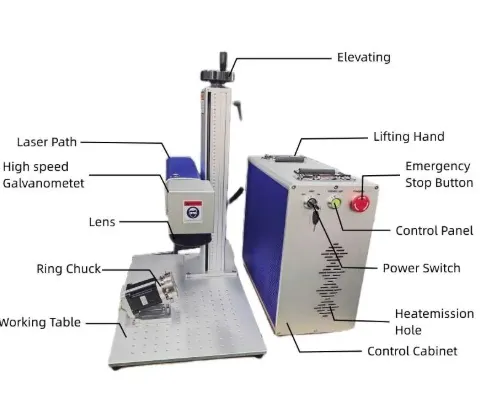
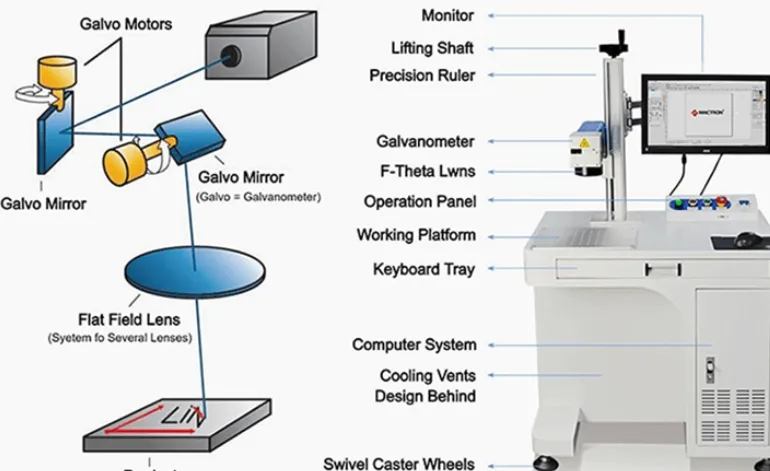
JQ Laser Fiber Marker: Real Reference Parameters
The following are published reference configurations from JQ Laser. They are not a promise that every machine will use exactly the same source, lens or scanner. The final configuration should be confirmed on the quotation and, ideally, validated by a sample test.
| Parameter | JQ Laser Reference | What It Means for Small Parts |
|---|---|---|
| Laser Type | Pulsed Fiber Laser | Standard choice for many metal marking applications |
| Power Options | 20W / 30W / 50W / 60W / 100W | Allows selection according to cycle time and depth |
| Wavelength | 1064nm typical | Common fiber-laser wavelength for metal processing |
| Reference Marking Speed | Up to approximately 7,000mm/s | Maximum scanning reference; actual cycle time must be tested |
| Standard Marking Field | 110 × 110mm | Useful for many small components and fixtures |
| Optional Fields | 150 / 175 / 200 / 300mm and other configurations | Larger field can cover larger parts but changes optical resolution and configuration |
| Cooling | Air cooling is common | Simple configuration for many workshop installations |
| Control | BJJCZ / JCZ-compatible | Common industrial marking-control architecture |
| Software | EZCAD2 commonly used | Suitable for text, logos, barcodes and 2D codes |
| Power Supply | 110V / 220V, 50/60Hz depending on destination | Must be confirmed for the destination country before shipment |
Start With the Actual Small Metal Part — Not a Generic Sample
This is one of the most important points I tell buyers. A supplier can show you a beautiful stainless-steel sample, but that does not prove the same parameters will work on your anodized aluminum connector, brass fitting or hardened steel component. Different alloys, surface finishes, coatings and geometries can behave differently.
| Small Part | Typical Material | Typical Mark | What Should Be Tested? |
|---|---|---|---|
| Electronic connector | Stainless steel / aluminum | Data Matrix / serial number | Code size, contrast, position accuracy and cycle time |
| CNC-machined component | Carbon steel / stainless steel | Part number / logo / serial number | Surface finish, marking depth and readability |
| Bearing | Bearing steel | Brand / model / batch code | Curvature, fixture repeatability and mark durability |
| Brass fitting | Brass / copper | Logo / specification / serial | Contrast, heat effect and processing speed |
| Small tool | Tool steel / stainless steel | Logo / size / identification code | Depth and wear resistance requirement |
| Anodized aluminum housing | Anodized aluminum | White/black logo, serial number | Coating removal, contrast and edge quality |
20W vs 30W vs 50W: How I Would Choose for Small Metal Parts
Higher wattage does not automatically mean a better mark. It mainly gives you more available processing capacity. The correct question is whether that extra capacity solves a real production problem.
| Requirement | 20W | 30W | 50W |
|---|---|---|---|
| Serial numbers | Very suitable | Suitable | Suitable |
| QR / Data Matrix | Suitable | Suitable | Suitable |
| Small logos | Suitable | Suitable | Suitable |
| Daily batch production | Good for lower volume | More production headroom | Higher processing capacity |
| Deep engraving | Limited / slower | Moderate | More suitable |
| Lowest equipment investment | Best fit | Medium | Higher |
The Part Fixture Can Matter More Than Another 10W of Laser Power
This is something that is easy to overlook when buying a laser. If your part is only 15–30mm wide and you need to mark 500 pieces, manually placing every piece in exactly the same position can become the real bottleneck.
1. Single-Part Fixture
Suitable for prototypes, repair work and low-volume production.
2. Multi-Part Fixture
Several identical parts are loaded together. Useful for batch marking.
3. Quick-Change Fixture
Useful when several product models are marked on the same machine.
4. Custom Automation Fixture
Used when the part needs controlled feeding, orientation or inspection.
Small Parts + Laser Marking = A Practical Traceability System
For many manufacturers, the purpose of buying the laser is not decoration. It is identification. A permanent serial number, QR code, Data Matrix or part number can connect the physical component with production records, inspection information, batch data or warranty information.
Part enters workstation
Part is positioned
Laser marks unique ID
Code is scanned
Data is stored
Part can be traced later
Laser marking itself does not create a complete traceability system. The marking machine, code-generation method, scanner, database and production software need to work together when full digital traceability is required.
What Should a Real Sample Test Include?
“We tested your material” is not enough information for a production purchase. Ask the supplier to document what was tested and how.
| Test Item | What to Record | Why It Matters |
|---|---|---|
| Material | Actual alloy / coating / surface finish | Different materials can require different parameters |
| Mark content | Logo / text / QR / Data Matrix / serial | Complex artwork changes cycle time |
| Mark size | Actual width × height | Confirms whether the required optical setup is suitable |
| Contrast | Visual and, where required, measured verification | Important for scanners and quality inspection |
| Readability | Actual customer scanner / verifier | A human-readable code is not necessarily machine-readable |
| Cycle time | Seconds per part | Directly affects production capacity |
| Repeatability | Position and mark consistency across multiple samples | One perfect sample is not enough for production |
Buyer Decision Matrix for Small Metal Parts
| Your Situation | Starting Configuration to Test | Possible Upgrade | Main Thing to Validate |
|---|---|---|---|
| Low-volume small parts | 20W + standard fixture | Multi-part fixture | Mark quality and operator convenience |
| Daily industrial production | 30W + fixture | Vision / automation | Cycle time |
| Deep engraving | 50W | Higher power / multiple-pass process | Required depth and time |
| Round parts | Fiber + rotary fixture | Automatic rotary loading | Part diameter and marking position |
| Variable part position | Fiber + vision | Vision + automatic inspection | Position tolerance |
| High-volume line | 30W / 50W + automation | PLC / encoder / vision / MES | Complete cycle time |
What Actually Changes the Price of a Small-Parts Fiber Laser Marker?
When you receive three quotations, don’t compare only the final number. Compare what is included.
| Quotation Factor | What Changes | Why It Affects Price |
|---|---|---|
| Laser source | Brand, model, power and source type | Different source configurations have different costs and process characteristics |
| Power | 20W / 30W / 50W / higher | Higher output generally increases equipment cost |
| Lens / field | 70 / 110 / 175 / 200 / 300mm etc. | Different optical configurations are required |
| Machine cabinet | Desktop / enclosed / customized | Structure, safety and integration requirements change |
| Rotary axis | Chuck / roller / custom fixture | Adds motorized mechanical hardware |
| Vision | Camera / lighting / software / inspection | Adds hardware and integration work |
| Automation | Fixture / conveyor / PLC / sensor / encoder | Engineering and commissioning become part of the system |
| After-sales support | Training / remote support / spare parts / warranty | Support level affects the total ownership risk |
What Information Should You Send for a Fiber Laser Marker Quote?
If you send only “Please quote me a 30W fiber laser,” the supplier has to guess. That usually creates multiple rounds of questions and makes quotation comparison difficult.
- Material: stainless steel, aluminum, brass, copper, titanium, carbon steel, etc.
- Part photo: preferably several angles.
- Part dimensions: length × width × height or diameter.
- Marking position: show exactly where the mark should be placed.
- Marking content: logo, text, QR code, Data Matrix, barcode or serial number.
- Marking size: actual required width and height.
- Required depth: surface mark or measurable engraving depth.
- Required contrast: black, white, bright, color or simply readable.
- Production volume: parts per day / week / month.
- Target cycle time: seconds per part if known.
- Part loading: manual, fixture, conveyor, robot or other method.
- Part geometry: flat, cylindrical, curved or irregular.
- Need for rotary: yes / no / not sure.
- Need for vision: positioning, inspection or both.
- Power supply: destination voltage and frequency.
- Workshop requirement: desktop, enclosed, portable or production-line installation.
- Destination country: needed for shipping and electrical configuration.
- Sample requirement: whether you want the supplier to test your actual parts before purchase.
Not Sure Whether You Need 20W, 30W or 50W?
Send us your actual small metal parts, marking artwork and required production quantity. We can test the material and discuss the laser power, lens, fixture, rotary axis, vision and automation based on the real application.
FAQ: Fiber Laser Marking Small Metal Parts
Is 20W enough for small metal parts?
For many small metal parts, yes. If the job is mainly serial numbers, QR codes, Data Matrix, logos and surface identification, a 20W fiber laser can be sufficient. If production volume or engraving depth is higher, test 30W or 50W instead.
Is 30W better than 20W for small parts?
Not automatically. 30W provides more processing capacity, which can be useful when the machine runs every day or when cycle time matters. If 20W already meets your required result and cycle time, buying 30W may not provide enough practical benefit to justify the extra cost.
When should I choose a 50W fiber laser?
Consider 50W when you need deeper engraving, faster material removal or higher production capacity. It is not necessary simply because the workpiece is small.
Do I need a rotary axis for small parts?
Only when the geometry requires controlled rotation. Flat parts normally use a fixed fixture. Rings, tubes, cylinders and some curved components may benefit from a rotary chuck or roller.
Do I need a vision camera?
Not necessarily. A stable fixture may be enough for a consistent product. Vision becomes more valuable when part position varies, multiple models share one station, or automatic positioning and inspection are required.
Is 7,000mm/s the actual production speed?
No. It is a reference maximum scanning speed for the published configuration. Actual cycle time depends on the marking content, material, lens, hatch settings, laser parameters, number of passes, fixture and automation.
What marking field should I choose?
Choose the smallest practical field that covers your actual marking requirement and workpiece. A 110 × 110mm field is a common JQ Laser reference configuration for small and medium parts. Larger fields are available when the application requires them.
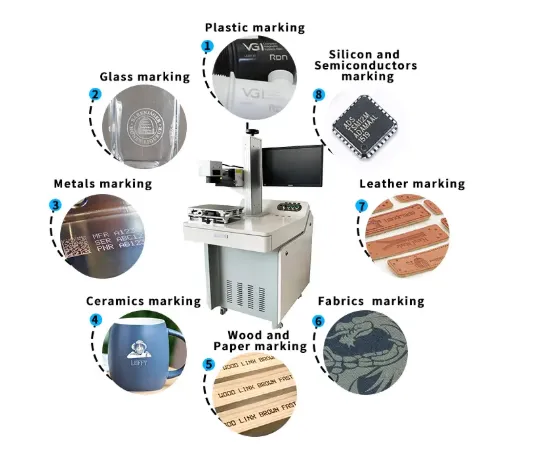
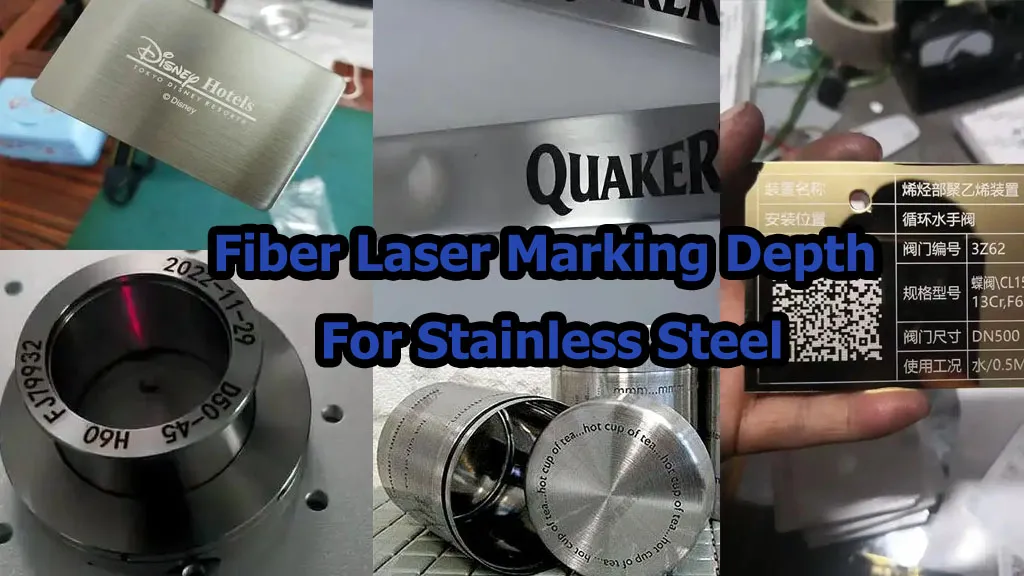
Can one fiber laser mark stainless steel, aluminum and brass?
Fiber lasers are commonly used for these metals, but the marking result and parameters can differ by alloy, surface finish, coating and required appearance. For mixed-material production, sample testing is the safer way to confirm the process.
Should I buy the highest-power fiber laser I can afford?
I would not. The machine should be sized according to material, marking result, cycle time, production volume and future requirements. Extra power that does not solve a real production problem simply increases the purchase cost.
What is the safest way to compare laser marking suppliers?
Ask every supplier to quote the same configuration: laser source and model, power, marking field, scanner, control card, software, cabinet, rotary device, vision, automation, warranty, shipping terms and sample result. This makes the quotations much easier to compare.
Related Fiber Laser Marking Resources
Technical Basis & Information Traceability
JQ Laser product data: The published JQ Laser 20W, 30W and general fiber laser pages were used for the machine parameters, power options, 1064nm wavelength, reference marking speed, marking fields, air cooling, control/software configuration and public price references.
JQ Laser automation data: JQ Laser’s automatic and rotary marking pages were used for the reference configurations involving rotary fixtures, PLC/I/O, sensors, encoders, vision and the distinction between maximum scanning speed and actual production throughput.
Industry technical reference: Technical guidance from industrial laser-marking manufacturers such as KEYENCE was used to support the discussion of material selection, traceability, parameter control, camera alignment, inspection and production integration.
Important limitation: The parameters shown on this page are reference configurations. They should not be treated as a guaranteed result for every metal alloy or every small part. Final power, lens, scanner, fixture and marking parameters should be confirmed through application testing.
Have a Small Metal Part You Need to Mark?
Don’t guess the wattage from a product catalog. Send the actual part, material, marking artwork and required production quantity. We can work backward from the result you need and determine whether 20W, 30W, 50W, MOPA, rotary, vision or automation is actually necessary.
Request a Fiber Laser Marking Solution