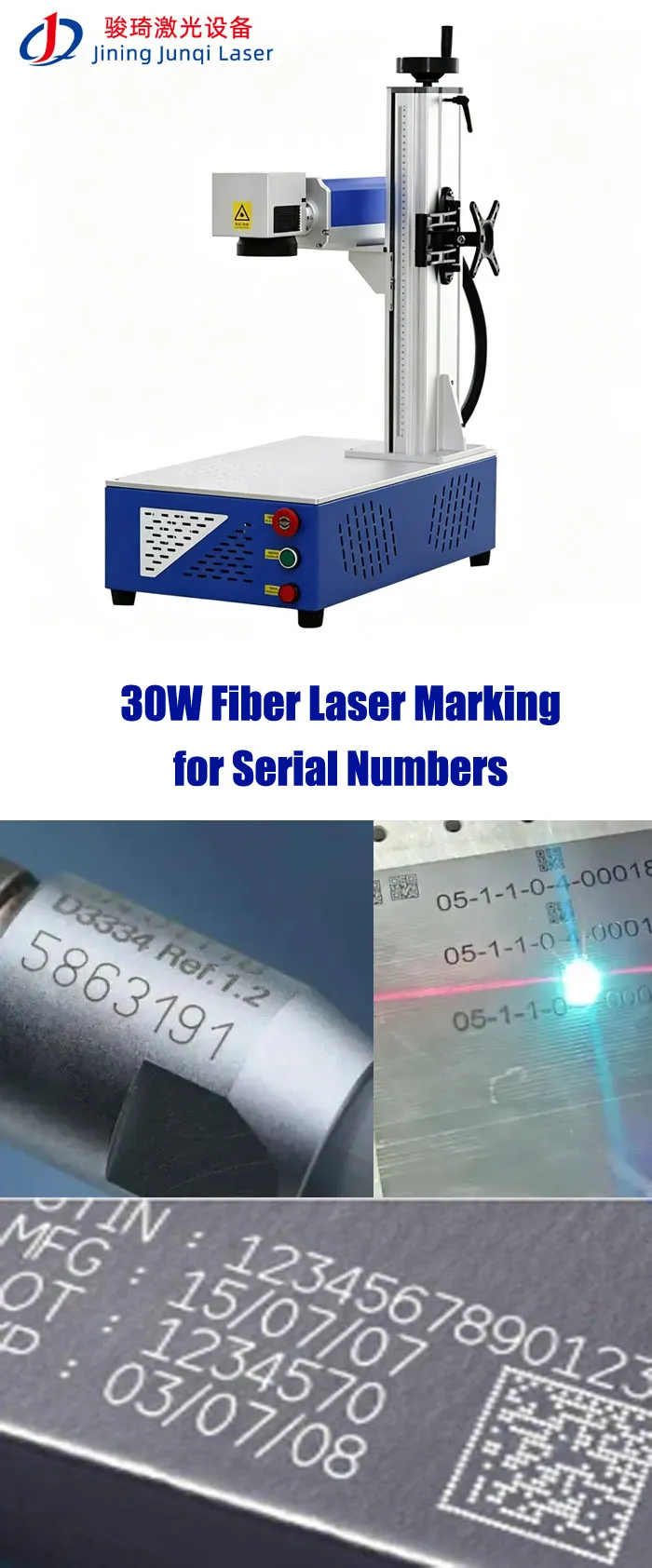
30W Fiber Laser Marking for Serial Numbers
A 30W fiber laser is a practical choice when serial-number marking has to be permanent, readable, repeatable and fast enough for regular production. It is commonly used for serial numbers, QR codes, Data Matrix codes, part numbers and logos on stainless steel, aluminum, brass and other suitable metals. The important point is that 30W does not automatically mean 7,000 mm/s production speed. Actual cycle time depends on the code, material, marking parameters, lens, fixture and loading process. For most customers, I would start with the actual serial-number artwork and production part, test the mark, measure the cycle time and then decide whether standard 30W, rotary, vision or automation is really necessary.

LEO has more than 10 years of experience in laser marking applications, working with customers on metal marking, traceability, application testing and automated marking projects. His approach is practical: start with the actual workpiece and marking requirement, test the process where necessary, and then recommend the machine configuration.
Table of Contents
Is 30W a Good Power for Serial Number Marking?
In many industrial applications, yes. I normally consider 30W a useful middle ground when a customer has moved beyond occasional marking and needs a machine that can run regularly in production.
The reason is not simply “30W is faster than 20W.” The real advantage is having more available processing capacity when the marking job becomes more demanding.
If your serial number is simple and your production volume is low, 20W may already be enough. If the machine will mark parts every day and you want more production headroom, 30W is worth testing. If the job requires deep engraving or very high material-removal rates, I would compare 30W with 50W instead of assuming 30W will solve everything.
When Does 30W Make Sense?
| Requirement | 20W | 30W | 50W |
|---|---|---|---|
| Basic serial numbers | Suitable | Suitable | Suitable |
| QR / Data Matrix | Suitable | Suitable | Suitable |
| Daily production | Depends on cycle time | Strong general-purpose option | Higher capacity |
| Deep engraving | Slower | More suitable | Stronger option |
| High-volume serial marking | Test cycle time | Good starting point | Compare against 30W |
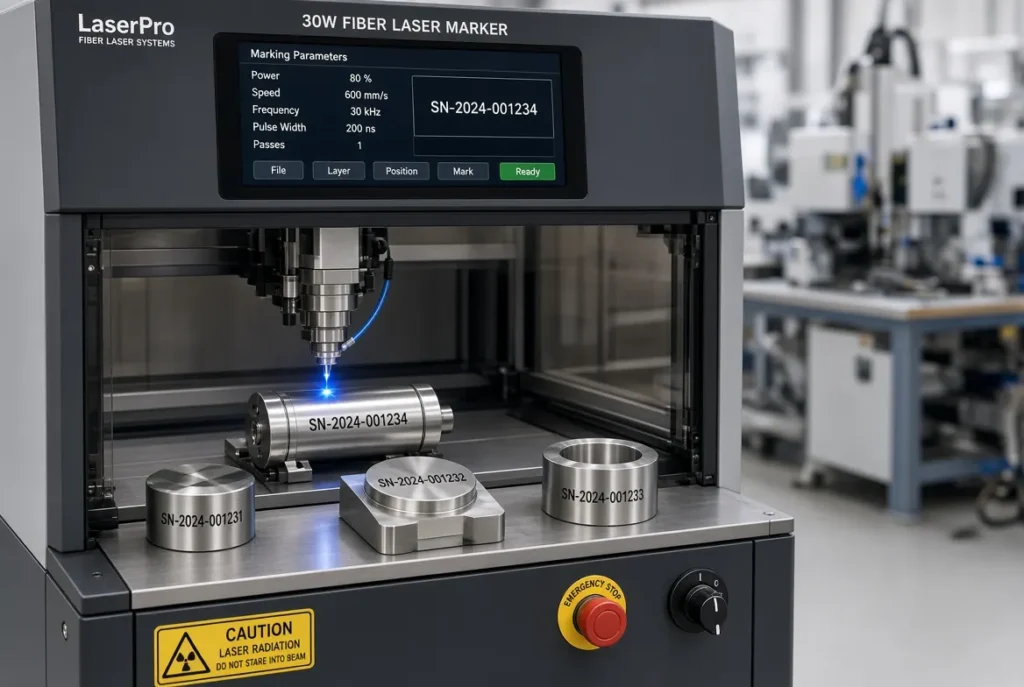
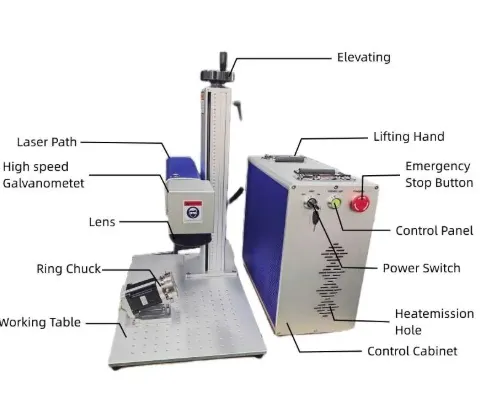
JQ Laser 30W Fiber Laser Marking Machine: Technical Parameters
These are the current published reference specifications for JQ Laser’s 30W fiber marking configuration. The final machine should always be confirmed against the commercial quotation because the laser source, galvo scanner, lens, marking field, enclosure and accessories can change by project.
| Parameter | Published 30W Reference | Production Meaning |
|---|---|---|
| Laser Type | Pulsed Fiber Laser | Standard architecture for many metal marking jobs |
| Laser Power | 30W | More processing headroom than a 20W configuration |
| Wavelength | 1064nm | Common wavelength for metal marking |
| Maximum Reference Speed | Up to approximately 7,000mm/s | Scanner reference, not actual cycle time |
| Standard Marking Field | 110 × 110mm | Suitable for many small and medium parts |
| Optional Fields | 150 × 150 / 175 × 175 / 200 × 200 / 300 × 300mm | Selected according to part size and marking requirement |
| Cooling | Air Cooling | Common configuration for this power range |
| Control | BJJCZ / JCZ-compatible | Industrial laser control architecture |
| Software | EZCAD2 commonly used | Text, serial numbers, barcodes, QR and graphics |
| Power Supply | 110V / 220V, 50/60Hz depending on destination | Confirm before production |
Source: JQ Laser’s published 30W Fiber Laser Marking Machine and general fiber laser specifications. Final configuration should be confirmed on the quotation. :contentReference[oaicite:1]{index=1}
How to Set Up Serial Number Marking
Serial-number marking sounds simple until you start production. The important question is not only “Can the software print numbers?” but whether the numbering sequence matches your production system.
Define the Format
Example: JQ202600001, JQ202600002, JQ202600003.
Set Start Value
Define the first number in the production sequence.
Set Increment
Decide whether the sequence increases by 1, another increment or follows a production rule.
Test the Sequence
Confirm that restarting or changing files does not produce unintended duplicate numbers.
JQ’s published marking-system information supports serial-number functions including start value, end value, step, repetition and reset functions. For applications where serial numbers are linked to an external MES/ERP/database, the integration method should be specified separately rather than assuming a standard EZCAD setup already provides full database traceability.
How Fast Can a 30W Fiber Laser Mark a Serial Number?
This is where I would be careful with supplier brochures. JQ’s published 30W configuration lists a maximum reference scanning speed of approximately 7,000mm/s. That is useful information, but it does not mean a serial number will always be marked at 7,000mm/s.
Actual cycle time depends on the number of characters, font, character height, line density, hatch spacing, material, laser parameters, required contrast, number of passes and workpiece positioning.
Think about the complete cycle
KEYENCE states that fiber laser systems can mark serial numbers, Data Matrix codes and logos on metal parts in under two seconds in suitable applications. This is a useful industry reference, but it should not be treated as a guaranteed JQ Laser cycle time because artwork, material, configuration and production workflow differ. :contentReference[oaicite:2]{index=2}
What Determines Your Actual Serial-Number Cycle Time?
| Factor | Faster / Easier Situation | Slower / More Demanding Situation |
|---|---|---|
| Serial Number | Short text | Long text + logo + code |
| Font | Simple font | Detailed font / small characters |
| Hatch | Lower required line density | Dense fill / multiple passes |
| Material | Easy-to-process surface | Difficult alloy / special finish |
| Required Contrast | Basic identification | High-contrast controlled mark |
| Number of Passes | Single pass | Multiple passes |
| Loading | Multi-part fixture | Manual positioning every part |
Serial Number Contrast: Black Is Not Always Better
When customers say “I want a high-contrast serial number,” I normally ask one more question: high contrast for whom?
The operator may need to read the number visually. A barcode scanner may need to decode it. A machine-vision system may need to locate it. These are not exactly the same requirement.
Visual Identification
The operator needs to read the serial number quickly without excessive reflection.
Barcode / 2D Code
The code must be readable by the actual scanner or verifier used by the customer.
Machine Vision
Lighting, camera angle, surface reflection and mark contrast can all affect inspection.
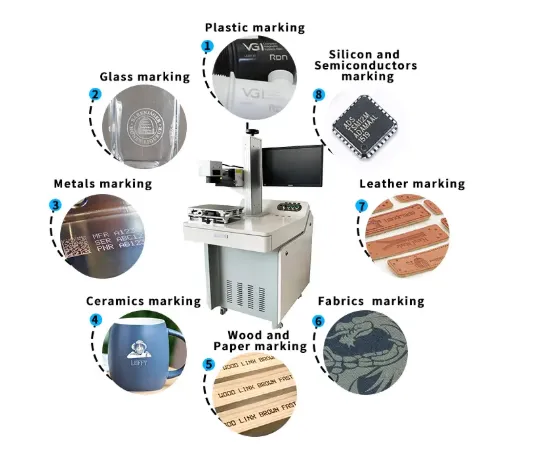
What Can a 30W Fiber Laser Mark?
30W fiber lasers are commonly used for metal marking, but the same parameters should not simply be copied from one metal to another. Surface condition and the required appearance matter.
| Material / Workpiece | Typical Serial Mark | 30W Starting Point | Main Test |
|---|---|---|---|
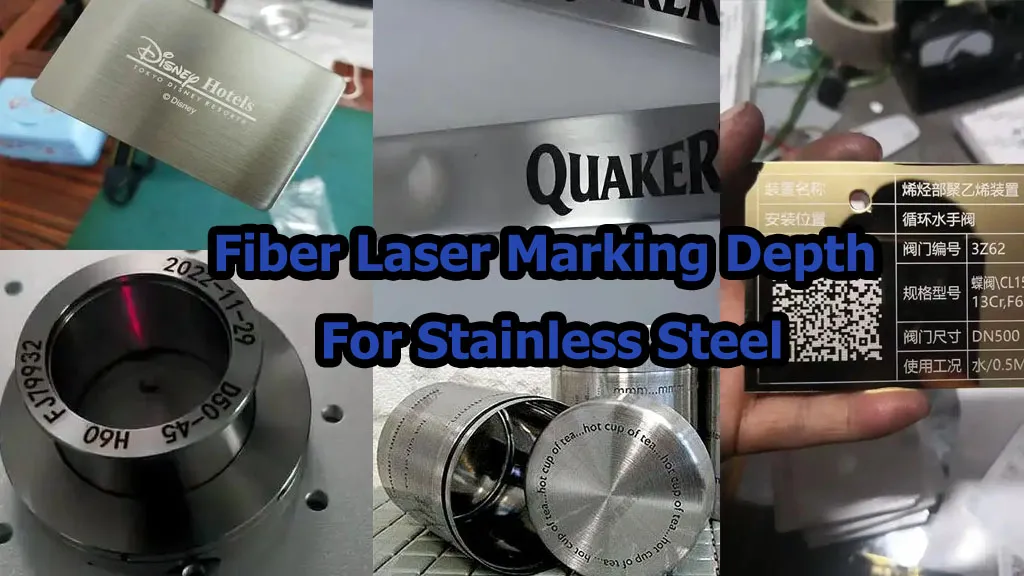
| Stainless Steel | Serial / QR / Data Matrix | Very common application | Contrast, annealing, etching and readability |
| Aluminum | Serial / model / logo | Common application | Coating and surface condition |
| Anodized Aluminum | Serial / logo | Common application | Coating removal and contrast |
| Brass | Part number / logo | Suitable starting point | Contrast and heat response |
| Copper | Identification / code | Application testing recommended | Reflectivity and process window |
| Titanium | Serial / logo / medical ID | Suitable starting point | Surface effect and contrast |
Real Serial-Number Applications for a 30W Fiber Laser
CNC-Machined Parts
Mark part number, serial number, production batch, customer code or Data Matrix directly onto machined metal components.
Typical problem:Every part looks almost identical, so traceability has to come from the permanent code.
Automotive Components
Permanent identification can be used for component tracking, production information and downstream assembly.
Typical problem:Code must survive handling and remain readable during later production steps.
Electronic Hardware
Small metal housings, connectors and components can receive serial numbers, Data Matrix codes or production identification.
Typical problem:Small available marking area.
Tools & Hardware
Mark model numbers, sizes, batch information and logos directly onto metal tools.
Typical problem:The mark may need to remain identifiable after repeated handling.
Medical Components
Stainless-steel instruments and other suitable components can require small permanent identification codes.
Typical problem:Surface appearance, code readability and process validation can become critical.
Industrial Equipment
Serial numbers can link physical components to inspection records, service history and production documentation.
Typical problem:The identification needs to remain attached to the part instead of a removable label.
Why Serial Numbers Matter More Than Just Marking
The real value of a serial number appears after the product leaves the laser. A unique code can become the link between the physical component and information stored in the manufacturer’s production or service system.
Generate ID
Mark Part
Scan Code
Store Data
Track Product
A laser marker creates the physical code. It does not automatically create a complete MES, ERP or traceability system. If your serial number must be linked to production data, database records or automatic inspection, the integration requirements should be specified during machine design.
30W Serial Number Marking Setup: What You Actually Need
| Component | Basic Configuration | When to Upgrade |
|---|---|---|
| Laser | 30W pulsed fiber | MOPA for specialized pulse-control applications |
| Lens | 110 × 110mm typical | Larger field or special optical requirement |
| Fixture | Fixed positioning fixture | Multi-part, quick-change or automated fixture |
| Rotary | Not required for flat parts | Cylindrical or ring-shaped parts |
| Vision | Optional | Variable position or automatic inspection |
| Trigger | Manual / foot switch | Sensor / PLC / encoder |
When Does Serial Number Marking Need Vision?
No Vision
The fixture always puts the part in exactly the same position.
Positioning Vision
The camera identifies the actual part position before the laser marks it.
Inspection Vision
The system checks whether the expected serial number or code was marked correctly.
What Happens Before a 30W Machine Leaves the Factory?
“Factory direct” only matters if there is an actual manufacturing and testing process behind it. JQ Laser states that it assembles machines, performs laser testing before delivery and can perform application testing before recommending the final configuration. :contentReference[oaicite:5]{index=5}
Machine Assembly
Mechanical and electrical components are assembled according to the selected configuration.
Laser Testing
Laser operation and marking performance are checked before delivery.
Application Testing
Actual customer materials can be tested when the project requires application validation.
Final Inspection
Machine functions, marking result and required configuration are checked before shipment.
How Much Does a 30W Fiber Laser for Serial Numbers Cost?
JQ Laser currently publishes a public reference range of approximately USD 1,100–2,000 for a standard 30W configuration. This is a reference range, not a fixed quotation.
Typical public-market reference for a standard 30W configuration. Final pricing depends on source, marking field, enclosure, rotary axis, automation, accessories and shipping terms.
Why Are Some 30W Quotes Much More Expensive?
| Price Factor | What Changes |
|---|---|
| Laser Source | Brand, model and configuration |
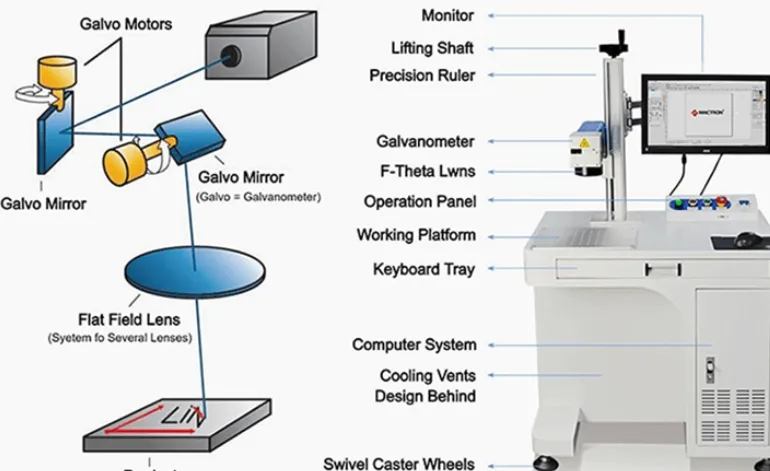
| Galvo Scanner | Scanner specification and positioning performance |
| F-Theta Lens | Marking field and optical configuration |
| Enclosure | Open-frame, desktop or enclosed configuration |
| Rotary | Chuck, roller or customized fixture |
| Vision | Camera, lighting and software |
| Automation | Fixture, conveyor, PLC, sensor and encoder |
| After-Sales | Training, troubleshooting and spare-parts support |
OEM & ODM 30W Fiber Laser Marking Machines
If you are buying one machine for your own factory, standard configuration is usually enough. If you are a distributor or building your own product line, OEM/ODM requirements become more important.
OEM
- Your brand and logo
- Private-label packaging
- Agreed machine configuration
- Product documentation
- Selected appearance customization
ODM
- Application-specific configuration
- Customized marking field
- Rotary and positioning system
- Vision integration
- Production-line automation
JQ Laser does not publish one universal OEM MOQ. The applicable minimum quantity depends on customization level, machine configuration, packaging requirements and production arrangement. For a specific OEM project, confirm MOQ before commercial quotation.
30W Fiber Laser Production Lead Time
JQ Laser currently publishes 5–7 working days as the typical production time for 30W fiber laser machines after order and configuration confirmation. This is production time, not the complete international delivery time. :contentReference[oaicite:6]{index=6}
Configuration
Production
Testing
QC
Packing
Shipment
Spare Parts and After-Sales Support for Overseas Buyers
A machine that marks perfectly on day one is not enough. For an overseas buyer, the supplier also needs to explain what happens when the marking becomes too light, the position changes, the software stops communicating or a component needs replacement.
Parameter Support
Review power, speed, frequency, focus and hatch settings according to the application.
Remote Troubleshooting
Photos, videos, software screenshots and marking samples can help diagnose problems remotely.
Spare Parts
JQ can help identify replacement components according to the actual machine configuration.
Installation & Training
Operator training can cover software, focusing, marking files, parameters and basic maintenance.
JQ Laser currently publishes a 2-year machine warranty under applicable terms, lifetime maintenance support, remote technical guidance and spare-parts support. Overseas on-site service is not presented as standard; remote technical support is the normal international support route, with on-site arrangements discussed separately when required. :contentReference[oaicite:7]{index=7}
30W Fiber Laser Serial Number RFQ Checklist
Don’t send only “30W fiber laser price.” Give the supplier enough information to quote the actual production configuration.
- Material: stainless steel, aluminum, brass, copper, titanium, etc.
- Material grade: for example 304 or 316L if known.
- Surface finish: polished, brushed, anodized, coated or raw.
- Part dimensions: length × width × height or diameter.
- Marking position: provide a drawing or photo.
- Serial number format: fixed text, sequential numbers, letters + numbers, etc.
- Code: serial number, QR, Data Matrix, barcode or combination.
- Character size: actual required character height.
- Marking area: actual width × height.
- Contrast: black, white/light, etched or cosmetic.
- Depth: surface marking or measurable engraving depth.
- Production quantity: parts/day or parts/hour.
- Target cycle time: seconds per part if known.
- Loading: manual, fixture, conveyor or robot.
- Part geometry: flat, cylindrical, curved or irregular.
- Rotary: required / not required / uncertain.
- Vision: positioning / inspection / both.
- Power supply: destination voltage and frequency.
- Destination: country, city and postal code.
- Sample testing: whether actual parts will be supplied for testing.
Send Us Your Serial Number Application
Send the actual part, serial-number artwork, material information and required production quantity. We can test the marking and help determine whether standard 30W is enough or whether you need a rotary axis, vision, automation or another laser configuration.
FAQ: 30W Fiber Laser Serial Number Marking
Is 30W enough for serial number marking?
For many metal identification applications, yes. A 30W pulsed fiber laser is commonly used for serial numbers, QR codes, Data Matrix codes, logos and part numbers. Actual suitability depends on the material, mark size, contrast and required cycle time.
How fast can a 30W fiber laser mark serial numbers?
JQ Laser publishes a maximum reference scanning speed of approximately 7,000mm/s. Actual serial-number cycle time depends on artwork, material, parameters, number of passes, fixture, loading and inspection. The correct way to quote production speed is to test the actual job.
Can a 30W fiber laser mark QR codes and Data Matrix codes?
Yes. 30W fiber systems are commonly used for QR and Data Matrix marking on suitable metal surfaces. For production traceability, the final code should be tested using the customer’s actual scanner or verification system.
Is 30W better than 20W for serial numbers?
Not automatically. 30W provides more processing headroom and can be useful for regular production, faster processing or some deeper marking jobs. If 20W already meets the required result and cycle time, 30W may not provide enough practical benefit to justify the additional cost.
Do I need a rotary axis for serial numbers?
Only when the part is cylindrical, ring-shaped or otherwise requires controlled rotation. Flat parts normally use a fixed fixture.
Do I need vision for serial number marking?
Not necessarily. A well-designed fixture can be enough when part position is fixed. Vision becomes more useful when the position varies, several models use one station, or automatic positioning and inspection are required.
What is the standard marking field for a JQ 30W fiber laser?
110 × 110mm is the standard reference field published for the JQ 30W configuration. Larger fields such as 150 × 150, 175 × 175, 200 × 200 and 300 × 300mm are available depending on the optical configuration.
What is the typical price of a 30W fiber laser?
JQ Laser currently publishes a public reference range of approximately USD 1,100–2,000 for standard 30W configurations. The final price depends on source, lens, cabinet, rotary axis, automation, accessories and shipping terms.
What is the production lead time for a 30W JQ Laser?
JQ Laser currently publishes 5–7 working days as the typical production time for a 30W fiber laser after order and configuration confirmation. Customized systems may require separately confirmed lead time.
Does JQ Laser support OEM and ODM orders?
Yes. OEM and ODM support can include branding, machine configuration, appearance, marking field, rotary systems, positioning systems, packaging, documentation and automation. MOQ depends on the specific project and customization level.
What happens if the marking becomes too light after installation?
Check the material and surface condition, focus, workpiece position, lens cleanliness, power, speed, frequency and hatch settings before replacing components. JQ Laser’s after-sales process uses photos, videos, software screenshots, marking samples and current parameters to help diagnose the cause remotely.
Related JQ Laser Resources
Technical Basis & Information Traceability
JQ Laser 30W specifications: The 30W product page provides the reference configuration used in this article: 30W output power, 1064nm wavelength, approximately 7,000mm/s maximum reference speed, 110×110mm standard marking field, air cooling and 110V/220V options. :contentReference[oaicite:8]{index=8}
Production integration: JQ Laser’s automation pages describe 20W/30W/50W/60W/100W fiber configurations, rotary systems, PLC/I/O, sensors, encoders and optional vision systems. They also explicitly distinguish maximum scanner speed from actual production throughput. :contentReference[oaicite:9]{index=9}
Industry speed reference: KEYENCE states that suitable fiber-laser applications can mark serial numbers, Data Matrix codes and logos on metal parts in under two seconds. This is used only as an external industry reference, not as a guaranteed JQ Laser cycle time. :contentReference[oaicite:10]{index=10}
Application testing: JQ Laser’s published company information states that customers can send actual materials or products for sample testing and that engineers consider material composition, surface condition, marking content, marking size, contrast, depth, production speed and automation requirements. :contentReference[oaicite:11]{index=11}
After-sales: JQ Laser’s current support information covers machine setup, software support, parameter guidance, remote troubleshooting, sample testing and spare-part identification. :contentReference[oaicite:12]{index=12}
Information limitation: No single speed, power or parameter value can guarantee the same result for every material, marking file or production line. Final performance must be confirmed through application testing and the agreed machine configuration.