Practical Fiber Laser Buying Guide
20W vs. 30W Fiber Laser Marking Machines: Which Power Fits Your Work?
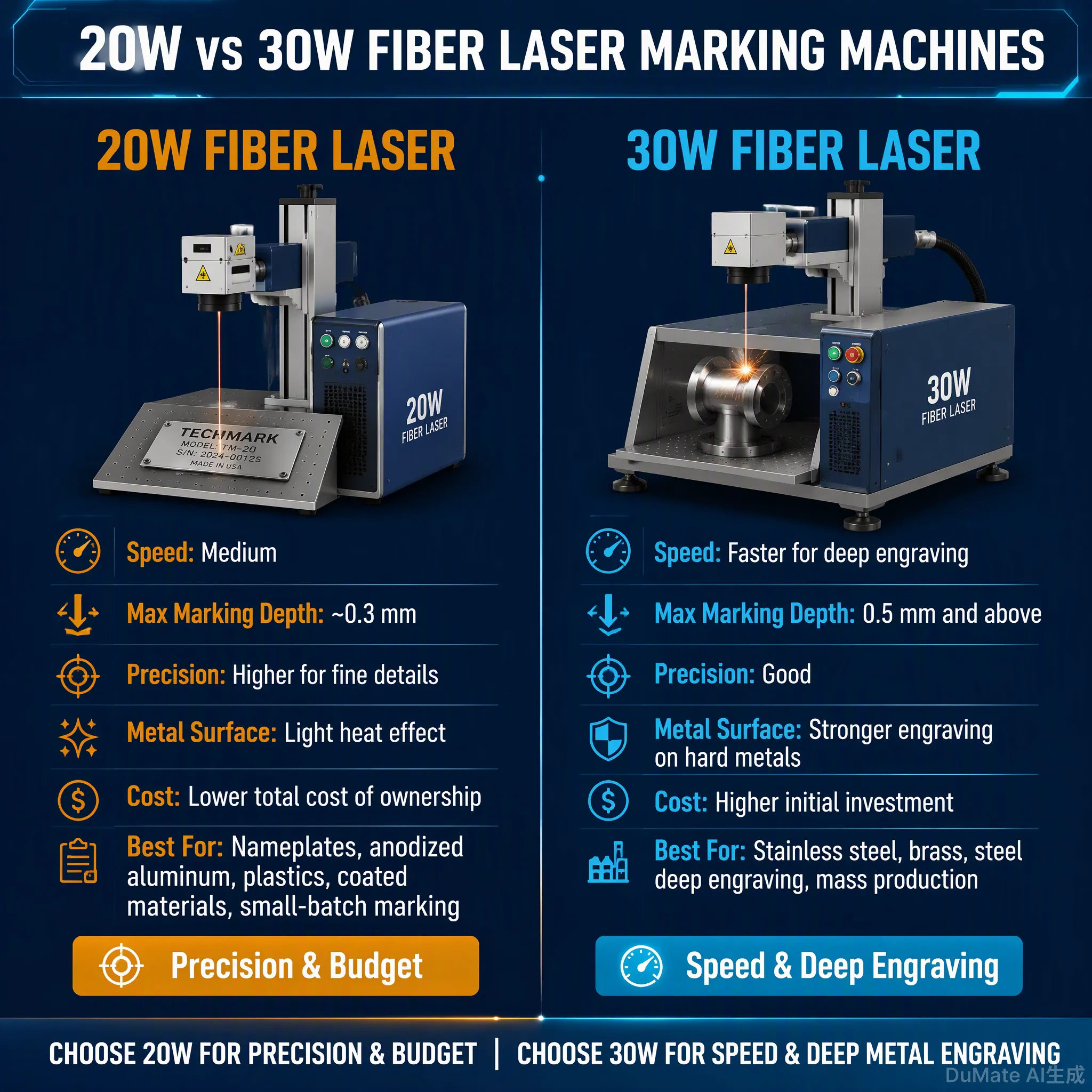
Choose a 20W fiber laser if you mainly mark serial numbers, QR codes, logos and product identification on metal, and your current production speed is acceptable. Choose 30W when you need more processing capacity, run repeated batches throughout the day, or want more flexibility for light engraving and tighter cycle times. A 30W machine has 50% more rated average laser power than a 20W machine, but that does not mean every job will finish 50% faster. Material, marking artwork, pulse settings, hatch spacing, focus and handling time all matter. If you are unsure, test your actual workpiece on both configurations before paying for the upgrade.

I have more than 10 years of experience with laser marking applications, including metal identification, industrial parts and automation projects. When a customer asks me whether to buy 20W or 30W, I start with the actual part, the required mark and the production target—not the wattage alone.
20W vs. 30W: The Quick Answer
For most standard metal identification jobs, both 20W and 30W fiber lasers are capable options. They can mark suitable stainless steel, aluminum, brass, steel parts, nameplates, tools and industrial components. Both can produce text, logos, serial numbers and QR codes when the optical configuration and process settings are appropriate.
The main reason to pay for 30W is additional processing capacity. It may help when the same marking job runs repeatedly, when some material removal is required, or when 20W cannot meet your target cycle time. If you only mark a small number of parts each day, the extra power may not pay for itself.
20W vs. 30W Fiber Laser: Side-by-Side Comparison
| Buying Factor | 20W Fiber Laser | 30W Fiber Laser |
|---|---|---|
| Rated average power | 20W | 30W |
| Typical wavelength | 1064nm | 1064nm |
| Standard marking field | 110 × 110mm reference | 110 × 110mm reference |
| Typical cooling | Air cooling | Air cooling |
| Standard surface marking | Suitable for many jobs | Suitable for many jobs |
| Deep engraving | More limited for demanding jobs | More processing capacity, but test depth |
| High-volume production | Works when cycle time is sufficient | Worth considering when capacity is limiting |
| Typical public price reference | USD 900–1,600 | USD 1,100–2,000 |
| Best buying reason | Meet the requirement with lower investment | Gain useful processing headroom |
Price ranges are public-market reference figures for common configurations, not fixed JQ Laser quotations. Final prices depend on laser source, galvo, lens, marking field, accessories, enclosure, automation and shipping terms.
Published JQ Laser Reference Specifications
Use the following figures as a starting point when comparing quotations. The final purchase specification should identify the actual laser source, lens, scanner, controller and software.
| Specification | 20W Reference | 30W Reference |
|---|---|---|
| Laser type | Pulsed fiber laser | Pulsed fiber laser |
| Rated power | 20W | 30W |
| Wavelength | 1064nm | 1064nm |
| Published maximum marking speed | Up to 7,000mm/s | Up to 8,000mm/s on the current product page |
| Standard marking field | 110 × 110mm | 110 × 110mm |
| Other field options | 70 × 70 / 175 × 175 / 200 × 200mm | 70 × 70 / 175 × 175 / 200 × 200mm |
| Cooling | Air cooling | Air cooling |
| Power supply | 110V / 220V options | Confirm destination-specific configuration |
Note: JQ’s published product pages use different maximum speed figures for the 20W and 30W configurations. These are scanner/marking specifications, not a guarantee of parts per hour. Confirm the actual configuration and test result on your quotation.
Does 30W Mark 50% Faster Than 20W?
No—not as a general rule. The 30W source has 50% more rated average power than the 20W source, but production speed does not scale in a simple straight line with wattage.
If the job is a short serial number, both machines may already be fast enough. If the job uses a dense filled logo, many hatch lines, multiple passes or deep engraving, the difference may be more noticeable. The result still depends on the laser source, pulse behavior, frequency, scanner, lens and required mark quality.
What to Measure During a Sample Test
- Actual marking time per part
- Required number of passes
- Contrast and edge quality
- Engraving depth, if applicable
- QR/Data Matrix readability, if applicable
- Part loading and positioning time
- Repeatability across multiple samples
If your 20W machine finishes a part in 2 seconds and the 30W finishes it in 1.7 seconds, the gain may not justify the price difference for a low-volume workshop. If the upgrade saves several seconds on every part in a multi-shift production line, the business case can be very different.
Which Power Fits Your Actual Work?
1. Stainless Steel Serial Numbers and QR Codes
For ordinary serial numbers, logos and QR codes on suitable stainless steel, 20W is often a sensible starting point. A well-selected lens, correct focus and stable fixture can matter more than moving straight to 30W.
Choose 30W if your marking content is dense, the job repeats throughout the day, or the 20W sample cannot meet the target cycle time without sacrificing readability.
2. Aluminum Housings and Nameplates
Both powers can handle many aluminum identification applications. However, bare aluminum, anodized aluminum and coated aluminum do not behave identically. Test the actual surface finish, not just a generic aluminum coupon.
For small nameplates or short text, 20W may be enough. For larger graphics, dense content or higher daily volumes, compare 30W against the same artwork and lens.
3. Brass, Copper and Other Reflective Metals
Fiber lasers can mark suitable brass and copper parts, but reflectivity and surface condition can affect process stability. More power alone does not guarantee the required contrast.
If you are marking electrical connectors, copper components or brass fittings, ask the supplier to test your actual alloy and surface condition. Confirm the appropriate configuration and safety requirements before production.
4. Tools, Hardware and Machined Parts
For hand tools, fixtures, machine components and CNC parts, the decision depends on whether you need surface identification or material removal. 20W is often suitable for standard identification. 30W is worth testing when marking is repeated at high volume or the required engraving is more demanding.
5. Deep Metal Engraving
If you need a visibly recessed mark, a 30W machine provides more available processing capacity than a 20W machine. But neither power guarantees a particular depth or cycle time. Material hardness, hatch spacing, speed, pulse characteristics, focus and number of passes all affect the result.
If deep engraving is the main job and production speed is critical, compare 50W as well rather than assuming 30W is the final step.
Material and Workpiece Test Matrix
| Workpiece | Start by Testing | What to Compare |
|---|---|---|
| Stainless steel nameplate | 20W | Contrast, fine text and cycle time |
| Aluminum housing | 20W vs 30W | Surface treatment and mark consistency |
| QR/Data Matrix on steel | 20W vs 30W | Code readability and repeatability |
| Brass fitting | Test actual alloy | Contrast and surface response |
| Copper electrical component | Test actual component | Reflectivity, stability and marking quality |
| Hardened steel tool | 20W vs 30W; consider 50W if needed | Required depth and processing time |
| Anodized aluminum product | 20W | Coating response and contrast |
These are starting points for evaluation, not guaranteed results. The final power should be selected from actual sample testing.
Before Upgrading to 30W, Check Your Fixture and Workflow
I have seen buyers focus on laser power when the real problem was positioning or part handling. If an operator spends more time loading a component than marking it, a higher-power source may make very little difference to total output.
Before upgrading, check:
- Is the workpiece located in the same position every time?
- Can a fixture hold several parts at once?
- Is the focus height consistent?
- Are serial numbers imported automatically or typed manually?
- Does the operator wait for a separate inspection step?
- Would a rotary axis or conveyor improve the workflow?
If production volume is growing, a 30W machine with a better fixture may be a better investment than a 30W machine with no improvement in workpiece handling.
Automatic laser marking machines | Automation marking solutions
How to Compare 20W and 30W Fairly Before Buying
If you are spending money on production equipment, do not compare two supplier videos filmed on different materials. Use the same test conditions.
- Send the same workpiece: Use the actual production material and surface finish.
- Provide the same artwork: Use your real serial number, logo, QR code or engraving file.
- Set acceptance criteria: Define contrast, depth, dimensions and readability before testing.
- Record the settings: Ask for the laser power, speed, frequency, hatch spacing and number of passes where available.
- Measure the cycle time: Include positioning and handling if production throughput is important.
- Test repeatability: Mark several parts, not just one carefully adjusted sample.
- Save the result: Keep the sample photos, parameters and agreed configuration with the quotation.
Is 30W Worth the Extra Cost?
Compare the additional machine cost with the production benefit—not just the price difference on the quotation.
A simple way to evaluate the upgrade is to measure the time saved per part, the number of parts processed per day, and whether the saved time can actually be used for additional production.
Questions to Ask Your Production Team
- How many parts do we mark per shift?
- What is the current complete cycle time?
- How much of that time is laser processing?
- What is the target cycle time?
- Will faster marking remove the actual bottleneck?
- Does the higher-power machine require different fixtures or safety equipment?
If the 20W machine already meets your output target, keep the budget. If the laser is the production bottleneck and a 30W sample proves a useful cycle-time improvement, the upgrade may be justified.
What to Check About the Manufacturer Before Ordering
The machine specification is only one part of the purchase. You also need to know who assembles the system, who tests your workpiece, and who helps if the marking result changes after installation.
Factory and Technical Capability
- Can the supplier show its assembly and testing process?
- Can engineers test your actual material?
- Can the supplier explain why it recommends 20W or 30W?
- Can it provide the actual laser source and controller model?
- Can it support fixtures, rotary axes or automation if needed?
QC Before Shipment
- Confirm the laser source and power configuration.
- Check the lens and marking field against the order.
- Test controller and software operation.
- Run an agreed marking test.
- Check accessories and final configuration.
- Keep the inspection record and photos.
Jining Junqi Intelligent Technology Co., Ltd. (JQ Laser) publishes information about machine assembly, laser testing, sample testing, OEM/ODM and after-sales support. Buyers should still confirm the specific process and deliverables for their own order.
OEM, MOQ and Lead Time: What Should Buyers Confirm?
For a standard machine, a single-unit order may be possible depending on the configuration. OEM branding, custom packaging, special fixtures and automation can change the minimum order requirements and production schedule. Ask for written confirmation rather than assuming the same MOQ applies to every project.
| Item | What to Confirm |
|---|---|
| OEM / ODM | Logo, appearance, packaging, documentation and customized accessories |
| MOQ | Standard machine vs. customized or private-label order |
| Lead time | Production start date, testing, QC and customization time |
| Spare parts | Availability, ordering process and shipping arrangements |
| After-sales | Software setup, parameter support, troubleshooting and warranty scope |
JQ’s shipping information lists approximately 5–7 working days for common fiber configurations, but the final lead time should be confirmed for the exact order. Customized machines may require additional time.
OEM & ODM service | Shipping & delivery | After-sales support
Spare Parts and Support: Don’t Ignore the After-Sale
Before ordering, ask how the supplier handles replacement components and remote troubleshooting. You do not need to purchase every spare part in advance, but you should know what is available and how to request it.
Confirm support for the components fitted to your machine, including:
- Laser-source service and warranty procedure
- Controller and software support
- Lens and optical replacement parts
- Power supply, cables and switches where applicable
- Rotary or fixture components if included
The exact spare-parts list depends on the configuration. Keep the final component list and machine serial information in your project records.
20W or 30W? Use This Buying Checklist
20W is a sensible starting point if:
- Your main jobs are serial numbers, logos, QR codes and ordinary metal identification.
- Your current or target cycle time is achievable with 20W.
- You have low-to-medium production volume.
- You want to keep the initial equipment cost lower.
30W deserves a closer look if:
- You run repeated marking jobs throughout the day.
- 20W cannot meet the required cycle time in sample tests.
- You need more capacity for light-to-moderate engraving.
- You expect the same machine to handle a wider range of production jobs.
Consider 50W or another laser configuration if:
- You need demanding deep engraving or significant material removal.
- Neither 20W nor 30W meets the required cycle time.
- Your material or desired marking effect calls for a different laser type, such as MOPA or UV.
Frequently Asked Questions
Is 30W always better than 20W?
No. 30W provides more rated average laser power, but it does not automatically create a better mark or reduce every cycle time. If 20W meets your quality and production targets, it may be the better investment.
Can a 20W fiber laser mark stainless steel?
Yes. A 20W fiber laser is commonly used for suitable stainless-steel identification, serial numbers, logos and codes. The final appearance depends on the stainless grade, surface finish, marking parameters and required result.
Can 30W engrave deeper than 20W?
30W provides more processing capacity and may achieve a required engraving result in less time under suitable conditions. Actual depth depends on material, speed, frequency, hatch strategy, focus and number of passes. Test the real part before setting a depth expectation.
Does 30W mark 50% faster because it has 50% more power?
No. Rated average power and production cycle time are different measurements. The speed gain depends on the marking task, optical configuration, parameters and handling time.
Are 20W and 30W machines suitable for QR codes?
Both can mark QR codes on suitable materials and with appropriate settings. If the code must meet a particular readability or verification standard, test it with the intended scanner or verification system.
What is the standard marking area?
JQ’s published 20W and 30W product pages list 110 × 110mm as a standard reference field, with other lens options available. Confirm the exact field and working distance on the quotation.
Can I order one machine first?
A single standard machine may be available depending on the configuration. OEM, special packaging and customized automation can change MOQ, so confirm the quantity requirements before ordering.
Should I test my own parts before buying?
Yes. Send the actual material and artwork, define the required mark quality and cycle time, and compare repeatable samples. This is more reliable than selecting power from a general specification table alone.
Still Unsure Whether You Need 20W or 30W?
Send us your workpiece, material, marking content, target cycle time and production quantity. We can help you compare the appropriate configuration and test the application before you decide whether the extra power is worth the investment.
For a useful quotation, include: material, part dimensions, marking size, required contrast or depth, daily output, destination voltage and any automation requirements.
Request a Quote & Sample TestRelated Laser Marking Resources
Technical Notes and Information Traceability
The product specifications in this guide are based on JQ Laser’s published 20W and 30W fiber laser product pages. Both list 1064nm wavelength, 110 × 110mm standard marking field and air cooling. The published maximum marking-speed figures differ by model page, so buyers should verify the exact configuration and treat maximum speed as a specification—not a guaranteed production cycle time.
The price figures are public-market reference ranges for standard configurations, not binding JQ Laser quotations. Final price, lead time, MOQ, components, warranty and included accessories must be confirmed for the specific order.
Material recommendations are general starting points. Actual performance must be verified on the customer’s alloy, surface finish, marking file and production workflow.