Bottom line: If you are engraving 925 sterling silver jewelry, do not start by copying a laser parameter table from another machine. Silver is highly reflective and conducts heat very well. A setting that gives a clean mark on stainless steel may produce a weak, uneven or overheated result on a polished silver ring.
For consistent silver jewelry production, test the actual alloy, surface finish, laser pulse settings, scan speed, focus, hatch spacing, pass count and workholding method. The right process depends on whether you want a fine logo, a readable serial number, a shallow engraved pattern, a dark-looking mark or a deeper design.
A 20W or 30W MOPA fiber laser is a reasonable starting point for many fine-detail jewelry trials. For deeper engraving or higher production volume, compare higher-power configurations only after checking the sample result and complete cycle time. More power does not automatically mean a better finish.
This guide is for jewelry manufacturers, custom jewelry workshops, silver product factories and buyers evaluating a fiber laser marking machine for sterling silver production.
Why Is Silver More Difficult to Laser Engrave Than Many Other Metals?
Silver looks simple to engrave, but it can be less forgiving than many buyers expect. The main issue is how the material interacts with the laser.
1. High reflectivity at infrared wavelengths
Silver has high reflectivity, particularly when the surface is highly polished. This affects how much incident laser energy is absorbed by the workpiece. Surface condition, wavelength, temperature and processing conditions all influence the actual interaction.
This is one reason a mirror-polished silver ring can behave differently from a brushed or oxidized silver pendant, even when both are made from the same nominal alloy.
2. High thermal conductivity
Silver transfers heat quickly. The energy delivered to the marking area does not necessarily stay concentrated where the laser beam hits. If the process is poorly balanced, the result may show weak contrast, rough edges, unwanted discoloration or inconsistent material removal.
3. Alloy and surface finish matter
925 sterling silver normally contains 92.5% silver, with the remaining alloy content depending on the product specification. Fine silver, sterling silver, silver-plated brass and silver-plated copper should not be treated as the same material.
For example:
- 925 sterling silver ring: the curved surface and polished finish affect focus and laser absorption.
- Fine silver pendant: the material composition and soft surface can affect the engraving result.
- Silver-plated jewelry: excessive material removal may expose the base metal underneath.
- Oxidized silver jewelry: the laser may alter or remove the darkened surface layer, changing the intended appearance.
My advice: before testing laser parameters, confirm exactly what the customer is supplying. Ask whether the part is solid 925 silver, fine silver, plated metal or an oxidized silver finish. A material name on a purchase order is not always enough.
Research on laser processing of silver identifies reflectivity and heat-related changes in optical properties as important factors in controlling the process. This is why the production recipe should be established on the real jewelry material, rather than copied from a steel marking job.
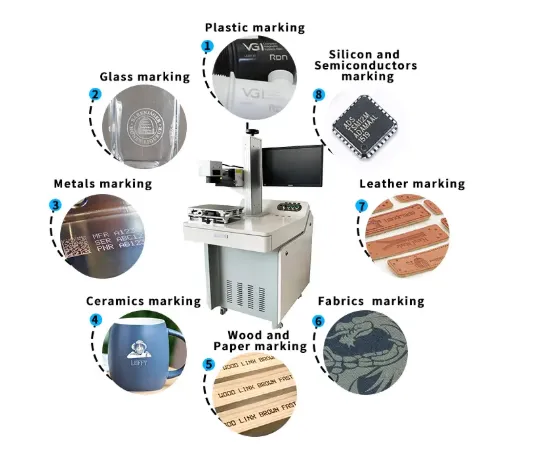
Where Is Laser Engraving Used in Silver Jewelry Production?
1. Inside-ring engraving
Common jobs include names, dates, short messages, wedding dates and small symbols inside rings.
Production challenge: the available area is narrow and curved. A rotary fixture or suitable ring-holding fixture may be required. Check the actual inner diameter, ring width, head clearance and focus position before choosing the machine.
2. Silver pendant logos and personalized designs
Jewelry factories use laser engraving for brand logos, initials, decorative patterns and customer-specific designs on pendants.
Production challenge: fine details can be lost if the laser spot, focus, hatch spacing or artwork resolution is unsuitable. Test the smallest lines and gaps in the actual design.
3. Serial numbers and product identification
Manufacturers may need to mark product IDs, batch codes, model numbers or small QR codes on selected jewelry products.
Production challenge: small codes must remain readable after polishing, cleaning and normal handling. The code size and contrast need to be checked with the intended scanner or inspection method.
4. Bracelet and chain components
Laser marking can be used for logos, small identification marks and decorative details on suitable bracelet plates and larger chain components.
Production challenge: small parts can move during marking. A stable fixture is important, especially when the surface is curved or the marking position is close to an edge.
5. Silver jewelry with black or contrasting details
Some manufacturers want a dark-looking logo or decorative pattern rather than a deep groove. The final appearance depends on the silver alloy, surface finish, pulse conditions and post-processing.
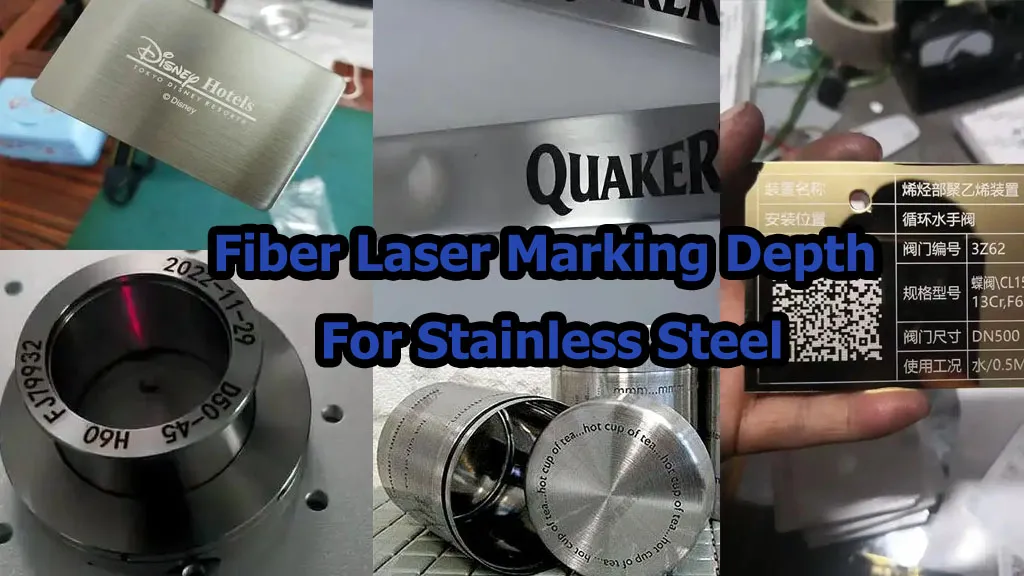
Production challenge: do not assume that a dark mark on stainless steel can be reproduced on silver. Silver’s optical and thermal behavior is different. The target appearance must be agreed upon and demonstrated with a sample.
6. Custom engraving and short-run production
Personalized names, initials and small-batch designs are common in jewelry workshops. Digital artwork makes it convenient to change the design without manufacturing a new mechanical engraving tool for every variation.
Production challenge: frequent artwork changes create a risk of selecting the wrong file or customer name. Use clear job naming, preview confirmation and controlled production records.
8 Process Variables to Test for Silver Jewelry Laser Engraving
There is no single parameter that controls the entire result. For a stable silver engraving process, treat these eight variables as a test matrix. Change one group at a time so you can understand why the result improves or deteriorates.
Variable 1: Laser Power
Laser power determines the average energy available to the process. It influences how much material can be modified or removed within a given time, but it does not independently determine the finished appearance.
Too little effective energy may produce a weak or inconsistent mark. Too much energy, especially with slow scanning or repeated passes, can create excessive heat, roughness or unwanted material removal.
What to test:
- Start with a low-to-moderate power range suitable for the selected source.
- Increase power in controlled steps while keeping the other main variables fixed.
- Compare contrast, line definition, surface roughness and depth.
- Repeat the test on the actual alloy and finish.
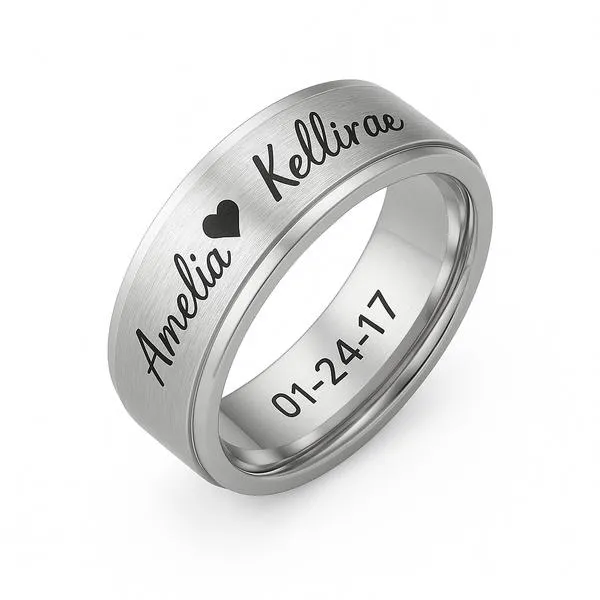
Practical example: a small logo on a polished 925 silver pendant may not need the same power strategy as a deeper serial number on a thicker silver component.
Limitation: software power percentage is not a universal measurement of optical output. The relationship between percentage and actual output depends on the source and controller.
Variable 2: Pulse Width
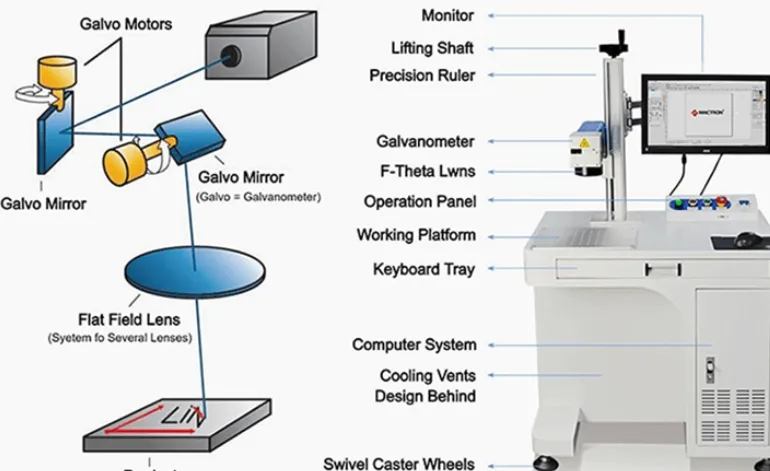
Pulse width is especially important when evaluating a MOPA fiber laser. It controls the duration of each laser pulse. Together with pulse energy, repetition frequency and scanning conditions, it changes how energy is delivered to the material.
A shorter pulse can provide a different energy-delivery pattern from a longer pulse. However, shorter does not automatically mean better. The right setting depends on whether the target is a fine surface mark, controlled engraving or material removal.
What to test:
- Compare several pulse-width settings supported by the actual laser source.
- Keep the test artwork, material, focus and scan conditions consistent.
- Inspect the edge quality and surface condition under magnification.
- Record whether the result is a surface change or actual material removal.
Equipment reference: JPT’s published 20W and 30W M7 MOPA source specifications list an adjustable pulse-width range of 2–350 ns. This is a source capability, not a recommended silver recipe.
Limitation: not every fiber laser is MOPA. A conventional Q-switched source may not offer the same independent pulse-width control.
Variable 3: Pulse Frequency
Pulse frequency describes how many pulses are delivered per second. It works together with pulse width, power and scanning speed.
Changing frequency can change the energy per pulse and the overlap between successive pulses. If you change frequency without considering the other settings, the mark may become too weak, too rough or excessively heated.
What to test:
- Choose a few frequency values within the source’s supported range.
- Compare the same design at the same power and scan speed.
- Inspect line continuity, edge quality, surface appearance and material removal.
- Repeat the most promising combinations with the actual production artwork.
Equipment reference: the published JPT 20W and 30W M7 MOPA specifications list a frequency range of 1–4000 kHz. The usable process window for a particular jewelry application will be narrower and must be established through testing.
Limitation: maximum frequency is not automatically the best production frequency. The interaction between frequency, pulse energy and scan speed matters.
Variable 4: Scanning Speed
Scanning speed controls how quickly the beam travels across the design. It influences energy delivered per unit length and interacts with pulse frequency and power.
If scanning is too fast for the chosen process, the mark may be too light or incomplete. If it is too slow, the process may create excessive heating or unnecessary material removal.
What to test:
- Build a speed test matrix using the same artwork and material.
- Compare the visual result and the measured cycle time.
- Check small text and tight corners separately from large filled areas.
- Include positioning and handling time when evaluating production capacity.
Practical example: a ring with a short inscription may have a short laser-on time, but loading, centering and rotating the ring can take longer than the actual marking.
Limitation: a galvo scanner’s advertised maximum speed is not the finished jewelry production rate.
Variable 5: Focus Position and Working Distance
Focus determines how the laser spot is formed on the surface. A small focus error can make fine lettering less clear or change the energy density at the workpiece.
Jewelry creates an extra challenge because rings, curved pendants and polished components do not always present a flat surface to the lens.
What to test:
- Confirm the correct working distance for the selected lens.
- Test the normal focus position and small controlled offsets.
- Check the center and edges of the intended marking area.
- For curved parts, verify focus across the complete marking area.
Practical solution: use a stable fixture and a repeatable focus method. For ring engraving, check whether the rotary attachment holds the ring at the correct height and prevents movement during rotation.
Limitation: a standard flat-field lens is not automatically suitable for every curved or irregular jewelry surface.
Variable 6: Hatch Spacing and Line Density
For filled graphics and larger engraved areas, hatch spacing determines how close the scan lines are to one another. It affects the amount of overlap and the appearance of the finished surface.
Lines that are too far apart may leave visible gaps. Lines that are too close may increase heat accumulation and extend the processing time without improving the appearance.
What to test:
- Use a test pattern with several hatch spacings.
- Compare the uniformity of filled areas and the visibility of scan lines.
- Inspect the edges of small logos and decorative shapes.
- Record the total processing time for each setting.
Practical example: a solid logo on a pendant needs a different hatch strategy from a thin outline or a short text inscription.
Limitation: there is no universal hatch spacing for every lens, spot size, material finish and design.
Variable 7: Number of Passes and Pass Strategy
One pass may be sufficient for a light mark. Deeper engraving may require multiple passes. However, simply adding more passes can increase cycle time and thermal accumulation.
For jewelry, the goal is to reach the required appearance and depth without damaging the surrounding surface or producing an unnecessarily rough finish.
What to test:
- Compare one pass with controlled multi-pass strategies.
- Measure depth where depth is part of the specification.
- Inspect edge quality and any raised material around the engraved area.
- Check whether cleaning or finishing is needed after engraving.
Practical solution: document the complete pass strategy, including any changes in speed, power, focus or hatch direction between passes.
Limitation: maximum engraving depth should never be treated as a target for thin rings or delicate jewelry. The part’s thickness and structural requirements matter.
Variable 8: Surface Preparation and Workholding
This variable is often underestimated. A polished ring, a brushed pendant and an oxidized silver component can produce different results even when the laser settings are unchanged.
Oil, fingerprints, polishing compound, tarnish, protective coatings and small scratches can affect the appearance and consistency of the finished mark.
What to test:
- Compare samples with the normal production cleaning process.
- Record whether the silver is polished, brushed, oxidized, plated or coated.
- Use a fixture that prevents movement during marking.
- For rings and curved pieces, verify the position and repeatability of the rotary setup.
- Inspect the result after the customer’s normal cleaning and finishing process.
Practical solution: establish a repeatable cleaning and fixture procedure. If a sample only works after unusually careful manual preparation, the process may not be ready for batch production.
Limitation: laser marking cannot compensate for inconsistent incoming material, damaged plating or unstable workholding.
Which Fiber Laser Configuration Should You Choose for Silver Jewelry?
For silver jewelry, start by comparing the process result rather than choosing a machine by wattage alone. A MOPA fiber laser is worth evaluating when pulse-width control is useful for fine process development. A conventional fiber source may still be suitable for some engraving applications, depending on the required finish.
JQ Laser published fiber laser range
JQ Laser’s published fiber laser product range includes 20W, 30W, 50W and 100W configurations. The typical reference wavelength is 1064 nm, with a standard 110 × 110 mm marking field on common configurations and optional larger fields depending on the optical setup.
| Configuration | When to evaluate it | What to verify on silver |
|---|---|---|
| 20W fiber | Fine logos, short text, basic identification and small-batch jewelry work. | Contrast, line definition, surface finish and whether the required engraving depth can be achieved. |
| 30W fiber | More process capacity for mixed jewelry work or when the 20W test does not meet the target cycle. | Whether the extra power improves the complete process without increasing heat damage. |
| 50W fiber | Evaluate when more material removal or higher output is required and the part can tolerate the process. | Depth control, edge quality, thermal effects and whether the cycle-time improvement justifies the cost. |
| 100W fiber | Consider for demanding industrial engraving after a clear process requirement has been established. | Whether this power level is appropriate for the size, thickness and thermal sensitivity of the jewelry component. |
Important: these are configuration choices, not a claim that all silver jewelry can be processed with all four power levels. A delicate ring and a thick silver pendant have very different process requirements.
Example: JPT M7 MOPA source specifications
For buyers evaluating a MOPA configuration, the following published JPT source specifications provide a useful reference:
| Parameter | 20W M7 reference | 30W M7 reference |
|---|---|---|
| Laser source model | YDFLP-E-20-M7-S-R | YDFLP-E-30-M7-S-R |
| Average output power | >20W | >30W |
| Wavelength | 1064 nm | 1064 nm |
| Pulse width | 2–350 ns | 2–350 ns |
| Frequency range | 1–4000 kHz | 1–4000 kHz |
| Maximum pulse energy | 0.8 mJ | 0.8 mJ |
| Cooling | Air-cooled | Air-cooled |
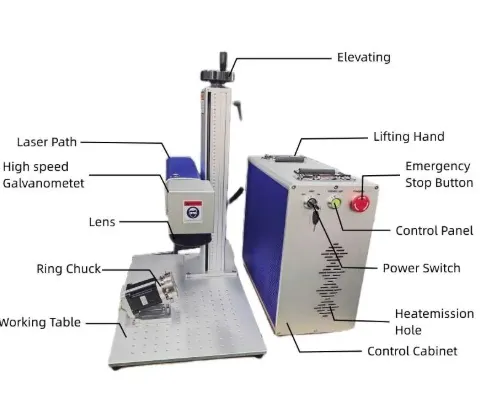
These specifications describe the laser source, not a complete JQ Laser machine configuration. The final machine also depends on the galvo scanner, lens, controller, software, enclosure and other selected components. Confirm the actual source model in the quotation.
Reference source specifications:
Do you need MOPA for silver jewelry?
Not automatically. MOPA is useful when adjustable pulse width and frequency provide a process-development advantage. It gives the engineer more ways to adjust the interaction between the laser and the surface.
However, MOPA does not guarantee a dark mark, a smooth finish or a particular engraving depth on silver. Those results still depend on the alloy, surface finish, optical setup and tested parameters.
If your production requirement is mainly straightforward serial-number engraving, compare the actual results and cost of a suitable conventional fiber source with a MOPA option before paying extra.
How to Run a Silver Jewelry Laser Sample Test
Do not use a valuable finished ring as the first test piece. Prepare representative samples from the same alloy and surface-finishing process used in production.
Step 1: Identify the silver material
- Confirm whether the material is 925 sterling silver, fine silver or silver-plated base metal.
- Record the supplier’s material specification where available.
- Record the surface finish: mirror-polished, brushed, oxidized or coated.
- Record the part thickness and geometry.
Step 2: Define the target result
Decide whether the goal is a fine surface mark, shallow engraving, deeper material removal, a dark-looking design or a readable serial number. Do not use the word “engraving” without explaining the required result.
Step 3: Create a test matrix
Start with controlled combinations of power, speed and pulse settings supported by the selected laser source. Then evaluate focus, hatch spacing and pass count on the most promising combinations.
Keep a record of each test. Do not change five settings at once and then guess which one improved the result.
Step 4: Inspect more than appearance
- Character and line definition.
- Surface discoloration and unwanted heat effects.
- Depth and material removal where required.
- Raised edges, roughness and visible scan lines.
- Consistency between repeated samples.
- Appearance after normal cleaning and finishing.
Step 5: Test the complete production method
Run multiple pieces using the proposed fixture, rotary attachment and operator workflow. Record loading time, alignment time, laser-on time, inspection time and unloading time.
Step 6: Keep a process record
A useful sample report should include:
- Material and alloy identification.
- Surface finish and part dimensions.
- Laser source brand and exact model.
- Rated power, pulse width and frequency where adjustable.
- Lens and marking field.
- Power setting, speed, hatch spacing and pass count.
- Focus position and fixture arrangement.
- Photos of the finished sample and inspection results.
- Laser-on time and complete part cycle time.
- Any limitations or required post-processing.
Why keep this record? It makes it possible to reproduce the result after delivery, compare suppliers fairly and investigate quality problems if the incoming silver finish changes.
Silver Jewelry Laser Engraving Buyer Checklist: 8 Checks Before You Purchase
Use the following checklist when comparing laser marking machine suppliers. Each check explains when it applies, how to verify it and what the test does not prove.
| Procurement check | Applicable conditions | Evidence / test method | Limitations |
|---|---|---|---|
| 1. Laser source and power | Fine detail, engraving depth, different jewelry thicknesses or cycle-time requirements. | Confirm exact source model and rated output. Test the real design on the actual silver alloy. | Higher wattage does not guarantee better contrast or a smoother finish. |
| 2. MOPA pulse control | When the process needs adjustable pulse duration or frequency to refine surface interaction. | Check the source datasheet and demonstrate several controlled pulse settings on silver samples. | MOPA capability does not guarantee a particular silver color or mark quality. |
| 3. Lens and marking field | Small text, detailed logos, large pendants or several parts in one fixture. | Test the actual artwork with the proposed lens. Check focus and detail across the full field. | A larger marking field may change spot size and detail performance. |
| 4. Rotary and fixture | Inside-ring engraving, curved rings, bracelets or small components that move easily. | Run repeated tests using the actual ring or bracelet dimensions. Check alignment and repeatability. | A rotary attachment is not automatically compatible with every ring shape or diameter. |
| 5. Material and surface preparation | 925 silver, fine silver, silver plating, oxidized or polished jewelry. | Test representative samples before and after the normal cleaning and finishing process. | A result on bare sterling silver does not prove performance on silver-plated or oxidized parts. |
| 6. Production cycle time | Batch production, personalization orders and high-volume jewelry work. | Measure full cycles including loading, alignment, engraving, inspection and unloading. | Scanner speed alone is not production throughput. |
| 7. Software and data workflow | Variable names, serial numbers, logos, batch IDs and personalized designs. | Test the file formats, variable-data process, job selection and backup procedure. | Standard software may not include customer database or ERP integration. |
| 8. Safety, service and spare parts | Every industrial laser installation, particularly open or semi-enclosed jewelry workstations. | Review the safety enclosure, interlocks, extraction needs, warranty, training and spare-parts list. | Safety and service scope depend on the delivered configuration and local requirements. |
What should be included in your supplier quotation?
- Laser source brand, model, power and pulse specification.
- Galvo scanner and F-theta lens model.
- Standard and optional marking fields.
- Z-axis adjustment and working distance.
- Rotary attachment type and compatible workpiece dimensions.
- Controller, software version and supported file formats.
- Protective enclosure, interlocks and extraction arrangement where applicable.
- Sample-test report and agreed acceptance criteria.
- Installation, operator training and maintenance guidance.
- Warranty, spare parts and technical support arrangements.
Comparison: Fiber Laser, MOPA Fiber Laser and Mechanical Engraving for Silver Jewelry
There is no single process that is best for every silver jewelry product. The right choice depends on the required appearance, production volume, part geometry and the amount of material that must be removed.
| Factor | Conventional fiber laser | MOPA fiber laser | Mechanical engraving |
|---|---|---|---|
| Process control | Depends on source design and available control parameters. | Adjustable pulse width and frequency provide additional process variables. | Controlled by cutting tool, feed, depth and machine mechanics. |
| Fine text and logos | Suitable when the source, optics and parameters meet the detail requirement. | Can be useful for fine process optimization; must be tested on silver. | Can produce clear cuts but tool geometry and mechanical setup matter. |
| Deep engraving | Possible with suitable power and multi-pass strategies. | Possible with suitable source power and process setup. | Can remove material directly; tool wear and setup affect the result. |
| Design changes | Artwork can be changed digitally. | Artwork and pulse recipes can be changed digitally. | Digital control depends on the engraving machine; tooling and setup may change with the design. |
| Contact with the workpiece | Non-contact laser process. | Non-contact laser process. | Cutting tool contacts the material. |
| Typical process concern | Silver reflectivity, heat effects and surface consistency. | Managing the interaction between pulse settings, heat and material removal. | Tool wear, clamping, burrs and access to small features. |
| Best buying approach | Test the actual alloy, finish and target design. | Test whether pulse flexibility produces a measurable improvement. | Compare finish quality, setup time and repeatability on the actual jewelry. |
Practical decision: if the main requirement is a fine logo or personalized text, compare a conventional fiber source and a MOPA source on the same sample. If the process needs controlled adjustment of pulse duration, MOPA deserves closer evaluation. If the customer requires substantial material removal, compare engraving depth, cycle time and finishing requirements—not just the initial mark.
How to Maintain Consistent Quality in Silver Jewelry Production
Keep material batches separate
Do not assume every incoming batch of silver behaves identically. Record alloy information and surface-finishing conditions, especially when different suppliers or polishing processes are involved.
Use controlled job files
Personalized jewelry production creates a risk of engraving the wrong name, date or design. Use clear file naming, order identification and operator preview checks. For larger operations, consider a controlled variable-data workflow.
Inspect the first piece of each new job
When changing the artwork, ring size, surface finish or fixture, inspect a first piece before releasing the batch. Check the result under the same lighting and viewing conditions used for final quality control.
Keep optical components clean
Dust, fingerprints and contamination on optical surfaces can affect marking consistency and may damage the lens. Follow the manufacturer’s cleaning instructions and use appropriate optical cleaning materials. Do not touch the lens surface with bare fingers.
Record process changes
If an operator changes speed, power, focus or pass count to improve one sample, record the change. Uncontrolled parameter changes make it difficult to reproduce the approved result across shifts.
Check the finished jewelry after normal finishing
Some pieces are polished, cleaned, plated, oxidized or otherwise finished after engraving. Confirm that the mark remains acceptable after the actual downstream process. Do not approve a sample based only on its appearance immediately after laser processing.
How JQ Laser Can Help with Silver Jewelry Engraving
JQ Laser offers fiber laser marking machine configurations in 20W, 30W, 50W and 100W options. The typical reference wavelength is 1064 nm, with a standard 110 × 110 mm marking field on common configurations and optional larger fields depending on the selected lens and setup.
For silver jewelry, the important first step is to test the actual part. We need to know whether you are engraving 925 sterling silver, fine silver or silver-plated material, and whether the target is a fine logo, personalized text, a serial number or deeper engraving.
Send these details for a useful technical recommendation
- Silver type: 925 sterling silver, fine silver or silver-plated metal.
- Surface finish: polished, brushed, oxidized or coated.
- Part type: ring, pendant, bracelet, chain component or nameplate.
- Part dimensions and thickness.
- Marking artwork and the smallest character or line detail.
- Required appearance: light mark, dark-looking mark, shallow engraving or deeper engraving.
- Production quantity and target cycle time.
- Whether a rotary attachment or custom fixture is required.
With this information, we can discuss which power range and optical setup should be tested first. The sample result should determine the final configuration—not a generic parameter chart.
Request a silver jewelry sample test or quotation: Contact JQ Laser.
Related products and solutions:
Technical note: The final laser source, pulse settings, lens, marking field and accessories depend on the selected configuration. Silver jewelry results must be validated using the actual alloy, surface finish, artwork and production workflow. No generic parameter table guarantees the same result on every silver product.
Frequently Asked Questions
1. Can a fiber laser engrave 925 sterling silver?
Yes. Fiber laser systems can engrave suitable silver materials, but the result depends on the alloy, surface finish, laser source and processing parameters. Test the actual 925 silver product before approving a production process.
2. Is a MOPA laser better for silver jewelry?
A MOPA laser offers adjustable pulse width and frequency, which can provide more flexibility when developing a process. It is not automatically better for every silver engraving job. Compare the actual samples, finish quality and cycle time before choosing.
3. What power is suitable for silver jewelry engraving?
20W and 30W fiber laser configurations are reasonable candidates for initial fine-detail jewelry trials. Higher-power configurations may be worth testing for deeper engraving or demanding production requirements. The correct power depends on the part and required result.
4. Can a fiber laser engrave inside a silver ring?
Yes, with a suitable fixture or rotary setup and adequate access for the marking head. Check ring diameter, inner width, focus position and fixture stability before selecting the machine.
5. Why does my silver engraving look uneven?
Possible causes include changes in alloy or surface finish, high reflectivity, inconsistent focus, poor workholding, unsuitable pulse settings or surface contamination. Test the material and process variables separately instead of increasing power immediately.
6. Can a laser produce a black mark on silver?
The final appearance depends on the silver composition, surface condition and laser process. Do not assume that a dark mark achieved on stainless steel can be reproduced on silver. Agree on the target appearance and test it on the actual jewelry material.
7. What marking area should I choose for jewelry?
A 110 × 110 mm marking field is a common reference configuration and may be suitable for many small jewelry parts. A smaller field may be preferable for certain fine-detail applications, while a larger field may be useful for multiple parts in one fixture. Confirm the lens and detail quality before ordering.
8. What should I send to a laser machine supplier for a silver sample test?
Send the silver type, surface finish, part dimensions, thickness, marking artwork, required appearance, production quantity and any rotary or fixture requirements. Include representative parts where possible.
Technical Sources and Further Reading
- JPT 20W M7 Fiber Laser Source Specifications. Published source model, 1064 nm wavelength, 2–350 ns pulse width, 1–4000 kHz frequency range and air cooling.
- JPT 30W M7 Fiber Laser Source Specifications. Published 30W source parameters and pulse-control range.
- JPT MOPA Fiber Laser Product Range. Manufacturer overview of MOPA source families and applications.
- Fabrication of holographic optical elements on silver by nanosecond IR laser source. Research on nanosecond infrared laser engraving of silver and the influence of laser-induced heating and optical-property changes.
- Stable formation of powder bed laser fused 99.9% silver. Research discussing the high reflectivity and thermal conductivity of silver in laser processing.
- IPG Photonics. Fiber laser manufacturer resources, including technical application information on laser engraving and process parameters.
- JQ Laser Fiber Laser Marking Machine. Published JQ Laser product configurations and reference machine specifications.
Source limitations: the academic studies cited above discuss laser processing of silver, but they do not establish a universal jewelry production recipe. JPT specifications describe the laser source, not the complete JQ Laser machine. The actual process window must be established through application testing.