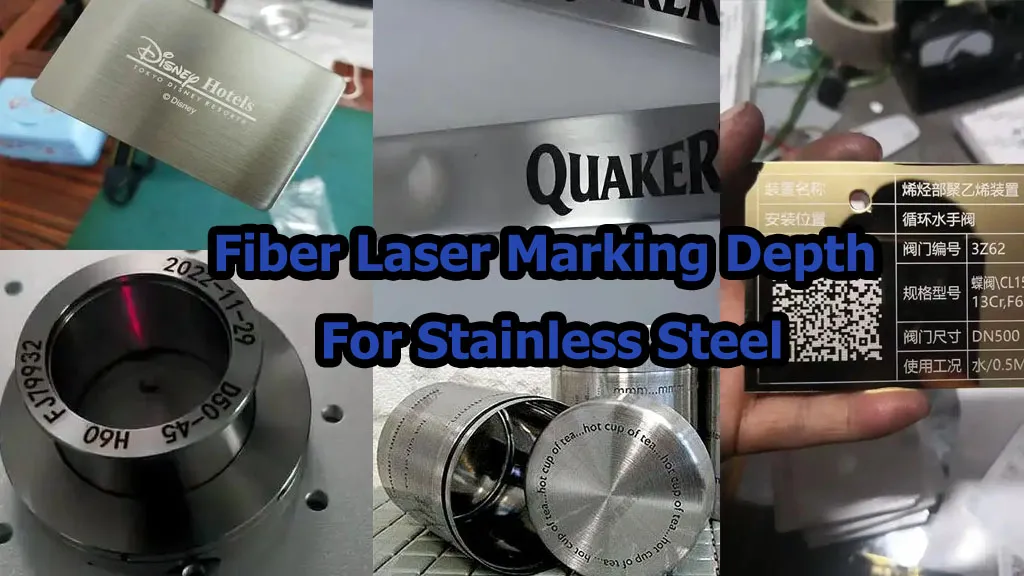
STAINLESS STEEL BLACK MARKING GUIDE
A MOPA fiber laser is often a better choice when the job requires a dark, even black mark on stainless steel rather than simple text or a light surface mark. Its adjustable pulse duration gives the operator another way to control how laser energy interacts with the metal surface. That extra control can help develop a more suitable black-marking process, especially for nameplates, instrument panels and traceability codes. However, MOPA is not automatically faster or better on every part. The real decision should come from a side-by-side test using the same stainless steel grade, artwork, marking area and acceptance criteria.
Request a Stainless Steel Sample Test Explore MOPA Laser Machines
The Short Answer: Why Choose MOPA for Black Marking?
The main reason is pulse control. A conventional Q-switched fiber laser and a MOPA fiber laser can both mark stainless steel, but a MOPA source allows the pulse duration to be adjusted within the range supported by the selected laser source. This gives the technician another process variable to work with when developing a dark mark without excessive surface damage.
For a manufacturer producing stainless steel nameplates, medical instrument components, kitchenware, precision parts or industrial identification plates, the target is usually not just “make the surface black.” The mark also needs to be even, legible, repeatable and suitable for the part’s later use.
MOPA is worth considering when a standard fiber laser struggles to produce the required black appearance, when the surface finish is important, or when the same production line needs several marking effects. If the job only requires ordinary serial numbers or logos and a standard fiber laser already passes the customer’s quality test, upgrading to MOPA may not be necessary.
What Is the Difference Between MOPA and a Standard Fiber Laser?
Both systems can use a 1064 nm pulsed fiber laser for marking metal. The practical difference is that a conventional fixed-pulse source offers less flexibility in pulse duration, while a MOPA source allows pulse width to be adjusted within its specified operating range.
That does not mean pulse width is the only setting that matters. Power, frequency, scan speed, hatch spacing, focus, surface condition and the number of passes all affect the result. The useful advantage of MOPA is the additional control available when tuning those variables together.
| Comparison | Standard Fiber Laser | MOPA Fiber Laser |
|---|---|---|
| Pulse duration | Generally fixed or less adjustable, depending on the source | Adjustable within the selected source’s supported range |
| Ordinary metal marking | Often a cost-effective choice for text, logos and serial numbers | Also suitable; extra pulse control may be unnecessary for simple jobs |
| Black marking on stainless steel | Possible, but the available process window may be more limited for some applications | Additional pulse control can help tune a dark, even surface mark |
| Fine appearance control | Depends on source, material and parameter window | More flexibility for selected color, black-marking and fine-marking processes |
| Purchase decision | Good when the required mark is achieved reliably at a suitable cost | Worth evaluating when appearance control or process flexibility has clear value |
The comparison is about process flexibility, not a claim that every MOPA machine produces a better mark than every standard fiber machine. The laser source, optical setup, material and operator’s parameter development still matter.
How Does a MOPA Laser Create a Black Mark on Stainless Steel?
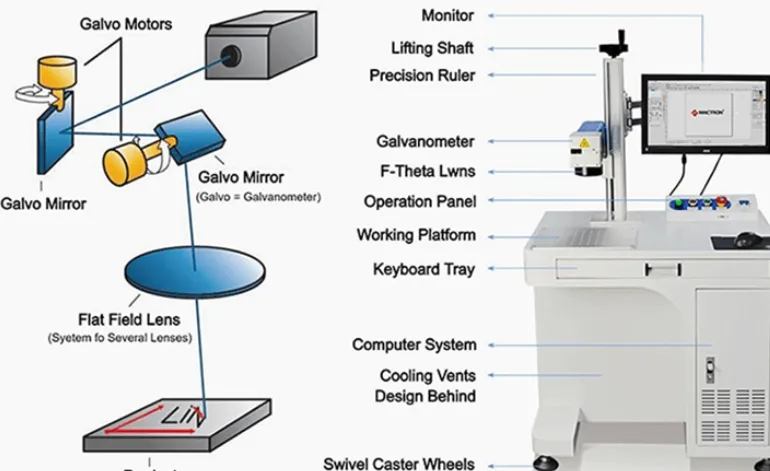
For many black-marking applications, the aim is to change the surface’s optical appearance through controlled laser heating rather than remove a large amount of metal. Depending on the material and process, the laser can form a thin modified or oxide layer that changes how the surface reflects light. This is commonly described as laser annealing or black annealing.
The result is sensitive to the actual stainless steel grade, surface finish, pulse duration, frequency, power, scan speed and hatch spacing. A parameter set that creates a dark mark on one 304 stainless steel plate may produce a different shade on another plate with a different finish or surface condition.
Why Pulse Width Matters
Pulse width describes how long each laser pulse lasts. In a MOPA source, adjusting the pulse width changes the way energy is delivered during each pulse. This gives the technician another way to balance surface modification, mark darkness and unwanted material removal.
In practical terms, the goal is to find a process window where the mark is dark enough, reasonably uniform and repeatable without producing unacceptable roughness, burrs or engraving depth. The best setting is not necessarily the one that looks darkest on one sample; it is the one that keeps meeting the agreed quality requirements across production parts.
Why Frequency, Speed and Hatch Spacing Still Matter
- Frequency: changes how frequently pulses are delivered and affects the energy pattern on the surface.
- Scan speed: changes how long the laser interacts with each area as the beam moves.
- Hatch spacing: determines how closely adjacent fill lines are placed and affects coverage and uniformity.
- Power: changes the available laser output and affects the overall process window.
- Focus and surface condition: influence the energy distribution and consistency across the marking area.
These variables interact. Slowing down or increasing power without checking the other settings can make the surface too hot, change the appearance or turn a surface mark into unwanted engraving. A small parameter test grid is usually more productive than changing settings at random.
A Real Sample Comparison: 30W Standard Fiber vs. 30W MOPA
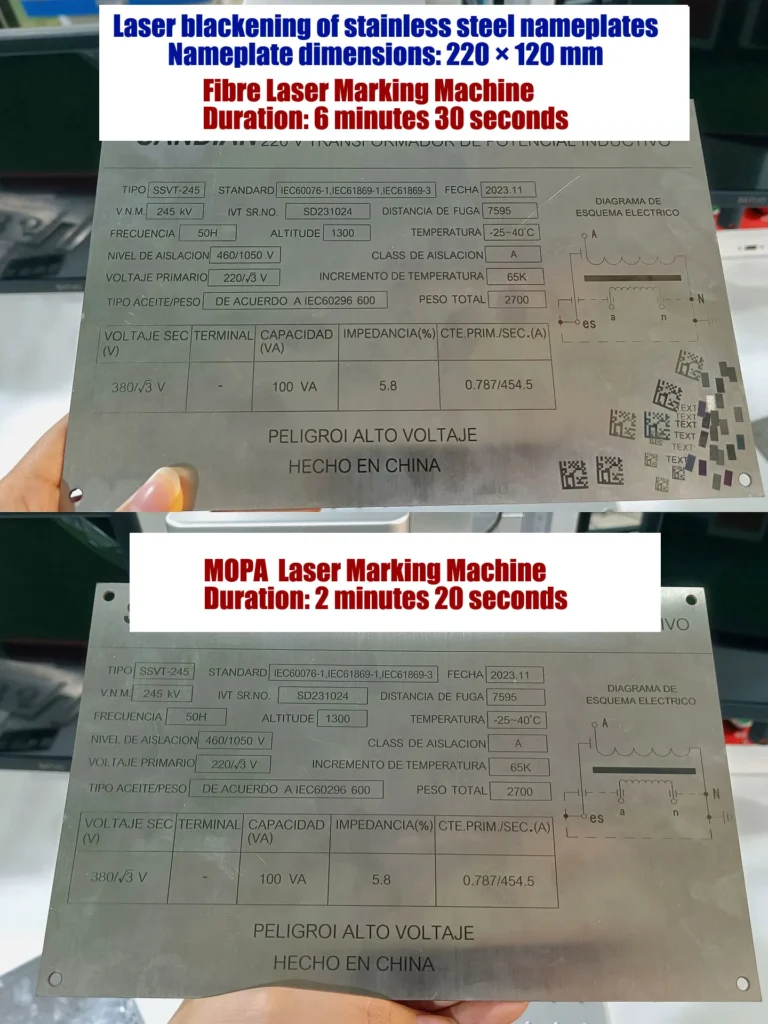
The following comparison comes from the stainless steel transformer nameplate photographs supplied for this article. The plate is labelled with the SANDIAN brand and contains electrical specifications, standards, a wiring diagram and other identification information.
The image annotation identifies the plate size as 210 × 120 mm and the lens as a 220 lens. The recorded marking times are 6 minutes 30 seconds for the standard 30W fiber laser and 2 minutes 19 seconds for the 30W MOPA laser.
| Test Detail | Standard Fiber | MOPA Fiber |
|---|---|---|
| Rated laser power | 30W | 30W |
| Workpiece described in the image | Stainless steel nameplate | Stainless steel nameplate |
| Plate dimensions shown | 210 × 120 mm | 210 × 120 mm |
| Lens noted in the image | 220 lens | 220 lens |
| Recorded marking time | 6 min 30 sec (390 sec) | 2 min 19 sec (139 sec) |
| Time difference | — | 251 sec less, approximately 64.4% lower recorded marking time |
What Does This Result Tell Us?
In this recorded example, the 30W MOPA setup completed the marked nameplate in 139 seconds, compared with 390 seconds for the standard 30W fiber setup. That is a substantial difference for a plate containing multiple lines of small text, technical data, boxes and a wiring diagram.
For a manufacturer producing similar plates, reducing marking time may improve output or free up operator time. However, this comparison should be treated as one observed sample result, not a universal performance guarantee.
The photographs do not provide the complete parameter files, pulse width, frequency, power percentage, hatch spacing, number of passes or a formal code/mark-quality report. Without those records, we cannot attribute the entire time difference to pulse width alone. Different scan settings or fill strategies may also explain part of the result.
Before using this result to forecast production capacity, repeat the test with the same artwork and material batch, record both parameter sets, and compare blackness, uniformity, legibility, surface condition and complete cycle time. If the plate includes a QR or Data Matrix code, verify it with the intended reader.
Which Stainless Steel Applications Benefit Most from MOPA Black Marking?
1. Electrical and Transformer Nameplates
Electrical nameplates often contain dense text, specification tables, serial numbers, diagrams and safety information. A dark, consistent mark improves visual contrast and makes the plate easier to read. MOPA is worth testing when the required black appearance or production cycle is difficult to achieve with a standard fiber laser.
2. Medical Instruments and Surgical Tools
Medical instruments may need clear identification, serial numbers or traceability codes. The process must be validated for the instrument’s steel grade, surface finish, cleaning method and any required passivation or sterilization process. A mark that looks black immediately after processing is not automatically approved for a regulated medical application.
3. Kitchenware and Premium Stainless Steel Products
Cookware, bottles, utensils and premium products often require a clean appearance with limited surface damage. MOPA can be useful when the target is a controlled black or decorative mark, but the final result depends on the steel finish and product design. Test the actual finished surface rather than a different scrap plate.
4. Automotive and Industrial Components
Stainless steel parts may require logos, batch information, serial numbers and machine-readable codes. If the mark is part of a traceability process, verify readability after any relevant cleaning, coating or environmental exposure required by the customer.
5. Precision Parts and Branded Hardware
Small components and polished hardware may have limited marking areas. Pulse control can help develop a suitable surface-marking process, but fixture stability, focus and artwork size are equally important. Test several parts to confirm repeatability before approving the production settings.
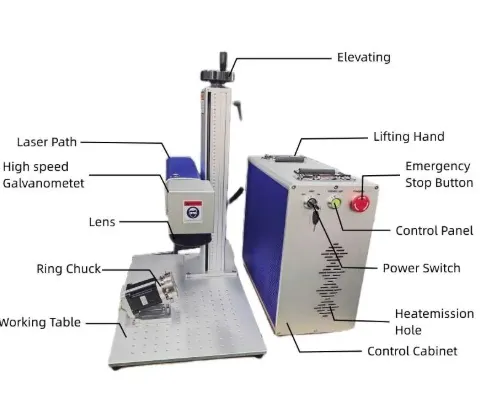
30W MOPA Laser Marking Machine: Reference Specifications
JQ Laser publishes a MOPA configuration range for stainless steel and other applications. The following values are reference specifications for the published configuration range, not a promise that every 30W source supports every listed setting. Confirm the exact laser-source model and parameters in the quotation.
| Parameter | JQ Laser MOPA Reference | Buyer Note |
|---|---|---|
| Laser type | Pulsed MOPA fiber laser | Confirm source brand and model |
| Rated power | 30W option | Compare output power and target process, not power alone |
| Wavelength | 1064 nm | Typical wavelength for this fiber configuration |
| Pulse width | Published configuration range approximately 1–350 ns | Actual range depends on the selected source |
| Frequency | Published configuration range up to approximately 4000 kHz | Confirm the specific source’s supported frequency range |
| Reference maximum scanning speed | Up to approximately 10,000 mm/s | Not the same as actual marking throughput |
| Typical standard marking field | 110 × 110 mm reference; other lenses available | Select the lens based on the actual artwork and required field |
| Cooling | Air cooling in common configurations | Confirm the delivered configuration |
| Software | EZCAD-compatible configuration, depending on controller | Confirm rotary, data and file-format requirements if needed |
These specifications are based on the current JQ Laser MOPA product information. The exact pulse-width and frequency limits depend on the source selected for the machine. A 220 mm focal-length lens, as noted in the supplied nameplate example, should be quoted and tested for the required usable marking field; do not assume that every lens has the same field or working distance.
See the MOPA Laser Marking Machine and MOPA Laser Marking Machine for Stainless Steel pages for product details.
How to Develop a Black Marking Process Without Wasting Material
When a customer asks us for a deep black mark, we do not recommend starting with maximum power and randomly changing speed. That approach can waste samples and make it difficult to identify why a setting worked.
- Confirm the material: identify the stainless steel grade if known, the surface finish and whether the part has been polished, brushed, coated or passivated.
- Define the target: decide whether the priority is maximum darkness, uniformity, low surface roughness, fine text, code readability or marking speed.
- Start with a parameter grid: vary a small number of settings systematically while recording pulse width, frequency, power, speed and hatch spacing.
- Inspect under consistent lighting: compare blackness and uniformity under the same viewing conditions. Avoid choosing a result based on one photograph with different exposure or reflections.
- Check surface integrity: look for excessive roughness, visible engraving, discoloration outside the mark and other defects relevant to the part.
- Repeat on multiple samples: use more than one piece to check material variation and process repeatability.
- Run downstream tests if required: for medical, food-contact, corrosion-sensitive or regulated applications, validate cleaning, passivation, wear or other relevant requirements.
- Save the approved recipe: record the laser source, lens, parameter file, material, sample ID and acceptance result.
There is no single universal setting for every 304 or 316 stainless steel part. A published parameter is a starting point for a specific machine and material, not a substitute for sample testing.
How to Choose Between a 30W Standard Fiber and a 30W MOPA
| Your Requirement | Suggested Starting Point | Why |
|---|---|---|
| Ordinary serial numbers and logos on metal | Standard fiber or MOPA | Choose the option that meets the required quality and cost target |
| Dark, even black marking on stainless steel | Evaluate MOPA first | Adjustable pulse duration adds another process-control variable |
| Decorative color marking on stainless steel | MOPA | Pulse control can help develop different surface appearances on suitable material |
| Deep engraving rather than a surface black mark | Compare source power and engraving process | Depth, pass count, cycle time and heat accumulation become more important |
| Large, dense nameplates with tight production targets | Test both machines using identical artwork | Actual marking time and acceptable quality matter more than a generic speed claim |
Questions to Ask Before Buying
- Can the supplier mark my actual stainless steel grade and finish?
- Will the sample be black and uniform under my inspection conditions?
- What are the exact laser source brand, model and pulse-width range?
- Does the quote include the lens required for my actual marking area?
- Can the supplier provide the tested parameter file and sample record?
- Is the quoted cycle time based on my full artwork, or just a small test logo?
- Will the mark meet any required corrosion, cleaning, passivation or code-reading criteria?
- What warranty, spare parts and technical support are included?
Price, Factory Capability and Project Support
The purchase price of a MOPA marking machine depends on the selected laser source, rated power, pulse-width range, galvanometer, lens, enclosure, software and any automation or custom fixture requirements. Do not compare quotations by wattage alone. Two machines labelled “30W MOPA” may not have the same pulse range or produce the same result on your stainless steel part.
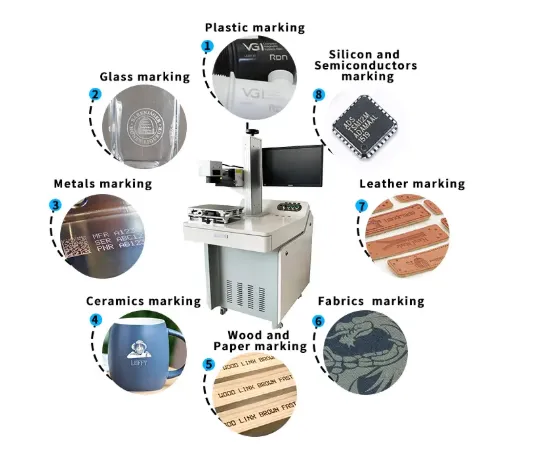
Jining Junqi Intelligent Technology Co., Ltd. (JQ Laser) supplies laser marking equipment and can evaluate MOPA configurations for black marking, color marking, serial numbers, logos and traceability applications. The appropriate configuration should be determined through the actual sample, not just a product brochure.
Sample Testing and Quality Control
For a serious black-marking project, ask the supplier to document the material, surface finish, laser source, lens, marking parameters, sample photos, marking time and agreed acceptance criteria. If the part has a required corrosion or cleaning performance, include the relevant test method in the project specification.
OEM, MOQ and Lead Time
OEM/ODM options, order quantity and lead time depend on the selected machine and project scope. A standard machine may be available for a one-unit order, but confirm this with the sales team. A customized lens, enclosure, fixture or production-line integration may require additional engineering and sample approval before the final schedule can be confirmed.
Spare Parts and After-Sales Support
Before placing an order, confirm the laser source model, controller, lens specification, warranty terms, spare-part availability and support process. Keep a backup of the approved parameter files and record the configuration used for sample acceptance so that later troubleshooting can refer to the same setup.
Related resources: OEM & ODM Services, After-Sales Support and Service & Support.
Frequently Asked Questions
Why is MOPA better for black marking on stainless steel?
MOPA offers adjustable pulse duration within the selected source’s range. This gives the operator more control over the laser-material interaction and can help develop a dark, uniform surface mark. The result still depends on the stainless steel grade, finish, lens and process parameters.
Can a standard fiber laser make black marks on stainless steel?
Yes, some standard fiber laser configurations can produce dark marks on suitable stainless steel. MOPA is worth testing when the standard source cannot consistently achieve the required appearance or when additional process control is valuable.
Does MOPA always mark stainless steel faster?
No. Marking time depends on the artwork, scan strategy, frequency, pulse width, speed, hatch spacing and quality requirements. The supplied 210 × 120 mm nameplate example records 2 minutes 19 seconds for a 30W MOPA setup and 6 minutes 30 seconds for a standard 30W fiber setup, but that result should not be generalized to every part.
What is the difference between black annealing and deep engraving?
Black annealing aims to change the surface appearance with limited material removal. Deep engraving intentionally removes material to create a measurable recess. They have different process targets and should be tested and evaluated separately.
Can a 30W MOPA laser mark 304 and 316 stainless steel?
A 30W MOPA configuration can be evaluated for black marking on both 304 and 316 stainless steel. The grade, finish, surface preparation and downstream requirements can change the result, so sample testing is necessary before approving a production process.
Will a black laser mark remain black after passivation or cleaning?
Not automatically. Passivation chemistry, cleaning, corrosion exposure and other downstream processes may change the appearance or performance of a mark. If these processes are part of the application, test the marked sample through the actual downstream procedure.
What information should I send for a MOPA quotation?
Provide the stainless steel grade if known, surface finish, part dimensions, marking artwork, target blackness, required cycle time, production quantity and any cleaning, corrosion or code-reading requirements. Actual samples are the best basis for finalizing the machine and process.
Need a Dark, Consistent Black Mark on Stainless Steel?
Send JQ Laser your stainless steel nameplate, instrument panel or component drawing. Tell us the material grade, surface finish, marking dimensions and target cycle time.
We can evaluate whether a 30W MOPA or another configuration is appropriate and define the sample test needed to verify blackness, uniformity, readability and processing time.
Related Laser Marking Resources
Technical Notes and Sample Traceability
The 210 × 120 mm nameplate dimensions, 220 lens annotation and recorded times of 6 minutes 30 seconds and 2 minutes 19 seconds are taken from the supplied comparison photographs. They are presented as one observed sample comparison, not an independently verified production guarantee.
The reference MOPA specifications in this article are based on JQ Laser’s published MOPA product information. The exact laser-source model and supported pulse-width and frequency ranges must be confirmed for the machine being quoted.
For reproducible results, retain the workpiece material and surface details, artwork file, laser source model, lens, pulse width, frequency, power, speed, hatch spacing, number of passes, sample photos, marking time and acceptance result. This record helps connect the approved sample to the delivered machine and any later process adjustment.