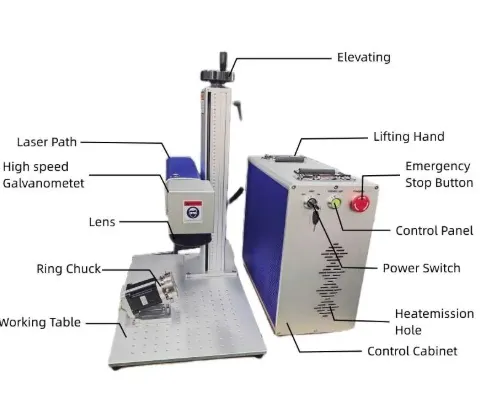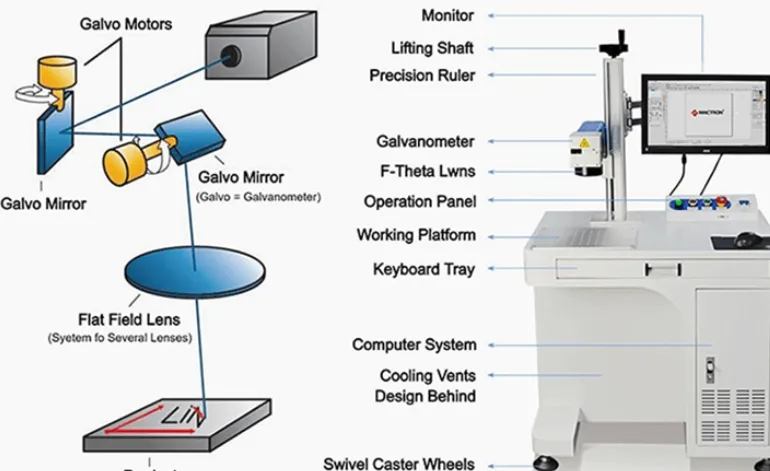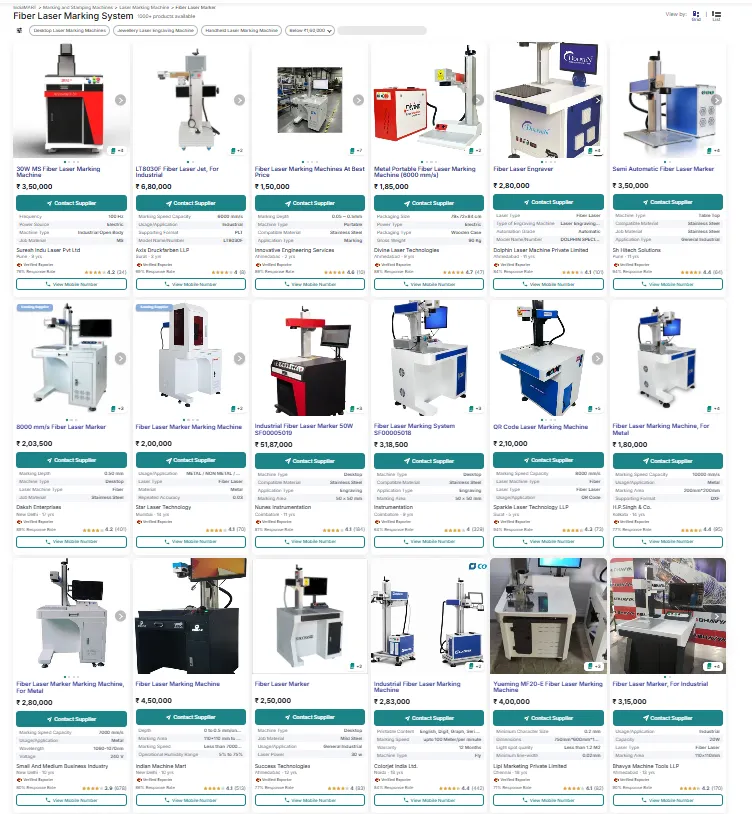
If you are searching for the fiber laser marking machine price in India, a realistic starting point is roughly ₹1.45 lakh to ₹3.5 lakh or more for many standard 20W–50W machines, based on publicly listed Indian-market prices. However, this is not a fixed market price. The final quotation depends on the laser power, laser source, marking field, galvanometer scanner, F-theta lens, software, rotary axis, machine structure, automation, GST, shipping and installation.
For example, one Indian supplier currently lists a 20W table-top fiber laser marking machine from ₹145,000 + GST, a 30W model from ₹175,000 + GST and a 50W model from ₹245,000 + GST. Other current Indian listings show prices around ₹165,200, ₹175,000, ₹230,000, ₹250,000 and ₹315,000 for different fiber laser configurations. These listings demonstrate why comparing only the advertised price can be misleading. :contentReference[oaicite:1]{index=1}
My advice as a laser equipment supplier is simple: don’t start by asking “How cheap can I get a 30W machine?” Start by asking “What exactly do I need to mark, how fast do I need to mark it, and what configuration is actually included in the quotation?”
1. How Much Does a Fiber Laser Marking Machine Cost in India?
There is a fairly wide price spread in the Indian market because different suppliers are selling different machine configurations under the same name: “fiber laser marking machine.”
A 20W desktop machine with a basic configuration is obviously not the same product as a 50W system with a larger marking field, better optics, rotary axis, enclosure or automation.
| Laser Power | Public Indian Price Examples | Typical Application | My Buying View |
|---|---|---|---|
| 20W | About ₹145,000–₹250,000+ depending on configuration | Logo, serial number, QR code, nameplate, general metal marking | Good starting point for basic marking |
| 30W | About ₹175,000–₹250,000+ in current public listings | General industrial marking, metal parts, tools and higher productivity | Often the most balanced choice |
| 50W | About ₹245,000–₹320,000+ in current public listings | Higher production volume, deeper engraving and material removal | Worth paying more when production requires it |
| 100W | Highly configuration-dependent | Deep engraving, high material removal and demanding production | Buy only when there is a clear production reason |
Important: these figures are public Indian-market reference prices, not a standardized industry price list. Some listings are quoted before GST, while others show different tax treatment or configuration details. For example, the Hindcam listing explicitly shows “₹145000 + GST” for one 20W machine, while another TradeIndia listing shows ₹165,200 including an 18% GST calculation from a ₹140,000 base price. :contentReference[oaicite:2]{index=2}
That is why I would never tell a customer that “a 30W fiber laser costs exactly ₹X in India.” That would give you a false sense of precision.
What Is the Practical Price Difference Between 20W, 30W and 50W?
From a buyer’s point of view, the difference is not simply the extra laser power.
You are paying for additional processing capability.
- 20W: good for many standard identification and surface-marking jobs.
- 30W: a useful middle ground when you want more production margin without immediately moving to 50W.
- 50W: makes more sense when cycle time, deeper engraving or higher daily production becomes important.
- 100W: generally justified only when material removal, deep engraving or production throughput can financially justify the higher investment.
These are application recommendations rather than universal performance claims. The same 30W machine can be fast for one marking job and slow for another because marking content, hatch density, material, lens and required quality all change the process.
2. What Are You Actually Getting for the Price?
This is where I would spend more time with an Indian buyer than simply discussing the price.
When someone tells me, “I found a 30W machine for ₹175,000 and another one for ₹250,000,” my next question is not which one is cheaper.
I want to see the configuration.
| Configuration Item | Why It Matters | What You Should Ask |
|---|---|---|
| Laser Source | Determines laser output and processing characteristics | Brand, exact model, wavelength, pulse parameters |
| Laser Power | Affects production capability and material removal | 20W / 30W / 50W / 100W |
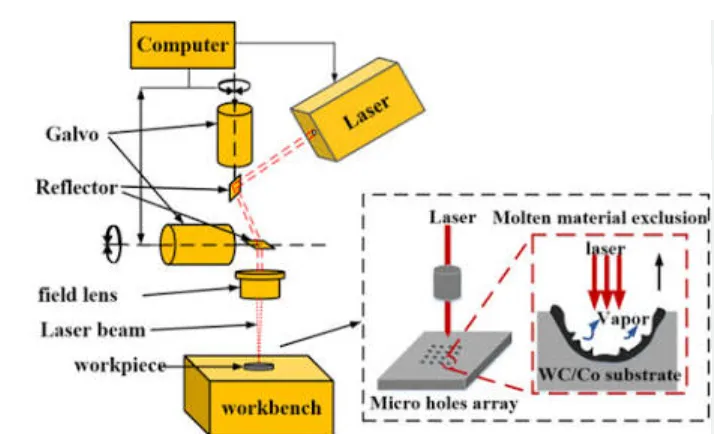
| Galvanometer | Affects beam positioning and marking dynamics | Brand and model |
| F-Theta Lens | Determines marking field and optical performance | 110×110, 175×175, 200×200, 300×300 mm, etc. |
| Control Card | Connects software and laser scanning system | Controller brand/model |
| Software | Controls text, QR, barcode, serial numbers and graphics | EZCAD version and license |
| Rotary Axis | Allows cylindrical products to be marked | Included or optional? |
| Computer | Needed for machine operation | Included or customer supplied? |
| Enclosure | Safety and production configuration | Open workstation or enclosed system? |
| Installation | Important for overseas or remote buyers | Included or additional? |
| Shipping | Can significantly change delivered cost | EXW / FOB / CIF / DDP? |
| GST / Tax | Changes the actual amount paid | Included or excluded? |
For example, an Indian listing for a fiber machine specifies 110×110, 200×200 and 300×300 mm marking areas, 7,000 mm/s marking speed, ±0.01 mm accuracy, air cooling and EZCAD control. Another listing shows 20W/30W/50W options with a 200 mm marking area and 7,000 mm/s speed. :contentReference[oaicite:3]{index=3}
The important point is that “30W fiber laser marking machine” is not a complete technical specification.
JQ Laser Published Fiber Laser Configuration
For comparison, JQ Laser currently publishes fiber laser marking configurations from 20W to 100W, with a typical 1064 nm wavelength, air cooling, standard 110×110 mm marking field and optional larger fields including 175×175, 200×200 and 300×300 mm. The published system information lists up to 12,000 mm/s as a maximum scanner/marking-speed figure and approximately ±0.01 mm marking accuracy for its fiber marking configurations. :contentReference[oaicite:4]{index=4}
| JQ Laser Published Specification | Reference |
|---|---|
| Laser type | Pulsed Fiber Laser |
| Power options | 20W / 30W / 50W / 60W / 100W |
| Typical wavelength | 1064 nm |
| Cooling | Air cooling commonly used |
| Standard marking field | 110 × 110 mm |
| Optional fields | 175 × 175 / 200 × 200 / 300 × 300 mm and other configurations |
| Published maximum speed | Up to approximately 12,000 mm/s depending on configuration |
| Published marking accuracy | Approximately ±0.01 mm |
| Software | EZCAD-compatible configurations |
Traceability note: the specifications above are from JQ Laser’s current published product information. They describe the available/configurable system, not a guarantee that every machine sold in India will have every option. The final quotation should always confirm the exact source, scanner, lens, marking field and software configuration. :contentReference[oaicite:5]{index=5}
3. Which Fiber Laser Should You Buy in India?
If I were talking to a factory buyer in India, I would not immediately recommend the most powerful machine.
I would first ask what you are actually marking.
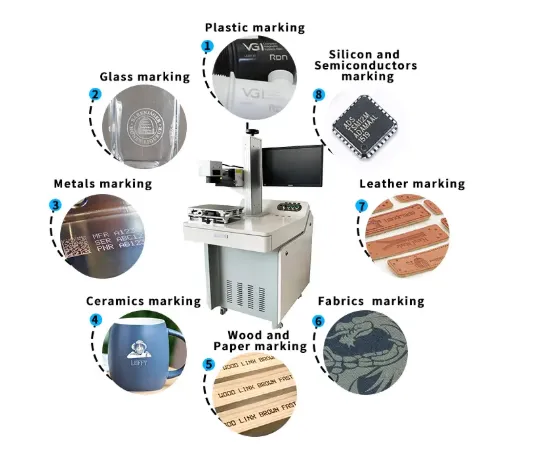
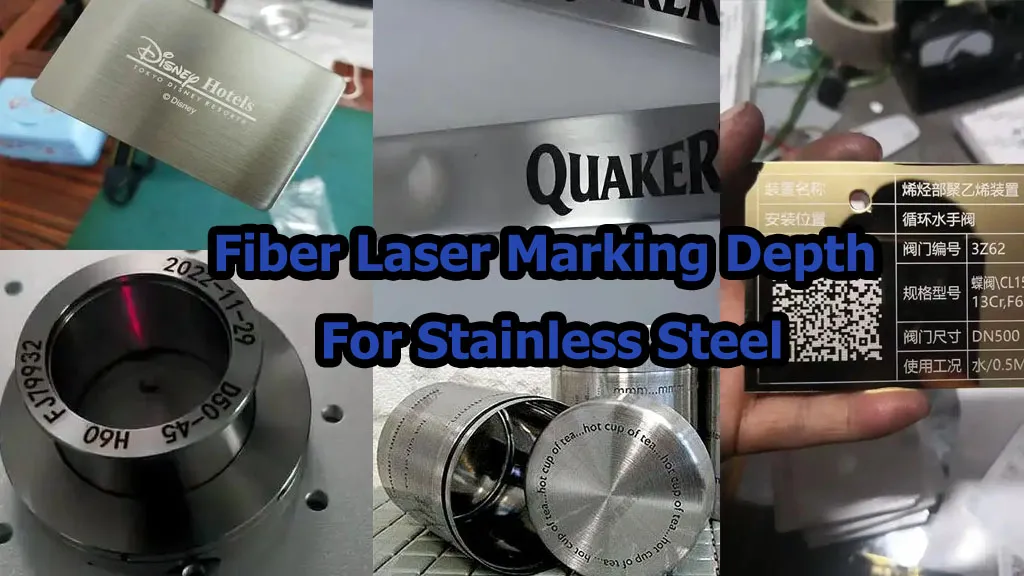
For Stainless Steel Parts
If your job is mainly logos, serial numbers, QR codes or specifications on stainless steel parts, a 20W or 30W fiber laser is often the first configuration I would test.
You normally do not need 50W simply because 50W sounds more powerful.
Raycus, for example, publishes a 50W Q-switched pulsed fiber source at 1064 nm for industrial marking and micromachining. Its published specifications include 50W average output power, and Raycus describes the series as suitable for marking and precision processing. :contentReference[oaicite:6]{index=6}
For Aluminum Nameplates and Anodized Aluminum
20W or 30W can be a practical starting point for many identification applications.
If you need a particular black-marking appearance or more control over the process, I would test a MOPA configuration rather than simply increasing the wattage.
That is an important distinction: sometimes laser type and pulse control matter more than additional power.
For Metal Tools and Hardware
For tools, saw blades, hardware parts and similar products, the decision usually comes down to marking content and cycle time.
If the requirement is simply one logo and a product specification, 20W or 30W may be enough.
If you are marking thousands of parts per day or need deeper engraving, 50W becomes more interesting.
For example, JQ Laser has a documented customer application involving metal saw blades using a 50W fiber laser configuration, with the customer’s reported marking requirement of logo and product specifications and approximately one second marking time per blade. The one-second figure is specific to that application and should not be treated as a universal 50W cycle time.
For Deep Metal Engraving
If you need to remove a meaningful amount of metal rather than simply create a surface mark, I would normally start evaluating 50W and above.
But I would still request a sample test.
Deep engraving is one of the applications where simply looking at wattage can lead to the wrong purchase. The result depends on power, pulse characteristics, frequency, speed, hatch spacing, focus and number of passes.
For High-Volume Production
If you are producing thousands or tens of thousands of parts, the question changes.
You should calculate the required cycle time and then evaluate whether a 30W, 50W, 100W or automated system provides the best production economics.
At this point, the marking machine itself may no longer be the main issue. Fixtures, sensors, rotary axes, conveyors, PLC communication and automatic loading/unloading can become more important than adding another 20W of laser power.
4. How I Would Compare a Chinese Machine With an Indian Machine
This is probably the most useful section for an Indian buyer considering importing a machine from China.
I would not compare only:
₹200,000 Indian machine vs. $2,000 Chinese machine.
That is not a meaningful comparison.
I would compare the total production-ready cost.
| Cost / Factor | Indian Local Purchase | Chinese Direct Purchase |
|---|---|---|
| Machine Price | Quoted in INR | Usually USD / RMB |
| GST / Local Tax | Check quotation | Check Indian import/tax obligations |
| Shipping | Usually lower domestic logistics | International freight required |
| Customization | Depends on supplier | Often flexible for factory configurations |
| Sample Testing | Should be requested | Should be requested before order |
| After-Sales Support | Local support may be easier | Remote support / local partner needs checking |
| Spare Parts | Potentially faster locally | May require international shipment |
| Factory Configuration Transparency | Supplier-dependent | Manufacturer-dependent |
| Total Cost | Not equal to machine price | Not equal to FOB price |
In other words, if an Indian supplier quotes ₹220,000 and a Chinese manufacturer quotes the equivalent of ₹150,000, you cannot conclude that China is automatically ₹70,000 cheaper.
You need to add freight, import costs, GST/tax treatment, accessories, installation, commissioning and support requirements before making the decision.
My Practical Buying Rule
Do not compare “machine price.” Compare “cost per production-ready machine.”
Then compare the actual marking result and cycle time on your own product.
Final Answer: What Is the Fiber Laser Marking Machine Price in India?
For many standard 20W–50W fiber laser marking machines, current publicly listed Indian prices are roughly in the ₹145,000–₹350,000+ range, depending heavily on configuration and supplier. Some specific public listings are lower or higher, so this should be treated as a market reference rather than a fixed price. :contentReference[oaicite:7]{index=7}
If your application is basic metal identification, I would normally test 20W or 30W first.
If you need higher throughput or deeper engraving, I would test 50W.
If you are doing heavy material removal or high-volume industrial production, then 100W or an automated system may make economic sense.
But before paying for any configuration, send the supplier your actual product and marking file.
A good laser supplier should be able to show you the actual marking result, recommend a configuration based on the application, and explain exactly what is included in the quoted price.
That is much more useful than simply telling you, “Our 30W machine is the cheapest.”
Data Sources and Traceability
This article deliberately separates three types of information:
- Indian public-market price references: current publicly listed prices from Indian laser-machine suppliers and TradeIndia listings. These are indicative market observations, not fixed industry prices. :contentReference[oaicite:8]{index=8}
- JQ Laser published specifications: current published fiber laser configurations, including 20W–100W options, 1064 nm wavelength, marking fields and published speed/accuracy information. :contentReference[oaicite:9]{index=9}
- Laser-source manufacturer data: Raycus publicly publishes specifications for its 50W Q-switched pulsed fiber laser, including 50W average power and 1064 nm central wavelength. :contentReference[oaicite:10]{index=10}
Prices change with configuration, exchange rates, taxes, freight and supplier policy. Buyers should request a current quotation and complete sample test before placing an order.
Get the Right Fiber Laser Marking Machine for Your Budget
If you are comparing fiber laser marking machine prices in India, send us your actual product before choosing the laser power.
We can evaluate the material, marking content, required marking size and production speed, then recommend a suitable fiber laser configuration instead of simply pushing a higher-wattage machine.
Information We Recommend Sending
- Product photos
- Material name
- Marking content
- Logo or marking file
- Required marking size
- Required marking depth
- Approximate production quantity per day
- Target cycle time, if available
- Whether rotary marking is required
- Whether automatic loading or conveyor integration is required
For most standard metal identification applications, we would test 20W or 30W first. For higher production requirements or deeper engraving, 50W and higher configurations may be more appropriate.
The final recommendation should be based on an actual sample test rather than laser power alone.
20W vs 30W vs 50W Fiber Laser: Which One Makes Sense?
| Requirement | 20W | 30W | 50W |
|---|---|---|---|
| Logo marking | Suitable for many applications | Suitable | Suitable |
| Serial numbers | Suitable | Suitable | Suitable |
| QR / Data Matrix | Suitable | Suitable | Suitable |
| Stainless steel marking | Suitable | Suitable | Suitable |
| Aluminum marking | Suitable for many applications | Suitable | Suitable |
| Deep engraving | Possible, but generally slower | Better production capability | Better suited to higher material removal |
| High-volume production | Application dependent | Often a good balance | More production margin |
| Initial investment | Lower | Medium | Higher |
Technician’s view: I would not automatically recommend 50W simply because the customer has the budget. If the job is only a logo, serial number or QR code on stainless steel, a properly configured 20W or 30W machine may already do the job.
If the customer needs deep engraving or a shorter cycle time, then the additional power can become worthwhile.
What Should You Ask an Indian Laser Machine Supplier Before Paying?
Here are the questions I would ask before placing an order:
- What is the exact laser source model?
- What galvanometer scanner is installed?
- What is the lens marking field?
- Is the quoted price including GST?
- Is the rotary axis included?
- Is the computer included?
- What software is included?
- Can you test my actual product?
- What is the measured cycle time for my marking?
- What happens if the laser source or scanner fails?
- Are spare parts available locally?
- What is included in installation and training?
If the supplier cannot clearly answer these questions, I would be careful about comparing its quotation with another supplier.
Why the Cheapest Fiber Laser Marking Machine May Not Be the Cheapest Solution
Let’s say one machine costs ₹170,000 and another costs ₹230,000.
At first glance, saving ₹60,000 looks attractive.
But if the cheaper machine produces a poor-quality QR code, requires significantly more marking time, cannot reproduce the same result consistently, or has difficult after-sales support, the initial saving may disappear quickly.
For production equipment, I prefer to calculate the total cost over the machine’s working life:
Total Cost = Purchase Price + Shipping + Tax + Installation + Maintenance + Downtime + Production Loss
This is especially important when the laser marking machine is part of a continuous production process.
Final Buying Advice for Indian Buyers
If you are buying your first fiber laser marking machine in India, don’t start with the question “20W, 30W or 50W?” Start with the sample.
Send the supplier your actual material and marking requirements.
Then compare:
- Marking quality
- Cycle time
- Laser source
- Scanner
- Lens
- Controller
- Software
- Warranty
- After-sales support
- Total delivered cost
Only after these points are clear should you compare the final price.
A ₹150,000 machine that meets your production requirement can be a better purchase than a ₹300,000 machine with features you never use. But a very cheap machine is not a bargain if it cannot reliably produce your required marking.
That is the way we recommend evaluating laser marking equipment: application first, configuration second, price third.
Need a Fiber Laser Marking Machine Price?
Tell us what you need to mark, and we can recommend a suitable laser power and configuration based on your application.
Send your product photo + marking requirement for a technical evaluation.