Quick answer: If you need clean, readable marks on ABS plastic without melting, burning or distorting the surface, start by identifying the exact ABS grade and the required mark appearance. For fine text, cosmetic housings and heat-sensitive parts, a 355 nm UV laser is often a sensible first option to test. For suitable dark or laser-sensitive ABS grades, a 1064 nm fiber laser may also work. A MOPA fiber source is worth comparing when pulse control can improve the process window.
Do not start by simply turning down the laser power. A weak mark can still have a wide heat-affected area, while a higher-speed process with the right pulse characteristics may produce a cleaner edge. The correct setup depends on the ABS formulation, pigment, flame-retardant package, glass-fiber content, surface texture, laser wavelength, pulse behavior and scan strategy.
This guide explains how to select a laser, build a practical test matrix, prevent common surface defects and choose a machine based on the actual ABS component you need to mark.
Table of Contents
1. First, Identify Which ABS Plastic You Are Marking
“ABS” is not a complete material specification. Two injection-molded parts can both be labeled ABS and still react very differently to the same laser. The pigment, additives, recycled content, flame-retardant package and molded surface all affect the result.
Before testing a machine, ask the plastic supplier or molding factory for the material grade and technical data sheet. If the part is a blend such as PC/ABS, do not treat it as ordinary ABS. If it contains glass fiber or flame retardants, test the exact grade rather than relying on a sample made from unfilled ABS.
| ABS condition | Common marking requirement | Main risk to check |
|---|---|---|
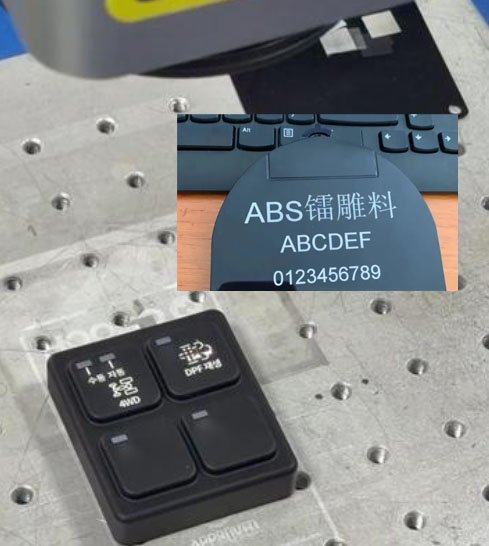
| Black or dark ABS | White, light-gray or high-contrast identification | Melting, raised texture, weak contrast, gloss halo and rough edges |
| White or natural ABS | Dark text, serial numbers, logos and QR codes | Yellowing, brown discoloration, carbonization and visible surface damage |
| Colored ABS | Readable marks that remain consistent with the product color | Different pigments can absorb laser energy differently |
| Flame-retardant ABS | Permanent identification on electrical and electronic components | Different chemical formulations and stricter cosmetic or functional requirements |
| Glass-filled ABS or ABS blends | Part numbers, traceability codes and logos | Uneven appearance, filler exposure and formulation-dependent contrast |
| Painted or coated ABS | Remove a coating to reveal a contrasting layer or create a surface legend | Coating removal may damage or melt the ABS underneath |
| Recycled or reprocessed ABS | Batch codes and production identification | Batch-to-batch variation in pigment, additives and marking response |
Our first question to a buyer is simple: Can you provide the exact molded part, not just a color sample or a material name? The best machine recommendation comes from testing the actual production component, including its texture, wall thickness and material grade.
2. Why ABS Melts, Burns or Develops a Rough Surface
ABS is a thermoplastic. When the laser deposits too much energy in a small area, the surface can soften, melt, swell, discolor or carbonize. The visible defect is not always a flame or obvious burn mark. It may appear as a shiny halo, raised lettering, rounded edges, small bubbles or a rough texture around the marking.
Plastic also behaves differently from metal. Its low thermal conductivity means heat does not spread away from the processing area in the same way it does in a metal workpiece. The laser energy absorbed by the polymer and its additives can therefore produce a localized surface change.
Common reasons for a poor ABS marking result
- Too much local energy: The selected power, speed, pulse behavior and scan overlap create excessive heating.
- Unsuitable pulse characteristics: A source with pulse behavior that is not suited to the ABS grade may create a wider melted area.
- Wrong wavelength for the formulation: The ABS or its additives may absorb the selected wavelength poorly or unevenly.
- Too many passes: Repeated exposure can build up heat and damage the surface.
- Incorrect focus: The actual spot size and energy density may differ from the intended setup.
- Excessive hatch overlap: Closely spaced scan lines can increase the total energy delivered to the same area.
- Material variation: A different pigment, filler or recycled-content percentage may change the marking response.
The goal is not simply to make the laser mark visible. The goal is to create the required contrast while keeping the surrounding plastic within the customer’s cosmetic and functional limits.
3. Choose the Right Laser Wavelength for ABS
Laser wavelength is one of the first things to evaluate when marking plastic. Different polymers and additives absorb different parts of the laser spectrum. A 1064 nm fiber laser, a 355 nm UV laser and a CO2 laser do not interact with every ABS formulation in the same way.
UV laser, 355 nm
A 355 nm UV laser is often a strong first candidate for ABS parts that need fine details, controlled surface appearance or reduced thermal impact. UV marking can create a color change through photochemical interaction with the polymer rather than relying only on a strongly thermal surface process.
Consider testing UV when you are marking:
- White or natural ABS housings that need dark identification.
- Cosmetic electronic enclosures with strict appearance requirements.
- Small text, logos and detailed product identification.
- Selected flame-retardant plastic grades.
- Thin molded parts where visible heat distortion is unacceptable.
UV is not a guarantee of zero heat or perfect contrast. A UV process can still create discoloration, haze or an unacceptable mark if the formulation and parameters are unsuitable. Test the finished production part.
Fiber laser, 1064 nm
A 1064 nm fiber laser can mark some ABS grades, particularly when the pigment or laser-sensitive additives provide suitable absorption. It may be a practical option for dark ABS or parts already developed for near-infrared laser marking.
However, a conventional fiber laser is not automatically the best choice for every ABS part. Some black ABS formulations can be difficult to mark cleanly with long, high-energy pulses. If the process creates melting, swelling or a rough surface, changing only the power may not solve the problem.
MOPA fiber laser
MOPA is a fiber laser architecture that provides adjustable pulse width on compatible sources. Pulse control gives the process engineer another variable to evaluate. It can be useful when a conventional 1064 nm process has a promising material response but needs further optimization.
Do not assume MOPA automatically solves a wavelength mismatch. If the ABS formulation does not respond well to 1064 nm, a different pulse setting may not create the required result. Compare MOPA with UV on the same part before paying extra for a feature you may not need.
Laser source comparison for ABS
| Laser type | When to evaluate it | Potential advantage | What can go wrong |
|---|---|---|---|
| UV, 355 nm | Fine marking, cosmetic parts, light-colored ABS and heat-sensitive applications | Can produce fine marks with a relatively small thermal footprint on suitable materials | Insufficient contrast, haze, discoloration or a cycle time that does not meet production needs |
| Fiber, 1064 nm | Dark or laser-sensitive ABS and formulations with suitable near-infrared absorption | Can be a cost-effective option when the material responds well | Melting, raised texture, weak contrast or an unsuitable response from the pigment package |
| MOPA fiber, 1064 nm | ABS grades where pulse-width adjustment may improve the marking window | More flexibility for testing pulse behavior | Additional cost without a meaningful improvement if the material is not suited to the wavelength |
| CO2 laser | Selected plastic engraving, surface texturing or coating-related processes | Can process many non-metal materials through surface interaction and material removal | Thermal damage, excessive removal, rough edges, residue or an unsuitable cosmetic result |
Practical starting point: For a white ABS electronics housing that needs fine, dark identification, compare UV first. For black ABS that needs a light mark, test a suitable short-pulse fiber process if the material formulation supports it. For a flame-retardant grade or a coated part, do not finalize the source until you have tested the exact production material.
4. Machine Setup: Control the Variables That Affect Surface Quality
Once the laser type has been selected for testing, the next job is to make the setup repeatable. A good sample is not enough if the next production batch has different focus, position or surface appearance.
4.1 Check the lens and marking field
The lens determines the available marking field and influences the focused spot size. A smaller field can be useful for small text and fine details, while a larger field covers a wider area. The actual result depends on the optical configuration, so do not choose a lens only by its nominal field size.
| Marking field | Possible application | What to verify |
|---|---|---|
| 70 × 70 mm | Small electronic components, compact ABS housings and fine identification | Smallest readable text, focus position and actual usable area |
| 110 × 110 mm | General ABS part marking and small-to-medium molded housings | Edge quality and code readability across the required working area |
| 150 × 150 mm or larger | Larger covers, panels and components | Whether the larger field still meets the required detail and contrast |
4.2 Verify focus on the actual molded surface
ABS parts are not always flat. A curved housing, recessed panel or ribbed surface can put different parts of the marking area at different heights. If the focus is correct at the center but wrong near the edge, small text and fine lines may become inconsistent.
- Use the approved focus gauge or focusing procedure for the selected lens.
- Check the actual part surface rather than an adjacent flat fixture surface.
- Use a fixed Z-axis reference for recurring products.
- Recheck focus after changing the lens, fixture or product height.
- For curved or uneven surfaces, test the full marking area rather than only the center.
4.3 Reduce unnecessary heat accumulation
If the ABS surface melts or develops a raised edge, review the whole scan strategy. Do not simply reduce power and assume the problem is solved.
- Test a higher scan speed while keeping other variables controlled.
- Check whether pulse energy and pulse duration suit the material.
- Review frequency and hatch spacing together, not in isolation.
- Start with one pass and add another only if the first pass does not meet the target.
- Inspect the mark after it has cooled, using the same lighting and viewing method.
Shorter pulses and reduced spot overlap can help reduce unwanted melting in some ABS processes. SPI’s published black-ABS example describes a 3 ns pulsed fiber process and explains how high speed can reduce spot overlap and total heat input. That is a source-specific application example, not a universal setting for all ABS grades.
4.4 Fixture the part properly
A plastic housing that moves during marking can create doubled edges, inconsistent spacing or a distorted code. Thin parts may also flex if they are not supported properly.
| ABS component | Fixture approach | Problem to prevent |
|---|---|---|
| Flat electronic cover | Locating nest with fixed stops | Different position and rotation from part to part |
| Curved appliance housing | Contoured support that holds the marking area at a repeatable height | Focus variation and movement during marking |
| Thin ABS panel | Full support under the marking area | Flexing, vibration and local distortion |
| Small electrical connector | Multi-position nest with controlled orientation | Inconsistent code location and manual positioning errors |
| Automotive molded trim | Product-specific locating fixture | Marking outside the approved identification zone |
5. ABS Laser Marking Parameters: Use a Controlled Test Matrix
There is no single parameter recipe that works for every ABS formulation. Even if two parts look identical, the resin grade or additive package may be different. A setting copied from another factory can create a melted edge, a weak mark or a different color.
The safest way to develop a process is to change a limited number of variables at a time and keep a record of the result.
5.1 Parameters to record
| Parameter | Why it matters | Record |
|---|---|---|
| Laser source and wavelength | Determines how the laser interacts with the ABS and its additives | UV 355 nm, fiber 1064 nm or another verified source specification |
| Average power | Controls the average energy delivered during marking | Software percentage and source rating |
| Pulse width | Changes the duration of each pulse on adjustable-pulse sources | Pulse duration in ns, where supported |
| Frequency | Changes pulse repetition rate and can affect the process response | Frequency in kHz |
| Scan speed | Affects exposure time and overlap along the scan path | Software speed in mm/s |
| Hatch interval | Controls the spacing between fill lines | Interval in mm |
| Pass count | Controls repeated exposure and total processing time | Number of passes and any cleaning pass |
| Focus position | Affects spot size and energy density on the surface | Lens, focus method and Z-axis position |
| Hatch angle | Changes fill direction and scan overlap patterns | Angle and whether cross-hatching is used |
5.2 A practical first-test procedure
- Prepare the real part. Use the production ABS grade, color, texture and molded geometry.
- Define the target. Specify the required contrast, smallest character, code size, surface condition and cycle time.
- Choose the first laser route. For fine cosmetic marking, test UV. For a suitable dark or laser-sensitive ABS grade, include a fiber test.
- Set the focus and fixture. Use the same lens and positioning arrangement intended for production.
- Run a small parameter matrix. Change one main variable at a time and label each sample clearly.
- Inspect the surface. Check contrast, line edges, raised material, melting, discoloration, gloss change and residue.
- Repeat the best candidate. Mark multiple parts using the same setup to check consistency.
- Save the approved recipe. Record source model, lens, material grade, settings, fixture, photos and inspection results.
5.3 Example: Published short-pulse fiber marking on black ABS
SPI Lasers published an application note on marking black ABS using its redENERGY pulsed fiber laser. The document describes a 3 ns pulse source and explains that short pulses and high scanning speed can help create contrast while limiting melting of the ABS matrix.
| Published example detail | Value stated in the application note | How to interpret it |
|---|---|---|
| Laser model | G4 20W EP-Z | Specific SPI source, not a JQ machine specification |
| Power shown in the parameter table | 10W | Do not assume the full rated source power was used |
| Pulse duration | 3 ns | Short-pulse example; not available on every fiber source |
| Frequency reference | 300 kHz | Source-specific operating condition |
| Pulse energy shown | 0.03 mJ | Published example value, not a universal ABS target |
| Number of passes | 4 | Multiple passes were used in that example; do not assume one pass is always enough |
| Reported coverage rate | Over 30 mm²/s | Specific to the sample and source configuration |
The useful lesson is not to copy these numbers. It is to understand the process direction: pulse duration, pulse energy, scan speed and overlap can matter as much as the power percentage. Test the same principle on your own ABS grade and compare the actual surface quality.
6. Real ABS Applications and What the Process Must Deliver
ABS is widely used for molded housings and industrial components. The marking requirement changes with the product. A cosmetic appliance cover may need a clean logo with no visible texture change, while an automotive electrical housing may need a durable traceability code that can be read by a camera.
6.1 Consumer electronics housings
Examples include router housings, electronic device covers, control panels and accessory enclosures. Typical marking content includes a brand logo, model number, certification symbol or serial number.
Process priority: Keep the surface appearance consistent. Check the mark under normal viewing conditions and inspect the gloss around the marking area. For small text, verify the actual character size on the production part.
6.2 Automotive ABS components
Examples include selected interior trim parts, electrical enclosures, connector housings and molded identification panels. Typical marking content includes part numbers, supplier codes, date codes and traceability information.
Process priority: Confirm the approved marking zone, code readability and resistance to the customer’s specified environmental tests. If the component is safety-related, the marking process must not compromise its mechanical or electrical function.
6.3 Electrical and flame-retardant housings
ABS and ABS blends are used in selected switches, electrical enclosures and control components. Flame-retardant grades may contain additives that change the laser response.
Process priority: Test the exact flame-retardant grade. Do not approve a process using standard ABS and then assume it will work on a flame-retardant version.
6.4 Appliance control panels and housings
Appliance parts may require icons, model numbers, brand marks and user-interface labels. Some components have a high-gloss or textured finish, making even a small heat halo easy to see.
Process priority: Check edge definition, gloss change and the appearance of the entire panel, not only the characters themselves.
6.5 Connectors and small molded components
Small connectors and molded parts often need compact data matrix codes, batch numbers or cavity identification. The available marking area may be limited, and a fixture is essential for repeatable positioning.
Process priority: Test the smallest code, the actual camera reading distance and the complete part orientation. A code that looks readable under a microscope may still fail the production reader.
7. Troubleshooting: How to Fix Melting, Burning and Poor Contrast
| Problem | Likely causes to investigate | Recommended action |
|---|---|---|
| ABS surface melts or swells | Excessive local energy, unsuitable pulse duration, low scan speed or too much overlap | Review pulse behavior, scan speed and hatch spacing. Test a suitable short-pulse or UV route. |
| Black ABS mark is too dark or rough | Carbonization, melting or an unsuitable material response | Compare a different wavelength or pulse condition. Inspect the surface texture, not only contrast. |
| White ABS turns yellow or brown | Excessive thermal effect or a formulation that responds poorly to the selected source | Test UV as an alternative and define a cosmetic acceptance limit for discoloration. |
| Mark is visible but the edge is raised | Foaming or melting in the surface layer | Check whether the required mark is a surface color change rather than a tactile or engraved mark. |
| Marking is uneven across one part | Focus variation, curved surface, inconsistent fixture or uneven molded texture | Check the full marking area, improve support and verify the focus at the actual surface height. |
| QR code or data matrix fails to read | Low contrast, damaged cell edges, unsuitable code size or inconsistent marking | Test with the production reader and the customer’s grading or verification method. |
| First batch passes but later batches fail | Material formulation, pigment, recycled content or surface finish has changed | Record material grade and batch. Revalidate after a resin or supplier change. |
| Part has odor, smoke or residue | Thermal decomposition or material/additive interaction | Stop and review the material SDS, process suitability and extraction system before continuing. |
Important: Do not process unidentified plastics or assume that all plastic fumes are harmless. Obtain the material safety data sheet (SDS), confirm the resin and additives, and use suitable local exhaust ventilation and filtration for the actual process. Do not laser-process PVC or unknown mixed plastics on the assumption that they behave like ABS.
8. JQ Laser Machine Configurations for ABS Marking
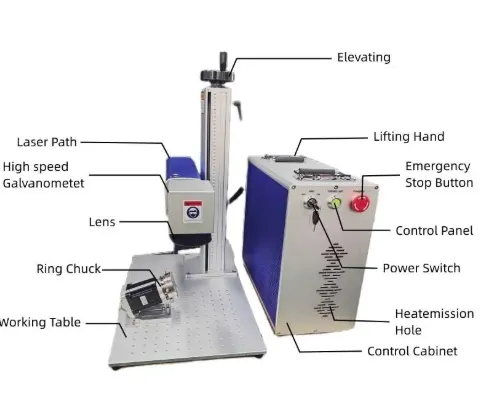
JQ Laser supplies UV and fiber laser marking configurations. For ABS applications, the machine should be selected according to the actual material grade, required appearance, marking area, production speed and cosmetic limits.
The following table lists configuration references from the JQ product range. These are machine specifications and available configuration options. They are not a claim that every ABS grade has been qualified on every model.
| Item | JQ configuration reference | Buyer confirmation |
|---|---|---|
| UV laser option | 5W UV configuration available in the product range | Confirm the exact source model, wavelength, output power and pulse specifications. |
| Fiber laser options | 20W, 30W, 50W and 100W configurations | Confirm the source model and whether its pulse characteristics suit the ABS formulation. |
| Fiber wavelength | Typically 1064 nm | Confirm the exact source datasheet. |
| MOPA option | Available on compatible fiber configurations | Confirm pulse-width and frequency ranges for the selected source. Do not assume all fiber models are MOPA. |
| Marking field | 110 × 110 mm standard reference on common configurations; 70 × 70 mm and larger fields may be available | Choose the lens according to the part size and smallest marking feature. |
| Scanner speed | Up to approximately 7,000 mm/s on referenced fiber configurations | This is a scanner specification, not a guaranteed ABS production rate. |
| Cooling | Air cooling on common fiber configurations | Confirm the cooling method of the selected UV or fiber source. |
| Power supply | 220V configuration reference for selected products | Confirm destination voltage, frequency, plug and electrical requirements. |
| Fixtures and automation | Custom workholding and automation can be discussed | Provide part drawings, dimensions, cycle-time target and loading method. |
For ABS parts with strict cosmetic requirements, we would usually compare a UV configuration with a suitable fiber option before making a final recommendation. If a dark ABS formulation responds well to 1064 nm, a fiber machine may meet the requirement at a lower system cost. If the fiber process causes melting or unacceptable surface change, UV deserves a direct comparison.
For a flame-retardant grade, a PC/ABS blend or a coated component, do not finalize the machine from a generic ABS demonstration. Ask for a test on the exact material and production geometry.
Explore the JQ UV laser marking machine, fiber laser marking machine, 20W fiber laser, 30W fiber laser and MOPA laser marking machine pages.
9. ABS Laser Marking Machine Procurement Checklist
Before purchasing a machine, compare the suppliers using the actual production part. The following checklist covers the working condition, evidence or test method, and limitations that should be clear before you place an order.
| Procurement check | Applicable working condition | Evidence or test method | Limitations to understand |
|---|---|---|---|
| 1. Exact ABS grade | All ABS parts, especially FR, glass-filled, recycled and PC/ABS grades | Obtain the resin grade, supplier TDS and SDS. Test a production part. | A test on standard ABS does not qualify a different formulation or blend. |
| 2. Laser wavelength | When comparing UV and 1064 nm fiber processes | Run a side-by-side sample test on the same part and inspect contrast and surface quality. | There is no wavelength that guarantees the best result for every ABS formulation. |
| 3. Laser source and pulse characteristics | When melting, raised edges or poor contrast are concerns | Request the exact source model and datasheet. Record pulse duration, frequency and power where available. | Not all fiber sources offer MOPA pulse-width control. A shorter pulse does not guarantee success on every material. |
| 4. Mark appearance | Cosmetic housings, logos, legends and product identification | Approve a physical sample against agreed limits for contrast, edge quality, gloss and discoloration. | “No burning” is not a measurable acceptance standard unless the customer defines visible and tactile limits. |
| 5. Smallest text or code | Compact connectors, electronic parts and traceability labels | Test the smallest actual artwork and verify it with the production camera or code reader. | Visual readability does not guarantee machine readability or code-grade compliance. |
| 6. Lens and marking field | Small parts, large housings or wide marking areas | Test at the intended lens field and inspect the full working area. | A larger lens field may not deliver the same fine-detail performance as a smaller field. |
| 7. Fixture and part support | Thin, curved, small or irregular molded parts | Run multiple parts in the proposed fixture and check position, focus and distortion. | A standard worktable may not be sufficient for repeatable production. |
| 8. Repeatability across batches | Recurring orders and multi-color production | Test parts from more than one material batch or color where possible. Save the approved process record. | One passing sample does not establish consistency across resin batches or suppliers. |
| 9. Production cycle time | High-volume component marking and automated lines | Measure complete cycle time, including loading, locating, marking, inspection and unloading. | Scanner speed alone does not represent accepted parts per hour. |
| 10. Safety and extraction | Any ABS laser marking workstation | Review material SDS, extraction requirements, enclosure, interlocks and local safety rules. | Fume composition depends on the formulation and process. A generic filter specification is not proof of suitability. |
| 11. Software and data handling | Serial numbers, QR codes, date codes and production traceability | Test variable-data import, code generation, file formats and data handoff with the intended workflow. | Software functions and automation interfaces vary by controller and configuration. |
| 12. After-sales and spare parts | Export buyers and factories running regular production | Request warranty terms, training scope, support channels, spare-parts list and response procedure in writing. | Warranty exclusions, shipping costs and local service availability must be confirmed in the quotation. |
10. Which Machine Should You Choose for ABS?
Use the following comparison to shortlist the machine type. The final decision should be based on the same production part, the same artwork and the same acceptance criteria.
| Buyer requirement | UV 355 nm | Fiber 1064 nm | MOPA fiber 1064 nm | CO2 |
|---|---|---|---|---|
| Fine text and small details | Strong candidate to test | Depends on grade and optical setup | Depends on grade and pulse settings | Evaluate carefully for detail and heat effect |
| Light-colored ABS | Worth testing for controlled dark marking | Depends on pigment and additives | Depends on pigment and pulse response | Usually not the first choice for fine cosmetic identification |
| Black ABS | Can be tested for controlled surface marking | Can work on suitable formulations | Worth comparing where pulse control may help | May be useful for selected engraving processes |
| Strict cosmetic limits | Often a useful first route to evaluate | Requires careful process validation | Requires careful process validation | Check thermal footprint and material removal |
| Flame-retardant ABS | Worth evaluating first on the exact grade | Formulation-dependent | Formulation-dependent | Requires a specific material and fume assessment |
| Pulse-width flexibility | Depends on UV source design | Usually limited on conventional sources | Adjustable on compatible MOPA sources | Depends on the CO2 source design |
| Best purchase decision | Choose when sample quality justifies UV | Choose when the ABS grade responds well and the result meets requirements | Choose when pulse adjustment provides a measurable improvement | Choose only when the required process and surface result justify it |
Our recommendation: For fine, cosmetic ABS marking, put UV on the shortlist first. For dark ABS or a laser-sensitive grade, compare 1064 nm fiber. Add MOPA to the comparison only when adjustable pulse behavior can improve the result. Do not buy a more expensive source until a side-by-side sample test shows why it is needed.
11. What Should Be Included in the Machine Quotation?
When comparing suppliers, ask for a complete configuration rather than a price based only on laser power. A machine that produces a good sample but lacks the correct fixture, lens or extraction arrangement may not be ready for production.
- Laser source brand, exact model, wavelength and rated power.
- Pulse specifications and MOPA capability, if applicable.
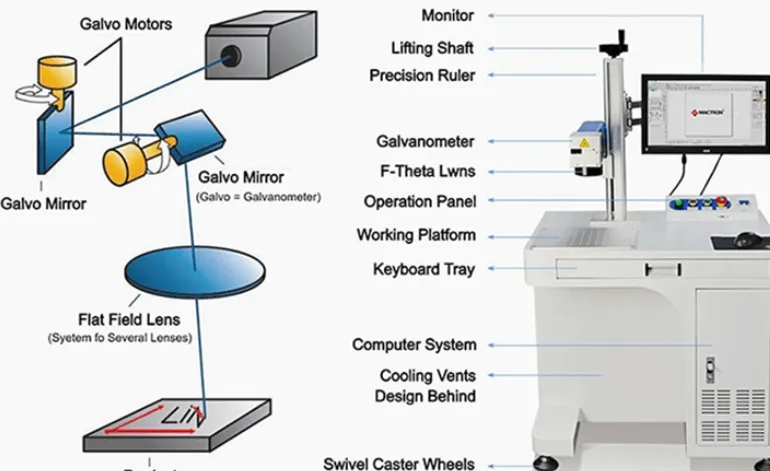
- Galvo scanner and marking lens specification.
- Controller, software version and supported file formats.
- Worktable, Z-axis adjustment and focusing method.
- Custom fixture or automation design, if required.
- Enclosure, interlocks and extraction arrangement.
- Sample test results and the agreed acceptance criteria.
- Training, software backup and operating instructions.
- Warranty, spare parts and after-sales support terms.
- Packaging, shipping, customs duties and local taxes.
For export orders, confirm the destination voltage, electrical frequency, plug type, shipping terms and customs responsibilities before payment. If the machine will be used by several operators, request a saved parameter file and a basic setup sheet for every approved ABS product.
12. Frequently Asked Questions
Can ABS plastic be laser marked without melting?
Yes, many ABS grades can be marked without unacceptable melting or surface damage. The result depends on the resin formulation, pigment, additives, laser wavelength, pulse behavior, focus and scan strategy. Test the exact production part before approving the process.Which laser is best for ABS plastic?
UV 355 nm is often a useful first option for fine marking and cosmetic ABS parts. A 1064 nm fiber laser can also work on suitable dark or laser-sensitive formulations. Compare the two on the actual ABS grade rather than choosing by general material name.Can a 1064 nm fiber laser mark black ABS?
Yes, some black ABS formulations respond well to 1064 nm fiber marking. The pigment and additive package affect absorption and contrast. If the surface melts or becomes rough, review pulse characteristics, scan overlap and wavelength suitability.Is a UV laser better than a fiber laser for ABS?
UV is often worth testing first when fine details and low thermal impact are important. Fiber may be more economical when the ABS formulation responds well to 1064 nm. The best option is the one that meets the required appearance, readability, cycle time and cost on the actual part.Does MOPA prevent ABS from melting?
No. MOPA provides adjustable pulse width on compatible sources, which can help optimize some processes. It cannot guarantee a no-melt result if the wavelength, material formulation or overall energy input is unsuitable.Why does my ABS part turn yellow after laser marking?
Yellowing or brown discoloration may result from thermal effects or the way the ABS formulation responds to the selected wavelength and process conditions. Test UV as an alternative where appropriate, and define a clear cosmetic acceptance limit.Can I use the same laser settings for black and white ABS?
Do not assume so. Pigments and additives can change the laser absorption and visible result. Keep separate approved recipes for different colors and formulations unless testing proves that one process works consistently for all of them.Can laser marking damage flame-retardant ABS?
It can create an unacceptable surface result if the process is not matched to the grade. Flame-retardant additives can change the material response. Test the exact grade and review its safety data before selecting the process.How do I prevent raised edges around ABS lettering?
Raised edges can be associated with foaming or melting. Review pulse characteristics, scan speed, hatch spacing, focus and pass count. Inspect the surface texture as well as the contrast when comparing samples.What should I send a supplier for an ABS laser marking test?
Send the actual molded part, resin grade, color, surface texture, material TDS or SDS, artwork, required contrast, smallest text or code size, marking area and production quantity. Also explain any limits on gloss change, melting, discoloration or surface texture.
13. Request an ABS Sample Test from JQ Laser
If you are looking for a laser marking machine for ABS plastic, start with a sample test on your actual component. A short demonstration on a different plastic grade cannot confirm that the same process will work on your production parts.
To help us evaluate the right configuration, send:
- ABS grade or material supplier information.
- Part color, surface texture and molded dimensions.
- Whether the part is flame-retardant, glass-filled, recycled or a PC/ABS blend.
- Artwork, logo, serial number or QR code.
- Required contrast and acceptable surface condition.
- Smallest character or code size.
- Daily production quantity and target cycle time.
Our team can discuss a UV or fiber configuration, lens selection, fixture arrangement and sample-testing plan based on your application. The final machine recommendation should follow the actual sample result and agreed acceptance criteria.
Jining Junqi (JQ) Laser
Website: https://fiberlasermarking.com/
Email: sales@fiberlasermarking.com
Contact JQ Laser for an ABS plastic marking test and machine quotation.
References and Technical Sources
The technical points in this guide are based on published laser-material guidance and application examples. Third-party process settings are identified as examples and should not be treated as universal recipes or JQ production parameters.
- TRUMPF: Laser Marking Booklet, Section 2.2 Plastics. Explains plastic marking mechanisms, absorption characteristics, additives and wavelength selection.
- SPI Lasers: Marking of ABS Black Plastic. Describes a short-pulse fiber laser example and explains the relationship between pulse duration, scan speed, overlap and melting.
- KEYENCE: Laser Marking on Plastic. Discusses plastic formulation, additives, color and the importance of selecting a compatible laser process.
- TRUMPF: Laser Marking Plastic. Explains foaming, color change and UV marking of selected flame-retardant plastics.
- Polymers: Review and Assessment of Existing and Future Techniques for Traceability with Particular Focus on Applicability to ABS Plastics. Reviews laser marking mechanisms and the influence of polymer composition and additives.
- Datalogic: Laser Marking Processes Reference Guide. Describes plastic foaming, color change, marking additives and related process mechanisms.
Parameter and application note: The SPI black-ABS values refer to its own laser source and sample. They are not validated JQ machine settings. The final wavelength, source, lens and process parameters must be confirmed on the customer’s exact ABS grade and production part.