If you are searching for a laser marking machine price in 2026, you have probably already noticed something confusing: the same 20W, 30W or 50W machine can have very different prices from different Chinese suppliers.
One supplier may quote less than US$1,500. Another may quote US$2,500 or US$4,000 for what appears to be almost the same machine.
So which one is right?
After working with laser marking machines and talking with overseas buyers, I have learned that the wrong way to buy a laser is to start with: “How much is your machine?”
The better question is: “What machine do I actually need for my material, production speed and marking result?”
This 2026 laser marking machine price guide is written from a practical manufacturer and salesperson’s perspective. I will show you the typical price ranges for fiber, UV and CO2 laser marking machines, explain why quotations vary so much, and—more importantly—show you when it makes sense to buy 20W, 30W, 50W or 100W.
I will also point out some situations where buying the more expensive machine is actually the wrong decision.
Laser Marking Machine Price in 2026: The Short Answer
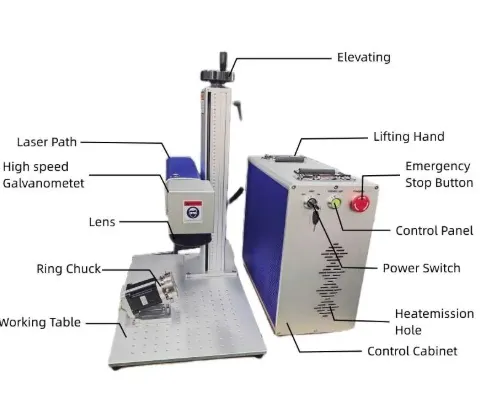
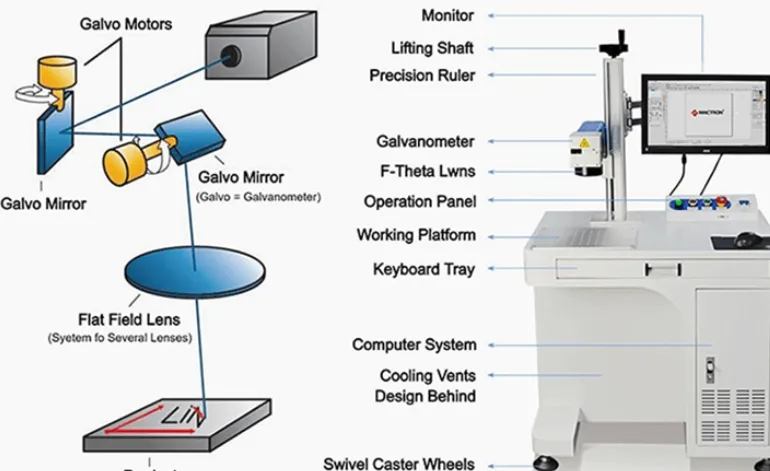
There is no single “correct” laser marking machine price. The final price depends on the laser source, power, wavelength, optical system, marking area, scanner, software, cooling system, machine structure and automation requirements.
For Chinese laser marking equipment, the following ranges are useful as a market reference rather than a fixed quotation.
| Machine Type | Typical Configuration | Public Market Reference | Typical Export Machine Budget |
|---|---|---|---|
| Fiber Laser | 20W | Approx. US$500–$1,600 | Approx. US$1,000–$2,000 |
| Fiber Laser | 30W | Approx. US$530–$1,600 | Approx. US$1,200–$2,500 |
| Fiber Laser | 50W | Approx. US$860–$3,884 | Approx. US$1,800–$4,500 |
| Fiber Laser | 100W | Approx. US$1,500–$6,000 | Approx. US$5,000–$17,000 for high-end MOPA/enclosed systems |
| UV Laser | 3W | Approx. US$1,500–$2,800 | Configuration dependent |
| UV Laser | 5W | Approx. US$1,600–$5,800 | Configuration dependent |
| UV Laser | 10W | Approx. US$900–$5,800 | Configuration dependent |
| CO2 Laser | 30W | Approx. US$1,100–$4,300 | Configuration dependent |
| CO2 Laser | 60W | Approx. US$1,500–$6,700 | Configuration dependent |
| CO2 Laser | 100W | Approx. US$2,800–$29,000 | Highly application dependent |
Important: These are market reference ranges compiled from public supplier pricing and typical export configurations. They are not fixed JQ Laser quotations. Prices can change according to laser source, lens, scanner, machine enclosure, automation, shipping terms and customer requirements.
The biggest mistake is comparing a US$1,200 machine with a US$3,000 machine simply because both are called “30W fiber laser marking machines.”
You need to compare the configuration behind the number.
My First Recommendation: If I Were the Salesperson, I Would Start With 30W Fiber
Let me make this very clear because this is probably the question I hear most often:
If I were recommending a fiber laser to a customer who mainly marks metal, I would normally start with 30W—not 50W.
Why?
Because 20W and 30W are enough for a very large number of everyday metal marking applications. You do not need to pay for 50W simply because 50W sounds more powerful.
For normal surface marking such as:
- Serial numbers
- QR codes
- Barcodes
- Logos
- Product identification
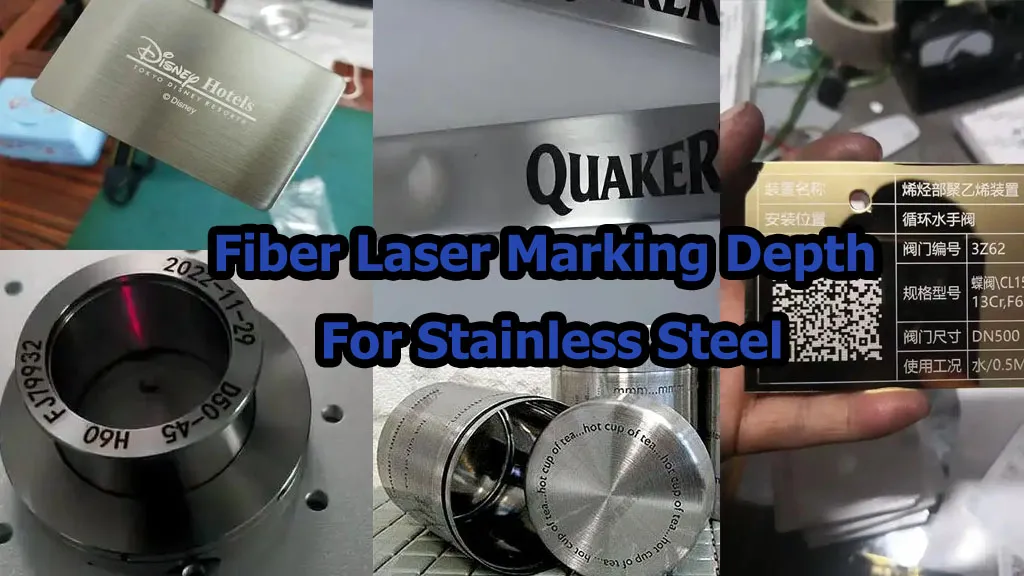
- Stainless steel marking
- Aluminum marking
- Brass marking
- Small hardware parts
20W or 30W can already be a very practical solution.
I would move the customer to 50W when there is a real reason: deeper engraving, faster cycle time, larger production volume, or a requirement for more stable material removal on demanding jobs.
And I would look at 100W when the application starts to look more like industrial production rather than a simple marking station.
20W vs 30W vs 50W vs 100W Fiber Laser: What Are You Actually Paying For?
| Power | My Typical Recommendation | Best For | When I Would Not Recommend It |
|---|---|---|---|
| 20W | Excellent entry point | General surface marking, QR codes, logos, serial numbers | Very deep engraving or very high production volume |
| 30W | My default recommendation for many metal buyers | General industrial marking, better productivity, light engraving | Heavy deep engraving |
| 50W | Upgrade when production requires it | Deep engraving, faster production, larger workloads | Simple low-volume identification marking |
| 100W | Industrial/high-production choice | Deep engraving, heavy processing, production lines | Small workshops with simple marking jobs |
20W Fiber Laser
A typical 20W configuration uses a 1064nm pulsed fiber laser. Common source options in the Chinese market include Raycus P20QB and Max MFPT-20. For applications requiring adjustable pulse width, JPT MOPA configurations are another option.
| Parameter | Typical Reference |
|---|---|
| Laser power | 20W |
| Wavelength | 1064nm |
| Frequency | Commonly 20–100kHz for standard pulsed configurations |
| Pulse width | Approx. 20–150ns for typical standard configurations; MOPA offers much wider adjustment depending on source |
| Marking area | 110×110mm commonly; 150/200/300mm configurations available |
| Maximum scanner speed | Approximately 7,000–8,000mm/s depending on configuration |
| Minimum line width | Approximately 0.01–0.012mm under suitable optical conditions |
| Minimum character | Approximately 0.15mm depending on material, font and optical setup |
JQ Laser currently publishes a 20W fiber model with a 1064nm source, up to 7000mm/s marking speed, a standard 110×110mm marking field, air cooling and 110V/220V power options.
That makes 20W a very sensible configuration for many small and medium metal components.
30W Fiber Laser
This is where I would normally start for a customer who says:
“I don’t need deep engraving, but I want something faster and I don’t want to outgrow the machine too quickly.”
Typical source options include Raycus P30QB and Max MFPT-30. MOPA configurations are also available when pulse-width control is important.
| Parameter | Typical Reference |
|---|---|
| Laser power | 30W |
| Wavelength | 1064nm |
| Frequency | Commonly 20–100kHz for standard pulsed fiber sources |
| Marking area | 110×110 / 150×150 / 200×200 / 300×300mm depending on lens |
| Scanner speed | Approximately 7,000–12,000mm/s depending on configuration |
The price difference between a basic 20W and 30W system can be relatively small compared with the overall machine investment. That is one reason I often recommend 30W as the “safe middle” for a buyer who expects the machine to be used for several years.
50W Fiber Laser
I would not sell 50W to every customer.
I would recommend it when the customer has a real production reason.
Typical sources include Raycus P50QB, Max MFPT-50 and JPT MOPA 50W configurations.
| Parameter | Typical Reference |
|---|---|
| Laser power | 50W |
| Wavelength | 1064nm |
| Frequency | Commonly 20–100kHz for standard pulsed configurations |
| Marking area | 110×110 / 150×150 / 200×200 / 300×300mm |
| Typical scanner speed | Up to approximately 8,000mm/s depending on configuration |
| Main advantage | Higher energy delivery, deeper engraving and improved productivity |
JQ Laser currently lists its 50W fiber system with 1064nm wavelength, up to 8000mm/s maximum marking speed, air cooling and 110×110mm standard marking area with larger lens options.
100W Fiber Laser
100W is a different conversation.
At this level, I would first ask about the production process rather than the product.
Typical applications include:
- Deep metal engraving
- Large production batches
- Heavy-duty industrial components
- Production-line marking
- High-throughput identification
Typical source choices include Raycus P100Q, Max MFPT-100 and higher-end JPT M7 MOPA configurations.
High-power machines can be sold as standalone systems, enclosed systems or integrated production-line solutions, which is one reason the price range becomes extremely wide.
20W vs 30W: Why I Often Recommend 30W
This is not because 20W is bad.
Quite the opposite. 20W is one of the safest and most economical fiber laser configurations for general metal marking.
But suppose you tell me:
- You mark metal every day
- You expect production to increase
- You want better processing margin
- You may do some light engraving later
In that case, I would probably quote 30W first.
The extra investment can be easier to justify than upgrading the machine later.
But if you tell me:
“I only mark 100 stainless steel plates a day and the QR code takes two seconds.”
Then I have no good reason to push you toward 50W. 20W may already do the job perfectly well.
When Should You Upgrade From 20W to 50W?
Customers sometimes tell me:
“I want 50W because 20W is not enough.”
I usually ask: “What exactly is not enough?”
There are three common answers.
1. They Need More Depth
If the customer needs deeper engraving, more laser energy can reduce the number of passes and improve productivity.
2. They Need a Shorter Cycle Time
If the factory is marking thousands of parts, processing time becomes more important than the initial machine price.
3. They Want More Production Margin
A 50W machine provides more processing headroom for demanding jobs. That does not mean every mark will automatically be twice as fast. Actual cycle time depends on material, graphic density, hatch settings, frequency, speed and required depth.
Fiber Laser Price: Why the Laser Source Matters
A machine’s wattage does not tell you everything.
For 20W and 30W fiber systems, common Chinese source options include Raycus and Max. For applications where pulse width needs to be actively controlled, MOPA sources such as JPT M7 are often considered.
The reason MOPA becomes interesting is not simply “higher quality.” It gives the engineer more control over pulse characteristics.
That can be useful for:
- Black marking on anodized aluminum
- Color marking on stainless steel
- Fine plastic processing
- Heat-sensitive applications
- Special surface effects
JQ Laser currently publishes MOPA configurations from 20W through 100W, with adjustable pulse width and frequency ranges depending on configuration.
UV Laser Marking Machine Price in 2026
If you are marking plastic, glass, PCB, medical packaging or other sensitive materials, don’t automatically compare UV with fiber based on price.
Compare the material interaction.
Typical UV configurations include:
| UV Power | Typical Application | Market Reference |
|---|---|---|
| 3W | Fine marking and sensitive materials | Approx. US$1,500–$2,800 |
| 5W | General precision plastic/electronics marking | Approx. US$1,600–$5,800 |
| 10W | Higher productivity and industrial applications | Approx. US$900–$5,800 |
JQ Laser currently lists UV configurations at 3W, 5W, 10W and 15W, using a 355nm wavelength, with air or water cooling depending on configuration and application.
For many plastic, PCB and precision marking applications, the important advantage is lower thermal impact rather than simply higher power.
When I Would Recommend UV Instead of Fiber
Here are some examples where I would test UV first:
- HDPE
- Engineering plastics
- Medical packaging
- Pharmaceutical packaging
- PCB
- Electronic components
- Glass
- Transparent or sensitive materials
JQ Laser’s published UV plastic solution specifically positions 355nm UV technology for ABS, PC, PVC, PP, PEEK, POM and other engineering plastics where low thermal impact is important.
CO2 Laser Marking Machine Price in 2026
CO2 is still the right answer for many non-metal applications.
Typical applications include:
- Wood
- Acrylic
- Leather
- Paper
- Packaging film
- Rubber
- Selected plastics
| Power | Typical Application | Market Reference |
|---|---|---|
| 30W | General non-metal marking and engraving | Approx. US$1,100–$4,300 |
| 60W | Higher speed and deeper processing | Approx. US$1,500–$6,700 |
| 100W | Industrial lines and larger processing | Approx. US$2,800–$29,000 |
The huge 100W CO2 price range is not a typo.
A sealed RF source, a glass-tube solution, a flying marking system, a large-format system and a 3D or automated industrial installation are completely different projects.
One of the Most Common Mistakes: Using the Wrong Laser
This is where a salesperson’s experience becomes useful.
I have seen customers make the following mistakes:
| Wrong Choice | Why It Is a Problem | Better Direction |
|---|---|---|
| Fiber for glass | Poor material interaction and unwanted thermal effects | Test UV first |
| Fiber for acrylic | Usually not the natural choice | CO2 or UV depending on application |
| Fiber for HDPE | May produce poor contrast or undesirable thermal effects | UV testing is often more appropriate |
| UV for deep metal engraving | Wrong economic and processing direction | Fiber, often higher power |
| CO2 for bare metal | Wavelength is not the natural choice for most bare-metal marking | Fiber laser |
Real Application Case: Why One Customer Upgraded From 10W to 20W MOPA
One of the more useful lessons from application testing is that higher power is not always the first solution.
In one U.S. acrylic/maple-related application, the customer initially considered a 10W system. During testing, the output stability, heating and carbonization behavior did not provide the desired result.
The final direction was a 20W JPT MOPA configuration.
The important point is not “20W is always better than 10W.”
The actual lesson is: the material and required effect determine the laser configuration.
If the customer had simply purchased the cheapest 10W machine without testing, the initial saving could have become a much bigger production problem.
Real Application Case: Automotive Traceability
For automotive components, the customer’s requirement is often not “engrave as deep as possible.”
The real requirement may be:
- Permanent traceability
- Data Matrix or QR code
- Serial numbers
- Repeatable positioning
- Production-line integration
- Readable marks after handling
In U.S. automotive-related applications, 20W fiber systems have been used for metal traceability applications where the priority was reliable identification and integration rather than deep engraving.
This is exactly why I would not automatically recommend 50W just because the customer works in automotive manufacturing.
Real Application Case: BAE Systems-Type Metal Traceability
Aerospace and defense-related manufacturing places a strong emphasis on permanent identification and traceability.
For a metal UID application, the key questions are:
- Can the code be marked consistently?
- Is the mark durable?
- Can the system maintain repeatability?
- Can the machine fit the production workflow?
Again, this does not automatically mean that 100W is required. A well-matched 20W or 30W fiber system can be the better engineering decision when deep material removal is not the objective.
Real Application Case: HDPE Bottle Bottom
Plastic packaging is a very different situation.
A German HDPE bottle application required a UV approach because the material and surface quality requirements made thermal processing a concern.
This is a good example of why I tell customers: do not tell me your budget before you tell me your material.
If the material is HDPE, medical packaging or another heat-sensitive polymer, I want to see the sample before I recommend fiber, UV or CO2.
Real Application Case: Wood Furniture
For wood furniture and similar organic materials, CO2 is often a much more natural choice than fiber.
The customer’s goal may be:
- Logo marking
- Decorative engraving
- Serial numbers
- Pattern engraving
- Large-area processing
The wavelength and absorption characteristics of the material matter more than simply choosing the laser with the highest wattage.
What Buyers Usually Ask Me Before Ordering
After enough customer conversations, the same questions come up again and again.
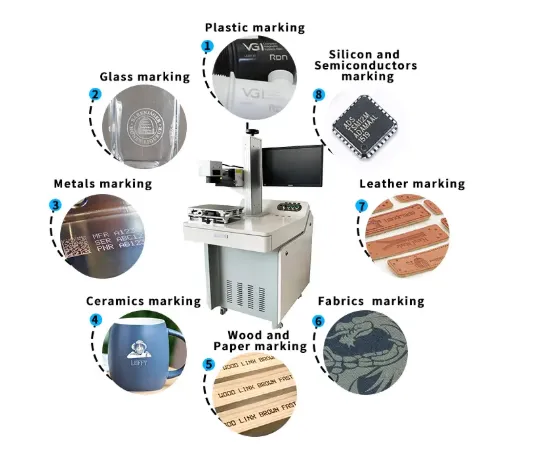
What materials can it mark?
This is usually the first question—and it should be. The laser should be selected according to the material.
Can it mark QR codes?
Yes, fiber, UV and CO2 systems can support barcode, QR code and variable-data marking when the material and application are suitable.
How fast is it?
Maximum scanner speed is not the same as real production cycle time. Ask the supplier to test your actual graphic on your actual material.
Can it work on my production line?
Yes, but line integration is a separate engineering project. It may involve conveyor systems, sensors, PLC, robot loading, vision positioning and MES/database communication.
What about after-sales service?
Ask who actually handles technical problems, how remote support works and which components are considered consumable or service parts.
How do I maintain the lens and cooling system?
The maintenance requirements depend on the machine type, working environment and cooling configuration. A good supplier should give you a practical maintenance schedule rather than simply saying “maintenance free.”
Where Buyers Usually Make the Most Expensive Mistakes
Mistake 1: Choosing the Cheapest Machine
A US$800 machine can look attractive until you discover that the quotation excludes the lens you actually need, uses a different source, or cannot produce the required result.
Mistake 2: Buying Too Much Power
If you only need surface identification, 100W may be unnecessary capital expenditure.
Mistake 3: Buying Too Little Power
If you need deep engraving thousands of times per day, 20W may become the bottleneck.
Mistake 4: Choosing the Laser Before Testing the Material
This is particularly risky with plastics, glass, coated materials and special alloys.
Mistake 5: Comparing Maximum Speed
A supplier may quote 8000 or 12000mm/s. That number alone tells you very little about your actual production cycle.
How to Compare Two Laser Marking Machine Quotes
When you receive quotations from two suppliers, create a simple comparison sheet.
| Item | Supplier A | Supplier B |
|---|---|---|
| Laser source brand/model | ||
| Laser power | ||
| Wavelength | ||
| Pulse width | ||
| Frequency range | ||
| Galvanometer | ||
| Lens brand/model | ||
| Marking area | ||
| Software | ||
| Cooling | ||
| Rotary axis | ||
| Warranty | ||
| Sample test | ||
| Shipping terms | ||
| Total delivered cost |
What Should Be Included in the Final Price?
Before placing an order, ask the supplier to clearly state whether the quotation includes:
- Laser source
- Galvanometer scanner
- F-theta lens
- Marking software
- Computer
- Rotary axis
- Auto focus
- Vision system
- Fume extraction
- Safety enclosure
- Packaging
- Spare parts
- Remote installation
- Shipping
The “machine price” and the “price delivered and ready for production” are not always the same number.
My 2026 Laser Marking Machine Buying Recommendation
| Your Situation | What I Would Test First | Reason |
|---|---|---|
| Small metal parts, low volume | 20W Fiber | Lowest sensible investment for many applications |
| General factory metal marking | 30W Fiber | Good balance of price, speed and future capacity |
| Deep engraving | 50W Fiber | Higher energy and material removal |
| High production volume | 50W–100W Fiber | Higher productivity and process margin |
| Engineering plastics | UV test first | Lower thermal impact for suitable applications |
| Glass | UV test first | Better suited to precision surface interaction |
| PCB/electronics | UV | Fine marking and sensitive components |
| Wood/acrylic/leather | CO2 | Suitable wavelength for many organic materials |
| Production line | Integrated system | Automation matters more than standalone machine price |
Our Practical Rule: Test First, Then Buy
If you remember only one thing from this article, remember this:
Do not buy a laser marking machine based only on the specification sheet.
Send your real material to the supplier. Send the actual marking file. Tell them your daily production volume. Tell them the required cycle time. Tell them the required depth and contrast.
Then compare the test results.
For JQ Laser, application testing can evaluate:
- Laser power
- Marking speed
- Frequency
- Pulse parameters where applicable
- Marking contrast
- Surface quality
- Thermal impact
- Marking depth
- QR/Data Matrix readability
This is particularly important when choosing between fiber, UV and CO2.
Final Answer: How Much Should You Budget?
If you are mainly marking metal and you are starting a new project, I would roughly think about the budget like this:
- US$1,000–$2,000: basic 20W fiber configurations
- US$1,200–$2,500: practical 30W fiber configurations
- US$1,800–$4,500: 50W fiber configurations
- US$5,000+: higher-end 100W, MOPA, enclosed or automated systems
For UV, a realistic starting point is generally several thousand dollars depending on power and configuration. For CO2, the range is even wider because RF, glass-tube, flying and automated systems have very different costs.
But if I were making the purchase decision myself, I would not automatically choose the cheapest machine.
I would choose the lowest-cost machine that can reliably meet the actual production requirement.
And for a typical metal-marking customer, I would usually test 30W fiber first.
Not because 30W is always the best.
Because it is often the most sensible balance between investment, speed and future production capacity.
Need a Laser Marking Machine Recommendation?
If you are comparing 20W, 30W, 50W or 100W fiber laser marking machines, or you are not sure whether you need fiber, UV or CO2, send the supplier your actual material and marking requirements first.
JQ Laser provides fiber, UV, CO2 and MOPA laser marking solutions for different industrial applications.
Explore JQ Laser Laser Marking Solutions
View Fiber Laser Marking Machines
View MOPA Laser Marking Machines
View UV Laser Marking Machines
View CO2 Laser Marking Machines
Send us your material, product photo, marking content, required marking size and daily production volume. We can determine the appropriate laser type and power from the application instead of simply selling you the highest-power machine.
Sources and Traceability
The technical specifications in this guide are based on a combination of manufacturer-published specifications, JQ Laser’s current published product information, and public Chinese-market pricing references. Prices are indicative and should not be treated as guaranteed quotations.
- Raycus P20QB/P30QB official product documentation: 1060–1085nm wavelength range and 20W/30W average power.
- JQ Laser 20W Fiber Laser Marking Machine: 20W, 1064nm, up to 7000mm/s, 110×110mm standard field and air cooling.
- JQ Laser Fiber Laser Marking Machine: 20W/30W/50W/60W/100W configurations and up to 12,000mm/s maximum scanner speed.
- JQ Laser 50W Fiber Laser Marking Machine: 50W, 1064nm, up to 8000mm/s and air cooling.
- JQ Laser UV Laser Marking Machine: 355nm, 3W/5W/10W/15W configurations and air/water cooling options.
- JQ Laser CO2 Laser Marking Machine: 10W/30W/60W/100W configurations for non-metal applications.
Because laser source models, market prices and machine configurations change over time, buyers should request a current technical quotation and sample test before placing an order.