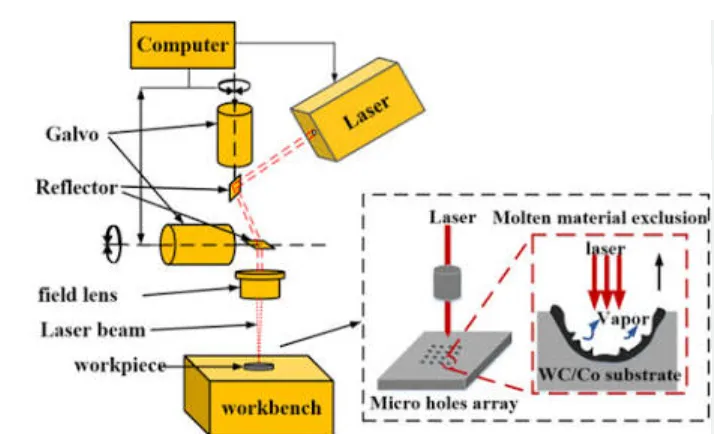
Table of Contents
Why Laser Marking Machine Reliability Matters in 2026
Laser marking machines have become essential in modern manufacturing for permanent, high-precision identification, traceability, and branding. From automotive parts and medical devices to electronics and consumer goods, these systems deliver non-contact, durable marks on metals, plastics, glass, and more.The global laser marking machine market was valued at approximately USD 3.38–4.1 billion in 2025 and is projected to reach USD 7.08–7.8 billion by 2033–2034, growing at a CAGR of 7.4%–8.56%. Asia-Pacific holds the largest share (around 37–44%), driven by electronics and automotive manufacturing, while fiber lasers dominate with roughly 44–48% market share.
Despite their reliability, unplanned downtime remains costly. Industry studies show large manufacturing facilities lose an average of 27 hours per month to machine failures, with costs reaching hundreds of thousands of dollars per hour in high-volume sectors. Proper troubleshooting and preventive maintenance can reduce these losses dramatically.This comprehensive guide covers the most common laser marking machine faults, root causes, step-by-step solutions, detailed comparisons, professional data, maintenance schedules, and cost analysis. Whether you operate a fiber, CO₂, or UV system, this resource will help you minimize downtime, improve mark quality, and maximize return on investment.
Understanding Laser Marking Machine Types and Their Failure Tendencies
Different laser sources have distinct strengths, limitations, and common failure modes.
| Laser Type | Wavelength | Best Materials | Typical Lifespan (Hours) | Common Failure Modes | Maintenance Level | Approximate Power Range |
|---|---|---|---|---|---|---|
| Fiber Laser Marking Machine | 1064 nm | Metals, some plastics | 50,000–100,000+ | Power attenuation, dirty optics, galvo issues | Low | 20–100 W+ |
| CO₂ Laser Marking Machine | 10.6 μm | Wood, acrylic, leather, paper, some plastics | 20,000–30,000 | Tube degradation, gas issues, mirror alignment | Medium | 10–100 W |
| UV Laser Marking Machine | 355 nm | Plastics, glass, ceramics, sensitive electronics | 8,000–15,000 | Crystal aging, contamination sensitivity | Higher | 3–15 W |
| MOPA Fiber Laser Marking Machine | 1064 nm (adjustable pulse) | Metals (color marking), plastics | Similar to fiber | Pulse parameter drift, optics | Low–Medium | 20–100 W |
Fiber lasers lead the market due to high electro-optical efficiency (often >30%), excellent beam quality, and near-maintenance-free operation. CO₂ systems remain popular for non-metals, while UV excels in “cold” processing for heat-sensitive materials.
Core Troubleshooting Principles
Always follow these safety and diagnostic rules:
- Power off and lock out the machine before mechanical or optical work.
- Wear appropriate laser safety glasses for the wavelength.
- Start with the simplest checks (power, connections, software) before complex components.
- Document parameters and changes for future reference.
- Test on scrap material after any adjustment.
High-Frequency Fault 1: No Laser Output (Laser Not Firing)
This is the most critical production-stopping issue.Symptoms: Software runs normally, but no beam is emitted; red pilot light may still work.Common Causes & Solutions:
- Power and interlock issues — Check main power, key switch, emergency stop button, and door interlocks. Release the e-stop by rotating it. Verify stable 220V (or specified) supply.
- Software and control card problems — Restart software, confirm power setting >0, reinstall drivers, reseat USB/Ethernet cables. Ensure the correct control card (e.g., JCZ/BJJCZ) is recognized.
- Optical path blockages — Remove protective lens covers. Clean focusing lens and protective window with anhydrous ethanol and lint-free wipes (wipe in one direction only).
- Cooling and protection triggers — Check chiller water level/temperature (ideal ~20–25°C), clean air filters and fans. Over-temperature protection often activates above 60°C.
- Laser source failure — For older lamp-pumped systems, check krypton lamp. For fiber systems, measure output with a power meter if available. Contact the manufacturer if power is significantly attenuated.
Professional Tip: Many “no light” cases are resolved by simply releasing the emergency stop or cleaning a dirty protective window. Dirty optics can reduce effective power by 30–40%.
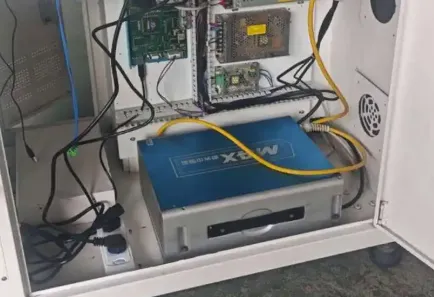
High-Frequency Fault 2: Blurred, Faint, or Uneven Marking QualityThis is the most frequently reported day-to-day problem.Symptoms: Low contrast, fuzzy edges, inconsistent depth, or incomplete fills.Primary Causes & Fixes:
- Incorrect Focus (most common)
Laser energy density peaks only at the focal plane.- Continuous light test method: Draw a small filled square, set moderate-to-high power and low speed, continuously mark while adjusting Z-axis until the mark is brightest and the sound is sharpest.
- Dual red-light method: Adjust height until the two indicator spots coincide.
- Ruler method: Use the manufacturer’s specified focal length (common F-theta lenses: 160 mm, 210 mm, 254 mm).
Re-check focus after changing material thickness or lens.
- Suboptimal Parameters
Power, speed, frequency, and fill spacing must match the material.
| Material Category | Recommended Power | Speed (mm/s) | Frequency (kHz) | Fill Spacing (mm) | Notes |
|---|---|---|---|---|---|
| Stainless Steel (surface) | 50–80% | 800–2000 | 20–50 | 0.05–0.15 | Higher power for deeper marks |
| Aluminum | 40–70% | 600–1500 | 20–40 | 0.05–0.12 | Watch for reflection |
| Plastics (UV preferred) | 20–50% | 500–1200 | 30–80 | 0.03–0.10 | Avoid melting |
| Anodized Aluminum | 30–60% | 1000–2500 | 20–40 | 0.05–0.10 | High contrast removal |
| Wood/Acrylic (CO₂) | 40–80% | 300–800 | Continuous or low | 0.1–0.3 | Risk of charring |
- Dirty or Damaged Optics — Clean regularly. Scratched lenses require replacement (cost typically $100–500 depending on type).
- Material Surface Issues — Clean oil, oxide, or coatings. Some plastics need specific additives or UV lasers for good contrast.
Real-World Impact: In one automotive parts case, correcting focus and reducing speed improved Data Matrix code readability from ~70% to over 98% first-pass yield.
Other Common Faults and Quick Solutions
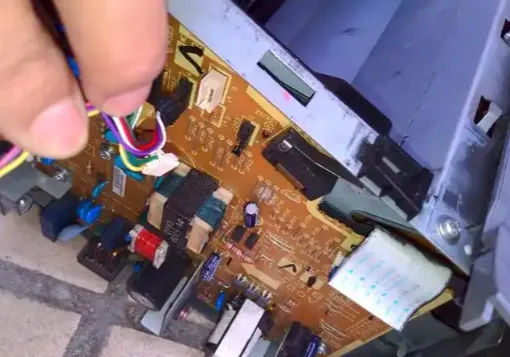
Galvanometer (Scan Head) Not Moving or Erratic Motion
Causes: Loose motor cables, lack of lubrication, lost origin, signal interference.
Solutions: Power off and manually check free movement; lubricate guides; perform software reset/origin; verify grounding and shielded cables.Machine Won’t Power On or Frequent Alarms
Causes: Power phase issues, tripped breakers, over-temperature/over-current.
Solutions: Check distribution panel, improve ventilation, clean filters, allow cool-down.Continuous or Intermittent Firing
Causes: Incorrect startup sequence, cooling flow problems, unstable voltage.
Correct sequence (typical): Main power → Computer/software → Chiller → Laser power supply → Galvo power. Use a voltage stabilizer if supply fluctuates.Position Offset or Poor Repeatability
Causes: Loose fixtures, non-level table, lost calibration.
Solutions: Secure workpieces with proper jigs; level the work surface; recalibrate galvo in software.
Detailed Comparison: Fiber vs CO₂ vs UV Laser Marking Machines
| Aspect | Fiber Laser | CO₂ Laser | UV Laser |
|---|---|---|---|
| Primary Strength | Metals, high speed, longevity | Non-metals, cost-effective | Heat-sensitive materials, fine detail |
| Beam Quality | Excellent (M² often <1.3) | Good | Excellent |
| Operating Cost | Lowest | Medium (tube replacement) | Higher |
| Typical Annual Maintenance | $500–2,000 | $1,000–3,500 | $1,500–4,000 |
| Environmental Sensitivity | Moderate | Moderate | High (cleanliness critical) |
| Best for Traceability | Automotive, tools, aerospace | Packaging, wood products | Electronics, medical devices, glass |
Fiber systems generally offer the lowest total cost of ownership for metal-heavy applications due to 100,000-hour laser source ratings and minimal consumables.
Preventive Maintenance Schedule to Minimize Faults
Daily
- Clean work area and remove debris.
- Wipe protective window and focusing lens if dusty.
- Check cooling system level and temperature.
- Verify red pilot light and basic focus.
Weekly
- Clean air filters and fans.
- Inspect cables and connectors.
- Test mark quality on standard sample.
- Lubricate linear guides if applicable.
Monthly
- Deep clean optical path.
- Check and tighten mechanical fasteners.
- Backup software parameters and jobs.
- Inspect for unusual noise or vibration.
Quarterly / Semi-Annual
- Professional power measurement.
- Full optical alignment check.
- Replace cooling water/filters as needed.
- Software and firmware updates.
Proper maintenance can extend practical machine life well beyond the laser source rating and keep annual costs in the $500–3,500 range depending on power and usage intensity.
Cost Analysis: Downtime vs. Maintenance Investment
Unplanned downtime in manufacturing can cost $187,000–$1.3 million per hour in extreme cases (heavy industry and automotive). Even modest facilities lose significant production hours monthly.Investing in training, scheduled maintenance, and quality optics typically pays for itself within months through higher uptime and consistent quality. Fiber laser sources rated for 100,000 hours equate to roughly 11+ years of continuous 24/7 operation or 25–50 years of single-shift use under ideal conditions.
Industry-Specific Considerations
- Automotive & Aerospace: High demand for durable Data Matrix and VIN marks; focus on depth consistency and contrast under harsh environments.
- Medical Devices: UV or fiber for UDI compliance; strict cleanliness and validation required.
- Electronics: UV preferred for PCBs and plastics to avoid thermal damage.
- Packaging & Consumer Goods: CO₂ or fiber for high-speed date coding and branding.
Advanced Tips for Stable Long-Term Performance
- Use voltage stabilizers or UPS in areas with unstable power.
- Maintain ambient temperature 15–30°C and moderate humidity.
- Keep a log of parameter sets for each material.
- Train multiple operators on basic troubleshooting.
- Consider predictive maintenance sensors (temperature, vibration) on high-utilization lines.
- For MOPA systems used in color marking, carefully document pulse width and frequency combinations.
Frequently Asked Questions (FAQ) – Optimized for Featured Snippets
What is the most common laser marking machine problem?
Incorrect focus and dirty optics are the leading causes of poor mark quality.
How long does a fiber laser marking machine last?
The laser source is typically rated for 50,000–100,000 hours. With proper care, the complete machine often serves 8–12 years or more in industrial settings.
Can I clean the laser lens myself?
Yes, using anhydrous ethanol or specialized lens cleaner and lint-free wipes. Always power off the machine first and wipe in one direction.
Why is my mark too light even at high power?
Check focus first, then optics cleanliness, then actual laser output power.
When should I call a technician?
If basic checks (power, focus, cleaning, parameters) fail to resolve no-output, severe power loss, or mechanical failures.
Conclusion:
Turn Troubleshooting Knowledge into Competitive AdvantageMastering laser marking machine common faults and solutions transforms reactive repairs into proactive reliability. By combining systematic diagnostics, regular maintenance, correct parameters, and an understanding of laser-type differences, manufacturers can achieve higher uptime, better mark quality, and lower total cost of ownership.
In a market projected to exceed USD 7 billion by the early 2030s, equipment reliability directly impacts competitiveness. Implement the schedules and procedures in this guide, document your results, and continuously refine your process.
For specific machine models or complex issues, consult your manufacturer’s technical support with detailed logs and photos. Consistent application of these best practices will keep your laser marking systems producing clear, permanent marks day after day.
Ready to optimize your laser marking operations? Bookmark this guide, share it with your maintenance team, and review your current procedures against the recommendations above. Proper care today prevents costly downtime tomorrow.