Packaging Industry | Laser Marking Application Guide
Looking for a reliable way to mark QR codes on packaging? The right solution depends on what you are marking, how fast your packaging line runs, and how the code will be scanned. A laser that works well on a coated carton may not be suitable for a flexible film, plastic bottle or metal closure.
For packaging manufacturers, food and beverage producers, cosmetics brands, electronics suppliers and industrial product manufacturers, QR codes can connect a physical package to product information, batch records, instructions or traceability systems. The challenge is not simply creating a QR pattern. It is producing the correct code at the right position, at production speed, with consistent readability.
JQ Laser helps customers evaluate laser marking configurations according to the packaging material, code content, line layout and inspection requirements. The recommended starting point is always a sample test using the actual packaging and the intended scanner.
Quick Answer: Which Laser Is Suitable for QR Code Packaging?
There is no single laser source that is best for every package. Use the following table as a starting point for selecting a process, then confirm the result on the real packaging material.
| Packaging material | Laser type to evaluate first | Typical application | What must be tested |
|---|---|---|---|
| Paperboard, carton and selected coated paper | CO2 laser | QR codes, batch information and product identification | Contrast, charring, surface damage and scan reliability |
| Selected plastic bottles, caps and rigid plastic packaging | UV or CO2, depending on the polymer and surface | Compact QR codes, product IDs and date/batch information | Material response, mark contrast, deformation and readability |
| Metal caps, metal containers and suitable metal labels | Fiber laser | Permanent product identification and traceability codes | Contrast, code dimensions, surface finish and scan performance |
| Flexible films, laminates and multilayer packaging | UV or CO2 may be evaluated; suitability is material-specific | Inline codes on selected packaging films | Layer damage, pinholes, heat effects, line speed and code readability |
| Mixed packaging materials or frequently changed products | Compare the appropriate laser source for each material family | Multi-product production lines | Changeover time, parameter control and repeatability |
Important: These are evaluation starting points, not universal material guarantees. Coatings, pigments, additives, thickness and surface finish can change the result. Do not approve a laser configuration based only on a sample made from a similar-looking material.
What Is QR Code Packaging?
QR code packaging means placing a machine-readable two-dimensional code on a product package, label, container or packaging component. Depending on the application, the code may identify a product, connect users to online information, or support batch-level and item-level traceability.
A QR code can direct a consumer to product instructions, ingredients, recycling guidance, warranty information or a brand website. In a manufacturing environment, a code may also be linked to a batch record, production date, serial number or internal tracking system.
However, a QR code does not automatically create traceability. The code content must be correct, and the information system behind it must be maintained. For serialised production, the system must also prevent duplicate or incorrect codes from being assigned to products.
Common QR code packaging applications
- Food and beverage: product information, batch identification and consumer-facing digital content, subject to the applicable packaging and regulatory requirements.
- Cosmetics and personal care: product instructions, authenticity information and links to brand content.
- Pharmaceutical and healthcare packaging: product identification and traceability where the selected code format and process meet the applicable requirements.
- Electronics packaging: model identification, product registration, warranty information and manufacturing records.
- Industrial products: spare-part identification, technical documentation, batch records and service history.
- Logistics and distribution: carton identification, shipment information and warehouse scanning, where the selected code type fits the workflow.
For regulated products, confirm the required code format, data structure, placement and verification standard with the brand owner or relevant regulatory authority. A standard QR code is not automatically interchangeable with GS1 DataMatrix or a GS1 Digital Link QR code.
Why Use Laser Marking for QR Codes on Packaging?
1. No ink ribbon or marking ink is required for the laser mark itself
Laser marking does not use conventional printing ink or thermal-transfer ribbon to create the mark. This can reduce certain consumable requirements. It does not mean the entire line is maintenance-free: extraction filters, optics, fixtures and other equipment may still need attention.
2. The code can be created directly on a suitable package
When the material responds well to the selected laser, the code can be marked directly on the packaging surface rather than relying on a separate printed label. This may be useful where the package design, environmental conditions or process requirements favor direct marking.
3. Variable data can be marked inline
With the appropriate controller and data interface, a production system can mark different QR codes, serial numbers or batch details on successive products. The data source, trigger sequence and code-generation process must be configured and tested; a laser source alone does not manage product data.
4. Marking can be integrated into automated packaging lines
Depending on the application, the system may use a photoelectric sensor, encoder, conveyor, PLC, fixed code reader or vision system. The integration should define what happens when a product is missing, a code cannot be read or the downstream equipment is stopped.
5. Marking parameters can be tuned for the material
Laser power, marking speed, frequency, pulse settings where applicable, focus, line spacing and the number of passes affect the result. The correct settings are determined through testing rather than copied from a generic parameter chart.
CO2 vs. Fiber vs. UV Laser for QR Code Packaging
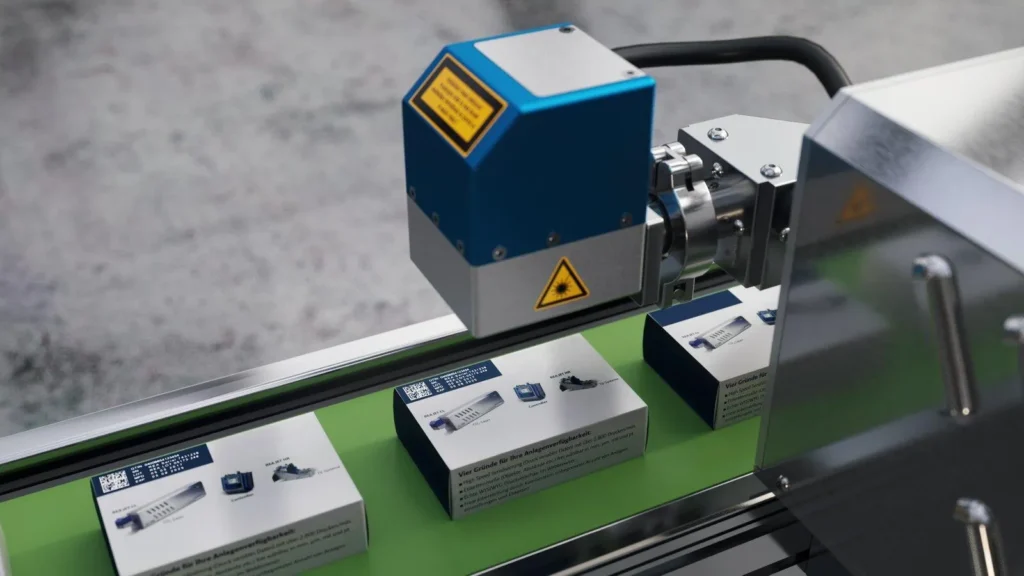
The wavelength and material response determine whether a laser produces a readable mark without unacceptable damage. The packaging material should therefore be the starting point for the comparison.
| Comparison point | CO2 laser | Fiber laser | UV laser |
|---|---|---|---|
| Common wavelength family | Typically around 10.6 μm, depending on source | Typically 1064 nm | Commonly 355 nm for UV marking systems |
| Materials to evaluate | Paper, carton, selected films, wood and suitable non-metals | Metals and selected laser-responsive materials | Selected plastics, coated materials and heat-sensitive applications |
| Potential packaging use | Carton codes, selected packaging films and paper-based materials | Metal closures, metal containers and suitable metal labels | Fine codes on selected plastics or other materials where low thermal impact is important |
| Main concern | Charring, burning, coating damage or film perforation | Insufficient contrast or unwanted thermal effects on unsuitable materials | Material-specific response, source cost and validation of production speed |
| Required verification | Actual packaging test and scanner check | Actual packaging test and scanner check | Actual packaging test and scanner check |
Wavelength alone does not guarantee suitability. Two packages made from the same base polymer may behave differently because their pigments, coatings or additives differ. If a package contains several layers, verify which layer is being affected by the laser and whether the mark compromises the barrier or sealing function.
Explore the related CO2 Laser Marking Machine, Fiber Laser Marking Machine and UV Laser Marking Machine pages to compare the available system types.
How to Produce a QR Code That Scans Reliably
A code can look sharp to the human eye and still fail when read by a scanner. This often happens when the code is too small, its modules merge, the background has poor contrast, the package surface is curved, or the code is distorted by a seam, fold or coating.
Check the code before choosing the machine
- Confirm the data: make sure the code contains the intended URL, product ID, batch information or serialised data.
- Choose the correct symbology: confirm whether the application requires a regular QR code, GS1 Digital Link QR code, GS1 DataMatrix or another code type.
- Set the physical size: define the available area, module size and required reading distance.
- Protect the quiet zone: leave the required clear area around the symbol. Do not place graphics, seams or text inside that area.
- Test contrast: the dark and light areas must remain distinguishable under the intended scanning conditions.
- Check the package position: avoid folds, seals, sharp curvature, wear areas and surfaces that become covered during packaging.
- Scan with the real reader: use the scanner or verifier intended for production, not only a smartphone.
- Test after downstream processes: if the package is coated, wrapped, heat-sealed or handled after marking, test the code again at the final inspection stage.
GS1’s barcode guidance also highlights symbol size, quiet zones, contrast, damage and positioning as important factors in reliable reading. For a code subject to a formal quality requirement, agree on the applicable verification method and acceptance grade before the production trial.
Reference: GS1: What should I check to ensure good quality barcodes?
Inline QR Code Marking on a Packaging Production Line
For a production line, the key question is not only how fast the laser can scan. It is whether the complete system can mark the correct code on every package at the required line speed.
A typical inline marking sequence
- The packaging machine or conveyor brings a product into the marking position.
- A sensor or encoder provides the product trigger or position information.
- The control system receives the correct QR code data.
- The laser marks the code using the validated recipe.
- A code reader or vision system checks readability, where required.
- The PLC records the result or triggers a reject mechanism if the code fails inspection.
This is a reference process, not a fixed design. Some applications require stop-and-mark operation, while others require marking during movement. The right design depends on the conveyor speed, product spacing, package orientation, data interface and inspection requirements.
What to confirm before buying
- Minimum and maximum line speed.
- Minimum spacing between packages.
- Code size and the amount of variable data.
- Available marking window and product-position variation.
- Sensor, encoder and PLC signal requirements.
- Whether the code is verified automatically.
- What happens when a code is missing, duplicated or unreadable.
- Whether the package can be stopped safely for re-marking or rejection.
Do not estimate line output from the laser scanner’s maximum speed alone. Measure the complete cycle, including triggering, data processing, product handling and inspection. A short sample demonstration should be followed by a sustained test using the intended line conditions.
See Automation Marking Solution for related production-line integration options.
QR Code Packaging by Industry
Food and beverage packaging
QR codes may connect customers to ingredients, nutrition information, product origin or other digital content. Production codes may also support batch identification. Test the actual carton, bottle, cap or film, and confirm that the marking process does not damage the packaging or interfere with sealing and product protection.
Cosmetics and personal care packaging
Boxes, bottles, tubes and closures may use codes for product information, authenticity programs or batch identification. Different packaging materials often require different marking configurations. Confirm readability on curved containers and on surfaces with glossy, colored or metallic finishes.
Pharmaceutical and healthcare packaging
Some applications require tightly controlled identification and traceability. The correct symbology, data structure, human-readable information, code grade and validation requirements must be defined by the customer and applicable rules. Do not assume that a generic QR code satisfies a regulated serialization requirement.
Electronics and industrial product packaging
QR codes can link products to manuals, technical records, warranty details or batch information. For small packages, the available code area and the scanner’s reading distance may determine the minimum practical code size. Test the final package after any coating, wrapping or label application.
Shipping cartons and logistics packaging
Outer cartons may need product, batch or shipment identification. Depending on the workflow, a 1D barcode, QR code, Data Matrix or GS1 logistics symbol may be more appropriate. Confirm the code type with the warehouse, carrier, customer or trading partner before selecting the marking process.
How to Test a QR Code Packaging Solution Before Ordering
A useful sample test should answer four questions: Does the material mark correctly? Does the code scan reliably? Can the required output be achieved? Does the process preserve the package’s functional properties?
Step 1: Send representative packaging samples
Provide the exact material, coating, color, surface finish and package dimensions. Include samples from normal production batches if material variation is expected.
Step 2: Provide the real QR code and data requirements
Send the intended code file or data structure, physical size, required quiet zone, location and any human-readable text. For variable codes, explain how the data will be generated and transferred to the marking system.
Step 3: Test suitable laser configurations
Compare the appropriate laser type and settings. Record the source model, rated power, lens, marking field, speed, power setting, frequency and pulse settings where applicable, line spacing and number of passes.
Step 4: Inspect the mark using the intended reader
Record successful reads, no-reads, incorrect data and any visible damage. If a formal code grade is required, use the agreed verifier and acceptance criteria. A smartphone scan alone is not a substitute for a specified industrial verification process.
Step 5: Test production speed and downstream effects
Measure complete cycle time and run repeated samples. Where relevant, inspect the package after sealing, coating, wrapping or normal handling. Check that the marking process does not create unacceptable pinholes, burns, deformation or barrier damage.
Step 6: Keep a traceable test record
Record the test date, workpiece description, source and lens configuration, parameters, sample count, reader used, results and approved settings. The final quotation and machine configuration should match the validated setup.
QR Code Packaging Buyer Checklist
| Decision item | Suitable situation | Evidence or test method | Limitations to confirm |
|---|---|---|---|
| Laser source | Selection based on paper, plastic, film or metal packaging | Mark the actual package with candidate laser configurations | Material names alone do not guarantee a result |
| Code size and layout | Limited space or small package surfaces | Measure the final code and test with the intended reader | Smaller codes may reduce reading tolerance |
| Line speed | Continuous or high-volume production | Time the complete cycle during a repeated trial | Scanner speed is not equal to packages per hour |
| Variable data | Serialised products or changing batch details | Test data transfer, code uniqueness and correct product assignment | Laser hardware alone does not guarantee data integrity |
| Code verification | Industrial traceability or customer-mandated code quality | Use the agreed reader or verifier and record the results | Phone scanning may not meet formal requirements |
| Package integrity | Flexible films, sealed packs or barrier packaging | Inspect for burns, holes, deformation and barrier damage | Readability alone does not prove packaging integrity |
| Automation and rejection | Inline production with automatic inspection | Test triggers, PLC handshakes, no-read handling and reject logic | Integration depends on the existing line and its controls |
| Supplier acceptance | Production equipment or customized systems | Match sample report, configuration sheet and purchase-order criteria | A demo video is not a complete acceptance test |
Frequently Asked Questions
Can a laser marking machine print QR codes on all packaging materials?
No. Different materials and coatings respond differently to laser wavelengths. Paperboard, plastic, flexible film and metal packaging may require different laser sources and settings. Test the actual package before selecting a machine.
Which laser is best for QR codes on cardboard boxes?
A CO2 laser is a common starting point for paper-based packaging, but the coating, ink, color and cardboard construction affect the result. Confirm contrast, charring, code readability and production speed on the actual box.
Can QR codes be marked on plastic bottles or caps?
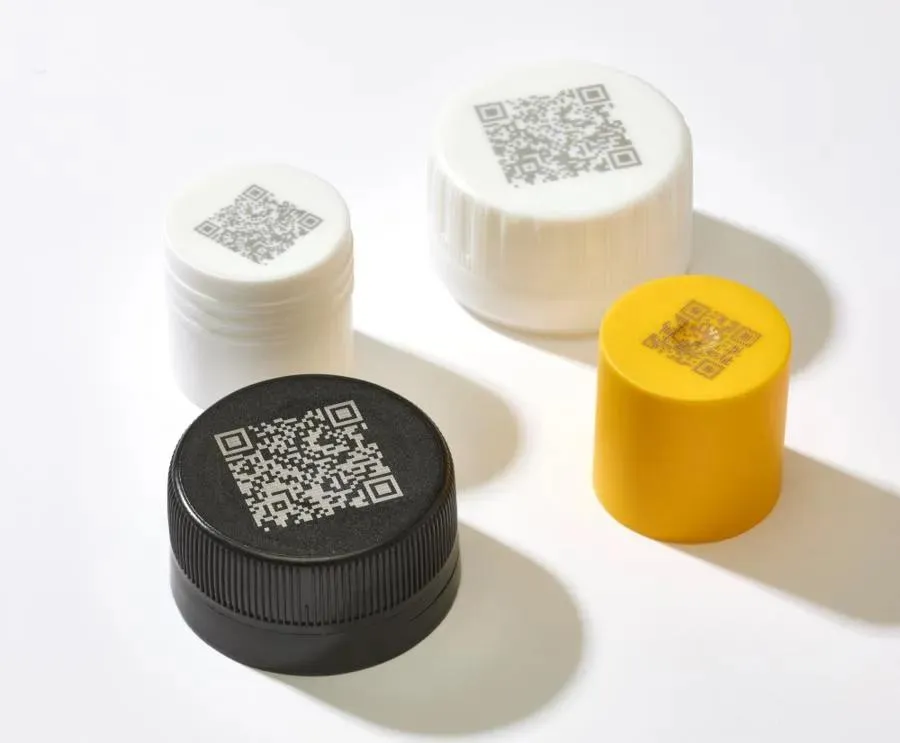
Yes, on suitable plastic materials. UV or CO2 laser systems may be evaluated depending on the polymer, additives, surface and required mark. The test should check readability, deformation and any damage to the package.
Can QR codes be marked automatically on a moving packaging line?
Yes, with a system designed for the actual line speed and product tracking requirements. The design may include sensors, an encoder, a PLC and a code reader. Test trigger timing, product spacing, code position and reject handling under real operating conditions.
Does laser marking eliminate all consumables?
The laser mark itself does not require conventional printing ink or thermal-transfer ribbon. However, the complete system may still require maintenance supplies, extraction filters or replacement components. Actual running costs depend on the machine and production environment.
How can I make sure a QR code remains readable after packaging?
Test the code after all relevant downstream processes, such as coating, wrapping, sealing and handling. Use the intended scanner or verifier and check code position, contrast, quiet zone, surface damage and the required quality criteria.
What is the difference between a regular QR code and GS1 DataMatrix?
They are different code symbologies and data formats. GS1 DataMatrix is commonly used in healthcare and other traceability applications, while QR codes may be used for consumer-facing links and other applications. Choose the format specified by the customer, trading partner or applicable standard.
What should I send to get a quotation for QR code packaging?
Send packaging samples or material details, package dimensions, the actual QR code or data structure, required code size, production line speed, scanning method, automation requirements and any applicable code-quality or packaging-integrity standards.
Discuss Your QR Code Packaging Project with JQ Laser
The best solution is the one that produces a readable code on your actual package, meets the required production rate and fits the existing line without compromising package integrity.
JQ Laser offers fiber, CO2 and UV laser marking machine configurations for different material and application requirements. The appropriate source, power, lens, marking field and automation options should be confirmed through sample testing and a review of your production process.
To help us evaluate your application, please provide:
- Packaging material, color, coating and dimensions.
- Photos or samples of the actual package.
- QR code type, size and example data.
- Required packages per minute or line speed.
- Whether the package is stationary or moving during marking.
- Scanner, verification and traceability requirements.
- Any restrictions on burning, holes, deformation or barrier damage.
Contact JQ Laser for a packaging sample test and configuration recommendation